I've been trying to use a hEX S (2025) (ROS 7.23.1) as a switch between a MikroTik CRS328-24P-4S+RM PoE switch and the 1Gb/s Ethernet port of an Acer 12-in-1 USB-C mini dock. The highest speed the hEX S and the Acer negotiate is 100Mb/s. The hEX's RouterOS claims that the Acer's Ethernet port (apparently a RealTek RTL8153) isn't proposing 1Gb/s speed. If I plug an ASIX AX88179 USB 3.0 to Gigabit Ethernet Adapter into one of the Acer's USB3.2 ports, the hEX has the same problem with that Ethernet adapter: it thinks the ASIX isn't proposing 1Gb/s speed. This situation is the same whether the Acer is connected to a Windows 11 laptop or an Ubuntu 26.04 laptop, both running on ASUS Zenbook hardware. The hEX S doesn't always get it wrong: its port that connects to the CRS328-24P-4S+RM does negotiate 1Gb/s. And if I bypass the hEX S and wire directly from the CRS328-24P-4S+RM to the Acer's Ethernet port, the CRS328 negotiates 1Gb/s. In short, all my experiments point to the hEX S (2025) as the negotiation culprit. Am I missing a ROS configuration option, or is there hope that a newer ROS version might fix this? MikroTik is claiming something for the hEX S (2025) that they're not delivering.
Per standard 1Gb connection NEED auto-negotiation, you can try limiting the advertised speeds and see what happens.
See also:
Which PC OS are you running?
Edited.
I tried it with both Windows 11 and Ubuntu 26.04 Linux, each running on a (separate) ASUS Zenbook 14 laptop.
All experiments were made with auto-negotiation enabled at both ends.
Yep, I was proposing to see what happens with autonegotiation on and ONLY gigabit among the advertised speed on the port used for the experiment
In the worst case you will have "no link".
The problem is that ROS in the hEX S (2025) reports about the status if its Ethernet interface that its partner Ethernet interface at the other end of the cable is not advertising any 1Gb/s services, either simplex or duplex. It is reporting everything 100Mb/s and below.
Yep, I understand, the experiment Is only to confirm that It Is not an issue with auto-negotiation starting from 10 Mbit, then increasing to 100 Mbit and then - for whatever reasons - stopping there.
What is shown as "advertised" shouldn't be read literally: it means only that these modes seem possible.
As to why exactly this occurs between some devices and not others is often unclear, and without involved diagnostics, it's impossible to tell.
The new hex s has two types of ports (different mac+phy), ether1 and ether2-5. It may well be that the problem you're experiencing will not be present on both.
It is also well known that quite a few usb ethernet adapters don't behave well...
I have had some issues with the default settings on Linux desktops, but not on Windows. You could try using a crossover cable i.e. a TIA 568 A to TIA 568 B cable. The symptoms seem to suggest that this is not the issue, and auto MDIX should be enabled by default on the Hex.
Sometimes you try the unlikely solutions just to be sure.
Thanks for the observation. It suggested a new experiment. I had not A/B tested eth1 because eth1 was powering the hEX S (2025) from my CRS328. So I temporarily wired in external power and did A/B testing of eth1 as well. The result was that the Ethernet from the CRS328 always negotiated a stable 1Gb/s no matter where it connected to the hEX S, while an Ethernet from the Acer mini dock seemed always to negotiate 100Mb/s no matter where it connected to the hEX S. Then I looked more closely at the Ethernet status in the hEX S's ROS and discovered something really interesting. When a hEX S (2025) eth port was connected to the Acer mini dock, that eth port flapped. I was seeing several disconnects per minute. It tried 1Gb/sec, kept it for a second or so, then dropped down to 100Mb/s for several seconds, then went back to 1Gb/sec for a second, and so on. So, to stabilize the situation I configured that hEX S (2025) eth port not to offer 1Gb/sec. That killed the flapping; now I see a stable 100Mb/sec to the Acer mini dock. Interestingly, I have another Acer mini dock whose Ethernet is directly connected to a MikroTik CRS326 port, and it negotiated 1Gb/sec and had only 8 link downs for whatever reason, the last one two days ago, while carrying 10TB of traffic. So there's something not quite right about the hEX S (2025) Ethernet PHY's, which are apparently use the EcoNet/MediaTek EN7523 chip. Or at least not yet right with ROS 7.23.1.
Did you try plugging the adapter into the Windows 11 laptop, install the latest driver from Realtek USB FE / GbE / 2.5GbE / 5G / 10G Family Controller Software (get the NetAdapterCx version). Go to the adapter properties in Device Manager and turning off all
- Adaptive Link Speed
- Advanced EEE
- Energy-Efficient Ethernet
- Green Ethernet
- Idle Power Saving
settings?
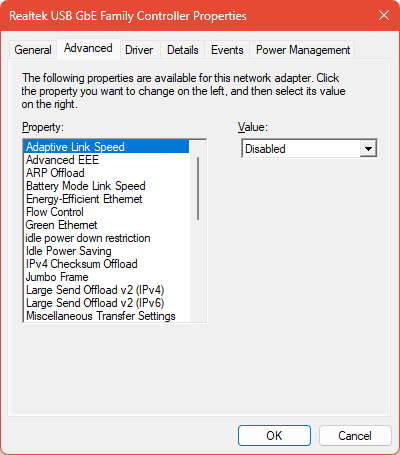
And the adapter also allows you to force the link speed to 1Gbps Full Duplex:
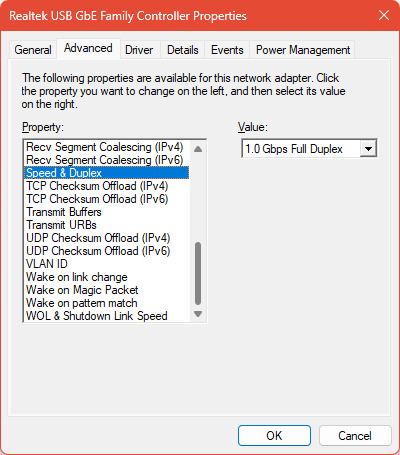
Maybe you can try that too.
Yep. That's what I was trying to suggest. For 1Gbps, the PHY actually does some pretty interesting stuff, and if it doesn't line up then that's shown as "not advertised" (even though it's present on the beat itself and is correctly received.)
I would suspect either EEE (or as it's also called, Green Ethernet) as CGGXANNX suggests. Or try a different cable, and plug it in five times to rub off any possible oxidation on the contacts.
I'm embarrassed to admit that a different cable, with its contacts polished and then mated/unmated five times, seems to have fixed the problem. You seem to have nailed the problem, many thanks.
Only for the record, in the (good?) ol'times, when Byte (the magazine) was a thing, Jerry Pournelle in his " Computing at Chaos Manor" column had a saying about the (at the time very advanced) SCSI bus devices to the effect of "When you have a connection problem, you should troubleshoot this, and that, and also that other thing, but it is always the cable".
Which evolved into Pournelle's Law:
https://www.computerworld.com/article/1332766/more-eternal-verities.html
• Pournelle’s Law: Cables do matter. When something doesn’t work, always check the cables and their connectors first.
Just to add my two cents here.
This weird case we have also seen with hAP ac Lite and mAP.
We had a laptop that would not negotiate 100Mbps with the hAP ac lite but with the mAP it was just fine. After many tests, checks we finally replaced the patch cable and everything was working normally!
Our assumption is that some devices seem to have lower tolerance when negotiating the ethernet speed while others work fine - therefore even a few db loss can result in some devices refusing to even work. Always try a good quality cable - and avoid CCA cables - only use 100% Cu for best performance.
In theory flapping between 10 and 100 should be less probabile than flapping between 100 and 1000, because both 10 and 100 need the same 4 wires, while 1000 needs all 8.
But sometimes It Is something else, only a few days ago:
Hap ax S ether 2 to 5 not working with some device - #2 by jaclaz
Though It seems that the issue Is with the PC network card (or on its drivers, or however the OS) It Is also possible that there Is some kind of false contact (physical incompatibility) between the RJ45 plug and socket of the network card, while the same plug makes contact on the hAP Lite socket.
Yeah, it's sort of embarrassing to admit how many hours I spent debugging only for the problem to turn out to be a loose connector/brocken locking clip/bent contact/loose crimp.
Anyway, glad it works.
On how to geek I found this for Linux hosts:
# Status
sudo ethtool --show-eee eth_interface

# Disable
sudo ethtool --set-eee eth_interface eee off
Apparently EEE/Green Ethernet can cause issues.
Only as a side-side note, Mikrotik devices do have a tool to test cables.
Even if not spectacularly accurate in the diagnosis it can often show if there is an issue (maybe not pinpointing exactly which issue it is), see:
cable-test on hap lite, pure madness