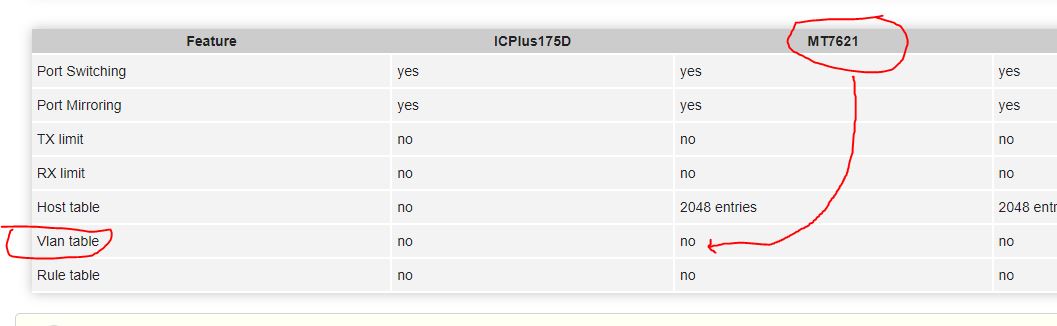
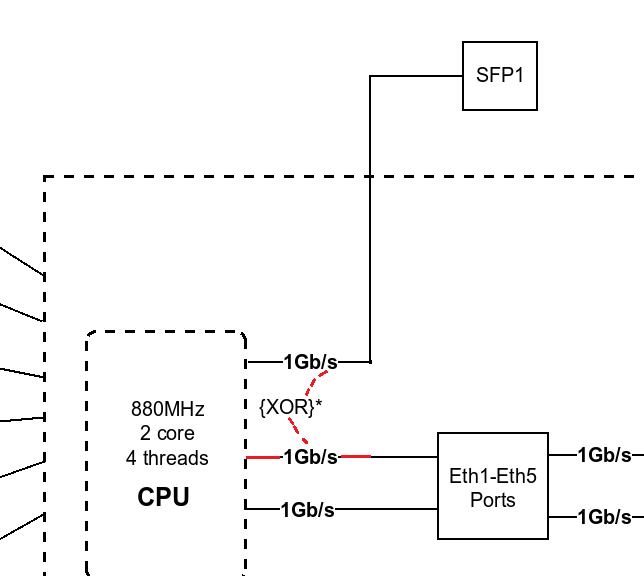
Is there some way to configure a hEX-S to do VLAN switching in hardware? There is a a bunch of options under /interface ethernet switch, but none seems to make any difference. Simple tagged and untagged/pvid settings will do fine.
The situation is that we are planning to run multicast audio and video (>25Mbps) passing over a hEX-S, and it will simply consume to much CPU to do that in a software bridge, and it may introduce jitter/stuttering and so on. We are doing it today with a RB260GS and it works fine, but we are trying to avoid those because of lack of manageability.
Yes, it does actually. But RouterOS uses the VLAN to separate each switch-port to a logical interface within RouterOS. So my question is if this setup is changeable, so there will only be one logical interface to the cpu-side (as it’s actually connected) and you can run a couple of hardware VLANs instead. The menu options is there strangly.
It won’t kill it, of course, but since the packet forwarding will be done in software, there is risks of latency/jitter/stuttering depending on cpu load.
RouterOS uses this VLAN support to create logical interfaces, that is hidden from the user and configuration. Or maybe there are many variants of MT7621.
Anyways, would be nice if there was a way to “disable logical ports layout” and get back the VLAN capability.
Okay but that does not mean setting up the router any differently with regard to the ‘new’ method of bridges and vlan filtering does it.
I thought its simply checking off a box somewhere.
I can confirm that is supported from ROS v7 but I noticed that VLANs have to have access to the bridge port (at least to forward the DHCP request to the uplink router).
The first configuration does work on my CRS328s.
I enable the conntrack temporarily on the hEX S but it showed only VLAN 99 traffic, so VLAN 20 traffic is only on the Switch Chip, which means L2HW does actually work.
I dare to say it is a bug, isn’t it?
So your DHCP server is on a machine beyond sfp1 port? In this case it seems like a bug indeed.
If DHCP server is running on hEX S device itself, then it’s not a bug.
I have been upgrading all devices to 7.2.1. hEX S was replaced by an updated one, one by one.
I will reset my new spare one and repeat the configuration but I’m sure it will happen again.
network topology: hEX S → CRS328 SFP → CCR1009 (router on stick design)
For devices with hardware offloaded VLAN filtering and wireless interface support (e.g. RB4011 with RTL8367 switch chip, or LtAP with MT7621 switch chip), more attention needs to be paid. Packets going from HW offloaded ports to wireless can be filtered, if the VLAN access to the CPU is not allowed. It is possible to allow CPU access for a certain VLAN by adding the bridge interface as a VLAN member (similar to the VLAN99 example) or disabling HW offloading on bridge ports.
If anyone has some concerns regarding limiting access to managing function of the device:
The web-config access is handled via the core router and its firewall.
Winbox by simply allowing the MAC WinBox Server only on the MGTM interface
(if you still want to be able to access the device via WinBox locally you use ACL-Rules)