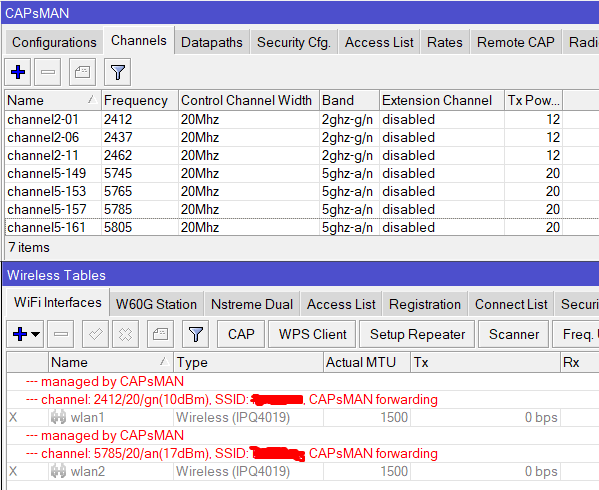
we have plenty of capsman installation and just reliaze there has been hidden preset wireless configuration since 6.45.1
i really mean that this problem never happened before 6.45.1
the tx-power setting on the capsman are clearly 12dBm for band 2GHz and 20dBm for band 5GHz, but on caps the tx-power reduced to 2-3 dBm.
after doing multiple check on lab, we found that there is the hidden preset of wireless configuration since 6.45.1, that are : country=etsi and antenna-gain=2 or bigger depending of the model. this preset still stay even if the hardware is fully reset; /system reset no-default=yes or /system reset caps-mode=yes
therefore, we have to do the following command on each caps :
/interface wireless
cap set enable=no
set [find name=wlan1] country=no_country_set antenna-gain=0
set [find name=wlan2] country=no_country_set antenna-gain=0
cap set enable=yes
the above commands will give the result tx-power set on capsman = tx-power set on caps
this hidden preset quite annoying as we HAVE TO do the extra work for each caps rather than reset 10 second to go to caps-mode. therefore, we hope the software of mikrotik can alter / cancel the mentioned hidden preset configuration.
FYI, in our country, the the legal freq for 5G is 5745-5825 with EIRP 36dBi while this freq does not include in etsi regulation. so there is no point to push etsi country regulation on it. and the setting put is far beyond of our country regulation; 12dBm and 20dBm.
The antenna gain parameter is now always set depending on the characteristics of the built-in antennas. This will not change. What may change is the prohibition to change this parameter even via the CLI.
Therefore, you need to accept this fact and adjust the corresponding settings once in Capsman.
For your information, devices like CAPac have a 5GHz limitation for MSC9 of 18dB, WAPac -17dB, which is written in their specifications.
In the final settings of the devices after installation, the power is adjusted for each point individually.
PS Why don’t you use the ac standard?
the way done by MT is opposite way of UI.
on UI we can see both the tx-power setting plus the total after antenna-gain and the total still follow the country regulation set on the profile.
the main question is, why country=esti should be put as hidden preset ?
rather than to put hidden preset config, it’s better to put the way how UI done.
we are not put AC standard as most of the client devices still does not support it yet, thus if 10 connected user support AC but next 1 only support N than 10 existing connection will drop to N. CMIIW.
From the wiki:
“Transmit Power representation on 802.11n and 802.11ac
802.11n wireless chipsets represent power per chain and the 802.11ac wireless chipsets represent the total power”
2 chain radio will give a differencce of 3dB between both representations. What is CAPsMAN using as representation?
EIRP value per regulatory domain. (eg ETSI).
The MT allowed EIRP value will be 3dB lower than in the regulations, due to TPC not being supported. (this changed with wifiwave2)
To see the allowed EIRP values for MT use “/interface wireless info country-info” (wireless becomes wifiwave2 if installed) http://forum.mikrotik.com/t/removing-wi-fi-country-lock-using-netinstall/160149/1
MT does not allow to change the “antenna gain” reduction factor used in the TX-power calculations for regulatory compliance, in the GUI. Not even for reducing the TX-power. (Rising the TX-power by giving a lower factor has been correctly disabled quite some time ago)
Setting “antenna gain” reduction factor lower than the built-in physical antenna gain, will disable the ability for setting another country or region in “regulatory domain”, unless the antenna gain reduction parameter is also corrected. (A parameter that is not visible in the GUI and not in the regular “export”)
i totally agree with point 1 of bpwl. with using N than the AP will get extra 3dBm transmit power
so if the tx-power=20, than the actual wil become 25.5dbm. this value still far from our country regulation limit. thus the additional 5.5dbm by antenna will not generate the rf noise.
for the rest, i believe it fully valid when the devices are set individually such as for stand-alone unit at home; not at offices, dormitory and or hotels that using plenty of caps.
we have plenty of sites that using cap-ac installed using ros version < 6.45.1 and than add another units when asked by the managements. unfortunatelly we got version > 6.44. do you know what ? customer complain that coverage area of old units a lot better compare to the new units. that’s why we try to find out what’s make the different.
before 6.45.1, the preset config is country=no_country_set antenna-gain=0. but since than the country=etsi with antenna-gain=2 or bigger even if we did fully reset with /system reset no-default=yes or /system reset caps-mode=yes. we never know this new hidden preset till the lab done couple days ago. and that tx-power on caps always less than the tx-power instructed by capsman as big as the mentioned value of the above hidden preset.
Country and Antenna gain do not are hidden parameters.
Do not provide wrong information.
Antenna-gain is shown, and defaults to 0, only if the routerboard has NO fixed antennas.
In case the routerboard has fixed antennas, it is obvious that, depending on the model, it already has a set value.
The correct configuration of the CAPsMAN completely ignores the country-set,
only if the purchased device does not come from lots destined for markets that FORCE MikroTik to limit the power and frequencies
in order to be able to sell in that country.
Increasing the coverage by increasing the power is a dummy thing, especially because you do not increase the power of the clients,
who maybe “hear” the AP better, but then can’t “talk” to him because they have poorer antennas and the powers fall within the range,
and usually to save the precious battery, they are unable to transmit even at the maximum power allowed by the standard.
the antenna-gain nomore shown under gui / winbox as we are mostly using cap-ac with integrated antenna on client sites.
no problem perior to 6.44 but not since 6.45.1
full-reset does not reset country and antenna-gain settings since 6.45.1. that is the reason i said hidden preset configuration.
as my prev explanation, the coverage area of the old cap-ac a lot better compare to the recent installation of cap-ac, and we found the problem source is the country and antenna-gain setting since 6.45.1.
as my installation, you can see that i reduce the tx-power of 2GHz by 8dBm to ensure the coverage area will be the same with of 5GHz. and the 5GHz itself limited to 20dBm (far from our country regulation). i do understand that playing high db gain of antenna has no benefit at all as most of the peripheral tx-power is 12dBm.
Antenna-gain is shown, and defaults to 0, only if the routerboard has NO fixed antennas. (and on not supported models, but this is another question)
In case the routerboard has fixed antennas, it is obvious that, depending on the model, it already has a set value.
It seems to me that you are leaved far behind and that you are the only one who still does not know it… It is the time that you use at least 6.48.6 (long term)
(and don’t create clickbait titles when opening new topics)
The new default “country” value is etsi fo non US-CA market and “united states” for US-CA market, on that case, MikroTik is forced to lock device for that market if want sell on those countries.
Some other DISTRIBUTORS, not direcly MikroTik, for distribute MikroTik hardware are forced from government to apply some restrictions.
You are deeply mistaken.
If 1 client out of 10 supports AC then it will work in AC the rest in N. This is how modern standards work. But I would disable the 1999 standard A to improve overall network performance.
Yes there were some errors in those firmware, but in 6.48.6 LT long ago fixed everything.
the antenna gain settings can always be seen by the command full export int wir e v