How can I Isolate one port of hAP ax3 for use by cAP ax in basement for tenant

Good day everyone,

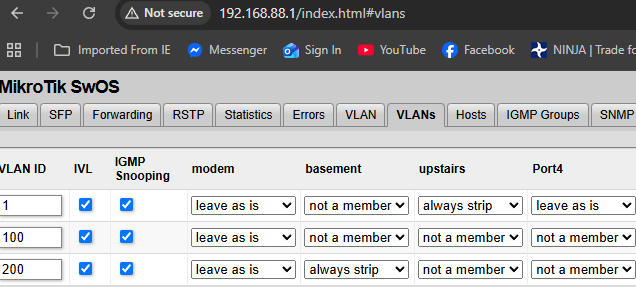
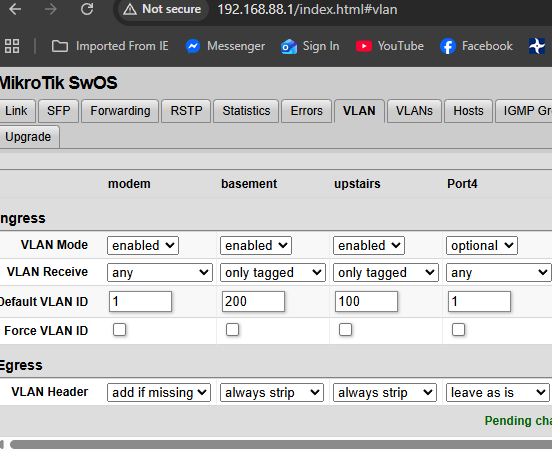
I've been doing endless research on how to configure my RB260GS switch (meant as entry switch to distribute internet) so that my cAP AX (basement use) and my hAP AX3 (upstairs) can access the internet but be isolated as this is meant to be a duplex with a shared internet service. I've setup the ports as such on the RB260GS below based on what I've found online. I'd like to find out if I'm on the right path here or I should rethink the setup. My hAP AX3 upstairs has all physical ports used and I'd basically want all of those ports to be part of VLAN100. As for the cAP AX in the basement, it is just a wireless AP that would be used on VLAN200. I've looked into how to configure the routerOS portion (hAP AX3 & cAP AX) but that seems even more complicated as none of the info I've found provides an easy to configure workflow.

Since you have two independent wireless AP devices (and I assume that they each have thier own cable to the router), I might be inclined to just leave the AP's pretty stupid, and NAT them out of the router separately, which would eliminate the need for VLANs completely, and give the desired isolation.

I've been looking at another way to get this done but still using a VLAN to isolate the tenants in the basement. What if I used my hAP AX3 as the device that is connected to the cable modem and from there connect the RB260GS as a basic switch just to get more ports on the same IP set that I have on my hAP AX3 for my own devices. I could then connect the basement device (cAP AX) to say port3 of the hAPAX3 and create a VLAN just for that port instead. The problem is actually doing the work. lol
I've read this page here VLAN - RouterOS - MikroTik Documentation on creating a basic VLAN with 2 routers and even after using the terminal commands as a basis it still doesnt work. The weird thing is the basement device still doesnt have access to the internet even without any VLANs setup yet that "internet" status check indicates its available on ether1 with the IPs from the upstairs. :zany_face:

Not saying my idea is better, but would not two bridges, two DHCP servers, two NATs and cable modem on eth1 also give you what you need? I guess in my mind, I tend to only use VLANs if I need multiple environments on the same cable.

Additional physical ports could be added to either bridge to allow extension switches/APs/etc. as desired.

In my opinion, you are overcomplicating things by introducing vlans, especially if you only need a single port for the basement.

Can you explain what you mean by "entry switch to distribute internet". If you mean your internet connection is to the RB260, then depending on your ISP, you may or may not be able to get two ip addresses from the ISP's DHCP server. But I would not count on it. An then the cAP AX in the basement would have to be configured as a router with its own internet connection.

You can use the RB260 as a dumb switch to give you additional ports from the hAP AX3, but that would not be utilizing its vlan features.

The simple way to achieve your goal of keeping your basement and upstairs "isolated" from each other, while still sharing the same internet connection, would be to dedicate a port on the hAP AX3 for the basement "LAN". See Once and for all COMPLETE Offbridge Port setup for how to do this. Then that removed port can become the basement LAN, however in this case you don't want to allow management access to the hAP AX3 from that port. Also, this needs to have the firewall adjusted to prevent routing between the bridge and the removed port.

@anav has several posts on how to do that.

Then you can reset your RB260 to the standard config, and plug it into one of the remaining bridge ports, possibly in a different part of the upstairs where you want another group of wired devices all being feed from the hAP AX3 with a single cable.

Can you explain the need for a vlan? There are cases that vlans make sense, but as @tadawson says, unless you are trying to share some ethenet switch or cable to have more than one distinct broadcast domain, it does not seem your requirements, as stated, need a trunk link or vlans.

If you were having the hAP ax3 and cap ax both broadcasting the same two SSIDs, then using vlans would make more sense. Or if you had multiple subnets in your upstairs, e.g. one for trusted, one for iot, one for guest, etc. then vlans allow you to keep each subnet separate, each with its own access class and firewall, while still allowing for sharing of wires and the switches in the hAP ax3 and RB260 for the different subnets.

I use vlans, and they are very useful, but unless this is a learning experience, in the specific case you presented, they are not needed; there are simpler ways to do what you want without using vlans. Your case: a single cable going to an access point in the basement that should be on its own isolated subnet while sharing access to the internet with the upstairs.

Each port of the hAP ax3 can be a separate network, and the firewall can control what hosts on each subnet are allowed to access. vlans are not needed for that.

vlans are another layer of abstraction between the bridge ports and the routing engine's interfaces. Whatever you can do with vlans can be done without them, it just requires more hardware (ports, wires, switches).

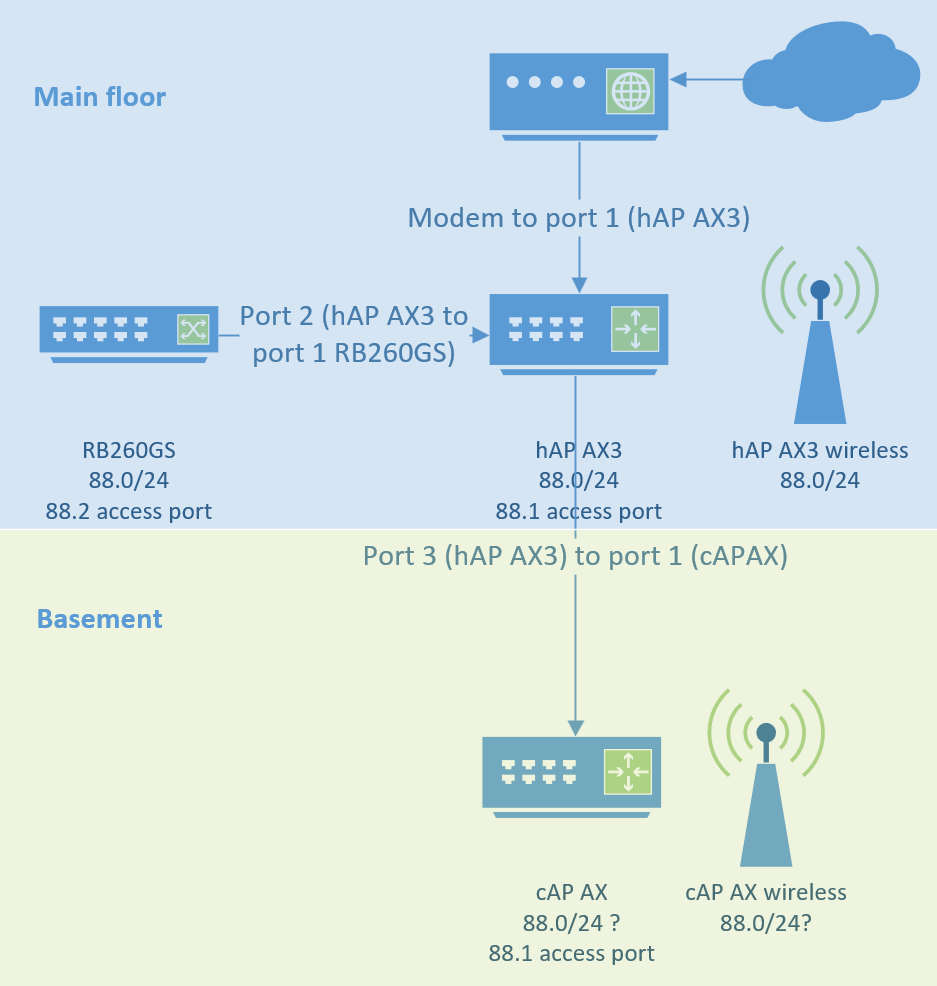
First of, I'd like to thank everyone that's replied to my post; its really appreciated! I'm not biased on vlans at all and if there's an easy way to seperate the basement device with the rest of the main floor then that's all good with me. Here's a diagram of what I've got so far. All I need want to do in the end is have the basement to be isolated from my equipment upstairs while still being able to use the internet that's fed from my router.

Two subnets. say 88.0/24 main, and 89.0/24 for the basement. Two sepatrate NATs out to the internet, and no routing between them. Main will need a bridge to allow the RB260 to connect, for basement, it's optional since only one port is in play.

@tadawson what is the reason for two separate NATs out to the internet? I have never needed more than a single masquerade rule for multiple subnets.

So are you saying that what you have is currently working, but that it isn't isolating the basement?

Are both wireless using the same ssid?

How did you get the current config?

How did you configure wireless?

post sanitized configs of both hAP ax3 and cAP AX see Instructions how to post the configuration here:
Forum rules - #5 by gigabyte091

I was thinking two separate nats to assist with the isolation of the two subnets. It may not be needed - there are liikely other ways. My brain was just wanting to keep the two subs configured as separately as possible.

In response to Buckeye above, I've included both device configs below. I played around the settings yesterday and had the basement with internet but as I was cleaning out old VLAN configs I seem to have lost it again. The intent is to have 2 SSID for each floor from their respective devices but having the basement isolated so it can only reach out to the internet via the main floor device. Thanks for any help! :slight_smile:

Mainfloor config

2026-06-19 14:33:29 by RouterOS 7.23.1

software id =

model = C53UiG+5HPaxD2HPaxD

serial number =

/interface bridge
add admin-mac= auto-mac=no comment=defconf name=bridge
/interface wifi
set [ find default-name=wifi1 ] channel.skip-dfs-channels=10min-cac
configuration.country=Canada .mode=ap .ssid=MikroTik disabled=no
security.authentication-types=wpa2-psk,wpa3-psk .ft=yes .ft-over-ds=yes
set [ find default-name=wifi2 ] channel.skip-dfs-channels=10min-cac
configuration.country=Canada .mode=ap .ssid=MikroTik disabled=no
security.authentication-types=wpa2-psk,wpa3-psk .ft=yes .ft-over-ds=yes
/interface ethernet
set [ find default-name=ether1 ] comment=entry
set [ find default-name=ether2 ] comment=Switch
set [ find default-name=ether3 ] comment=basement name=ether3-basement
set [ find default-name=ether4 ] comment=Desktop
set [ find default-name=ether5 ] comment=Cameras
/interface ethernet switch
set switch1 cpu-flow-control=yes
/interface list
add comment=defconf name=WAN
add comment=defconf name=LAN
add comment=basement include=LAN name=basement
add comment=basementandLAN include=basement,LAN name=basementLAN
/ip pool
add name=default-dhcp ranges=192.168.88.10-192.168.88.254
add comment=basement name=poolbasement ranges=192.168.20.1-192.168.20.254
/ip dhcp-server
add address-pool=default-dhcp interface=bridge name=defconf
/interface bridge port
add bridge=bridge comment=defconf interface=ether2
add bridge=bridge comment=defconf interface=ether4
add bridge=bridge comment=defconf interface=ether5
add bridge=bridge comment=defconf interface=wifi1
add bridge=bridge comment=defconf interface=wifi2
add bridge=bridge ingress-filtering=no interface=ether3-basement
/ip neighbor discovery-settings
set discover-interface-list=basementLAN
/ipv6 settings
set disable-ipv6=yes forward=no
/interface detect-internet
set detect-interface-list=all
/interface list member
add comment=defconf interface=bridge list=LAN
add comment=defconf interface=ether1 list=WAN
add comment=basement interface=ether3-basement list=basement
/interface ovpn-server server
add mac-address= name=ovpn-server1
/ip address
add address=192.168.88.1/24 comment=defconf interface=bridge network=
192.168.88.0
add address=192.168.20.1/24 comment=basement interface=ether3-basement
network=192.168.20.0
/ip arp
add address=192.168.88.100 comment=server interface=bridge mac-address=\

add address=192.168.88.99 comment=VM interface=bridge mac-address=\

add address=192.168.88.228 comment=cameras interface=bridge mac-address=\

/ip dhcp-client
add comment=defconf interface=ether1 name=ether1
/ip dhcp-server network
add address=192.168.20.0/24 comment=basement dns-server=
192.168.20.1,192.168.20.1 gateway=192.168.20.1
add address=192.168.88.0/24 comment=defconf dns-server=192.168.88.1 gateway=
192.168.88.1 netmask=24
/ip dns
set allow-remote-requests=yes
/ip dns static
add address=192.168.88.1 comment=defconf name=router.lan type=A
/ip firewall filter
add action=accept chain=input comment=
"defconf: accept established,related,untracked" connection-state=
established,related,untracked
add action=drop chain=input comment="defconf: drop invalid" connection-state=
invalid
add action=accept chain=input comment="defconf: accept ICMP" protocol=icmp
add action=accept chain=input comment=
"defconf: accept to local loopback (for CAPsMAN)" dst-address=127.0.0.1
add action=drop chain=input comment="defconf: drop all not coming from LAN"
in-interface-list=!LAN
add action=accept chain=forward comment="defconf: accept in ipsec policy"
ipsec-policy=in,ipsec
add action=accept chain=forward comment="defconf: accept out ipsec policy"
ipsec-policy=out,ipsec
add action=fasttrack-connection chain=forward comment="defconf: fasttrack"
connection-state=established,related
add action=accept chain=forward comment=
"defconf: accept established,related, untracked" connection-state=
established,related,untracked
add action=drop chain=forward comment="defconf: drop invalid"
connection-state=invalid
add action=drop chain=forward comment=
"defconf: drop all from WAN not DSTNATed" connection-nat-state=!dstnat
connection-state=new in-interface-list=WAN
/ip firewall nat
add action=masquerade chain=srcnat comment="defconf: masquerade"
ipsec-policy=out,none out-interface-list=WAN
/ip ipsec profile
set [ find default=yes ] dpd-interval=2m dpd-maximum-failures=5
/ip nat-pmp
set enabled=yes
/ip upnp
set enabled=yes
/ip upnp interfaces
add interface=bridge type=internal
add interface=ether1 type=external
/ipv6 firewall address-list
add address=::/128 comment="defconf: unspecified address" list=bad_ipv6
add address=::1/128 comment="defconf: lo" list=bad_ipv6
add address=fec0::/10 comment="defconf: site-local" list=bad_ipv6
add address=::ffff:0.0.0.0/96 comment="defconf: ipv4-mapped" list=bad_ipv6
add address=::/96 comment="defconf: ipv4 compat" list=bad_ipv6
add address=100::/64 comment="defconf: discard only " list=bad_ipv6
add address=2001:db8::/32 comment="defconf: documentation" list=bad_ipv6
add address=2001:10::/28 comment="defconf: ORCHID" list=bad_ipv6
add address=3ffe::/16 comment="defconf: 6bone" list=bad_ipv6
/ipv6 firewall filter
add action=accept chain=input comment=
"defconf: accept established,related,untracked" connection-state=
established,related,untracked
add action=drop chain=input comment="defconf: drop invalid" connection-state=
invalid
add action=accept chain=input comment="defconf: accept ICMPv6" protocol=
icmpv6
add action=accept chain=input comment="defconf: accept UDP traceroute"
dst-port=33434-33534 protocol=udp
add action=accept chain=input comment=
"defconf: accept DHCPv6-Client prefix delegation." dst-port=546 protocol=
udp src-address=fe80::/10
add action=accept chain=input comment="defconf: accept IKE" dst-port=500,4500
protocol=udp
add action=accept chain=input comment="defconf: accept ipsec AH" protocol=
ipsec-ah
add action=accept chain=input comment="defconf: accept ipsec ESP" protocol=
ipsec-esp
add action=accept chain=input comment=
"defconf: accept all that matches ipsec policy" ipsec-policy=in,ipsec
add action=drop chain=input comment=
"defconf: drop everything else not coming from LAN" in-interface-list=
!LAN
add action=accept chain=forward comment=
"defconf: accept established,related,untracked" connection-state=
established,related,untracked
add action=drop chain=forward comment="defconf: drop invalid"
connection-state=invalid
add action=drop chain=forward comment=
"defconf: drop packets with bad src ipv6" src-address-list=bad_ipv6
add action=drop chain=forward comment=
"defconf: drop packets with bad dst ipv6" dst-address-list=bad_ipv6
add action=drop chain=forward comment="defconf: rfc4890 drop hop-limit=1"
hop-limit=equal:1 protocol=icmpv6
add action=accept chain=forward comment="defconf: accept ICMPv6" protocol=
icmpv6
add action=accept chain=forward comment="defconf: accept HIP" protocol=139
add action=accept chain=forward comment="defconf: accept IKE" dst-port=
500,4500 protocol=udp
add action=accept chain=forward comment="defconf: accept ipsec AH" protocol=
ipsec-ah
add action=accept chain=forward comment="defconf: accept ipsec ESP" protocol=
ipsec-esp
add action=accept chain=forward comment=
"defconf: accept all that matches ipsec policy" ipsec-policy=in,ipsec
add action=drop chain=forward comment=
"defconf: drop everything else not coming from LAN" in-interface-list=
!LAN
/system clock
set time-zone-name=America/Toronto
/tool mac-server
set allowed-interface-list=LAN
/tool mac-server mac-winbox
set allowed-interface-list=LAN
Basement configuration

2026-01-16 06:52:09 by RouterOS 7.20.7

software id =

model = cAPGi-5HaxD2HaxD

serial number =

/interface bridge
add admin-mac= auto-mac=no comment=defconf name=bridge
/interface ethernet
set [ find default-name=ether2 ] disabled=yes
/interface wifi
set [ find default-name=wifi1 ] channel.skip-dfs-channels=10min-cac
configuration.country=Canada .mode=ap .ssid=basement datapath.vlan-id=20
disabled=no mtu=1500 security.authentication-types=wpa2-psk,wpa3-psk .ft=
yes .ft-over-ds=yes
set [ find default-name=wifi2 ] channel.skip-dfs-channels=10min-cac
configuration.country=Canada .mode=ap .ssid=basement disabled=no
security.authentication-types=wpa2-psk,wpa3-psk .ft=yes .ft-over-ds=yes
/interface ethernet switch port
set 0 default-vlan-id=1
/interface list
add comment=defconf name=WAN
add comment=defconf name=LAN
/ip pool
add name=default-dhcp ranges=192.168.88.10-192.168.88.254
add name=basement ranges=192.168.20.10-192.168.20.254
/ip dhcp-server
add address-pool=basement interface=bridge name=defconf
/disk settings
set auto-media-interface=bridge auto-media-sharing=yes auto-smb-sharing=yes
/interface bridge port
add bridge=bridge comment=defconf interface=ether2
add bridge=bridge comment=defconf interface=wifi1
add bridge=bridge comment=defconf interface=wifi2
/interface bridge settings

ipv6 neighbor configuration has changed, please restart the device in order to apply the new settings

set use-ip-firewall=yes
/ip neighbor discovery-settings

ipv6 neighbor configuration has changed, please restart the device in order to apply the new settings

set discover-interface-list=LAN
/ipv6 settings

ipv6 neighbor configuration has changed, please restart the device in order to apply the new settings

set disable-ipv6=yes
/interface detect-internet
set detect-interface-list=WAN internet-interface-list=all lan-interface-list=
all wan-interface-list=all
/interface list member
add comment=defconf interface=bridge list=LAN
add comment=defconf interface=ether1 list=WAN
/ip address
add address=192.168.88.1/24 comment=defconf interface=bridge network=
192.168.88.0
add address=24.212.184.28/27 interface=ether1 network=24.212.184.0
/ip dhcp-client
add comment=defconf interface=ether1
/ip dhcp-server network
add address=192.168.20.0/24 dns-server=192.168.20.1,192.168.20.1 gateway=
192.168.20.1
add address=192.168.88.0/24 comment=defconf dns-server=192.168.88.1 gateway=
192.168.88.1
/ip dns
set allow-remote-requests=yes servers=206.248.154.22,206.248.154.170
/ip dns static
add address=192.168.88.1 comment=defconf name=router.lan type=A
add address=192.168.20.1 comment=defconf name=basement type=A
/ip firewall filter
add action=accept chain=forward comment="defconf: accept in ipsec policy"
ipsec-policy=in,ipsec
add action=accept chain=forward comment="defconf: accept out ipsec policy"
ipsec-policy=out,ipsec
add action=fasttrack-connection chain=forward comment="defconf: fasttrack"
connection-state=established,related hw-offload=yes
add action=accept chain=forward comment=
"defconf: accept established,related, untracked" connection-state=
established,related,untracked
add action=drop chain=forward comment="defconf: drop invalid"
connection-state=invalid
add action=drop chain=forward comment=
"defconf: drop all from WAN not DSTNATed" connection-nat-state=!dstnat
connection-state=new in-interface-list=WAN
add action=accept chain=input protocol=icmp
add action=accept chain=input connection-state=established
add action=accept chain=input connection-state=related
add action=drop chain=input in-interface-list=!LAN
/ip firewall nat
add action=masquerade chain=srcnat comment="defconf: masquerade"
ipsec-policy=out,none out-interface-list=WAN
/ip route
add disabled=yes dst-address=0.0.0.0/0 gateway=24.212.18.1
add address=24.212.184.28/27 interface=ether1 network=24.212.184.0
/ip upnp
set enabled=yes
/ip upnp interfaces
add interface=bridge type=internal
add interface=ether1 type=external
/ipv6 firewall address-list
add address=::/128 comment="defconf: unspecified address" list=bad_ipv6
add address=::1/128 comment="defconf: lo" list=bad_ipv6
add address=fec0::/10 comment="defconf: site-local" list=bad_ipv6
add address=::ffff:0.0.0.0/96 comment="defconf: ipv4-mapped" list=bad_ipv6
add address=::/96 comment="defconf: ipv4 compat" list=bad_ipv6
add address=100::/64 comment="defconf: discard only " list=bad_ipv6
add address=2001:db8::/32 comment="defconf: documentation" list=bad_ipv6
add address=2001:10::/28 comment="defconf: ORCHID" list=bad_ipv6
add address=3ffe::/16 comment="defconf: 6bone" list=bad_ipv6
/ipv6 firewall filter
add action=accept chain=input comment=
"defconf: accept established,related,untracked" connection-state=
established,related,untracked
add action=drop chain=input comment="defconf: drop invalid" connection-state=
invalid
add action=accept chain=input comment="defconf: accept ICMPv6" protocol=
icmpv6
add action=accept chain=input comment="defconf: accept UDP traceroute"
dst-port=33434-33534 protocol=udp
add action=accept chain=input comment=
"defconf: accept DHCPv6-Client prefix delegation." dst-port=546 protocol=
udp src-address=fe80::/10
add action=accept chain=input comment="defconf: accept IKE" dst-port=500,4500
protocol=udp
add action=accept chain=input comment="defconf: accept ipsec AH" protocol=
ipsec-ah
add action=accept chain=input comment="defconf: accept ipsec ESP" protocol=
ipsec-esp
add action=accept chain=input comment=
"defconf: accept all that matches ipsec policy" ipsec-policy=in,ipsec
add action=drop chain=input comment=
"defconf: drop everything else not coming from LAN" in-interface-list=
!LAN
add action=fasttrack-connection chain=forward comment="defconf: fasttrack6"
connection-state=established,related
add action=accept chain=forward comment=
"defconf: accept established,related,untracked" connection-state=
established,related,untracked
add action=drop chain=forward comment="defconf: drop invalid"
connection-state=invalid
add action=drop chain=forward comment=
"defconf: drop packets with bad src ipv6" src-address-list=bad_ipv6
add action=drop chain=forward comment=
"defconf: drop packets with bad dst ipv6" dst-address-list=bad_ipv6
add action=drop chain=forward comment="defconf: rfc4890 drop hop-limit=1"
hop-limit=equal:1 protocol=icmpv6
add action=accept chain=forward comment="defconf: accept ICMPv6" protocol=
icmpv6
add action=accept chain=forward comment="defconf: accept HIP" protocol=139
add action=accept chain=forward comment="defconf: accept IKE" dst-port=
500,4500 protocol=udp
add action=accept chain=forward comment="defconf: accept ipsec AH" protocol=
ipsec-ah
add action=accept chain=forward comment="defconf: accept ipsec ESP" protocol=
ipsec-esp
add action=accept chain=forward comment=
"defconf: accept all that matches ipsec policy" ipsec-policy=in,ipsec
add action=drop chain=forward comment=
"defconf: drop everything else not coming from LAN" in-interface-list=
!LAN
/system routerboard mode-button
set enabled=yes on-event=dark-mode
/system script
add comment=defconf dont-require-permissions=no name=dark-mode owner=*sys
policy=ftp,reboot,read,write,policy,test,password,sniff,sensitive,romon
source="\r
\n :if ([system leds settings get all-leds-off] = "never") do={\r
\n /system leds settings set all-leds-off=immediate \r
\n } else={\r
\n /system leds settings set all-leds-off=never \r
\n }\r
\n "
/tool mac-server
set allowed-interface-list=LAN
/tool mac-server mac-winbox
set allowed-interface-list=LAN

Before making any changes backup what you have and save to your PC. This youtube video MikroTik RouterOS Backup & Restore Guide | WinBox, Terminal, .backup and .rsc Explained by MikroTik Canada is relatively short and shows how. I like to use the same name for both export and backup (with different types (.rsc and .backup). using a name that has the reason and date is a good thing to do, expecially when you want to restore later and you are trying to determine which one to restore.

ether3-basement should not be a member of the bridge. That's a misconfiguration that ROS shouldn't allow, but it has very few blade guards and just does what you configure it to do in many cases where it should not.

Go back and see step A1 of Once and for all COMPLETE Offbridge Port setup

As you currently have it configured, you have applied an ip address to the bridge and to one of the bridge members. If you remove the ether3-basement from the bridge, then what is connected to ether3 should not be in the same layer 2 (mac address) LAN as the other ports you have in the bridge (2,4,5, wifi1,wifi2), but ether3-basement will have its own ip address (and therefore an automatically created connected route for the 192.168.20.0/24 network).

Also, as stated earlier, I have no experience with any MikroTik wireless devices, but it appears to me that your cAP ax is configured as a router instead of an access point only. And it is using the same default lan IP range as your home network upstairs (both bridges have 192.168.88.1/24 as their ip address). This in itself won't cause a problem (because in router mode with nat masquerade, the cAP's WAN ip will be what is seen by the hAP ax3's ether3 interface. But ideally the cAP should just be setup in AP mode (I think that you can do that with quickset, but again, I haven't ever used a cAP device). Then all devices in the ether3 LAN would get ip addresses from the dhcp server on the hAP ax3.

It looks like your dhcp server is not set up correctly for the basement.

You have a dhcp ip pool setup for the basement, but you did not instruct the dhcp-server to use it.

You should add under /ip dhcp-server

add address-pool=poolbasement interface=ether3-basement name=basement

and under /ip dhcp-server network you should change the first line from

to (change dns-server=192.168.20.1,192.168.20.1 to dns-server 192.168.20.1) to clean it up.

add address=192.168.20.0/24 comment=basement dns-server=
192.168.20.1 gateway=192.168.20.1

Then plug a PC with wired interface configured to obtain ip address via dhcp into ether3 and it should get an addresss from poolbasement (like 192.168.20.254).

Verify it has internet access. Get this working before you start work on the cAP ax.

thanks for the nice breakdown there! Got it all working now on the main floor and I can get a .20 IP when I connect my PC in ether3 and internet is good.

As for the basement, when I connect on that SSID and use the mikrotik app to remote into the cAP, the internet status says theres internet via 24.x.x.x AND 192.168.20.2. Strange thing is I have no internet access from my phone and I also have a .20 IP address issued from the DHCP I setup on that cAP.

The way I would set it up would be to have the cAP act only as an access point, with everything including the wireless being in the same bridge/broadcast domain (LAN). Then it would be just like adding a switch to the ether3 port. The cAP won't have any firewall, nat, routing, dhcp server, etc.; those functions will all be done by the hAP ax3.

But I will defer to someone that actually has a mikrotik access point.

I would backup your current cAP config (just in case) and then reset it to default, and possibly use quickset to set it up in AP mode. But hopefully someone that has actually used MikroTik wifi will be able to give you more details about how to set up the cap ax.

Just to be sure, please specify if you want the cap ax in the basement to be totally separate (using different SSIDs and subnet than you will be using upstairs). e.g. SSIDs for upstairs main-5g and main-2 g both connected to 192.168.88.0/24 and basement-5g and basement-2g connected to the 192.168.20.0/24.

Then hopefully someone can give you good advice about how to settup the wifi parts.

That's how I run my 4 AP's - pure AP setup with DHCP, firewall, and control from my router via CapsMan

Either put the unit in AP mode, or CAP mode. Both base on a pure AP config, CAP mode just lets you remote control.

To get more eyes on the problem, you may want to change the topic title to something like "How can I Isolate one port of hAP ax3 for use by cAP ax in basement for tenant". You should be able to do this by editing the first post.

Also if you are able, change the category from SwOS to RouterOS (general or perhaps wireless), because the thread has changed quite a bit from the beginning question (paraphrased) "How can you configure SwOS to isolate two neworks?". That's quite different than what has evolved in the thread.

I checked the cAP and it is indeed setup in AP mode. To repond to Buckeye's question above I would prefer to have the basement with its own SSID and have my own on the main floor. The basement now has its .20 IP pool running fine but oddly the internet still cant reach through that pool.

I'm not sure if the CapsaMn would work in this situation seeing as I'd want that AP to run off 1 port and on its own IP pool. I think @tadawson reply above was indicating that all 4 APs had the same config as the main router they connect to which would mean the same SSID.

No - My CapsMan config is AP/radio unique, and any one can be unique in it's SSID offering(s). (At present, 3 serve 3 SSIDs, some unique to 2GHz, some to 5, some common) and the 4th AP has one common SSID, and three others that I run or don't based on what I am doing, all in CapsMan. All DHCP is done on the router, and is subnet centric. An AP gets DHCP based on which sub it's connected to, and connectivity is controlled the same way - at the router.

Setup your CapsMan provisioning rules based on the AP radio MAC, and you can be as granular as you like.

AP's get address from DHCP (static, so admin IP isn't a chase) as well. Literally, the only config I put on the CAP is the NTP client, define timezone, a reboot notification script and schedule, and possibly enable the DHCP client (might be in the base CAP config). I don't set anything for datapath either - the default works 100%. Doing it this way, if an AP should move to a different subnet, nothing on the AP should need to be touched.

I also have freq/channel configs unique to each AP, so that they are forced to frequencies that don't overlap - again, via CapsMan.

All in all, I have 11 unique SSID/freq configs in CapsMan that get sent to the AP's as master and slave in the provisioning rules.

My network does have 5 VLANs (default (1) plus 4 others) but those are more used to trunk between switches, and to my server. Devices are served by setting the VLAN/PVID on the switch ports, and leaving that complexity out of clients.

AP device name is also set through CapsMan.

My baseline "rule" is "Don't overcomplicate! The simplest that gets the job done is the goal". (Otherwise, you can get yourself all wrapped up quickly . . . If you need more, start simple, and build from there. At least then you will know what change broke things, and can back it/them out easily.)

With this setup on your AP's, it should be as simple as putting your basement AP on the basement port/subnet (with it's associated router based DHCP server/pool, and it should run. (This is also why folks have suggested putting a PC or such on that port to verify function. If that works, the AP (if setup correctly) should offer exactly the same config to clients, just connected by radio.

(Oh, and using CapsMan on my AP's, I also get to enjoy 802.1r fast roaming between them.)

add action=create-enabled comment="2G All" disabled=yes master-configuration=TPC-LowSpeed slave-configurations=TPC-LegacyDerp supported-bands=2ghz-ax
add action=create-enabled comment="East 2G" disabled=no master-configuration=2G_chan1 radio-mac=04:F4:1C:D9:D5:50 slave-configurations=TPC-LegacyDerp
add action=create-enabled comment="Center 2G" disabled=no master-configuration=2G_chan6 radio-mac=04:F4:1C:E9:F0:1C slave-configurations=TPC-LegacyDerp supported-bands=2ghz-ax
add action=create-enabled comment="West 2G" disabled=no master-configuration=2G_chan11 radio-mac=04:F4:1C:EA:23:E2 slave-configurations=TPC-LegacyDerp supported-bands=2ghz-ax
add action=create-enabled comment="5G All" disabled=yes master-configuration=TPC-HighSpeed slave-configurations=TPC-LegacyDerp supported-bands=5ghz-ax
add action=create-enabled comment="East 5G" disabled=no master-configuration=5G_UNII2A radio-mac=04:F4:1C:D9:D5:4F slave-configurations=TPC-LegacyDerp
add action=create-enabled comment="Center 5G" disabled=no master-configuration=5G_UNII3 radio-mac=04:F4:1C:E9:F0:1B slave-configurations=TPC-LegacyDerp
add action=create-enabled comment="West 5G" disabled=no master-configuration=5G_UNII2C radio-mac=04:F4:1C:EA:23:E1 slave-configurations=TPC-LegacyDerp
add action=create-enabled comment="Upstairs 2G" disabled=no master-configuration=TheVictorian radio-mac=04:F4:1C:F0:07:13 slave-configurations=VictorianWPA,TPC-Guest
add action=create-enabled comment="Upstairs 5G" disabled=no master-configuration=5G_UNII1 radio-mac=04:F4:1C:F0:07:12 slave-configurations=TPC-LegacyDerp,TPC-Guest

I've been in IT for over 25years and I seem to be going in circles with this entire config which should be pretty basic as I'm not asking for anything difficult. To add to the problem the routerOS was upgraded so many youtube how to videos arent useful anymore. My problem with this UI interface is that it offers no intuitive way to set things up for even basic stuff like I'm trying. But enough of a rant...I've got basic concept questions.

To use CAPSMAN overall from the main router (AX3 in this example) I've followed a youtube video on how to setup the WIFI menu tabs for config, channel, security, datapath, registration, provisioning, radios.
https://www.youtube.com/watch?v=qiCyMNn7x4s&t=2371s
The wifi within the AX3 is not managed by CAPSMAN but I believe it should as well to keep things simpler. I've reset the cAP AX to factory because after following another youtube video to configure wifi it somehow locked me completely out including the ether1 port. I've enabled the AP mode AND CAPS on the CAP AX only as this point and nothing else. To keep this super basic how can the AX3 main router take over that CAP AX and apply the wifi settings I've configured so I can manage everything from the main router? When I go in the wifi menu and scan I can see the cAP AX wifi SSID but there's nothing to allow me to take over control of it, atleast not in a clear and intuitive way.