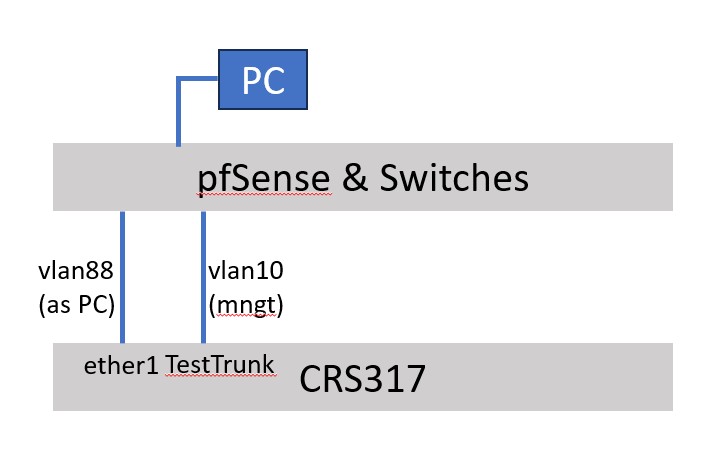
Hello, on my CRS317 I would like to create the following setup:
the CRS is connected with a vlan trunk towards pfSense being the router.
the CRS ports are partly used as trunks and for edge
ether1 is used in favor of emergency managment (pivd 1, default bridge 192.168.88.1)
the normal management vlan is arriving via the trunk.
I did create a second bridge in favor of cpu access for the management vlan, with the PID of the mngt-lan
and assigned an address to that bridge. the mngt bridge is member of the management vlan (gw on pfSense)
Given the fact that all vlans should be capable to reach all SFP’s, I assume they all need to be member of the main/default bridge.
I configured the described setup, but do not manage to communicate via the management lan with the CRS.
(I am actually accessing the CRS via a lan connected to ether1)
Question:
what am I doing wrong / how to solve this !?? (example would be appreciated)
As you noted, frames are passed (switched) only between ports of same bridge. Having two bridges in same device is (from L2 perspective) the same as having two devices.
But I wonder: if sole purpose of the second bridge is to give emergency management access via the sole bridge port (ether1), then you can skip that bridge and set necessary IP settings to ether1 directly.
You’re mentioning management VLAN with gw on pfsense … I fail to understand how you’ve set things up. I recommend you to post textual export of configuration for review.
The situation related to the pfSense gateways is simple.
pfSence is the router and has the gateway for all vlans. Part of those vlans, one of them the managment lan, is connected with the CRS via a trunk.
The vlans are distributed via the SFP’s to the connected equipment, without involvement from the CRS-CPU. Two exceptions:
ether1 which is quasi connected to a PC (in reality the network emulating a PC-connection)
the management vlan
Those two connections do interact with the CRS-CPU via two bridges. I did add an address within the managment subnet to the management bridge
Two because the ether1 connection should behave like the factory default the second should fit with the management vlan.
In the future I will need a third bridge being the GW of a local VLAN.
I will look into the option of publishing the actual config. Nothing really secret in there. A few more things then more then relevant here. I have to query the internet about how to make a textual config dump
The config regarding ether1 is mighty weird … it’s added as port to the “grand” bridge, srt as access port of VLAN 88. Then you have br10 which is configured as tagged member of VLAN 10 of “grand bridge” but it’s not even set as port of same bridge??
A side note: ROS can HW offload only one bridge per switch chip built in device. For most devices (including CRS317) this means single bridge … and even on devices with multiple switch chips, bridges have to be set up carefully to enable them for HW offload. The rest of bridges are run by CPU, which is very bad for their performance.
So unless there are very good reasons in favour, it’s best to avoid using multiple bridges. With bridge VLAN filtering (and many devices can properly offload that to HW as well) most tasks can be achieved on single bridge by deploying VLANs. And I have a very strong feeling that’s true in your use case as well.
Beware that CRS devices are pretty low-throughput routers unless they’re properly configured for L3HW offload … which only works if all involved ports/interfaces are members of same bridge. So another reason for using single bridge.
BTW, it seems you’re abusing bridge with PVID set instead of using VLAN interface (/interface/vlan) anchored to “grand bridge” … and you definitely don’t need VLANs to use ether1 as OOB management port.
The config regarding ether1 is mighty weird … it’s added as port to the “grand” bridge, srt as access port of VLAN 88.
yep correct is exactly as it behaves after a factory reset. You normally have to connect a pc for initial setup, here my vlan88 emulates a PC
Then you have br10 which is configured as tagged member of VLAN 10 of “grand bridge” but it’s not even set as port of same bridge??
Perhaps I do something wrong there; The only task of that bridge is to provide access to the CPU for the mngt lan
A side note: ROS can HW offload only one bridge per switch chip built in device. For most devices (including CRS317) this means single bridge … and even on devices with multiple switch chips, bridges have to be set up carefully to enable them for HW offload. The rest of bridges are run by CPU, which is very bad for their performance.
The only bride carrying significant data is the default bride carrying all vlans apart from the actual two managment vlans, which are hardly carrying traffic
So unless there are very good reasons in favour, it’s best to avoid using multiple bridges. With bridge VLAN filtering (and many devices can properly offload that to HW as well) most tasks can be achieved on single bridge by deploying VLANs. And I have a very strong feeling that’s true in your use case as well.
How!? A bride does normally filter on vlan to security protect the CPU. And with now to later perhaps three that seems conflicting. I agree that it will be hard to access the CPU even if that filter on vlan is not there
Beware that CRS devices are pretty low-throughput routers unless they’re properly configured for L3HW offload … which only works if all involved ports/interfaces are members of same bridge. So another reason for using single bridge.
that is the reason that I tied all interfaces to the main bridge. I do even assume that without router & FW function it is not possible to send traffic to bridges not attached to the same bridge
it is quite clear to me that the CRS-cpu is not powerfull. that is one of two reasons not to use the CRS as combination of router & Firewall and Switch. The other reason is that IMHO the pfSense is much much more user friendly (arguable of course)
That does not take a way that I am sometimes think, what to do in case that my pfSense system is temporarily not available. So I sometimes consider using the CRS as a minimal firewall in that case
BTW, it seems you’re abusing bridge with PVID set instead of using VLAN interface (/interface/vlan) anchored to “grand bridge” … and you definitely don’t need VLANs to use ether1 as OOB management port.
I think that you are saying that it you set the bridge to accepted tagged frames only, that filter setting is not relevant. If so you make a very good point !
OK there is a lot of info there. The first part are things I all ready know. The biggest problem is the RouterOS GUI, not saying that I understand every thing.
Simple things which makes me crazy is vlans:
should I define them in the interface menu !!!??
or in the bridge menu !!??
why can I select an vlan created in the interface menu, but not one created in the bridge menu !?
when I create a vlan in the interface menu should I use the bridge as base (seems logical) or should I use some interface seems very strange!
In the ping tool I can access an interface create vlan but not a bridge created vlan … ???
Your last point in the yesterday mail very relevant to what is the bridge listening:
what is the implication of vlan filtering !? Filtering on pivd works and is very logical
however listening to multiple vlans is absolutely not
yesterday evening your remark gave me the impression that in the bridge menu the vlan selection could be pivd in combination with untagged or accept tagged only which would make pivd unrelevant or hybrid, but looking again at the bridge settings … that does not seems to match …
It are that kind of things which confuse me
I will read parts of the suggested links, but a big part of the problem is I think the GUI and how to set up routing as related with a vlan
/interface/bridge is sbout swich-lije entity (called brudge), its ports including CPU-facing btidge port. And VLANs allowed accross those pirrs.
/interface/vlan is about CPU ability to interact with tagged VLANs whichever CPU interface it might be, eithrr etherX inzetdsces, bridge, etc. The thing is that L3 of CPU in principle doesn’t know about VLANs (which are L2 function). VLAN interfaces are sort of pipes with tagged end (anchored to L2 interface such etherX or bridge the bridge-facing CPU interface) and untagged end where udualky one sets L3 properties (IPv6 address, DHCP server or client, etc.). The pipe then adds/removes VLAN header to/from frames passing (depending on direction). This function is what I was referring to when I wrote about you “abusing” bridge with PVID set to interface with certsin VLAN.
I do not even get the simplest test setup working. The test setup is shown above.
The setup is damn simple. The CRS is connected to my network via two connections:
the left connection is the link via ether-1 I use to configure the CRSnow (& emergency access). That connection emulates a local PC
the right connection is a trunk carrying one tagged vlan being the mngt vlan (vlan10)
the PC on top allows me to send e.g. pings to both connections and to access the internet
My actual / goal is a situation where I can mange the CRS via both links. Should be very easy.
However despite many hours, trying lots of different options, and your support … I still do not manage … bizar
Below the actual rsc file of this extreme minimal setup. I would be very happy if you would have a look at that config and could tell me what I am doing wrong.
Try to connect actual PC directly to the management port.
The way connections are shown on image they possibly make a loop … if “pfSense & switches” allow that. And RSTP (enabled by default on ROS bridges) will break the loop by disabling one of links forming a loop, by default the slower one …
In my network there are multiple vlans. The network has a star structure.
Each vlan has its own gateway to the firewall.
Involved vlans are:
PC-lan That is where the PC is
VLAN88 The connection to the CRS ether1. To allow access to the CRS performs an outbound NAT so that the CRS thinks the source is within the local lan (192.168.88.0/24)
MNGT-lan That is my normal management lan and I have of course access to that vlan
Next to that I have been trying all kind of things to understand why it is not working. So I did capture vlan88 & management traffic using the pfSense capture tool. Also using the CRS capture and ping facility.
Pings / arp messages send via the management lan are not answered. Pings using the CRS ping tool do config depending allow to ping the pfSense gateway but I did not manage to ping the bridge. (in the situation I used the interface vlan type so that I could select the vlan as source in then ping tool
Since that the CRS is here next to me I did pull the VLAN88 cable which did as expected not allow me to ping the CRS via the managment lan
We are coming closer. I just made a number of traces and there is more working now than before.
(I think the same config I did post)
I think there is a routing problem / config error on the CRS with as consequences that packages are ‘spread’ across interfaces (something like that). See the capture at the right at the picture.
Still no GUI and changing behavoir. The traces are not constantly like this (especially those towards the mngt vlan).
RSTP is unaware of VLANs. It’s a protocol directly on ethernet and if two bridges/switches are connected using multiple links, even of they are trunks for distict VLANs, RSTP will detect a loop.
I’d recommend you to simplify your setup, try to get it working, and later add the “bells and whistles”.
I could disable RSTP there will not be a loop! Or I could disable it for an particular interface I think! Not an expert but I think I did read something about an related setting.
NO it is not rstp. I turned it off! Still same situation.
However I think it is a routing problem. Some way I have tell the switch that it should / must(!) use the route
via the management lan in case the traffic is inside the management lan
and the other interfaces is in fact / should be routeing less since the traffic seems to be local to the vlan
So seeing ‘192.168.88.xx’ traffic (and perhaps other way around) is definitely NOT OK.
Note here that the interface connection via the ‘vlan88’ route works perfect! About this setup, I do not regard it as bells and wissels. IMHO the management is the core of the setup. Adding simple vlans is probably peanusts. think
Objectively your setup is not very special indeed. But from the hurdles you’re describing it seems you’re not very well versed in ROS. So having multiple “independent” connections from a switch upstream, doing some routing, etc. … does seem it’s “bells and whistles” for you right now.
Since you don’t seem to want to listen to my advice, I’ll stop giving them. Some other kind soul may come by and help you further.