By default, it works as a caching recursive resolver, which means it will query the root servers, etc… and use port 53 (UDP & TCP). It can also work as forwarder and forwards requests to upstream DNS servers. In that case, DoT (DNS over TLS) can also be used and unbound will use port 853 TCP to communicate with the upstream servers (or other custom ports that those servers might support).
Thanks. Can confirm that the root server queries are on port 53. So for now I have 53 blocked on my firewall for everybody except the piholes.
That is fine, as long as you understand that in today’s world that does not do anything.
(because of DoT, DoH and VPN)
I’m preventing my kids from going around the block by trying to use another DNS server. As of now they don’t even know how I’m blocking them. If they were to figure it out and try the options you’ve listed, I’ll shut off their internet on the firewall.
When your kids have Google software (Android, Chrome) they already are using DoH without knowing it…
Education is what you need, MT wont replace parenting.
Besides that, there are a lot of very educational videos on Youtube.
E.g. on the MikroTik channel 
https://www.youtube.com/@mikrotik
I get that. That is news to me a little bit, but I don’t understand how it is relevant. That browser is doing UDP connections to youtube. How did the browser resolve youtube.com to an IP address to initiate that UDP stream? If the DNS blocking works and the browser cannot resolve the name youtube.com to a valid IP address, I don’t see how the browser makes an HTTP/3 connection via UDP. Assuming the person uses some technology (DoH, VPN, etc.) to bypass the DNS blocking tricks, which means they can resolve the name youtube.com to a valid IP, they’ll be able to use HTTP/3 or just good old HTTP/2.
There isn’t a situation where HTTP/2 is blocked but HTTP/3 works, is there? Either DNS blocking works and neither HTTP/2 nor HTTP/3 work, or DNS blocking is bypassed and both HTTP/2 and HTTP/3 work fine. What am I missing?
It’s now very easy to have secure DNS turned on. Mobile OSes have settings to turn them on at the OS level, same with Windows. Every modern web browser now either use secure DNS by default or have setting to turn that on. So, you just have to assume that DNS blocking is useless against someone who know how to use the search engine for two minutes.
As for why UDP and HTTP/3 are relevant. As other have posted in the thread. With HTTP/2 and without ECH (encrypted client hello) support from the sites, it was until recently possible, with helps from the requirement for SNI, to “block” traffic to sites using HTTPS and HTTP/2 by using the tls-host filter. Because in the first packets of the HTTPS connection the domain name is sent in clear text. But that feature from RouterOS only supports TCP and older HTTP protocols. HTTP/3 uses QUIC (over UDP) and also with ECH the domain name is no longer sent in clear text.
So, with secure DNS and HTTP/3, there is no way for you on the router running RouterOS to know whether someone in your LAN is opening YouTube anymore. Unless you somehow have the list of all possible IP addresses used by Google to serve the site and its videos.
If a site supports both HTTP/2 and HTTP/3, even if you successfully identify and block the HTTP/2 connection to it, eventually the users will still be able to access the sites. Because nowadays, to profit from the latency advantages that HTTP/3 brings immediately, even when visiting a brand-new site, browsers will try to establish both connections, TCP for HTTP/2 and QUIC for HTTP/3 at the same time. And if HTTP/3 “wins” (because of lower latency) the browsers will switch to using it immediately and don’t even wait for the HTTP/2 connection to complete. Here you can see my browser (Edge) says that it switches to using HTTP/3 because it won the race when I tried to access medium.com

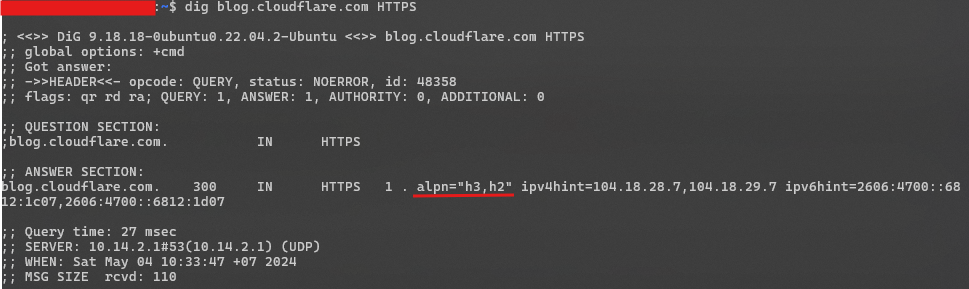
Also, last November RFC 9460 has became “Proposed Standard”. With this (HTTPS Resource Record in DNS) sites are now able to instruct browsers to always use HTTP/3, there is no need to initiate the parallel HTTP/2 connection. Modern browsers currently already query for RR type 65 (HTTPS RR) when looking up the domain with DNS, and CDN like Cloudflare already enable the records when the hosted site support HTTP/3. Here you can see apln=“h3,h2” in the HTTPS record as an example.
The best way for blocking sites - at least from the results I have been able to accomplish - is as follows.
-
Find all domain names related to a service. This requires some manual input from the user, but there are blocklists on Github. Netify.ai is also very useful.
-
Add all those domain names to an address list. This is easiest when done through the terminal. For example…
/ip firewall address-list

add address="googlevideo.com" comment="YouTube" list="Blocked Domains"
add address="gvt1.com" comment="YouTube" list="Blocked Domains"
add address="video.google.com" comment="YouTube" list="Blocked Domains"
add address="video.l.google.com" comment="YouTube" list="Blocked Domains"
add address="youtu.be" comment="YouTube" list="Blocked Domains"
add address="youtube.com" comment="YouTube" list="Blocked Domains"
add address="m.youtube.com" comment="YouTube" list="Blocked Domains"
add address="www.youtube.com" comment="YouTube" list="Blocked Domains"
add address="youtubeeducation.com" comment="YouTube" list="Blocked Domains"
add address="youtubeembeddedplayer.googleapis.com" comment="YouTube" list="Blocked Domains"
add address="youtube.googleapis.com" comment="YouTube" list="Blocked Domains"
add address="youtubei.googleapis.com" comment="YouTube" list="Blocked Domains"
add address="youtubekids.com" comment="YouTube" list="Blocked Domains"
add address="youtube-nocookie.com" comment="YouTube" list="Blocked Domains"
add address="youtube-ui.l.google.com" comment="YouTube" list="Blocked Domains"
add address="yt3.ggpht.com" comment="YouTube" list="Blocked Domains"
add address="yt.be" comment="YouTube" list="Blocked Domains"
add address="ytimg.com" comment="YouTube" list="Blocked Domains"
add address="ytimg.l.google.com" comment="YouTube" list="Blocked Domains"
add address="ytkids.app.goo.gl" comment="YouTube" list="Blocked Domains"
add address="yt-video-upload.l.google.com" comment="YouTube" list="Blocked Domains"
add address="l.google.com" comment="YouTube" list="Blocked Domains"
add address="i.google.com" comment="YouTube" list="Blocked Domains"
add address="s.ytimg.com" comment="YouTube" list="Blocked Domains"
add address="withyoutube.com" comment="YouTube" list="Blocked Domains"
add address="wide-youtube.l.google.com" comment="YouTube" list="Blocked Domains"
add address="ggpht.com" comment="YouTube" list="Blocked Domains"
add address="youtubefanfest.com" comment="YouTube" list="Blocked Domains"
add address="youtubegaming.com" comment="YouTube" list="Blocked Domains"
add address="youtubego.com" comment="YouTube" list="Blocked Domains"
add address="youtubemobilesupport.com" comment="YouTube" list="Blocked Domains"
- Next add two firewall rules. One looks at the IP addresses and adds it to a list with a TTL of 30 days. Remember to move it to the correct position/number after adding it.
/ip firewall filter

add chain="forward" dst-address-list="Blocked Domains" action="add-dst-to-address-list" address-list="Blocked Domain IPs" address-list-timeout="30d 00:00:00"
add chain="forward" dst-address-list="Blocked Domain IPs" action="drop"
- Make sure your MikroTik’s DNS server accepts external queries (while also blocking queries from WAN!) and use it in your DHCP Server. This is important because if the client device requests the IP of ‘youtube.com’, and it goes through the MikroTik, the firewall will memorise the IPs and it will work very effectively! My DNS config is as follows…
[admin@MikroTik] > /ip dns print
                      servers: 1.1.1.1,1.0.0.1,8.8.8.8,8.8.4.4
              dynamic-servers:
               use-doh-server:
              verify-doh-cert: no
   doh-max-server-connections: 5
   doh-max-concurrent-queries: 50
                  doh-timeout: 5s
        allow-remote-requests: yes
          max-udp-packet-size: 4096
         query-server-timeout: 2s
          query-total-timeout: 10s
       max-concurrent-queries: 1000
  max-concurrent-tcp-sessions: 100
                   cache-size: 32768KiB
                cache-max-ttl: 1d
      address-list-extra-time: 0s
                   cache-used: 58KiB
The reason that this does not work well is that there are multiple addresses for each domain name, and that the returned addresses vary depending on where the DNS request is coming from.
When your router is making DNS requests for these domains via the DNS resolvers configured in the router, it can get different addresses than the user gets via the 8.8.8.8 or 9.9.9.9 or whatever resolver they use in their phone!
@pe1chl indeed, realized my mistake. I quickly edited my post just before seeing yours.
.
Ok. that’s the issue. You’re assuming DNS blocking is trivially bypassed. Because none of the things you mention are relevant if DNS blocking works. SNI, ECH, QUIC, etc. all require DNS first to look up the IP to talk to.
I don’t see any network-level way of blocking a web site, given just its domain name, like youtube.com. That was how I opened the discussion. There’s no practical way to block the IP addresses, to block ports, no SNI inspection, etc. That’s why I started with talking about how to block DNS resolution for a domain, highlighting all the ways that it has limitations. Everyone seems to have piled in to point out all the ways that DNS blocking can be bypassed, which are all true, but that doesn’t yield any practical result for the OP. I’m going to focus on making it hard to bypass DNS blocking.
DNS blocking can be trivially bypassed by putting resolved IP addresses for blocked hosts into OS hosts file.
Why?
Some business users with limited bandwidth do not want their WAN interface saturated. I have seen this for some businesses with only 15mbps.
That will be an endless uphill battle.
When you are selling such a limited service (or your clients buy it and ask you to maintain the router) you should simply explain to them that it has limited usefulness in today’s world, and that it will easily be saturated.
And tell them that their policy should be “no video streaming or other high-bandwidth applications”.
“blocking youtube” is not going to bring you anything. there are plenty other video services and you cannot block all of them.
instead, maybe focus on some queueing setup so that high-bandwitdh users do not adversely affect low-latency users (like VoIP).
I do 100% agree to pe1chl
If you have limited bandwidth, I would use some QoS.
Example if you have 10MBps total and 4 users, you could give 2.5MBps to all 4.
If some of the 4 does not use all their bandwidth, you can share it with the rest or the one who needs more.
Edit, if this is for children, then its education.
Does anyone have a better approach to block sites generally?
Not with MT equipment, as stated you need to procure high end routers with IDS/IDP, and then pay for subscription services to use their de-encryption engines to look at https traffic etc… Now reading above maybe that is not enough. I know on the enterprise stuff I use, its not accessible, so with enough $$$ perhaps its still possible.
Anything less then the above anyone is selling is horse sheite.