I’m getting this question over and over and over again when someone sees that XD
Because two switches in RB2011 are separate and not connected - they’re bridged in software in default config. But there’s a lot of shenanigans in RouterOS with connection tracking when single connection gets looped by software bridge twice, eg:
http://forum.mikrotik.com/t/loopback-nat-is-performed-only-once/121914/3
So I do not bridge them in software. I had more threads about similar issues with hairpin-like configs and conntrack. Basically mikrotik is keeping track of connection and it’s not treated as “state=new”, independent connection when it goes back to bridge to device for the second time so NAT and other stuff is not properly applied on second run through device. And since I have L2 transparent proxy, SSL decryption, IPS/IDS and some other devices in chain I do loop traffic more than once through routers (simply because I’m using switches in them as… well just physical switches - like in this case of RB2011). So all in all I’m using /ethernet switch config and CPU is isolated from traffic that passes through those switches on /interface switch vlan level. As a result RB2011 doesn’t (in software) see connections passing through those switches in “dumb port extender mode” when they simply go through there to reach CCR1009 and then it only sees those connections on CPU port when they go back to it (routed back by CCR1009) and properly applies NAT, firewall and stuff like this. So I’m essentially using RB2011 as two entirely separate devices - [simple switch] for CCR1009 just to have more physical ports in CCR in this place and [router+AP]. Okay maybe it’s a bit difficult to explain without picture so it’s case like this (arrow represents path of connection):
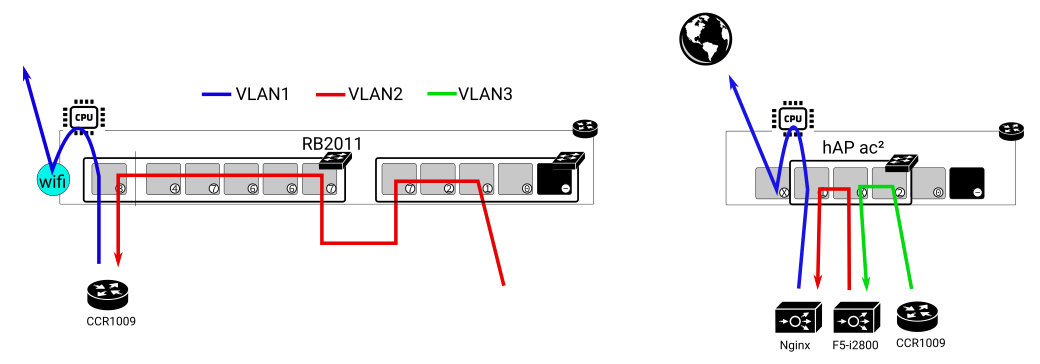
If I used software bridge then RB2011 would not properly apply NAT/mangle/fw rules to connection when it reaches it as blue path (since it’d already consider it established connection). I did my best to explain how it works XD. So in my config CPU port of switch chip has only like one VLAN allowed (blue) so CPU doesn’t see any connection when it goes there initially (red) and only sees it in software for the first time when it comes as blue. So since entire goal is to avoid RB2011 registering connections passing through those switches in connection tracking - I can’t bridge those two switches in software. THE END. xD
I have similar config on ac² where switch is isolated from CPU and connection tracking doesn’t see connections going through ether2-ether4 (just ac² has only one switch chip and doesn’t need such retarded physical interconnect like RB2011). So I’m basically using RB2011 as 2 completely unrelated devices and ac² as two completely unrelated devices. I could just buy two physical switches instead of using one device for 17 separate things and then try to workaround weird quirks for hours but according to simple math two routers are cheaper than two routers AND two switches xD
Does it still work like this? I don’t know. It did back in 2016. I configured it to work and never looked back.