Implementing a VLAN solution

I started my Mikrotik journey in July of this year by introducing a RB4011 into a small business. My networking friends tried to discourage me from using the equipment by recommending other vendor that they felt were less complicated. You have to know your SH*&% to work with Mikrotik was their critism.

It has been a challenge but the equipment continues to exceed my expectations. My one takeaway is how versatile the router has been. I’ve implemented features I didn’t even know I needed when I started.

This forum has been a great resource since I started. I’ve come back to this waterhole to tap into those that have way more knowledge than me, to have a discussion on what I feel is my next step in network design.
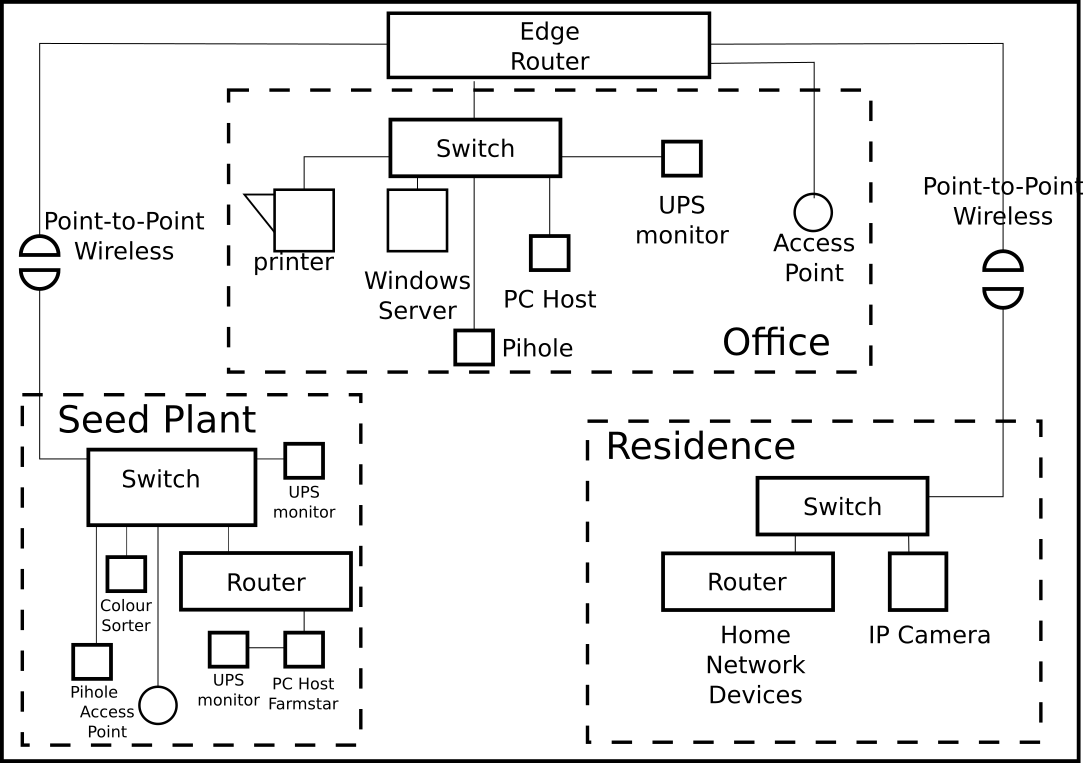
The current network design has the edgerouter (RB4011) providing three LAN subnets. Just LAN nothing else.
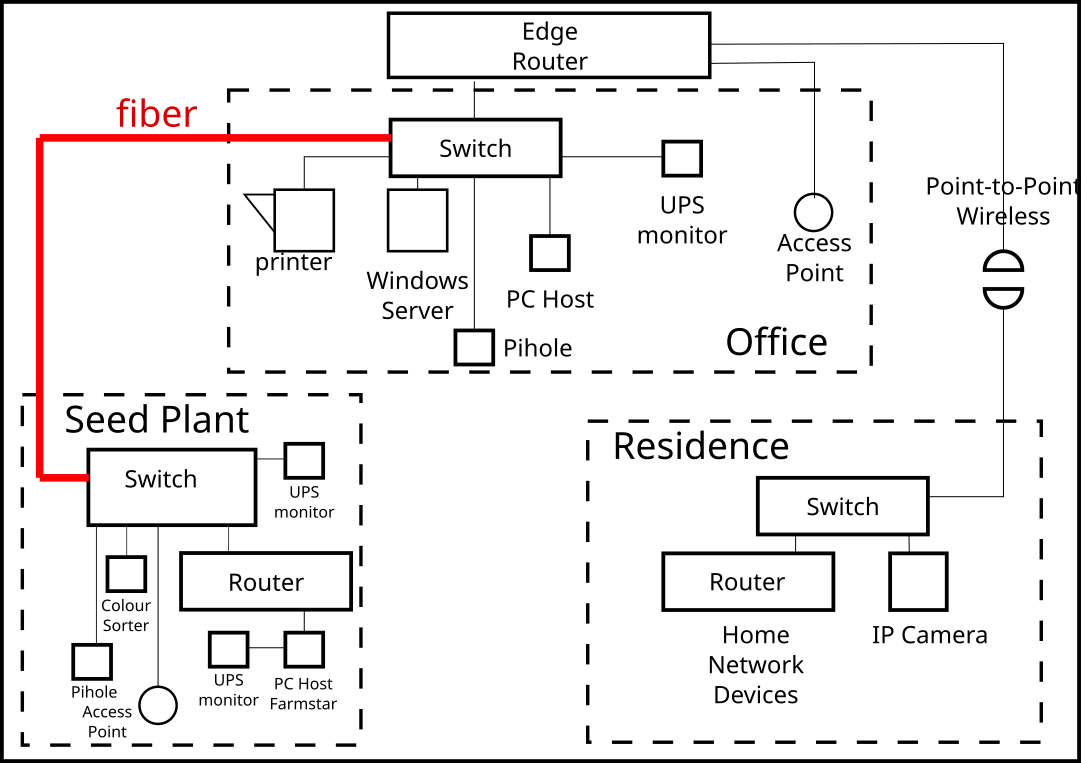
In January fiber will be installed that connects the switch in the Office to the switch in the Seed Plant. The switches are a Mikrotik CSS326 purchased in October. The point to point link that once supported the Seed Plant has been repurposed to support the Residence because the equipment is VLAN capable.

My plan is to reconfigure the edgerouter and implement three VLAN’s. The switches would be carved to provide LAN ports, OSS (Operational Support System) ports and MGMT (Management ports).

In the current network, LAN access is distributed to all sites. Many of the systems at the Seed Plant are not actually LAN devices but rather computers that run the operation. My goal is to VLAN the fiber backbone so I can better manage the traffic at the firewall.

The edgerouter would trunk the three VLANs to the switch in the Office. The trunk would extend to the switch at the Seed Plant. The Office and Seed Plant switches ports can be carved to support what is needed.

If successful I would move the point to point connection to the residence from the edgerouter to the Office switch and create a forth VLAN for network traffic from the residence. The current switch in the Residence is not VLAN capable so it would need to be replaced.

I’m looking for plus’s and minus’s. Critiques and criticism. What have I missed? Sharing your insight will help me know what I don’t know.

I’m new to network design. I retired in 2017 from a technology career. I started doing break-fix on this network and the role has expanded to CTO. I do all the work between break-fix and CTO.
1 Like

Hi,

you definitely should start with VLAN topics here: Topics tagged rtfum
and that:
Beginners journey into VLANs - #10 by vlan_newbie

The last thread was closed so no link can be added to make it easy to connect to the new continued thread.

This is the continuation of Beginners journey into VLANs

VLANed home network, 2nd try

if a moderator could put a link to it in the first thread that would be good.

Thank you so much! Just looking at the diagram made me realize some stuff I didn’t consider. I’ve got some time before I implement so lots of room for improvements.

Done.

1 Like

If isn't clear to me what "LAN access is distributed to all sites" means. Are all three buildings currently all in a single subnet?

What are the routers in the Residence and Seed Plant doing? These would have other subnets behind them.

Will there be "shared" devices (e.g. the Office printer and Windows server) that you want to access from other buildings?

vlans are just a way to allow networking resources to be shared, they don't provide functionality that could not be achived with additional ethernet adapters, switches, and links (wires, fiber, wireless). The primary advantage of vlans is scalability and reduction of physical equipment.

If you have only a single subnet in the residence, and you don't need "direct" (layer 2/switch level) access from the residence, then there isn't an absolute requirement for a managed switch. What a managed switch with vlan capabilities allows is to have specific ports on the switch be "connected" to a different LAN (provided by a vlan). So you could have a specific ports dedicated to connections to different subnets, each with a different purpose. For example, you could then have your "guest" vlan span over all three buildings, or have a specific port in the residence that would have access to the office LAN.

There are three subnets .70 seedplant, .80 Office and .90 Residence. These areas are physically three different buildings on the property. The three subnets are listed as LAN type subnets on the router. That is how the network, including internet is provided to all clients. These LAN subnets distribute the network throughout the whole operation including printers and access points. The LAN subnets also support IP from equipment , colour sorter and PLC’s in the plant.

The seed plant router and residence router are for isolating other networks. The seedplant router has a number of PLC’s and computers behind it that monitoring sensors on motors and other mechanical devices. It is the demark device for support from the company that monitors the seed plant. They have a .5 subnet that they manage.

The residence router isolates the owners home network from the company network. Consumer electronic devices on the other side, at one time, existed on the whole network. I got tired of seeing TV traffic spilling out so I introduced the router.

The office has the shared resource of the AP and the printer. The seed plant just has the AP. The guest AP is on a separate network and subnet. It provides only internet access and no access to the company network.

I have a blank slate when it comes to VLAN implementation. I’m looking for knowing what I don’t know to assist in my in the final design. A VLAN to support camera might not be such a bad idea. At one point there were multiple cameras.

Port 9 on the router feeds via a PTP wireless device the residence. The residence was once the office. Internet originated at the residence a number of years ago. We exceeded the ISP capacity and had to find another provider. Two providers later we have stable 100MB internet access to the office router. That internet access is distributed to the company network.

The residence switch has a camera and the residence router. If the switch was VLAN capable I’m thinking the home network and the camera become seperate VLANS. Just an uninformed idea.

I suggest you start by making a list of all the IP addressed devices, including the router. Group them together as best you can by function - eg computers tablets and mobile phones in the residence can be grouped as personal devices. Similarly computers in the office form another group and plcs in the seed plant form another. Include resources such as networked printers, network attached storage and don't forget the internet as a resource.

Then draw a grid of all of the groups on both axes and mark with ticks and crosses what you will let communicate with what. From this you can begin to work out what can be put together on a vLAN and what must be on separate vLANs. I think this step is inescapable because of the diversity of your network and the use cases it supports. Otherwise you risk implementing something and then finding gotchas.

1 Like

Great suggestion. I have an IP map of the network. All the subnets I control and those behind the two routers.

My vision started with three VLANs. Client, system and management. What advantage/disadvantage is there to being more granular. i.e. client desktop, laptop, tablet, phone… I’ve had little need so far for control. Moving printer(s) only have one now to a separate VLAN seems overkill for my network size.

My concern is managing the traffic on the new fiber backbone. If I can use VLANs it can help with that.

If I started with Clients VLAN10 series. VLAN11-19 would not be assigned until i wanted to groom clients devices to different VLANS. Just my thinking. VLAN 10’s are clients, VLAN20’s systems,VLAN 100 management

What type of switches are being connected with fiber? Do the switches have built in SFP cages (that you insert an SFP module into).

If this is a fiber that will be terminated in the SFP modules that are directly connected SFP cages in the switches, then the link should look like ethernet, and be able to carry vlan tags, i.e. if you can do it with an ethernet cable connected between two non-PoE ports on the switch, then you should be able to do the same thing over the fiber. Fiber can't carry power, but it has many other advantags from an electrical isolation point of view, and you can also go further than copper links will allow.

Basically, the granularity is dictated by the analysis. Increased granularity will also increase the implementation and subsequent management. It is not going to be clear cut, there will be judgements to be made. A single Guest network may suffice for all of the Access points across the site, but you might want to separate personal devices in the residence from the rest. So you might not need to put 'trusted' phones on a separate vLAN from tablets and PCs in the residence. If you use printers as a site fax, it might be handy to give them a vLAN or you could just put them on the vLAN providing general access to the internet. Or if you don't use them as a site fax, then they could go on a vLAN for the location.

There might be some wrong answers, but there is no unique right answer.

1 Like

Two Mikrotik CSS326 and one RB260GS. The RB is planned and will replace the residence switch.

I would like to separate the residence traffic. A lone VLAN for that. Again thinking.

I’m not sure of of device VLANs. I have one printer putting that on a VLAN seems like much.

There are different views on which devices should be in separate VLANs, but I am sure that:

  1. Servers and network devices should be in management VLAN. Users should not have access to it (thanks to firewall between vlans): they shouldn’t be able to connect to your router, switch or Windows server RDP port. This is crucial for security.
  2. Guests and regular users should be in different VLANs as they have different access policies (implemented on a router firewall)
  3. WiFi APs should be in the same broadcast domain with controller to find it using L2 layer. Even if they are in another network, they still need a different DHCP server to get a controller IP (other devices do not need it)
  4. Same for VoIP phones and PBX
  5. If printer has a web UI (or some other port to configure it) move it to the management network to prevent users from accessing it.
  6. If you have a backup server (you should!) put it in a separate VLAN, so when hackers break your network and destroy all data you’d be able to recovery it from your backup server. The first thing hackers do, is a network scanning: if your backup server lives in the same network, they will find it wipe all data.

The question is: what would happen if a device in VLAN would be compromised? How far can a hacker go from it? We do not want hacked user machine to access backup server, so we put it into a separate VLAN and protect with a firewall.

The other question is: do devices have completely different network settings (i.e. users use Windows DC as a DNS, network devices doesn’t)? If so, you need different DHCP servers, and each VLAN might have only one.

PS: One more example is to use VLANs to express user location: In Microsoft AD one can configure different servers for different networks: i.e you have branches in City1 and City2. In each city you have a domain controller. You want users to connect to the closest one (because latency or bandwidth between cities isn’t great). Even though users in both cities have the same policy, you still put them in different VLANs to run different DHCP servers to make them have different networks to bind each network to the “closest” server.

I agree with what @DuctView said, there isn't a one size fits all answer. But I have seen a lot of people just learning about vlans go way overboard with the number of vlans.

The more vlans you create, the more complex your firewall rules between the vlans will need to be.

In general it comes down to what you trust, and what you want to limit access to or from. You may want to have multiple trusted (but mutually exclusive vlans, i.e. one for business, one for home)

And when you have mulitple subnets, things like the windows firewall can sometimes make you think you have something wrong with your router's firewalls.

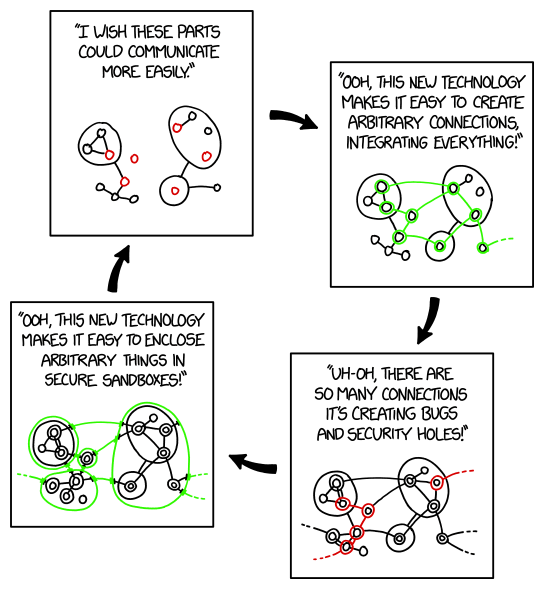
Remember that traffic between vlans will need to be routed. And some things that are multicast or broadcast based won't work across a router boundary without helpers. So you can get into a situation similar to this xkcd Sandboxing Cycle cartoon.

Google search necessary vlans

Here's a good overview of the types of things to consider when deciding what is needed for your use case.

What VLANs Do You Actually Need? by WunderTech.

1 Like

I understand management VLAN for network devices but how does that work on server? The server interface is the users access to the resources. If I create a management interface am I not bridging two networks?

Say, you have two servers:

  1. **nix server provides resources to users using ports 80/http and 443/https. And 22/ssh is for management.
  2. Windows server provides resources using port 445/smb and 3389/rdp is for management

If they were in the same vlan and network as users, any user could access management ports. Of course, you could configure firewall on each server, but it not convenient.

So, you put servers into a different VLAN and different network (i.e 192.168.10.0/24) while your users are in 192.168.0.0/24.

Now, users can only access servers via router as they aren’t in the same network.

On your router you use firewall to give them access to 80, 443 and 445 only.

This “server” VLAN doesn’t have to be the same one you use to manage your router, but still it must differ from he one used by users.

PS: but routing isn’t free sometimes. If you have 10Gb connection between user and server machine and want to utilize it, you might need to put them in the same VLAN. It is always a tradeoff

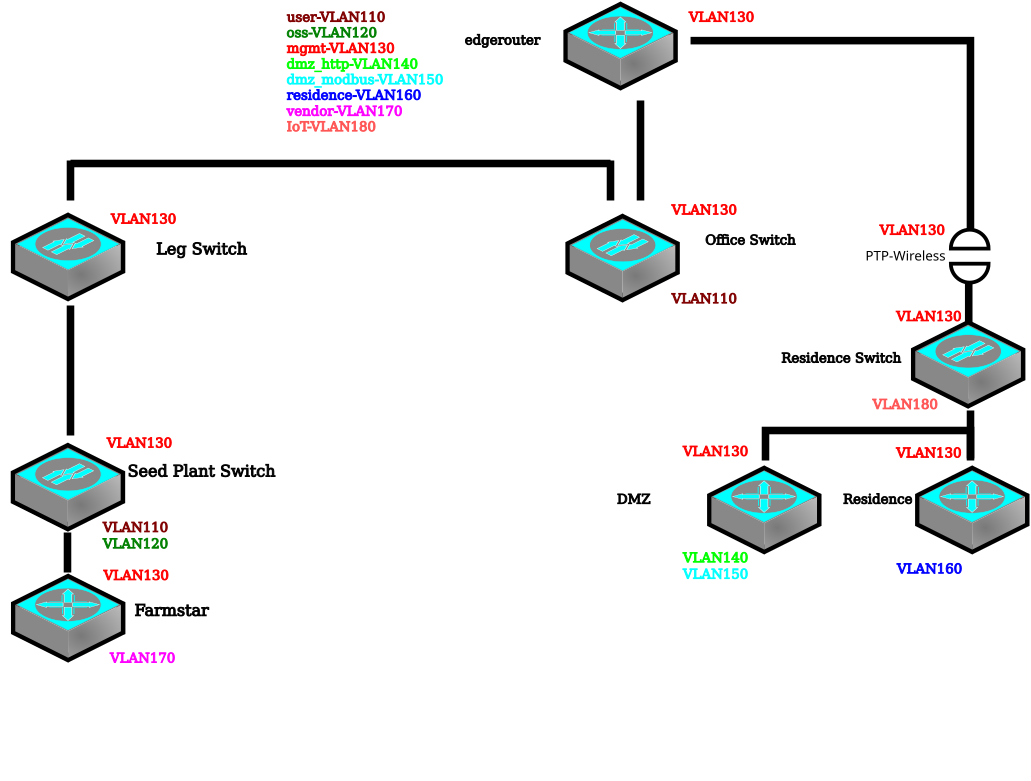
I categorizing the LAN traffic to create a VLAN list. To do this I simplified the drawing to only network devices. There are two pihole DNS devices missing from the drawing. I’m thinking they would be included in VLAN130. After a number of iterations I arrived at a seven VLAN assignments.

user traffic is VLAN110. It originates at the office switch. Operational support systems (OSS) traffic VLAN120 is the seedplant systems. mgmt traffic VLAN130 would be connections to all the devices, including the two piholes not shown. Behind the DMZ router is http VLAN140 and modbus VLAN150 traffic. The http is remote reading of the indicator and modbus is an interface that sends data to the cloud over a VPN. Residence VLAN160 traffic is access to the internet for the residence. The vendor VLAN170 traffic was a late addition. The farmstart router hides PLCs and monitoring systems for a vendor responsible for the plant. I thought getting that on its own VLAN would keep them isolated. VLAN170 over on the residence switch covers the IP camera.

VLANs keep traffic from the seedplant out of the residence side. The same with the residence traffic is not over at the seedplant. The DMZ traffic is isolated also. I have a VLAN trunk on the seedplant side and another trunk on the residence side. VLAN Access links are at the switches and routers.

Before asking follow-up questions I wanted to get a sense I am on the correct path?

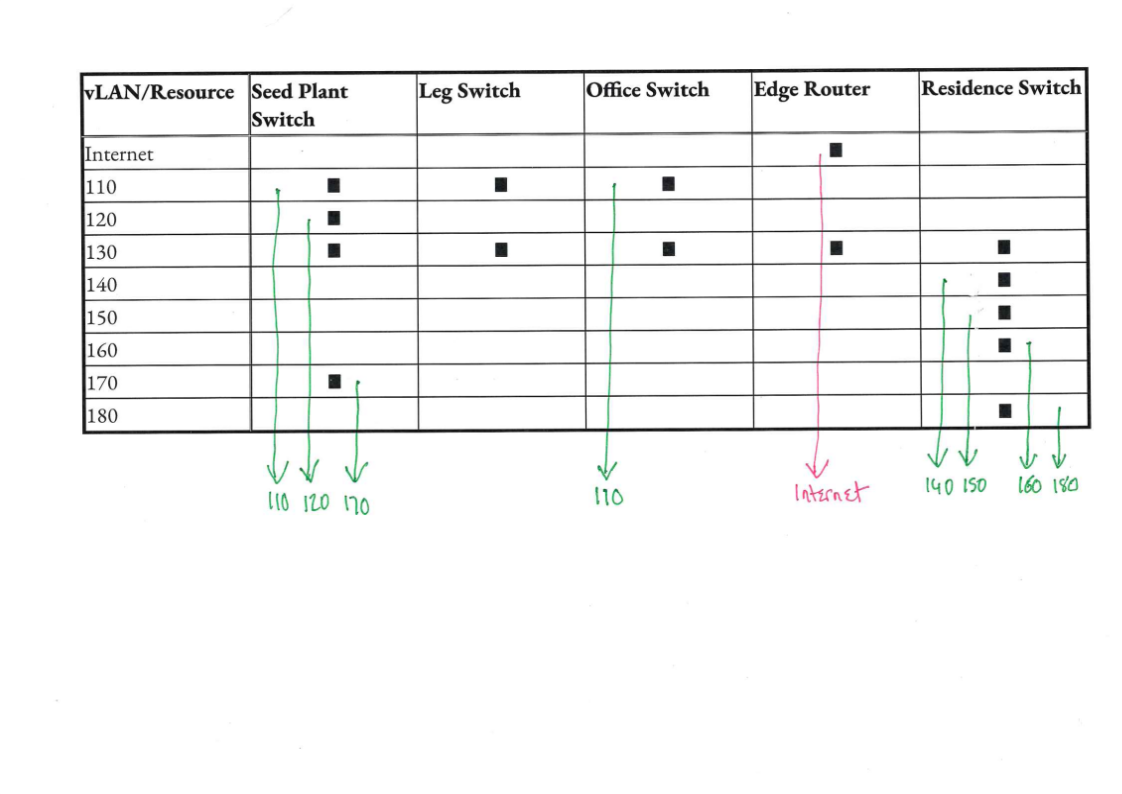
This is what I am seeing

[I have left out vLAN 130]. I don't see that the Leg Switch is actually 'useful', although it might have a purpose outside the vLAN scheme. But we have a reasonable indication of where the "citizens" of the vLANs are located, although it is at this stage missing the extent of the vLANs, so we do not know where the "customers" [who take data from the vLAN] and "suppliers" [who supply data to the vLAN] live.

This is necessary to make decisions on where you are doing your inter vLAN routing. The simplest example,

  • who has access to the Internet
  • do you take the internet to them
  • or do they go to the Edge Router for the Internet

Similar questions too for all of the vLANs, except for 110, where it is clear the vLAN spans the Office and the Seed Plant and 130 which spans everything

WOW, great summary table!

North of the edgerouter is Internet.

VLAN’s 110, 120 & 160 will access the internet from the edge router

VLAN 110 will call VLAN 140 as well as VLAN180

VLAN150 is accessed from a cloud system via VPN to the edgerouter.

Edgerouter & Office switch are in one building. Leg switch is in another building. Seedplant & Farmstar another and the the devices after PTP are the residence building.

The Leg Switch is the fiber connection point from office building to seed plant building. At some point the edgerouter will move to the Leg Switch building. The Leg switch will form the hub of the future network when required.

The Leg is an 85 foot tall structure that provides clear line of sight to an ISP tower. If our internet bandwidth requirements increase the tower becomes the next location for internet access. The edgerouter would move to that location.