LTE CAT6 modem disconnecting every 2-3 minutes

Hi,

my LTE CAT6 modem does disconnect every 2-3 minutes.
Can’t see why this should happen. (SIM card works fine in mobile phone, same APN setup as well).
And it worked in the past on leap-mini without any issues.

23:09:22 lte,info WAN2-LTE: registered home 
23:09:29 interface,info WAN2-LTE link up 
23:11:04 lte,info WAN2-LTE: not registred, state: 0 
23:12:04 lte,error failed to register on network 
23:12:04 lte,account WAN2-LTE session: 155s 9158316/263300 bytes 8608/3405 packets 
23:12:04 interface,info WAN2-LTE link down 
23:12:11 lte,info WAN2-LTE: registered home 
23:12:18 interface,info WAN2-LTE link up 
23:14:20 lte,info WAN2-LTE: not registred, state: 0 
23:15:20 lte,error failed to register on network 
23:15:20 lte,account WAN2-LTE session: 181s 24826400/659577 bytes 22939/8566 packets 
23:15:20 interface,info WAN2-LTE link down 
23:15:27 lte,info WAN2-LTE: registered home 
23:15:34 interface,info WAN2-LTE link up 
23:16:06 lte,info WAN2-LTE: not registred, state: 0 
23:17:06 lte,error failed to register on network 
23:17:06 lte,account WAN2-LTE session: 92s 3397383/74285 bytes 3117/998 packets 
23:17:06 interface,info WAN2-LTE link down 
23:17:13 lte,info WAN2-LTE: registered home 
23:17:20 interface,info WAN2-LTE link up 
23:18:45 lte,info WAN2-LTE: not registred, state: 0 
23:19:45 lte,error failed to register on network 
23:19:45 lte,account WAN2-LTE session: 145s 39661952/778303 bytes 36336/10617 packets 
23:19:45 interface,info WAN2-LTE link down 
23:19:52 lte,info WAN2-LTE: registered home 
23:19:59 interface,info WAN2-LTE link up

paste:

[admin@MikroTik] > interface lte export

Try this:

interface lte set lte1 allow-roaming=no band="" modem-init="" network-mode=lte operator=""
interface lte at-chat lte1 input="AT*Cell=0"

Good idea is enable logging:

/system logging action
add memory-lines=10000 name=test target=memory
/system logging
add action=test prefix=SXTR__LTE topics=lte
add action=test prefix=SXTR__GSM topics=gsm

Hi SiB,

thanks for the advice. Strangely enough with your first command (the second one fails) the modem is now connected
without disconnection.
Thanks for that. I still need to test at night time, when load in my area increases a lot.

PS: When the failure appeared, the LTE1 status was: Rx/TX disabled, not searching. Why would the LTE interface not search for network?
I could understand that the network drops the connection, but the modem should always search and RF (Rx/TX) should always be enabled.
Seems to me like the module had some internal reset or so…?

What mens “Rx/TX disabled”? lte1 as interface can be disabled but Rx/Tx can have =0 or >0.

Why would the LTE interface not search for network?

If you just have enable 3g/lte then he drops to 3g and stay on it.
He try stay in LTE if you not use Cell Lock. I check on 3 ISP sim card’s and he always try reconnect. (I put my SXTR&LTE6 on floor, even into metal box :slight_smile: ) and after put it on place with signal the connectivity comeback to lte (in lte only mode) or 3g (if 3g.lte mode was selected before).

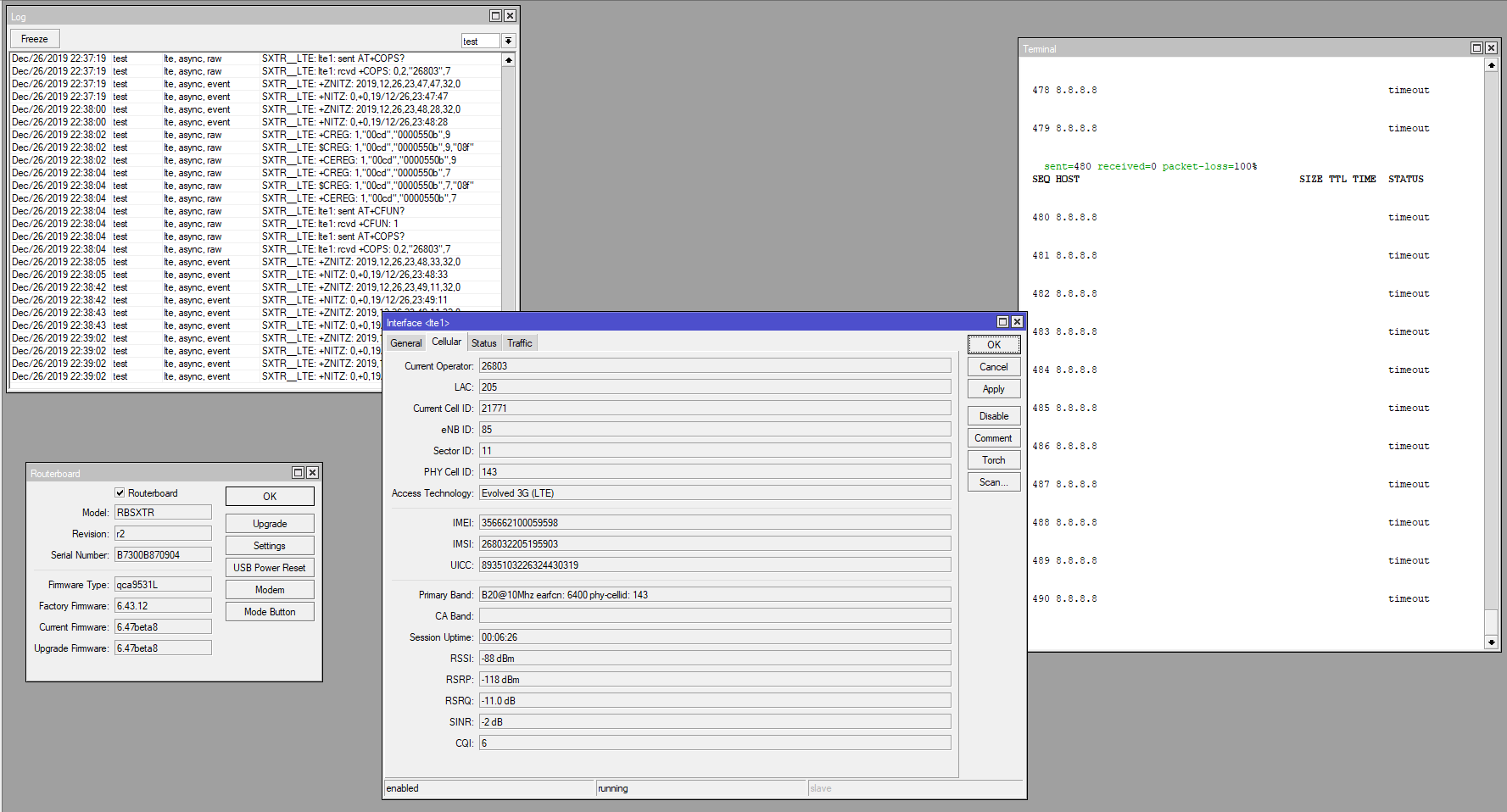
I know about issue with Rx=0, rsrq=19,5dB, other signal value freez what I currently checking with support@mikrotik.com and decsribe it into: http://forum.mikrotik.com/t/v6-46-1-stable-is-released/135478/1 but this is only when you use Cell Lock feature.

One bonus.
When i select Band=3 and CellLock (the same cell have 3g and lte) then when LTE is out-of-signal then 3g starts works for ever, never comeback to lte mode by himself. This works at CellLock with specific Band, and then the info give me earfcn&phy-cell on 3g connection what is never show in just simple 3g connection.

I hope my answer is ok :slight_smile:

Hi SiB

this is the error I get when the LTE link goes down and I don’t understand why this happens
nor what it means.
LTE-IF-bug.png
Any idea?

Hmm, I know only one situation todo this.
When I do CellLock at CellID with weak signal then this will happens.
Try do:

/interface lte at-chat lte1 input="AT*CELL=0"
/interface lte at-chat lte1 input="AT+RESET"

and check again.
Give me a feedback, please.

Please check your signal, maybe you are at “black hole” and time to change ISP or test other one?

also face stability problems with my new R11e-LTE6, in my case whole modem randomly hang, “AT+RESET” cmd from your post helped for now
signal is perfect, because im <50m from BTS

Issueing:

/interface lte at-chat lte1 input="AT*CELL=0"

Gives following error :

output: +CME ERROR: phone failure

and even reset command returns:

output: ERROR

I opened the audience and think I could probably try to replace the modem with a different one.
Do you know what other vendor module would work (It probably uses USB connection)?

I have a even stranger problem, the modem connects to my operator (NOS in Portugal), everything works fine, BUT! I have no Internet connection, the Mtik while doing a ping it shows the status TIMEOUT, I can see the TX working but no RX.

Plug a SIM card from another operator and boom, everything is ok… wtH?!?

I’ve already tried changing MTU, other things that I don’t remember now, but the stupidity of all of this is that if I change from LTE to 3G I get Internet… :imp:

Same SIM in a Huawei B something works perfectly… Does anybody knows what the hell is going one here?

PS: The LTE Cat4 modem works fine with tha F… SIM card…
mtik.PNG
Thanks for your time :laughing:

you are at very cell edge, aren’t you?

WeWiNet, please write to support@mikrotik.com with the description of your problem. If I understand that you don’t have any CellLock command used - just regular configuration?
Setneuf, it looks like the signal might be too low for the Band20 LTE. What signal you were getting with the regular LTE card and was it using the same band and cell?
When you switch to 3G it could switch to different tower. Try to use LTE and disable the Band20 and check only band 1,3,7,8 and check if it finds any connection.
You can try to check the nearest LTE tower in the cellmapper.net site to see which bands each tower supports (those are user data and might not have all the new data, you can also try to contribute your date if you have Android phone from your Region if you have the same LTE operator SIM card).

WeWiNet

.
I cannot reproduce this behavior.
I can only get response like “no such item” or “failure: modem not ready” etc. but at+reset or at*cell=0 give me some proper responce.

Remember to provide more information like:

put [interface lte info lte1 once as-value ]
interface lte print detail
interface lte apn print detail

You should write to support@mikrotik.com with attachment supout.rif file.
.

Do you know what other vendor module would work (It probably uses USB connection)?

I think the best is this one in Cat.6 and the same 2xCA:
Quectel EP06-E and wAP R ac (RBwAPGR-5HacD2HnD) → http://forum.mikrotik.com/t/quectel-ep06-e-and-wap-r-ac-rbwapgr-5hacd2hnd/131724/1

Mizm

On hand you means Freeze ? IP address still assigned + lte1 up and running + Rx=0 + status signal not change at all like constans ?
Please read this: http://forum.mikrotik.com/t/v6-46-1-stable-is-released/135478/1 Similar?
You use just normal (without CellLock)?
You enable lte topic in logging and discover someting?

Please provide:

put [interface lte info lte1 once as-value ]
interface lte print detail
interface lte apn print detail

Setneuf

You not use a Cell Lock by at-chat lte1 input=“atcell=2,3,6400,143" ? Because in CellLock after loose signal at moment you stuck in offline mode. Maybe you assign only B20 or this is your only Band with signal?
In normal mode means at-chat lte1 input="at
cell=0” works me automatic migration into 3G (UMTS/HSDPA..)

I can confirm that different SIM cards works me different too.
CellLock at one ISP works with Cameback signal.
Other ISP SIM card works on R11e-LTE6 and USB E3372 and many devices like phones but not work in first version “SXT LTE 3-7”.
At screen I see similar situation to my report http://forum.mikrotik.com/t/v6-46-1-stable-is-released/135478/1
.

I’ve already tried changing MTU, other things that I don’t remember now, but the stupidity of all of this is that if I change from LTE to 3G I get Internet…

It’s like you do CellLock at 3G… OR you select that Band who works you only at 3G.
Please do:

interface lte set lte1 allow-roaming=no band="" modem-init="" network-mode=lte operator=""
# wait to new connection
interface lte at-chat lte1 input="AT*Cell=0"
# wait to new connection
/interface lte at-chat lte1 input="AT+RESET"
# wait longer because lte1 will disapeer from device
system routerboard usb power-reset
# wait longer because lte1 will disapeer from device
system resource irq print interval=1s where users~"usb1"
# COUNT is still upper?


Same SIM in a Huawei B something works perfectly… Does anybody knows what the hell is going one here?
PS: The LTE Cat4 modem works fine with tha F… SIM card…

In general this is bad re-connecting stuff from MikroTik and we all try send own supout.rif to support@mikrotik.com to produce better modem firmware who give us good stability, proper 2xCA and after long signal-off situation automatic registration in network and connection without own scripting.

WeWiNet

You must enable the AT logs by

/system logging action
add memory-lines=10000 name=test target=memory
/system logging
add action=test prefix=SXTR__LTE topics=lte
add action=test prefix=SXTR__GSM topics=gsm

do reboot of mikrotik to have got fresh situation.
Next please share log’s or check the AT+CFUN.
CFUN=4 means “disable phone both transmit and receive RF circuits”
ROS send the AT+CFUN=1 to activate full functionality but before that do stuff like setup PIN, BAND’s etc.

Remember that if device not work properly by out-of-box then you can give it to warranty.

Hi again, tried only one band and nothing… I’m getting very dissapointed with this modem, is even worst than the r11e-lte… :angry:

modem.PNG
The modem connects, but no internet or anything come in from the provider.

Setneuf

Your screenshot give confirmation that you have got IP address from your ISP, connections is proper.
Show us this:

/ip address print  <- should print IP 83.132.25.126 at lte1 interface
/ip route print    <- should print "ADS 0.0.0.0/0 via lte1"
/interface lte apn print   <- should print "add-default-route=yes"

Means you must have in APN a add default route to yes or just a manualy route to 0.0.0.0/0 via gateway=lte1.
And then you could do ping/tracert etc to internet.
Without default route via lte1 interface you not reach internet. Your screenshot show only 1/2 necessary stuff.

You just now write that you cannot RUN a internet. I thinking that it’s working and you must do sometimes a reboot etc. to do re-connection. Or you setup some parameters who block you a connection but you have a primary start setup problem.

I did not use the LTE modem for a while, but today when trying to use it my Audience CAT 6 modem is just completely stuck!!!
It toggles every 10 seconds the message in status: “tx and rc rf disabled” → full → “tx and rc rf disabled” → full
Using same setup as always, nothing changed (same APN etc.). No cell lock used or anything like that.

Here the log that shows up:

09:19:35 lte,async WAN2-LTE: rcvd +CPIN: READY 
09:19:35 lte,async WAN2-LTE: sent AT*BAND? 
09:19:35 lte,async WAN2-LTE: rcvd *BAND: 11, 78, 147, 480, 50923735, 0, 2, 2, 0 
09:19:35 lte,async WAN2-LTE: sent AT*BAND=11,78,147,480,50923735,0,2,0 
09:19:35 lte,async WAN2-LTE: rcvd OK 
09:19:35 lte,async WAN2-LTE: sent AT*lteband=3,7,1,20,12,17,2,25,26,5,8,38,41,40,39 
09:19:36 lte,async WAN2-LTE: rcvd OK 
09:19:37 lte,async WAN2-LTE: sent AT+ZGDCONT=5,"IP","sl2sfr",0 
09:19:41 lte,async WAN2-LTE: rcvd +CME ERROR: Invalid Param 
09:19:41 lte,async WAN2-LTE: sent AT+ZGPCOAUTH=5,"","",0 
09:19:45 lte,async WAN2-LTE: rcvd +CME ERROR: Invalid Param 
09:19:45 lte,async WAN2-LTE: sent AT+COPS=0 
09:19:45 lte,async WAN2-LTE: rcvd OK 
09:19:45 lte,async WAN2-LTE: sent AT+COPS=3,0 
09:19:45 lte,async WAN2-LTE: rcvd OK 
09:19:45 lte,async WAN2-LTE: sent AT+CFUN=1 
09:19:45 lte,async,event +CPAS: 2 
09:19:45 lte,async WAN2-LTE: rcvd OK 
09:19:45 lte,debug WAN2-LTE: config ok 
09:19:45 lte,async WAN2-LTE: sent AT+CFUN=4 
09:19:45 lte,async,event *RADIOPOWER: 1 
09:19:45 lte,async,event +CGEV: ME DETACH 
09:19:45 lte,async,event +CPAS: 5 
09:19:45 lte,async WAN2-LTE: rcvd OK 
09:19:45 lte,async WAN2-LTE: sent AT+CPMS="SM","SM","SM" 
09:19:45 lte,async,event *RADIOPOWER: 0 
09:19:45 lte,async WAN2-LTE: rcvd +CPMS: 7,30,7,30,7,30 
09:19:45 lte,async WAN2-LTE: sent AT+CFUN=4 
09:19:45 lte,async WAN2-LTE: rcvd OK 
09:19:45 lte,async,raw WAN2-LTE: sent AT+CFUN? 
09:19:45 lte,async,event *RADIOPOWER: 0

WeWiNet

.
In my opinion the WARRANTY needed. You can do supout.rif and ask the support@mikrotik.com for confirmation.
Your R11e-LTE6 is inside PCB, not separate modem in mPCIe slot - info from photos at mikrotik.com - means only warranty.

What is super wrong here.

09:19:37 lte,async WAN2-LTE: sent AT+ZGDCONT=5,“IP”,“sl2sfr”,0
09:19:41 lte,async WAN2-LTE: > rcvd +CME ERROR: Invalid Param
09:19:41 lte,async WAN2-LTE: sent AT+ZGPCOAUTH=5,“”,“”,0
09:19:45 lte,async WAN2-LTE: > rcvd +CME ERROR: Invalid Param

The APN “sl2sfr” I assume is correct, you can try write wrong and check what will change in logs but the error about invalid param’s are wrong. Syntax is proper. Maybe the MTK support can know what generate that error but it’s not your error I think. Realy, please contact with support because it’s not problem to solve at forum.

I cannot give more info because all my ISP do correction of APN and even if I write “WrongAPN4884” then they are accept anythink as default “internet” but when I type specific like “internet.cp” then my ISP only at this APN give me a PublicIP. As you can see I cannot in my country write wrong apn and check what is normal response but the invalid syntax is like some other problem.
.
The CFUN=1 or CFUN=4 is normal and this give you this two state. Problem before is with APN syntax.
GC3HZFm2Yc.png
Please write to support@mikrotik.com

SIB,

thanks for your advice.

I think I found my problem (hopefully).

Initial boot of LTE modem must complete once!!! (don’t disrupt it)
When you do it correctly and then disable modem, I get good status:
“Not Searching”
“Pin ok”
Functionality: “minimum”.

If I then need LTE modem I can enable it and it works!!!

Before I had after reset/power cycle, DSL and LTE i/f up and each try to get up. But DSL netwatch was disabling
LTE very shortly after boot (I think this was too early).
Now I added delay: I let LTE come up completly once after boot, and only then disable it…

I will try to test couple of times in coming days to see if this was really my issue.
If this is confirmed it would mean ROS to LTE modem communication is not robust enough and you need to gracefully disable LTE modem
(but I could be wrong :wink:)