Hello,
I’m working with an embedded system, which has two parts (for the sake of argument, let’s call them parts A and B) which have IP addresses 90.0.0.50 and 90.0.0.51, respectively. Under normal circumstances, these two parts talk only to each other, so it is no big deal if they cannot change their IP.
But, this system can be connected to a PC for debug, reprogramming, etc.
However, I would like to connect TWO of them to one PC, which is a problem considering the identical IP’s. I’ve acquired a Mikrotik router (L009UGiS-RM) so I can resolve this…
What I want to do, is to map each of the systems to different addresses based on which port they’re connected to. Like this (simplified to only show one of the two addresses):
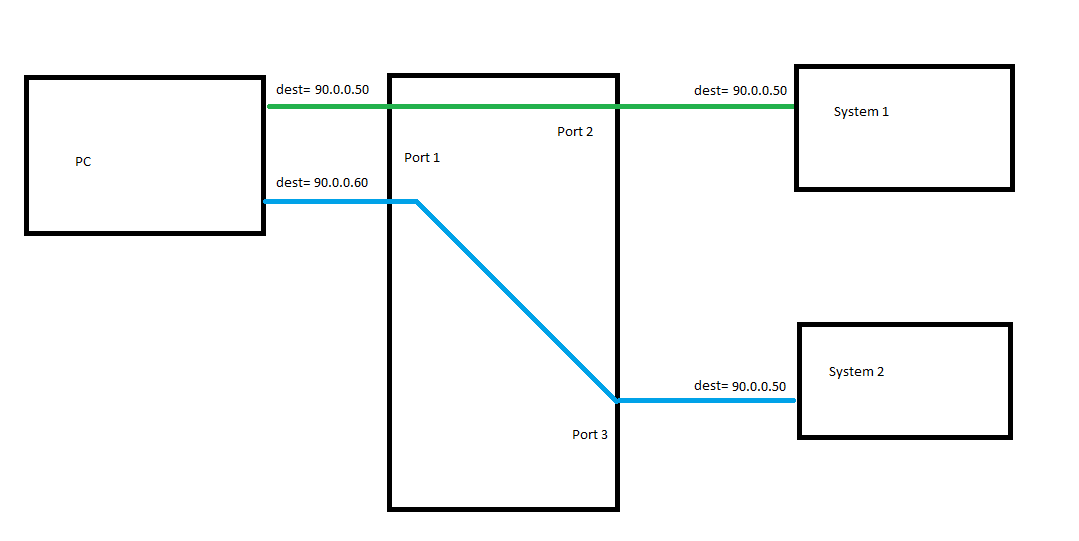
I’ve seen this topic: http://forum.mikrotik.com/t/connecting-to-multiple-devices-with-same-ip-address/159052/1
which seems to be the same issue, but I’m having trouble understanding what’s going on in the proposed solution:
#add pc-side addresses of router
/ip address
add address=90.0.0.50/24 interface=ether1
add address=90.0.0.60/24 interface=ether1
#add device-side addresses of router
...
add address=192.168.0.1 interface=ether2
add address=192.168.0.1 interface=ether3
...
#mark pakets according to which port they should go to
/ip firewall mangle
add action=mark-connection chain=prerouting dst-address=90.0.0.50 new-connection-mark=port1
add action=mark-connection chain=prerouting dst-address=90.0.0.60 new-connection-mark=port2
...
#transfer the mark from prerouting to routing?
add action=mark-routing chain=prerouting connection-mark=port1 new-routing-mark=port1 passthrough=no
add action=mark-routing chain=prerouting connection-mark=port2 new-routing-mark=port2 passthrough=no
...
#map two PC-side IP's to singular device-side IP
/ip firewall nat
add action=dst-nat chain=netmap dst-address=90.0.0.50 to-addresses=90.0.0.50
add action=dst-nat chain=netmap dst-address=90.0.0.60 to-addresses=90.0.0.50
...
#...?
add action=masquerade chain=srcnat out-interface=ether2
add action=masquerade chain=srcnat out-interface=ether3
...
#????
/ip route
add dst-address=192.168.0.0/24 gateway=ether2 routing-mark=port1
add dst-address=192.168.0.0/24 gateway=ether3 routing-mark=port2
(altered to reflect the addresses I’m working with)
I get what’s going on in most of it, but I’m struggling with the last two sections. What are these doing? And how does the traffic going to .60 and .70 get routed to ports 2 and 3? (if the answerer of that topic was even right at all in the first place, and if it wasn’t, what would be?)
Thank you