I’m looking into things that should make that MUCH easier like it does in pfsense and OpenWRT like Tailscale or Netbird, and that seems to be an awful experience in Mikrotik as well.
Design constraint; my fleet of Mikrotik routers are going to be in various facilities behind firewalls I don’t control. They need to connect outbound to a management server over the internet.
I’m starting to use Mikrotik routers to replace Ubiquiti Edgerouters and Ubiquiti has UISP that I can load on a random linux box in a internet cloud host and VERY easily manage hundreds of Edgerouters, remote shell and firmware updates. The absolute key part of UISP is all I need to do to connect a router is insert a single key string and then it will connect back to UISP over the internet via a wss:// socket.
I need the same thing for Mikrotik, what are my options?
You can easily create a "central mgmt site" and connect with a site2site vpn, like wireguard (or ipsec, or ovpn) for each your remotes points.
After that, you'll have a L3 routing between your central and your remotes.
This can be used for remote mgmt and others uses...
I'm just using custom and manually executedscript for push files and reboot devices. I've never used dude, don't understand it's usage and need some stuff on devices
When you enable BTH, a WireGuard peer is automatically created. That peer can be imported into any WireGuard client (like the Windows one, my case). What the phone app does is to create a new WireGuard peer for you when you sign up into your router through the app and import it into the app’s data. It’s nothing fancy, just autoconfigures everything for you. All of this is described in the documentation.
I’m connecting to my hex S refresh, wwhiich is behind CGNAT using the WireGuard windows client. Instructions for this are in the docs. I can confirm that hex Refresh works for it, but I don’t know why non-arm devices wouldn’t… As far as I know, WireGuard is not limited by architecture? And Back To Home is just WireGuard under the hood.
“Router requirements BTH requires a MikroTik "ARM" CPU based router. View supported routers.”
The supported routers list is just a filter for ARM but the Hex refresh isn’t on the list for whatever reason even though it says ARM elsewhere on the product. Hex/Hex refresh stretch my budget a little bit but I’m confident we could swing to that.
I’m not sure though the reasoning behind it, since any device supporting WireGuard and RouterOS v7 should be capable of using it. The only Mikrotiik devices I’ve dealt with were ARM/ARM64 and PowerPC (RB1100AHx2). The RB1100AHx2 was not upgradable to ROS 7 directly (the upgrade had to be performed using NetInstall) because ROS 7 only supports those architectures officially.
However, I wonder if now that ROS7 lts was released, it’s officially supported in all architectures, hence bringing BTH support.
The best way to test though would be by upgrading any of those devices to latest ROS 7 and checking if BTH exists on IP/Cloud.
Beside, can’t you use RoMON over EoIP or any L2 tunnel as well?
Verified no mention of Back to Home on a Hex RB750Gr3 on 7.20.6.
RoMON EoIP; not over the internet I can’t?
These routers are installed in a variety of businesses (not ours) behind firewalls I don’t control. One OpenVPN tunnel connects their LAN to a isolated VM for PLC application connectivity.
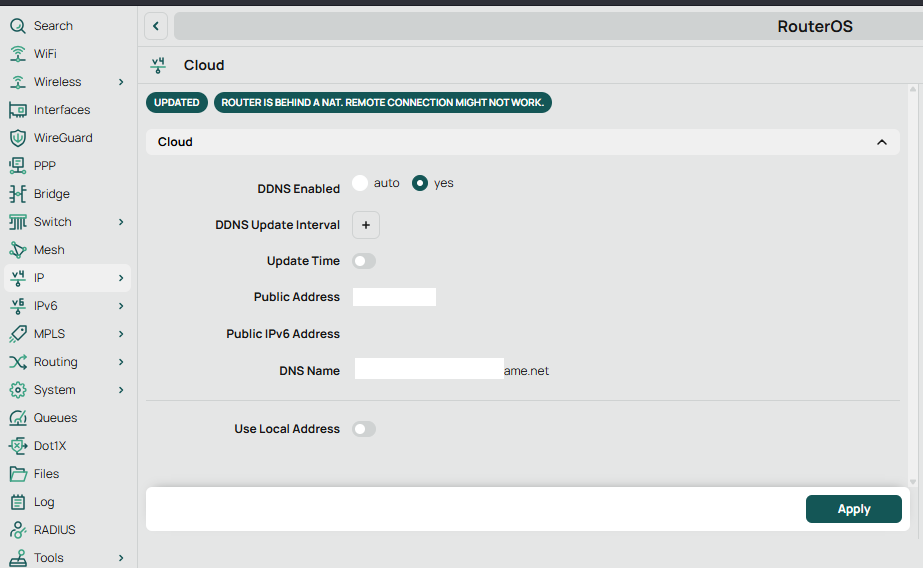
BTH needs DDNS enabled as well, do you have it? Share a screenshot of the whole IP/Cloud page if you want me to verify.
RoMON would be over EoIP. If you already have a OVPN tunnel, EoIP can go through it. EoIP is the equivalent to running a physical cable between 2 switches, you will be in the same L2 domain: EoIP - RouterOS - MikroTik Documentation
I don’t normally turn on DDNS, but I did here and I’m still not seeing anything mentioning back to home. Not even in search. And yes, it would normally be behind another NAT router I don’t control.
The Existing PLC VPN tunnel is OpenVPN dev tun topology "subnet" and terminates in a isolated VM. I’ve got a hundred of those and counting. No way to get them tied together to one place, and from a security standpoint I don’t want to either. Averaging 2.1 remote VPN routers per VM so far, mostly Ubiquiti at the moment.
In the past when I was considering OpenWRT I just made another OpenVPN server for the routers to reach out to. That sort of worked and provided a place for Zabbix to monitor them. I might conceivably do the same in a CHR but honestly I was hoping to not have to deal with even that much. Ideally I want something on the level of Ubiquiti UISP where I just put in a connection key and it’s connected to the management server.
If the way of working works for you in the supported devices, I would open a ticket with Mikrotik to ask for BTH being supported in the devices that are not supported. I don’t see a reason why they are not supported honestly, and Mikrotik is not precisely known for obsolescency either.
That’s OK, realistically I don’t see them going backward to port that and support it on MIPS. I’m pretty early in deployment and I can probably switch to Hex Refresh. I’ll pick one up to play with.
If you haven’t purchased all the devices yet, yes, that’s the best option in my opinion. ARM is widely supported, not only by Mikrotik, but by OpenWRT, bare Linux distros, etc… Anything different to x86/x64, ARM or RISC nowadays is doomed in my opinion.