Mikrotik RB4XX with Sierra Wireless MC7710

Hi

I have been struggling the whole day to setup an RB411 with Sierra Wireless MC7710 on an LTE connection.

I have setup many standard PPP with 3G connections and have been scouring the forums for a guide on how to setup LTE.

Is it as simple as setting up PPP?

Can anybody possibly assist me I cannot for the life of me get this working

I am running RouterOS v6 on an RB411U

What is the problem? Does RoS find a Sierra Wireless card? I assume it is a mini-PCIe card.

Hi , yes it does find the card but I am not able to specify a data or info channel.

its like it is not connecting to the network at all, my other 3G card works just fine (SIMCOM 5220)

could be unsupported, must contact support with supout.rif file and possibly remote access

Thanks normis ill contact support

Hi, bjorncmtec and other boardies,

Are there any progress/solution on setting-up MC7710 on RB411u?
I am facing similar issue. I have tried RouterOS v5.22 and v6.0rc6 but the modem is not responding to any command from routerOS.

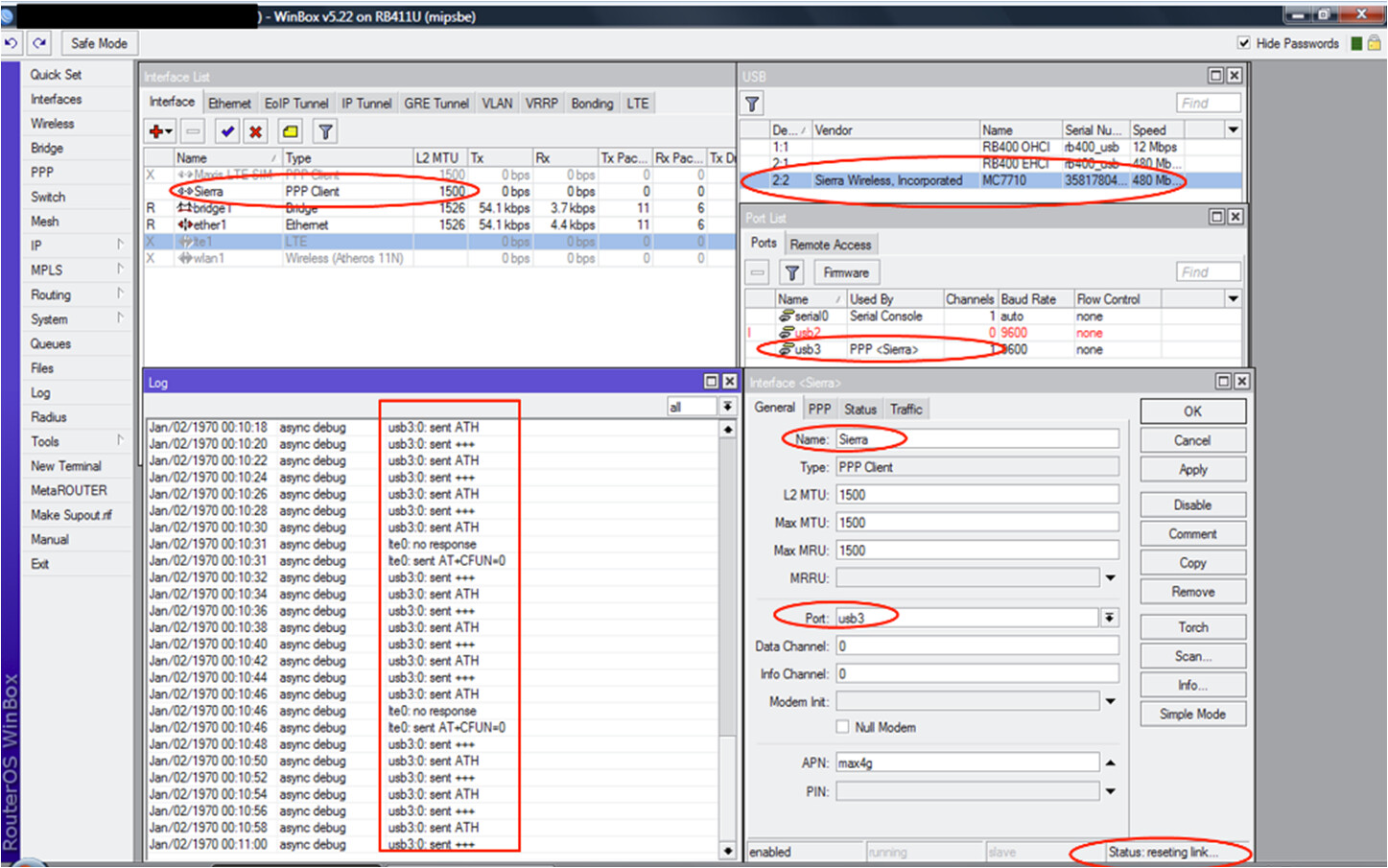
The MC7710 is detected by RouterOS as shown in “/system resource usb” and “/port” lists (Device usb3).
After it was detected, two interfaces were automatically created, i.e., ppp-client and lte.

The debug log is shown in the picture attached below. From the debug log, it seems that the RouterOS keep sending the modem the following commands:

LTE interface: “lte0: sent AT+CFUN=0”
PPP-cleint interface: “usb 3.0: send ATH & usb 3.0: +++”

Both these commands are shutting down the modem. The command is not set by me and the modem is new. I can’t find anyway to stop these commands. I tried to send AT command to the modem via serial-terminal but the modem is not responding. I am unable to change the data and info channel in the ppp-client interface too.

/system serial-terminal usb3 channel=0 Results:“modem not responding”

Tried to turn on the modem via modem initialization command AT+CFUN=1 in ppp-cleint interface, but nothing changes.

Does any modifications on the MC7710 firmware is required for it to work compatibly with RB411u?

Please advice. Thank you.


Thank you.
Picture1.png

Hi thchua

I have not had enough time to test further, hopefully someone else can pipe in with some advise.

it is possible the problem is caused with the newer Sierra firmware as we have seen such similar reports that the device doesn’t respond anymore after upgrading to the new firmware. You could try to find some older firmware and check if it is possible to downgrade to older one. Maybe other users can commend which firmware versions are good enough.

A dumb question. Did you try to change the channels?

bjorncmtec:
Thanks for the reply. Will share here if I manage to get it working.

uldis:
From what I read from this forum and the web, the only firmware version working compatibly with ROS is v3.0.8.2 (SWI9200X_03.00.08.02AP R3715 CARMD-EN-10526 2011/11/14 18:42:43). The newer MC7710 available in the market now is typically v3.5.19.4 (SWI9200X_03.05.19.04AP CARMD-EN-10527 2012/09/17 17:57:14) - incompatible with ROS.

bysard:
Yes, we tried to changed the data and info channel. Just to share what we tried with the modem until now.

Two interfaces created automatically by ROS for MC7710,i.e., LTE and PPP-client

LTE interface
-With the new MC7710, when enabled the LTE interface seems to be “locked-up”.
-Can’t get info from the modem (Vendor ID, Device ID, etc).
-Async-debug log, ROS keeps sending AT+CFUN=0 to the modem. [Turning the radio off]
-Can’t connect to any operator.

PPP client interface
-When the ppp client interface is enabled, the modem seems to be “locked-up”
-Default info and data channel assigned is channel-0.
-Tried to change to other channel (1,2,3,etc), failed - error: “no such channel available”.
-When check under Port list, this port only has one channel (i.e., channel 0).
-That is why trying to change the info/data channel from 0 to 1,2,3,etc will show error.
-Tried to connect the channel through serial-terminal, no response from channel-0. Same result if use other channel number.
/system serial-terminal usb3 channel=0 → no response
-Async-debug log, ROS keeps sending AT command “ATH” & “+++” to the modem. [command for hang up?]
-Can’t connect to any operator

Disabling DirectIP modem
As mentioned by uldis, the newer firmware most probably not compatible with ROS. He suggested to disable the DirectIP of the modem, reboot and then try to use the pp-client.

/port firmware set disable-directip-modem=yes
/system reboot

-After the above steps, now instead of one, there are five channels [0-4] available now for the MC7710 port.
-Now the info and data channel number can be changed. Tried all combination, non get the modem working.
-Tried communicating with the five channel through serial-terminal, only channel-0 responded (continuously) with the code for the firmware version. Other channel no response.
/system serial-terminal usb3 channel=0 → Firmware version of MC7710
-Still can’t connect to any operator
-Async-debug log, ROS keeps sending AT command “ATH” & “+++” to the modem. [command for hang up?]
-Status: Resetting link

That’s what we tried until now. Seems to me that the only immediate solution now is to downgrade the firmware. Anyone here know where/how to get hold of Sierra legacy firmware for MC7710 (SWI9200X_03.00.08.02AP). Not easy to get it directly from Sierra or other distributors. If anyone has a copy to share, that would be great.

Will update if there are further progress. Hopefully someone here will come up with a solution soon.

Cheers!
Thanks for the update thchua

If i manage to i might try different firmwares if they are available.

This is strange because I have seen other people (in other threads) get this combination working.

“-Now the info and data channel number can be changed. Tried all combination, non get the modem working.”

I had a situation where I tried all channels and got no connection until… I made a change and power cycle the router and tried, made another change - power cycle - retry. And at some point (got MC8790 with 7 channels) I made a stable connection with ports 3 and 6. I don’t mean these exact ports will work for you, but it seems there are some issues with it. Also try to delete PPP connection and create a new one, sometimes it hangs some settings.

bysard: Thanks for the advice. I will try the steps soon and follow up with the updates.

The solution to the MC7710 not working after the boot with the 3.5 firmware is solved by upgrading the modems firmware to the latest one (3.5.23.2). their release note states the fix as well:
“Fix AT port unresponsive if device is powered prior to enumeration”

You can download the new firmware from the Sierras development site.

Hi, I really worked hard to get the RB411U working with the MC7710, I had it working and surfed the web on 76mbit/s LTE network! This was early spring, and I had to downgrade the fw on the modem itself, change the Device ID on the modem so that it was in DirectIP mode (vs QMI), then I got the LTE interface showing up on the RB411U etc etc. I had it working in the field for some weeks until the Routerboard itself lost contact with the modem, all it says is lte1: no response.. I have got some help from the Mikrotic Support, and there are some really smart people there, but it is very hard to work out these issues when they reply at random times and only via email.. I need to solve issues much quicker and possibly get assistance by phone.. I cannot reach my modem now, but I really wish I could load that new fw of the MC7710 remotely.. unfortunately I need to pull out the modem and slot it into my laptop to have the fw upgrade done, and I am nowhere near this device..

sierra only provides a Windows utility for the firmware upgrade so currently there is nothing we could do about it.
So the only solution in your case is to exchange the modem. If you have a spare one, you could upgrade that and swap the cards.

Hi Guys

I have done a lot of work with the Sierra Wireless MC7710 on an LTE connection and have gotten it to work just fine. I have it working on 5.25, 6.0, 6.1, 6.2

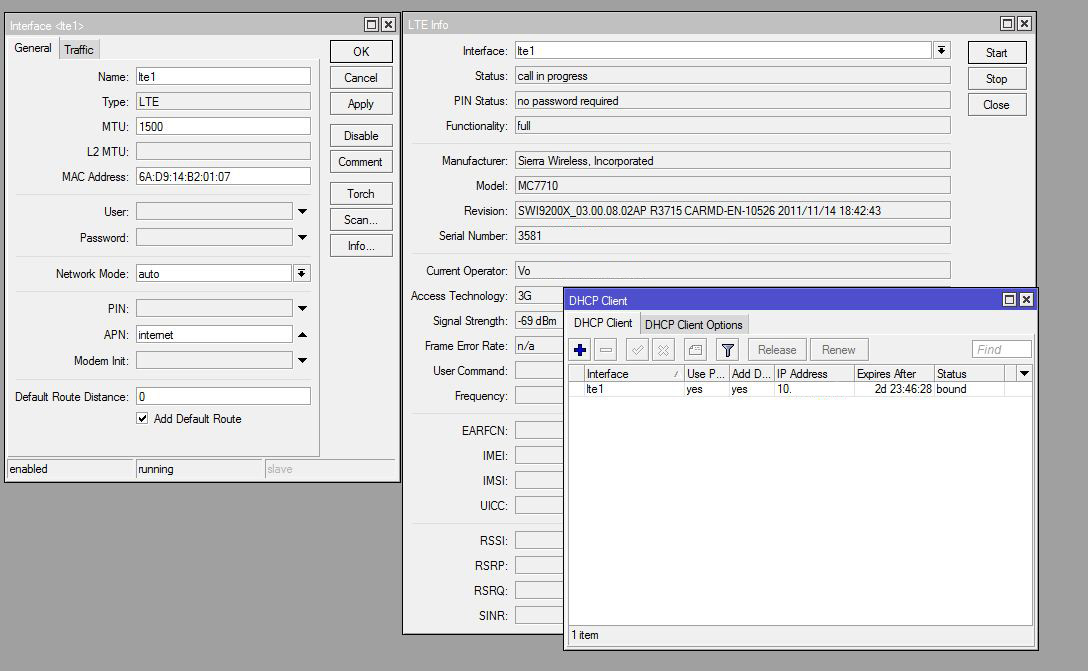
Firstly you will need to get the modem firm ware upgraded to the latest version. (I just went back to my supplier and requested that they get the firmware upgraded.) Then all you need to do is add a dhcp client on the lte interface and your done. Once you add the dhcp client to the lte interface you will see it obtain a IP automatically, this can take a minuet or two, but a reboot after configuring this normally makes work faster. You will then be connected and can continue to configure your Mikrotik.

I have added a image of my working Sierra Wireless MC7710 on an LTE connection below.
lte.JPG

Thanks for the help everyone, how do i go about upgrading the FW for the modem.

I found the FW on Sierra’s Developer Zone website but there are 2 different packages, DIP and QMI, which one should i use?

You need to use DIP - DirectIP