My new L41G-2axD&FG621-EA looses its LTE interface after a few days,
its gone from the interfaces and the SMS tool no longer works.
See this error log: (via OCR how can I dump the log as text properly?)
Itel link down
Itel IPv4: 86.62.33.118. DNS: 213.162.70.9.213.162.70.25
Itel fink up
first L2TP UDP packet receivedfrom 162.142.125.91
first L2TP UDP packet receivedfrom 162.142.125.192
Itel fink down
Itel IPv4: 94.162934, DNS: 213.162.70.25,213.162.70.9
Itel fink up
he 1 : no response for: AT+GTANTINFO?
Itel fink down
Ite 1 mbim: en•or: invalid transaction #73
Itel IPv4: 185.81.210.183. DNS: 213.162.70.25.213.162.70.9
Itel link up
no response for: AT+CEREG=2
Itel fink down
Itel mbim: error: invalid transaction #12
Itel : no response for: AT+CGREG—2
Itel no response for: AT EO Vl
hel mbm: en•or•. invalid transaction
tel: no response for: AT+CMEE=2
Itel mbim: error: invalid transaction
Rebooting the router seams to fix the issue, but still this is obviously absolutely not acceptable, please advice how to debug and fix.
Do I need to RMA the unit?
My use case for the unit it to have backup remote access when my fiber internet goes down, hence it must be absolutely reliable.
A couple of things.
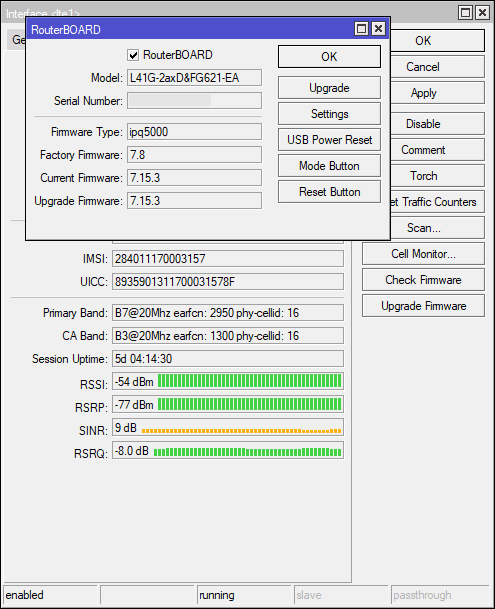
Is BOTH the routerOS version Current as well as the HapAX hardware board Firmware(System->RouterBoard { }, if not ->upgrade+reboot).
Then after a reboot and the LTE comes back, have you checked the firmware upgrade for the LTE card itself ?
( Ps you could add in a watchdog service, and have the unit reboot in the short term ( if LTE does down ). Only a couple of lines of script.
Also, your not the only person with the issue, but likely firmware related :
Not at all a “solution” to your issue, but if the failures are one or two weeks apart a workaround would be to set a scheduler to reboot the router once every (say) two days at (still say) 4:00 in the morning (i.e. at the time when it is likely not in use).
I would however check if the connection resumes after disabling and re-enabling the LTE interface, if this is the case, it would not be a bad idea to add a netwatch script that disables and reenables the LTE whenever it detects the link down, as this would also help for possible disconnections caused by other reasons.
To get a (snippet) of a log, I guess the easiest would be from a terminal run:
/log print
and then copy/paste the output.
I’m not sure how it the LTE modem is connected on hAP ax lite LTE6 - what does /system/resource/usb/print show when the LTE interface is present in the configuration?
I just wanted to be sure that the router uses USB to talk to this particular modem model. So do check whether the row is still there once it fails, but after you do that, try /system/routerboard/usb/power-reset duration=20s. If it asks for a bus number, try 1, wait for two minutes whether the interface appears, and if not, try with bus=0.
While the modem is stuck, /system/resource/usb/print may not show it at all or it may show another device.
For the moment I wouldn’t update the RoS (unless you are missing some other feature implemented in later versions) and definitely not the firmware of the LTE thingy, given the issues reported on the mentioned thread that seems objectively worse than the ones you are reporting.:
Quite a bit of LTE issues have been fixed in 7.15 and 7.16rc.
So I WOULD upgrade ROS … you can always downgrade if needed (not so with modem FW).
I had some LTE issues on my AX Lite LTE related to modem FW which were remotely investigated by support earlier this year when I was using a version 7.13, even 7.14.
Upgrading to latest modem FW version made the connection crash. In the mean time that modem version was removed for upgrade.
As far as I know there hasn’t been a new modem version released yet but 7.15 definitely did address it. And in 7.16rc there are even a lot more LTE-related issues fixed.
There has been a change in wireless packaging/modules between 7.12.x and 7.13, but that shouldn’t be a problem, the 7.12.x contains all, while in 7.13.x and up you may need the separate package: http://forum.mikrotik.com/t/v7-13-5-stable-is-released/171923/1
the upgrade process from 7.12 should take care of that automatically (if you use the built in procedure).
He knows, he is asking if there is a way back, should the upgrade not provide increased stability.
Not saying that it always pays to be prudent/conservative, but right now the OP with an oldish RoS version and oldish modem firmware has hiccups once a week or every two weeks, whilst the proactive people that updated everything as soon as it came out, had (or still have?) them much more frequently or even continuously.
BTW it is not clear on the other thread if the issue is actually completely solved by setting manually the APN, if it is, even if “philosophically” wrong, it doesn’t seem to me such a bad or complex workaround.
Ok updated to 7.15.3 lets see if it helps.
one annoying thing now it says in the interface list that there is a new model firmware which we don’t want to udatete just yet, any way to remove that anointing reminder?