NV2 locked to 6,5Mbit --> Known issue

I had This problem also but Lucky i had One stx left from my six pack. I chance the client site and after that no problems. There have not bin any issues after I put the new stx on. I have the old (old it is not only 20 days old) with me and all settings is is the same but wend I put the old on again I still have only 6mbit/6mbit same firmware and all?

Cheers jimmy

Send from mobile phone

So are you saying you think it a hardware issue only affecting certain hardware?

That is quite interesting as I did have one case of this happening once on another link and a week or so after it happened twice the card died.

The current link I have the prob happening on is both new SXT units though.

Hi guys :slight_smile:

I have the exact same problem with Groove and SXT APs. TX-Rate freezes at 6.5 Mbit
So, after a while i made 2 scripts wich "watch" APs and force disconnet if needed over SNMP.

There is first one (Mikrotik AP):
/system script
add name=wlanFix policy=
ftp,reboot,read,write,policy,test,winbox,password,sniff,sensitive,api
source="/interface wireless registration-table print\r
\n/interface wireless registration-table remove 0"

And second (FreeBSD/Linux machine):
#!/bin/sh
DEVICES="10.11.106.254 10.11.113.254"
for DEVICE in $DEVICES
do

Get Current Frequence

CURFREQ=snmpget -c public -v 2c $DEVICE .1.3.6.1.4.1.14988.1.1.1.2.1.8.212.202.109.72.76.239.1 | awk '{print $4 }'

Compare and disconnect if needed

if [ $CURFREQ = "6500000" ]; then
snmpset -c public -v 2c $DEVICE 1.3.6.1.4.1.14988.1.1.8.1.1.3.1 s 1
else
echo $CURFREQ
fi
done

Hint: Ofcourse you have to change SNMP comunity to fit your needs.

In my case i run it on evry 5 min via crontab on FreeBSD, but i think it could be used on Linux as well.
I hope it could be usefull :slight_smile:

From detected nv2 problems in our network I cannot say that the problem is related to any specific hardware (although I didn’t checked it much). I can say only it affects older slow boards (1xx) more frequently than the more modern ones. And after upgrading the problematic old boards to 5.26 the frequency of the problem lowered significantly.

And it seems that for some strange cause the probability of nv2 modulation lock is much higher when a new radios are installed (when we upgrade an old PtP link to MIMO usually it locks withing a few of days. Then it locks again one or 3 times and after it there is much longer time than the problem occurs again).

And my colleague thinks that when the radio is powered of and on the probability of the nv2 modulation lock is higher too.

From my point, I have bye a six pack stx and only one has this problem, so in my case it is the hardware.
My point wars to complete reset and put new firmware and all again, but it is still the same, 6mbit lock?

Cheers
jimmy

Send from mobile phone

Problem persist with ROS 6.7 on both sides of P2P link. [Ticket#2013110466000664]
locked.jpg

So it seems we are no closer to a fix of this problem…

Having read through this thread, it’s interesting that a hardware problem has been mentioned, so here’s my take on this, maybe someone can offer me help, maybe it could help others…

I have what I consider a fairly large network with currently around 150 clients, 18 base stations and a mix of sectors and OmniTiks, it’s all MikroTik, but that will be no reason for me to get an answer from them. I have dedicated links between base stations using either RB433s and grids, SXTs or Sextants and I have various Internet connections, I’m running a bridged network with OSPF and PPPoE.

I have only recently experienced this locked speed and it only happens on the client, the AP adapts. I have a couple of SXT 5nD r2’s creating a dedicated backhaul link and originally they were fine for almost a year, then I noticed this locked problem on one end, so changed it for a new one, the problem was immediately still there, so I changed the other end thinking the problem was there instead.

Immediately the problem was there and even after 2 days it remained locked, I sent in supouts and gave complete access to support, but they have been less than helpful, hence posting here. It seems we have more experience than MT support at trying to resolve problems.

So having replaced both ends of this link with brand new SXT 5nD r2s, the problem was immediate, so by order of MT, I uploaded “test” software and rebooted, only to find I then had to go and replace them both again as neither came back. Having sent in lots of supouts and trying various software versions over the last 6 weeks, I now have it running 6.10 and it’s working… BUT…

When I upgraded to 6.10 the problem was immediately still there, so instead of having them connect to each other, I put them as clients on different base stations and noticed that the problem was on the RX on 1 and the TX on the other, so I reversed the AP/Client connection and rejoined them and now it’s been up for almost 5 days without fail. So to clarify, the 2 ends had the same problem when connected as clients to different AP’s but on alternate chains, 1 was on RX, the other was on TX.

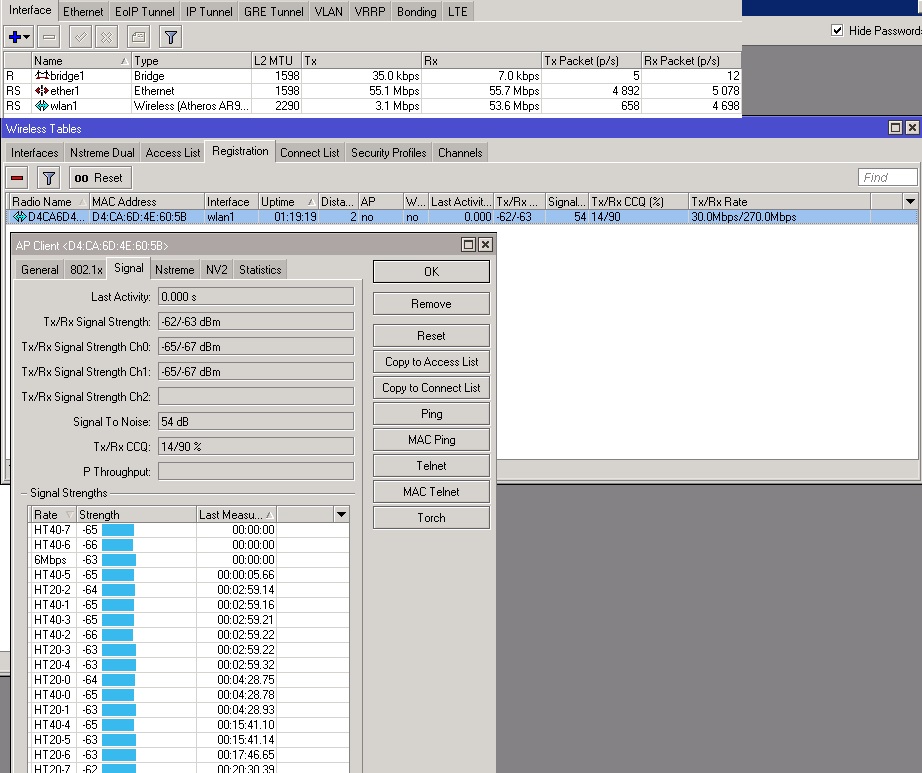
When I originally had these 2 brand new SXT’s connected, they were oriented so that I had poor speed on one chain, which is the problem seen everywhere, by changing the AP to client and visa-versa, it has now been up for 5 days without fail. When I first linked them, they immediately failed in the other orientation no matter what I did, reboots, wireless disconnects etc., never fixed it, at the moment I have this:

Today I see I have yet another problem on a different SXT 5nD r2 link, this was a new SXT running ROS 5.24 and has been up, running and in service for 237 days, so I think this proves it’s a hardware problem.

Now please note that although the actual link speed is fairly fast, I have most of my backhaul links running at around 270Mbps both ways, notice the registered signal level though, I have it ordered by last measured and you can see it is locked at 6Mbps, so although it appears to be running at 243.0Mbps/81.0Mbps, it is not, the test for this is to run ping speed or traceroute across the link one way, then the other.

Trace to a node either side of the wireless link and it becomes clear that the ping speed and thus data speed is low in one direction, my network has many clients that come and go frequently so I use OSPF and when these links run slow, OSPF drops out as it cannot exchange routing data efficiently enough to keep the routing tables updated, thus I end up with a link that drops an entire network segment, which then cascades to other routers and causes downtime on the affected segment as it cannot find the default route to the Internet.

If MT support are interested, I have supouts of this link, although you’ve been no use so far, I want to try my own tests which I will report back on soon. I want to downgrade the affected links to 5.14 as it seems I have no problems on links running this, but to be honest, this could also prove it’s a hardware problem. If it does prove to be a hardware problem, then the Mikrotik equipment I’ve been buying recently is not fit for purpose and I will be seeking replacements.

Gary

on the pictures you attached there is nothing typical to NV2 locked modulation state. If the link modulation is locked the ‘station’ side shows that

  1. in SNR measurement sorted by measurement time there is one or 2 modulation (probably low ones) in fresh state (measurement age in seconds or rather near zero seconds) and the other ones are much older (it can be hours or days - it depends on how long is the link in the locked state).
  2. TX quality is 100%

Since the 6mbps is the default modulation which is used whenever there is a need to send some information which must reach all the connected clients you will see that modulation SNR as the fresh one near all the time. Every time for example a broadcast/multicast packet is sent from AP it is send using 6mbps modulation (because any connected station must be able to receive it).

So again - on the pictures there is no locked modulation (if they are taken from ‘station’ side of the link, of course)

The second picture shows poor CCQ in RX direction…

In our network the locked modulation problem didn’t occur on any our link we upgraded to 6.10 (resp 6.8rc1) yet. It is not 100% proof because of short time (some links had the problem after weeks or months of running OK).

From 6.8rc1 we have no problems. It is amazing to hear that you are the same :slight_smile:
Picture which Gazza put is NO locked modulation

Thanks for the responses guys, care to comment on this capture then?..

This was one of the original SXTs that I changed because it wasn’t passing data. It’s shown running 5.23 and as you can see according to the wireless signal level it appears to be fine, if only a bit slower than normal, the link had been up for just over an hour, the last measured rate shows 6Mbps at the top of the list like my other picture, but you can see from the wireless link speed it’s locked to 6.5Mbps. It was normally 243~270Mbps for almost a year before it “failed”.

I’m not about to get into an argument on my findings, but when the 6Mbps is ALWAYS at the top of the client last measured rate list, I know there’s a problem, I then run tests across the wireless link and prove it because the traceroute time from both sides will be 1ms or 2ms one way and sometimes 100s from the other, it sometimes even times out.

Judging by the last measured rates alone would suggest the link is fine as you’ve pointed out in my previous picture, however, looking at the wireless link speed of 6.5Mbps and the CCQ you can see there’s a problem. In my experience of this, it is my understanding and observation that there is no direct correlation between (1):CCQ, (2):wireless link speed and (3):last measured rate time.

I have monitored the CCQ to be ~ 80-100% and the wireless link to be 243Mbps/270Mbps yet last measured is 6Mbps and other times it can be 4/80% CCQ, wireless link 6.5 ~ 162Mbps/243Mbps with last measured as in my previous shot above showing 6Mbps, HT40-6, HT40-5, … in that order yet still struggling to pass data across the link.

It seems to me there IS a correlation between the CCQ and wireless speed, but not between wireless speed and last measured. However there is always a correlation between poor throughput and last measured. If it is always or nearly always 6Mbps as the last measured rate, then throughput is bad.

I know there’s a problem on my network because I use it, I am a client of it and when it drops out, I search for where and it always turns out to be on one of these links where last measured is 6Mbps, even when there’s others measured higher below it at the same time, if 6Mbps is ALWAYS last measured, then there’s a problem. The links that are solid with no problems NEVER or rarely show 6Mbps as last measured, it’s always, or nearly always the 2nd or 3rd in the list, like the first picture I posted above.

When I search for a problem that’s how I find it, I look at the client last measured and if it shows 6 most or all of the time, I then run a traceroute over it which shows the poor speed. The attached picture below shows 94/94% CCQ, 270Mbps/270Mbps link speed last measured at 6Mbps and the average traceroute speed at 70ms, this is between the 2 SXT’s directly wirelessly connected to each other under 6.9. After contacting support, I was given and tried it with 6.8rc1 but it failed straight away and never got better. I gave support access to them, sent them screen shots and supouts but they visited it only once and told me to upload 6.9, after which I’ve been ignored!!! This shot is taken AFTER I tried with 6.8rc1 and then upgraded to 6.9 but it still has the EXACT same problem.

I’ve since loaded 6.10 on this link where I noted the RX/TX chain problem and set it up so the problem end is the AP which seems to have solved it for now. It’s been 5 days, whereas when I had it setup the other way it failed straight away and didn’t get any better even after 3 days.

Support always says about giving steps to recreate the problem, but they are so far not willing to spend the time to investigate my problem where it occurs straight out of the box. I am very wary of upgrading links as it seems we are being used as test subjects. I don’t feel being told to “try” something is solving anything. I understand it’s difficult when a problem occurs, you need to be able to re-create it to then find a solution, but when the fault happens straight away from first power up, what better scenario can there be to jump on it and find out why?

For now I will try to find my own work around, as mentioned earlier, I will downgrade to 5.14 as it seems none of my links are suffering up to this, I am increasingly seeing problems which I think is hardware related since they are happening randomly and cannot easily be replicated. You will note in this last picture, there are just 2 deciding factors that this link is locked.

(1):Last measured data rate at 6Mbps with subsequent times being in the past
(2):Traceroute throughput is slow across the wireless link

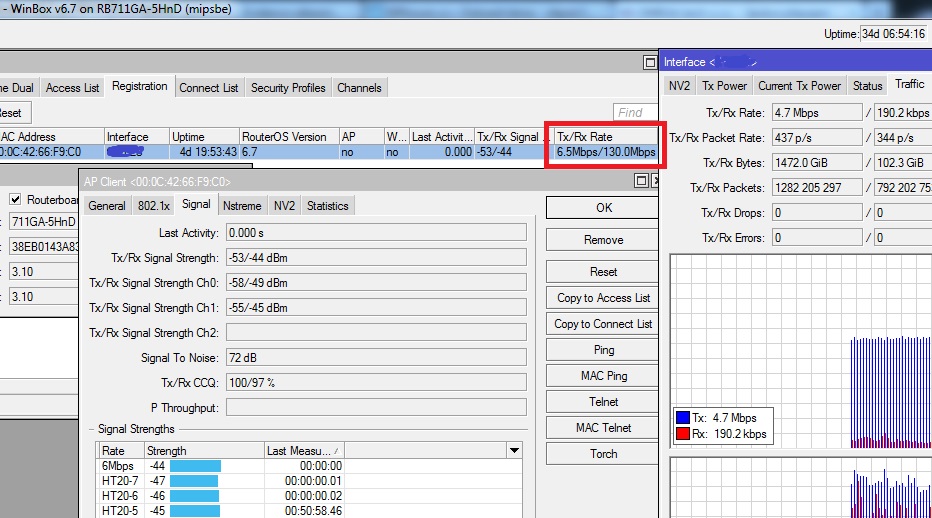
These are the only 2 factors that prove there is a problem, wireless link speed and CCQ have no place in this diagnosis. As for your kind responses dada and honzam, your last picture honzam from January 16th shows the same as mine, last measured rate looks fine, with other high rates below, as does the CCQ at 100/97%, so the only way you know there is a problem is because the data throughput on the link is slow, just 4.7Mbps and the last measured rate is 6Mbps.

In my humble opinion, it is the last measured rate that is holding down the wireless speed and choking throughput, not that there is a wireless problem, if this is software triggered from hardware, then the problem is hardware and I am here, willing and able to give as much time to solving this as you need MikroTik, my family, livelihood and business depend on it, just don’t take too long, it’s already been over a month and in another month my network will hopefully be servicing hundreds more clients using your products, so don’t fail me..,

Gary

I assume the picture is taken from AP side of the link. There is 6.5mbps mentioned in registration table as TX modulation. It could be that the link is in locked modulation state but to be sure you need to check the other side of the link and inspect the measured SNR. If there is only one or 2 modulations which have fresh data and the other modulation’s data are ‘old’ (and they stay old even if there are data transfered through the link) the link has really probably locked modulation. The CCQ on station will probagly be 100 procent in the case too.
Of course on locked state there should not be usually (probably in rare cases the link can lock on the highest modulation too) the highest modulation in the fresh ones - if you have exceptionally good link (no interference) it can run on highest modulation all the time (except packets sents purposedly in lowest modulations - broadcasts etc)

Even on a link in good state you will always see the 6.5mbps modulation as the fresh one - again it is a default modulation used to distribute packets which should be delivered to multiple recipients at the same time (broadcasts, multicast etc). Because the default (or basic) modulation is the only one which all connected stations must be able to use.
So having 6.5mbsp as a fresh modulation is not the proof of problem.

I am not saying you have no problem with the link - I am just saying that it looks like you have no nv2 modulation locked problem like we were observing. If the problem occurs again try to create snapshot of meassured modulation on CLIENT side (station)

on a good working link you should see the basic (6.5mbps) modulation and the highest one(s) on the top of the list of measured modulations (sorted by time) = most of packets received on highest modulation and the broadcasts and service frames received on the basic modulation.


if this snapshot was taken from client side it does have measured RX levels which looks like there is a modulation lock. But I would expect the 100% CCQ in RX (maybe even on lowest modulation the link is not fully reliable).
There is 13 minutes gap between 6.5mbps modulation and the others. Which should mean all the data in last 13 minutes were received on 6.5mbps modulations. So either you have only broadcast/multicast packet going through the line or there is modulation locked.
There is 6.9 on the radio - what version of ROS do you have on the other side (it should be the AP od th elink probably)? I guess/hope you have there something older than 6.8rc1. If not than the NV2 locked problem was not really solved yet. You have to have both sides of the link od 6.8rc1+ ROS …

the problem is that it is not possible to see what exactly is causing the problem by observing (connecting to) the radios. They did it in our case and it involved installation of special packages to the radios - with restart so the locked modulation problem disappeared and we had to wait for the another problem hit.

what I know about the problem there is no report of it since ROS6.8rc1. May be your case it the first one but I hope it isn’t :slight_smile:

[/quote]

I would like to add one comment yet:

  • the problem with locked NV2 modulation seems to have something related with radio interference. Probably if there is no interference the problem will not likely occur. You are using wide channel (40mbps) which does increase the probability of interference (IMHO)…
  • if I need to transfer approx 50mbps+ I use more professional equipment than Mikrotik ones (using 10ghz or other band suitable for directional radio links). In this way I (and many others) am saving the 5ghz band for another use (delivering data to customers via APs etc) and I am having more robust and reliable uplinks…

Until 5.22 the link between my two SXT’s with both chains activated used to enter stall mode. After 5.22 stalling was fixed but it entered 6.5 Mbps rate mode.
Since then I only use SXT on single chain mode.
Is there someone in the world who linked two SXT’s for a week with traffic spikes of 40-60 Mbps and had no problems? I have 4-5 setups and I just gave up the ideea. (Lucky me the bandwidth of a single chain was enough)

Upgrade to 6.11 http://download2.mikrotik.com/routeros/6.11/routeros-mipsbe-6.11.npk

the problem with the locked data-rates to 6.5mbps is fixed in newer Router v6 releases.
Please upgrade the RouterOS to the current release - v6.11
Also you need to upgrade both - AP and the Clients.

Upgraded to 6.11. Firmware 3.12.
The issue is still there just that it has other flavour.
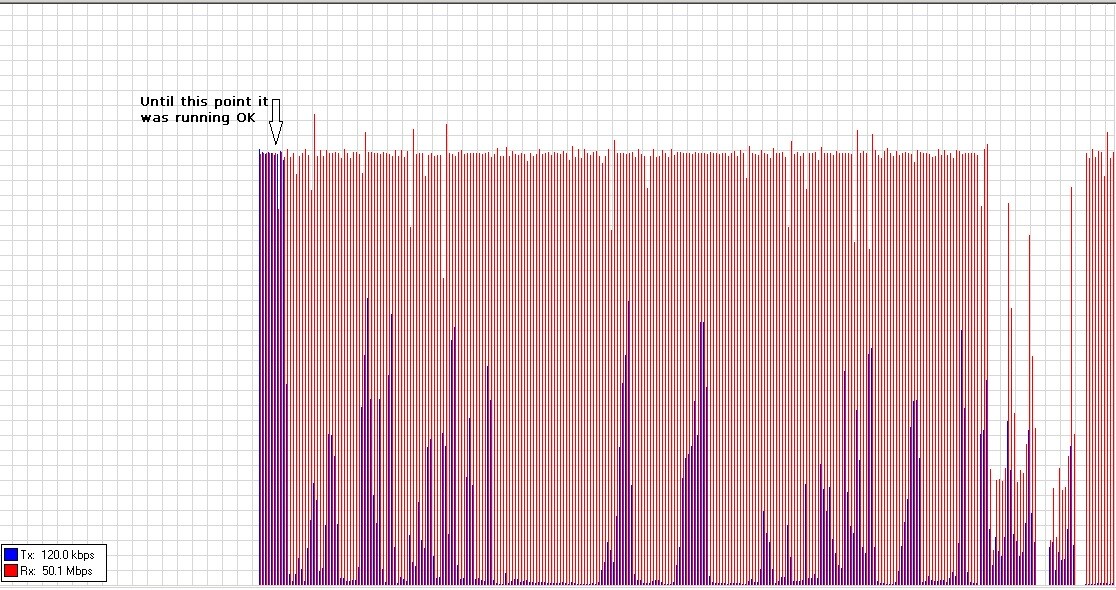
It worked well for 30 minutes and then the connection rate (for tx in this specific case) went up and down from 6.5 to 120 Mbps. The RX stayed at 270/300 Mbps.
The throughput can be seen in the picture.
nv2.jpg
Now I upgraded both sides to firmware 3.13 and rebooted. Currently showing 270Mbps/300Mbps on both sides with BTEST udp running fixed at 50Mbps/50Mbps. I will get back with the results.

Every single link with SXT’s with dual chains enabled that I tested developed the behaviour. How cannot this issue be isolated? Really. :slight_smile:

And I am back with updates:
nv2.jpg
Disconnecting the link by clicking the minus sign (-) on the side with low TX CCQ caused a reconnection but the CCQ and rate were still low (not steady 6.5 but oscilating at 6.5-60 Mbps).
However, if I disconnected the link from the other side it started working well again.

Bottom line, the issue is not fixed yet.

LE: The link dropped with control frame timeout/registration timeout. Link restored by watchdog on the other side. Disabling the second chain for another year or so :slight_smile:) …

We have the same issue as you. Problem is not fixed yet. With ROS 6.10 on both sides of P2P link. TX CCQ is vely low and rate is 6,5-30Mbit.
After remove wireless client (clicking minus) then is everythink OK - tx/rx - 130/130. CCQ ok
Unfortunately I forgot to generate supout and send to support. If you have supout.rif (before and after) sent it to support@mikrotik.com

How often does it happen now with newer RouterOS versions?
If you are able to reproduce this problem please report to support@mikrotik.com with the support output files attached from both ends.
Also if you could provide remote-access to such link, it would help us.

I have a similar problem. After upgrading to 6.12 from 6.9 there was bad connection between two sxts (about 300m) for several days, than Tx locked on 6mbps on an AP and Rx on a client without any real throughput. Restart and downgrade to 6.9 didn’t help. It was set to 5Ghz-A/N, 40Mhz, NV2. I’ve tried to switch it to only A, 20Mhz, 802.11 and different channel, it didn’t help. Rx on the AP (Tx on the client) jumps from 6mbps to 90mbps (before upgrade it was 180/180, I’ve disabled higher modulations) on N and to 54mbps on A.

UPD: Ticket#2014042266000767

On newer releases (or older, same thing) it happens every 1 or 2 hours, on every link that i’ve tested if the throughput is constant over 40 mbps.
I see this behaviour especially on SXTs, but also on rb711G-5HnD (once in a week or so but this week occured 3 times).

It only happens when running with both chains enabled.