I run a small rural WISP with users connecting via PPPoE. These sessions are terminated on my CCR1016-12G running firmware 7.19.3.
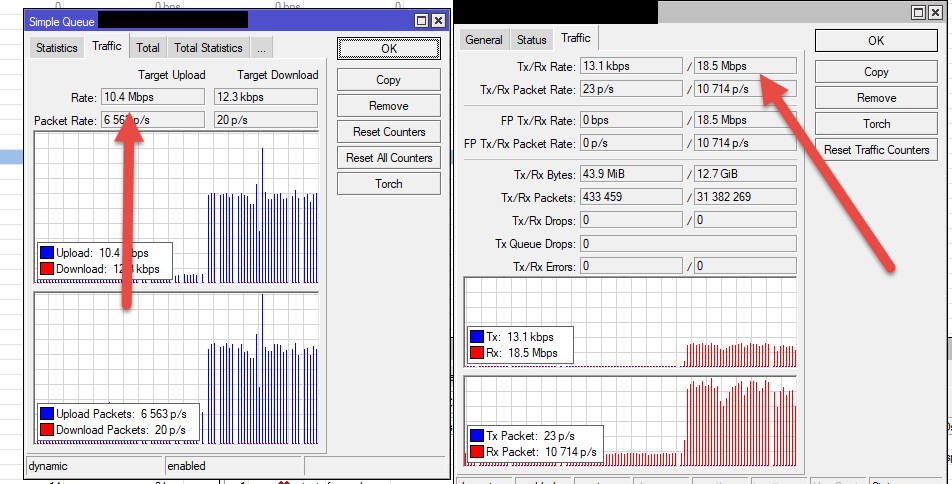
For some reason, one customer’s connection can bypass the Simple Queue max rate limits. I do not have FastTrack enabled. This customer has an infected/hacked CCTV network video recorder (which is being dealt with), and it is spewing out so much traffic, it saturates the customer’s radio uplink.
I can see her Simple Queue turning red in WinBox, suggesting the CCR is aware that her traffic flow is exceeding the specified limits - however, it appears unable to limit the flow, which is disconcerting.
I previously had issues with Upload Max Limit not applying to any of my customers, but this was fixed after upgrading the CCR from the latest LTS firmware to version 7.19.3.
Would having my Connection Tracking values set too aggressively, cause this problem? I wonder if the nature of the traffic is such that the CCR can’t keep track long enough to apply the rate limits? You’ll have to forgive my ignorance in this regard!
I would be grateful for any advice you can offer. Thank you.
Queues work by buffering and dropping packets, this in turn limits the amount of traffic going through a point in your network. A queue on your CCR can only control the amount of traffic going through it - if a device upstream generates packets non-stop upstream then the amount of traffic hitting your CCR is going to be much higher than your set queue as your CCR is powerless to stop upstream traffic. This is why DOS attacks are so effective and hard to mitigate.
You would have to make a queue on the radio uplink in order to not saturate the link or make a queue on the customers router if it is ISP controlled.
Thanks for your reply. To be clear, this traffic is going through the CCR and out onto the Internet via our leased line backhaul.
Suspect Device → Customer Router (PPPoE Client) → CPE Radio → Access Point → CCR Router (PPPoE Server) → WAN
Considering the above, do you think the CCR should have been able to limit the flow of traffic passing through it? All other traffic, coming from devices behind customer routers, is properly rate limited.
Are you saying that more than the queue set amount is arriving at the CCR and is also going out to backhaul?
If that is true, what traffic amount is being displayed in your queue. If that is as was set I would look at the customer traffic in more detail to see why it’s not being captured by the queue. Probably some traffic is of type not specified by queue.
That’s correct, yes. In this particular case, the Target Upload is 5120k and the Target Download is 15360k. My CCR was seeing the ~45 Mbps upload traffic and the queue was red, but it was not limiting the traffic down to 5 Mbps.
There are no Packet Marks set, so presumably it should shape all traffic coming through that PPPoE interface, right? The customer has disconnected the offending appliance from her network, so I can’t experiment with it any more. Do you think this could be a bug of sorts?
in this kind of situation you must limit or drop this kind of malicious traffic the closer you can where is originated, maybe limit or drop from that customer CPE if it supports
The experts here tell me this is “voodoo.” Yet it consistently works for me. It costs you nothing to try it. It’s one export command, one delete all command, one import command. See if it “magically” solves your issue.
According to the schematic in one of previous posts, queue on CCR is only capable of limiting uplink traffic on the “CCR Router (PPPoE Server) → WAN” segment. But it can’t limit uplink traffic on anything to the left of your CCR.
Sometimes queues appear to handle the amount of traffic even “on the left side of queue”, but that only works for proper TCP connections … due to TCP stack’s ACK and window sizing algorithms (queue drops a packet, TCP stack notices it and adjusts window size and hence Tx rate). This never worked for UDP packets.
Or are you saying that queue on CCR did not limit traffic on the right side of your schematic (and 45Mbps hit the WAN interface)?
I had exactly the same issue with infected video recorder other day at customer, what makes the thing unbelievable is that it was uploading at 100mbit thru pppoe connection on mikrotik with isp dsl modem in bridge mode, which shouldn’t be possible as it’s poor Dsl line 20/2mbit and customer is far from central even isp was clueless how this is possible. And also it was going over simple queue limits from 2mbit to 100mbit, queue was red and showing 100mbit upload..
we are having the exact same problem where clients are running their lines at 100mbps yet the dynamic queue is on 10mbps or less. It is devices behind the clients CPE running android devices uploading thousands of UDP packets.