Passthrough WAN inside LAN in separate VLAN

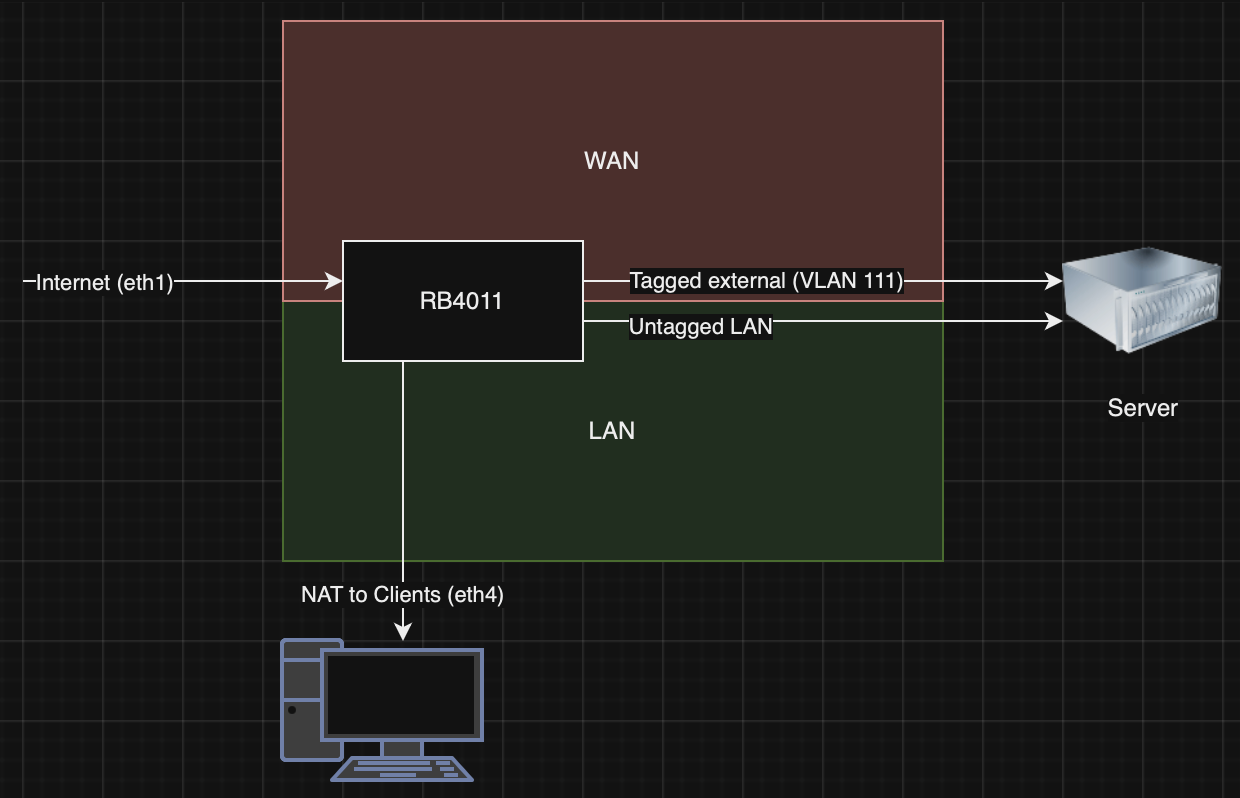
Hello everyone! I’m trying to achieve simple VLAN config, which was possible with simple smart switch in 2 clicks, but got stuck making that working on RB4011, even reading several articles, so I would appreciate any help.
2024-11-30.png
Specs:
eth1 - ISP
eth2, eth3, eth4 - LAN (bridge)

eth2 - comes to Server IPMI
eth3 - comes to several Server VM’s which also have internet via NAT.
eth4 - comes to internal clients (WiFi + TV) which have access to the internet via NAT and access to Server.

The problem is that now I need to passthrough raw connection to ISP to the several VM’s like they would be connected directly, with separate IP addresses, so I can’t use DMZ, port forwarding for some reasons.

So resulting config should be:
eth1 - untagged WAN
eth4 - untagged LAN (NAT)
eth2, eth3 - untagged LAN (NAT) + tagged VLAN 111 (external network from eth1)

I’ve remote access to 4011 via eth1, so I’ve enabled safe-mode and tried to make new bridge with VLAN filtering, then added eth2 and eth3 as bridge ports with PVID 111, but when I add eth1 as bridge port I always lock-out myself. I’t seems that I’m doing something wrong.

Can anyone help me?

I am confused by your explanation, do you mean you have separate WAN connections to the VMIs, and TVs?? I dont see those connections on the diagram

Okay I get it now, you think NAT is the mechanism to provide internet to users, its actually firewall rules that do so.

So to be clear do you mean your ISP is providing you a block of public IPs and you want to attribute some to specific devices???

Thank you for your reply!

I have single ISP, and single WAN connection. I had 1 static real IP coming from eth1. All clients such as TVs, notebooks, etc. used NAT to get internet (they are connected via switch, which connected to eth4 of RB4011), server with its VMs used eth2 and the same LAN subnet like other clients.

Now ISP gave me ability to use another 2 static real IP addresses(not a block), so now they are total of 3. And I want to allow some VM’s use them directly (without any filtering/routing of RB4011). The other VM’s should use old mechanism. But server has only 1 physical interface for that, so I need to pass WAN, and LAN through it. I thought that I could achieve that by using VLANs - so LAN traffic will be, for ex. in VLAN 100 (untagged eth2, eth3 and eth4 by default) and WAN traffic will be in VLAN 111 (tagged eth2 and untagged eth1).

The own IP address of the router cannot remain attached to ether1 as it becomes a member port of a bridge.

So to make the WAN subnet available to the servers, you have to make the bridge VLAN-aware by setting vlan-filtering to yes, add an /interface vlan name=bridge.wan.111 interface=bridge vlan-id=111 (which may or may not make the bridge port named bridge a tagged member of VLAN 111 depending on RouterOS version, so you may have to do that manually using /interface bridge vlan add bridge=bridge vlan-ids=111 tagged=bridge), and duplicate all firewall rules that currently refer directly to ether1 with otherwise identical rules that refer to bridge.wan.111, and make bridge.wan.111 a member of the same _interface list_s like ether1. This can still be done without affecting normal operation.

But then you have to do two things at once - move the IP configuration from ether1 to bridge.wan.111 and at the same time make ether1 a member port of the bridge with pvid set to 111. As doing either of these separately will cut your remote access both to the device and to whatever accesses the internet through it, if you do that remotely, you cannot use a mouse - instead, you have to use the command line and send all the necessary commands semicolon-separated on a single line, such as
/ip address set [find where interface=ether1] interface=bridge.wan.111 ; /interface bridge port add bridge=bridge interface=ether1 pvid=111

Since I had cases in the past where the safe mode did not revert the configuration, I prefer to set a scheduler item to revert the changes in some 5-10 minutes before I do them, but of course it is possible to have the revert script wrong as well so be very careful. A safer possibility would be to save a backup and let the scheduler restore it.

Loosely related to the topic, you say your 3 IP addresses are not in the same “block” - does it just mean that they are not adjacent but still within the same subnet or they come even from different subnets? If from different subnets, did the ISP give you also the gateways for the two new IPs? Because if not, they may expect your 4011 to route the traffic to them.

Thank you, sindy, I’ve tried, but still same effect, after the last command (/ip address set [find where interface=ether1] interface=vlan111 ; /interface bridge port add bridge=bridge_EXT interface=ether1 pvid=111) connectivity gets lost (Request timeout for ping). And the most confusing moment, that I’ve tried the same scenario on another 4011 which is near me, and it worked.
I have no idea why?

The same model, same firmware (7.16.2) The main difference that my local 4011 is getting external IP as DHCP client and I do everything from LAN subnet, so I’ve changed interface from eth1 to vlan111 in DHCP client config, but remote 4011 has static IP configuration and I do everything via WAN.
May be there is a default route issue after changing interface?

Here are my configs. I’m using bridge_EXT and vlan111 for external network in both cases.

Local (working) 4011:

[admin@MikroTik 4011] > interface vlan print
Flags: R - RUNNING
Columns: NAME, MTU, ARP, VLAN-ID, INTERFACE
#   NAME      MTU  ARP      VLAN-ID  INTERFACE 
0 R vlan111  1500  enabled      111  bridge_EXT

[admin@MikroTik 4011] > interface bridge print
Flags: X - disabled, R - running 
 0 R ;;; defconf
     name="bridge" mtu=auto actual-mtu=1500 l2mtu=1592 arp=enabled arp-timeout=auto 
     mac-address=B8:69:F4:88:1A:69 protocol-mode=rstp fast-forward=yes igmp-snooping=no auto-mac=no 
     admin-mac=B8:69:F4:88:1A:69 ageing-time=5m priority=0x8000 max-message-age=20s 
     forward-delay=15s transmit-hold-count=6 vlan-filtering=no dhcp-snooping=no port-cost-mode=short 
     mvrp=no max-learned-entries=auto 

 1 R name="bridge_EXT" mtu=auto actual-mtu=1500 l2mtu=1592 arp=enabled arp-timeout=auto 
     mac-address=00:EB:D8:31:93:3F protocol-mode=rstp fast-forward=yes igmp-snooping=no auto-mac=no 
     admin-mac=00:EB:D8:31:93:3F ageing-time=5m priority=0x8000 max-message-age=20s 
     forward-delay=15s transmit-hold-count=6 vlan-filtering=yes ether-type=0x8100 pvid=1 
     frame-types=admit-all ingress-filtering=yes dhcp-snooping=no port-cost-mode=long mvrp=no 
     max-learned-entries=auto 

[admin@MikroTik 4011] > interface bridge port print
Flags: X - DISABLED, I - INACTIVE; H - HW-OFFLOAD
Columns: INTERFACE, BRIDGE, HW, PVID, PRIORITY, PATH-COST, INTERNAL-PATH-COST, HORIZON
 #    INTERFACE   BRIDGE      HW   PVID  PRIORITY  PATH-COST  INTERNAL-PATH-COST  HORIZON
;;; defconf
 0  H ether2      bridge      yes     1  0x80             10                  10  none   
;;; defconf
 1 IH ether3      bridge      yes     1  0x80             10                  10  none   
;;; defconf
 2 IH ether4      bridge      yes     1  0x80             10                  10  none   
;;; defconf
 3 IH ether5      bridge      yes     1  0x80             10                  10  none   
;;; defconf
 4 X  ether6      bridge              1  0x80             10                  10  none   
;;; defconf
 5 X  ether7      bridge              1  0x80             10                  10  none   
;;; defconf
 6 IH ether8      bridge      yes     1  0x80             10                  10  none   
;;; defconf
 7 IH ether9      bridge      yes     1  0x80             10                  10  none   
;;; defconf
 8  H ether10     bridge      yes     1  0x80             10                  10  none   
 9    bonding1    bridge      yes     1  0x80             10                  10  none   
10    ether1      bridge_EXT  yes   111  0x80                                     none   

[admin@MikroTik 4011] > ip address print
Flags: D - DYNAMIC
Columns: ADDRESS, NETWORK, INTERFACE
#   ADDRESS           NETWORK        INTERFACE 
;;; defconf
0   192.168.1.1/24  192.168.1.0  bridge    
1 D x.x.x.222/26   x.x.x.192   vlan111

[admin@MikroTik 4011] > ip route print
Flags: D - DYNAMIC; I - INACTIVE, A - ACTIVE; c - CONNECT, s - STATIC, d - DHCP; H - HW-OFFLOADED
Columns: DST-ADDRESS, GATEWAY, DISTANCE
#      DST-ADDRESS       GATEWAY          DISTANCE
  DAd  0.0.0.0/0         x.x.x.193            1
  DAc  x.x.x.192/26   vlan111                 0
  DAc  192.168.188.0/24  bridge                  0
  
 [admin@MikroTik 4011] > interface list member print
Flags: X - DISABLED
Columns: LIST, INTERFACE
#   LIST  INTERFACE 
;;; defconf
0   LAN   bridge    
;;; defconf
1 X WAN   ether1    
2   WAN   vlan111

Remote 4011 (Before last command “/ip address set [find where interface=ether1] interface=vlan111 ; /interface bridge port add bridge=bridge_EXT interface=ether1 pvid=111” and loosing connectivity):

[admin@MikroTik] > interface vlan print                                                                                        
Flags: R - RUNNING          
Columns: NAME, MTU, ARP, VLAN-ID, INTERFACE
#   NAME      MTU  ARP      VLAN-ID  INTERFACE 
0 R vlan111  1500  enabled      111  bridge_EXT
[admin@MikroTik] > interface bridge print                                                                                      
Flags: X - disabled, R - running 
 0 R ;;; defconf
     name="bridge" mtu=auto actual-mtu=1500 l2mtu=1592 arp=enabled arp-timeout=auto mac-address=2C:C8:1B:63:43:31 
     protocol-mode=rstp fast-forward=yes igmp-snooping=no auto-mac=no admin-mac=2C:C8:1B:63:43:31 ageing-time=5m 
     priority=0x8000 max-message-age=20s forward-delay=15s transmit-hold-count=6 vlan-filtering=no dhcp-snooping=no 
     port-cost-mode=short mvrp=no max-learned-entries=auto 

 1 R name="bridge_EXT" mtu=auto actual-mtu=1500 l2mtu=65535 arp=enabled arp-timeout=auto mac-address=2C:C8:1B:63:43:30 
     protocol-mode=rstp fast-forward=yes igmp-snooping=no auto-mac=no admin-mac=2C:C8:1B:63:43:30 ageing-time=5m 
     priority=0x8000 max-message-age=20s forward-delay=15s transmit-hold-count=6 vlan-filtering=yes ether-type=0x8100 pvid=1 
     frame-types=admit-all ingress-filtering=yes dhcp-snooping=no port-cost-mode=long mvrp=no max-learned-entries=auto 

 2 X name="bridge_PVE" mtu=1500 arp=enabled arp-timeout=auto mac-address=2C:C8:1B:63:43:31 protocol-mode=rstp fast-forward=yes 
     igmp-snooping=no auto-mac=yes ageing-time=5m priority=0x8000 max-message-age=20s forward-delay=15s 
     transmit-hold-count=6 vlan-filtering=no dhcp-snooping=no port-cost-mode=long mvrp=no max-learned-entries=auto 
[admin@MikroTik] > interface bridge port print                                                                                 
Flags: I - INACTIVE; H - HW-OFFLOAD
Columns: INTERFACE, BRIDGE, HW, PVID, PRIORITY, PATH-COST, INTERNAL-PATH-COST, HORIZON
#    INTERFACE     BRIDGE      HW   PVID  PRIORITY  PATH-COST  INTERNAL-PATH-COST  HORIZON
;;; defconf
0    ether2        bridge_PVE  yes     1  0x80             10                  10  none   
;;; defconf
1    ether3        bridge_PVE  yes     1  0x80             10                  10  none   
;;; defconf
2 IH ether4        bridge      yes     1  0x80             10                  10  none   
;;; defconf
3 IH ether5        bridge      yes     1  0x80             10                  10  none   
;;; defconf
4 IH ether6        bridge      yes     1  0x80             10                  10  none   
;;; defconf
5 IH ether7        bridge      yes     1  0x80             10                  10  none   
;;; defconf
6 IH ether8        bridge      yes     1  0x80             10                  10  none   
;;; defconf
7 IH ether9        bridge      yes     1  0x80             10                  10  none   
;;; defconf
8 IH ether10       bridge      yes     1  0x80             10                  10  none   
;;; defconf
9 I  sfp-sfpplus1  bridge      yes     1  0x80             10                  10  none   
[admin@MikroTik] > ip address print
Flags: X - DISABLED, I - INVALID
Columns: ADDRESS, NETWORK, INTERFACE
 #   ADDRESS             NETWORK        INTERFACE     
;;; defconf
 0   192.168.8.1/24      192.168.8.0    bridge        
;;; Main
 1   x.x.x.207/26    x.x.x.192  ether1          
;;; PVE
2 X 192.168.29.1/24  192.168.29.0  ether2

[admin@MikroTik] > ip route print
Flags: D - DYNAMIC; X - DISABLED, I - INACTIVE, A - ACTIVE; c - CONNECT, s - STATIC
Columns: DST-ADDRESS, GATEWAY, DISTANCE
 #     DST-ADDRESS       GATEWAY        DISTANCE
1  As 0.0.0.0/0         x.x.x.193         1
   DAc x.x.x.192/26  ether1                0
   DAc 192.168.8.0/24    bridge                0
   DAc 192.168.29.0/24  ether2                0
   
[admin@MikroTik] > interface list member print 
Columns: LIST, INTERFACE
# LIST  INTERFACE     
;;; defconf
0 LAN   bridge        
;;; defconf
1 WAN   ether1        
2 WAN   vlan111

Firewall rules in both cases also doesn’t have any rules with interface specification (ether1), only WAN list. So I have no idea what’s the problem.

Loosely related to the topic, you say your 3 IP addresses are not in the same “block” - does it just mean that they are not adjacent but still within the same subnet or they come even from different subnets? If from different subnets, did the ISP give you also the gateways for the two new IPs? Because if not, they may expect your 4011 to route the traffic to them.

Yes, they are not adjacent, but in the same /26 subnet (x.x.x.207, x.x.x.233, x.x.x.240)
If you use safe mode to prevent a complete loss of access should the switchover fail, it is well possible that it takes the bridge so long to start forwarding via its new member port ether1 that the safe mode concludes that the management connection has been inactive for too long and reverts the configuration. So first, add edge=yes to the /interface bridge port add … command, as it will make the bridge start forwarding through that port immediately rather than waiting for quite some seconds to make sure no STP BPDUs are coming through there.

If that does not help either, you’ll have to think about using the scheduler to eventually revert the changes instead of safe mode, or engaging someone with a mobile WiFi hotspot on site to provide you with a temporary secondary WAN connection (where the 4011 would act as a WiFi client of the hotspot and establish a VPN connection somewhere - do not get tempted to use Wireguard for that as it is not exactly easy to make it work in multi-WAN setup).


Since the default route uses an IP address, not an interface name, as the gateway, there is no reason why it should cause trouble.


Since the goal is to have VLAN 111 on the same port to which the servers are currently connected, you must do all this (add the VLAN interface, make ether1 a member port) on bridge_PVE, not on bridge_EXT.

I don’t even see a reason to have bridge and bridge_PVE separated rather than using two VLANs on a single bridge, but unlike the previous point, that’s just a matter of choice.

Yeah, adding “edge=yes” did the trick. Only one packet was lost, and safe mode passed it well.
sindy, I am very grateful for your help!

Since the goal is to have VLAN 111 on the same port to which the servers are currently connected, you must do all this (add the VLAN interface, make ether1 a member port) on bridge_PVE, not on bridge_EXT.

Yes, of course, it was done in another bridge just for test purposes.

It seems that access to local network via ether2 without VLAN tag works fine.
And if I understand correctly, after all I should add PVE port (ether2 - line #3) to bridge in tagged mode to be able to use 111 vlan on it, right?

[admin@MikroTik] /interface/bridge> vlan print
Flags: D - DYNAMIC
Columns: BRIDGE, VLAN-IDS, CURRENT-TAGGED, CURRENT-UNTAGGED
#   BRIDGE      VLAN-IDS  CURRENT-TAGGED  CURRENT-UNTAGGED
;;; added by pvid
0 D bridge_EXT         1                  bridge_EXT      
                                          ether3          
                                          ether2          
;;; added by vlan on bridge
1 D bridge_EXT       111  bridge_EXT                      
;;; added by pvid
2 D bridge_EXT       111                  ether1          
3   bridge_EXT       111  ether2

Is such config secure enough (only specifying vlan111 as WAN interface) with LAN subnet untagged or should it be better to use separate VLAN for LAN subnet on bridge_EXT also?

OK, but to avoid further tampering with the remote access, I’d now keep ether1 and VLAN 111 on bridge_EXT and migrate other ports from bridge_PVE to bridge_EXT, and once bridge_PVE becomes empty, remove it and rename bridge_EXT to bridge_PVE.


Indeed you have to manually add ether2 to the tagged list on the /interface bridge vlan row for vlan-ids=111 on bridge_EXT (but the print output suggests you have already done that).


If you enable ingress-filtering and only make each port (“ether2” in this example) a member of the VLANs you want it to handle (VLAN 1 and VLAN 111 in this example) using the appropriate settings in /interface bridge port and /interface bridge vlan subtrees, it doesn’t matter much whether one of the allowed VLANs is set in access (tagless, untagged) mode on that port or not. So security-wise, switching the “LAN” VLAN 1 on ether2 to tagged (trunk) mode is only optional, and so is changing the VLAN ID to something else than 1. But if you opt for the latter, it must be done properly, i.e. you must either change the pvid in the configuration of the bridge to that “something else” or you must add another VLAN interface to the bridge with that “something else” as vlan-id). I assume you are familiar with the concept of a “virtual switch”, “virtual router-facing port of the virtual switch” and “virtual bridge-facing interface of the router” as explained here, i.e. that you understand the role of the pvid parameter in the bridge settings).