PPTP & Routing

Hello,

This is my first time working with Mikrotik hardware so sorry asking basic questions.

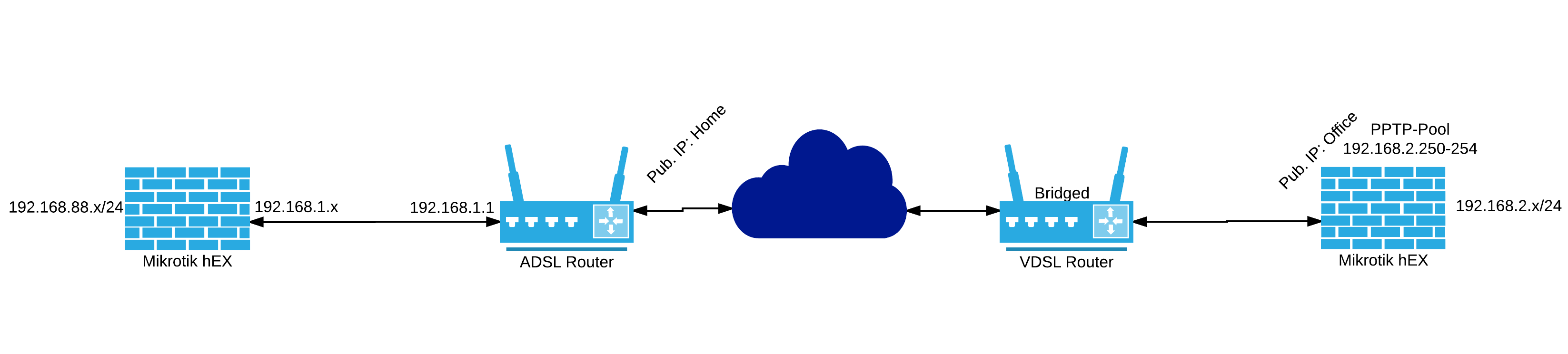
I’ve setup a PPTP connection between the office and “home office” using two hEX gateways.
PPTP VB.png
I have some difficulty connecting from the home network to the office.
If I ping from the Mikrotik device at home and I select PPTP interface I’m able to ping the office 192.168.2.x, but if I ping from my laptop (192.168.88.x) I’m not able to ping the 192.168.2.x network.
The pool used for the PPTP connections is 192.168.2.250-254

Anybody that knows what I’m missing?

Thanks in advance.

Can you ping the private IP of your PPTP server (I guess it’s 192.168.2.1?) using your laptop from home?

No I can’t.

I can ping from the hEX at home to 192.168.2.1, not from my laptop.
I’m thinking about an routing error but can’t seem to figure it out.

You’re going to have to provide configs for people to figure out what is going on. You simply haven’t provided enough information.

When you copy and paste in your configs, change your WAN IPs to a private IP address.

PPTP doesn’t traverse a NAT gateway. If you need NAT traversal which your drawing indicates it does switch to a different technology like IPSec w/NAT-T enabled.

Good luck.

This is the config.
config.doc (41.5 KB)

add a NAT rule to masquerade all traffic going trough the PPTP link :

/ip firewall nat
add action=masquerade chain=srcnat disabled=no out-interface=pptp-out1

I’ll do so later today. Keep you posted.

Ok, the hEx at home can ping every other device at the office, but my laptop is still not able to access the office network.

Any suggestion? I’m not getting anywhere. Could be my noobism.

Thanks in advance

rvdvalk, Did you see my comment about PPTP and NAT gateways? Some have helpers that can enable this kind of communication but it isn’t guaranteed in the least bit. You likely want to look at switching to a solution that has NAT traversal capabilities. You may want to look at L2TP wrapped in IPSec. Let me know if that’s something you’d like to proceed with. You can try the examples on the Wiki and we can go from there.

Hello,

I’ll look into this.

I’ve got it up and running. It looks like I made a typo somewhere :S eventhough I was sure I didn’t :wink:

L2TP and IPSec are working fine. The routing is still an issue though.
I can’t ping from my laptop to the office (mikrotik router 192.168.2.x)

Thanks for helping me out.

So you switched to L2TP/IPSec or you stuck with PPTP?

Correct I switched to L2TP/IPSEC. that is good because PPTP is less secure as stated by different people on the Internet.

But now I need to get routing to work the right way :slight_smile:

Ok, so I can ping from my router to the office network (servers, printers) but I’m unable to ping from my laptop to the office network.

What am I missing?

I’d have to see the configs. Typical mistakes are source NAT exclusion or incorrectly setting up “interesting traffic” rules in the IPSec policy.

Your office has no return path to get back to your home. i.e. it doesn’t know how to route to 192.168.88.0/24

I’ve added a route at the office to 192.168.88.0/24 using the L2TP connection as a gateway.
I’m able to acces the router at the office now, 192.168.2.1 but not the server or printer.

Two possibilities:

  1. if your server and printer think they are on the same subnet as you, they will send an arp request instead of trying to route the traffic, and nothing will respond. Enabling proxy-arp on your bridge at the office (the bridge that connects to the server and printer subnet) would fix that if that is the case
  2. a firewall rule may be blocking this traffic