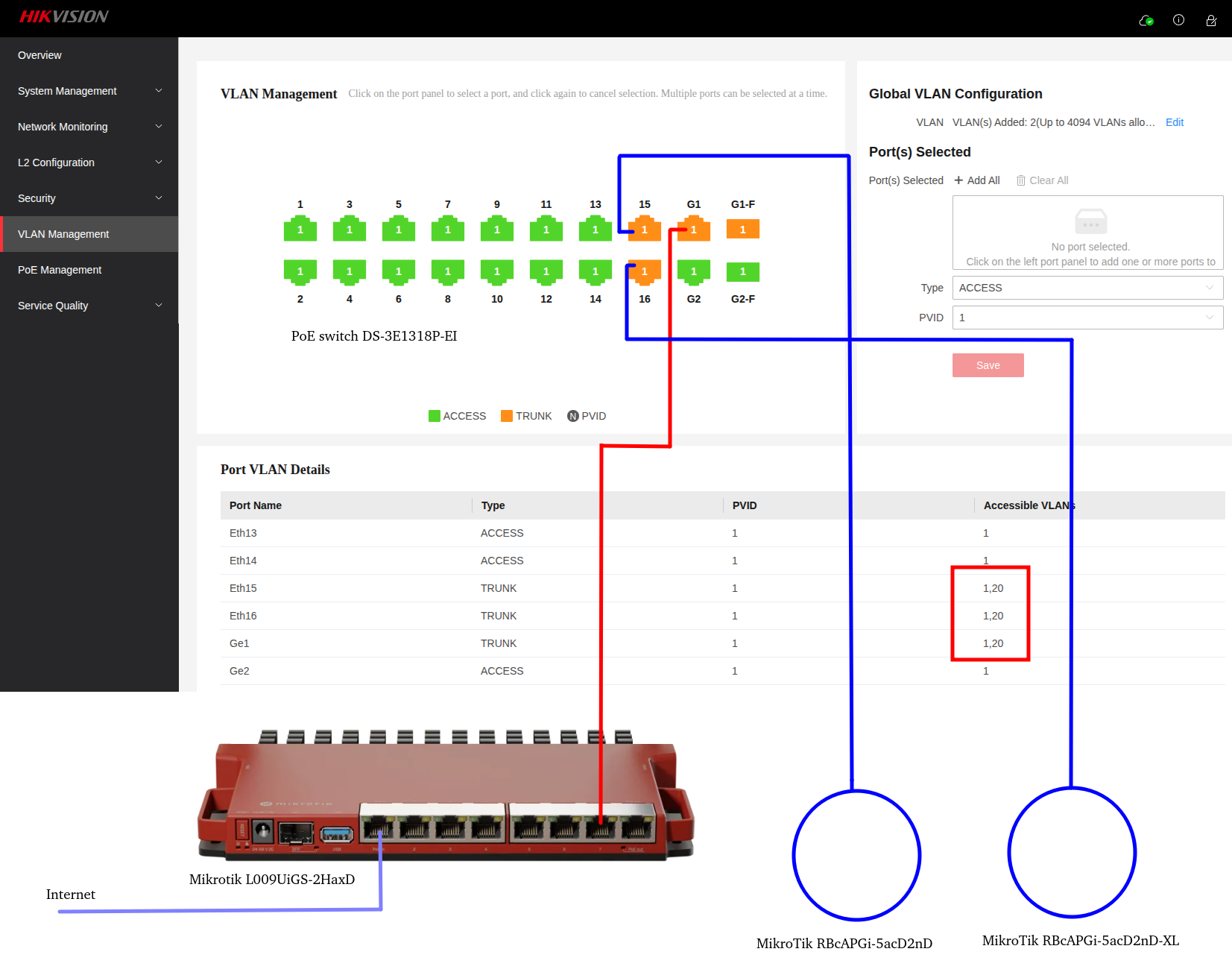
I have a main router Mikrotik L009UiGS-2HaxD (ver. 7.16.2)
Port PoE In (1) is the internet source
Port 7 is connected to port G1 on the PoE switch and from the PoE switch (port 15, 16) 2x AP
AP1 MikroTik RbcAPGi-5acD2nD (ver. 6.49.19)
AP2 MikroTik RBcAPGi-5acD2nD-XL (ver. 6.49.19)
I had to connect 2x APs via PoE switch, because port 8 probably wouldn't be able to power both APs
Unfortunately, the PoE switch has ports 1-16 only 100Mbps
What is my goal.
I need to create 2 separate networks on the APs (1x network - personal, 1x network guests).
That's why I used VLAN. However, I have problems. I'm also worried if my settings are correct.
I've exported all devices
Main router
LAN IP address 192.168.150.0/24
VLAN IP address 192.168.20.0/24
AP1 IP address 192.168.150.5
AP2 IP address 192.168.150.6
Main router export
/interface bridge
add name=bridge1 vlan-filtering=yes
/interface pppoe-client
add add-default-route=yes disabled=no interface=ether1 name=pppoe-out1 use-peer-dns=yes user=xxx
/interface wireguard
add comment=wg_server_linux listen-port=51832 mtu=1420 name=wireguard1
/interface vlan
add interface=bridge1 name=vlan_20 vlan-id=20
/interface list
add name=LAN
/ip pool
add name=dhcp_pool0 ranges=192.168.0.2-192.168.0.254
add name=dhcp_pool1 ranges=192.168.150.100-192.168.150.254
add name=pool_vlan_20 ranges=192.168.20.10-192.168.20.100
add name=dhcp_pool3 ranges=192.168.20.100-192.168.20.200
/ip dhcp-server
add address-pool=dhcp_pool1 interface=bridge1 name=dhcp1
add address-pool=dhcp_pool3 interface=vlan_20 name=dhcp2
/port
set 0 name=serial0
/interface bridge port
add bridge=bridge1 interface=ether2
add bridge=bridge1 interface=ether3
add bridge=bridge1 interface=ether4
add bridge=bridge1 interface=ether7
add bridge=bridge1 interface=ether5
add bridge=bridge1 interface=ether6
add bridge=bridge1 interface=ether8
/ip neighbor discovery-settings
set discover-interface-list=LAN
/interface bridge vlan
add bridge=bridge1 tagged=bridge1,ether7 vlan-ids=20
/interface list member
add interface=bridge1 list=LAN
/interface wireguard peers
add allowed-address=0.0.0.0/0 comment=wg_client ``endpoint-address=wireg.net`` endpoint-port=51832 interface=wireguard1 name=peer2 persistent-keepalive=25s preshared-key="xxxxxxxxxxxxxxxxxxxxxxxxxxxxxxxxxxxxxxxxxxx=" public-key=
"xxxxxxxxxxxxxxxxxxxxxxxxxxxxxxxxxxxxxxxxxxxx="
/ip address
add address=192.168.150.1/24 interface=bridge1 network=192.168.150.0
add address=10.10.5.3/24 interface=wireguard1 network=10.10.5.0
add address=192.168.20.1/24 interface=vlan_20 network=192.168.20.0
/ip cloud
set update-time=no
/ip dhcp-client
add interface=ether1
/ip dhcp-server network
add address=192.168.20.0/24 dns-server=1.1.1.1,8.8.8.8 gateway=192.168.20.1
add address=192.168.150.0/24 dns-server=192.168.150.1 gateway=192.168.150.1
/ip dns
set allow-remote-requests=yes
/ip firewall filters
add action=accept chain=input comment="accept established,related,untracked" connection-state=established,related,untracked
add action=drop chain=forward comment=BLOCK_GUEST_TO_PERSONAL dst-address=192.168.150.0/24 src-address=192.168.20.0/24
add action=accept chain=input comment="Allow WireGuard management" disabled=yes in-interface=wireguard1
add action=accept chain=forward comment="Allow WG access to LAN" disabled=yes in-interface=wireguard1
add action=drop chain=input comment="drop invalid" connection-state=invalid
add action=accept chain=input comment="accept ICMP" in-interface=pppoe-out1 protocol=icmp
add action=accept chain=input comment="allow Winbox" in-interface=pppoe-out1 port=8291 protocol=tcp
add action=accept chain=input comment="allow SSH" in-interface=pppoe-out1 port=22 protocol=tcp
add action=drop chain=input comment="block everything else" in-interface=pppoe-out1
add action=fasttrack-connection chain=forward connection-state=established,related hw-offload=yes
/ip firewall nat
add action=masquerade chain=srcnat out-interface=pppoe-out1
/ip service
set telnet disabled=yes
set ftp disabled=yes
set www disabled=yes
set ssh port=2200
set api disabled=yes
/system clock
set time-zone-autodetect=no time-zone-name=Europe/Bratislava
/system note
set show-at-login=no
/system ntp client
set enabled=yes
/system ntp client servers
add ``address=0.sk.pool.ntp.org
add ``address=1.sk.pool.ntp.org
/system routerboard settings
set enter-setup-on=delete-key
/tool bandwidth-server
set enabled=no
/tool mac-server
set allowed-interface-list=LAN
/tool mac-server mac-winbox
set allowed-interface-list=LAN
AP1 export
/interface bridge
add name=bridge-LAN vlan-filtering=yes
/interface vlan
add interface=ether1 name=vlan20 vlan-id=20
/interface wireless security-profiles
set [ find default=yes ] supplicant-identity=MikroTik
add authentication-types=wpa2-psk mode=dynamic-keys name=host-security supplicant-identity=MikroTik wpa2-pre-shared-key=xxxxxxxxxxxxxxx
add authentication-types=wpa2-psk mode=dynamic-keys name=guest-security supplicant-identity=MikroTik wpa2-pre-shared-key=xxxxxxxxxxxxxx
/interface wireless
set [ find default-name=wlan1 ] band=2ghz-b/g/n channel-width=20/40mhz-XX country=slovakia disabled=no mode=ap-bridge security-profile=host-security ssid=personal_wifi_2.4
add disabled=no mac-address=XX:XX:XX:XX:XX:XX master-interface=wlan1 name=wlan1-guest security-profile=guest-security ssid=hostia_wifi_2.4
set [ find default-name=wlan2 ] band=5ghz-a/n/ac channel-width=20/40/80mhz-XXXX country=slovakia disabled=no mode=ap-bridge security-profile=host-security ssid=personal_wifi_5
add disabled=no mac-address=YY:YY:YY:YY:YY:YY master-interface=wlan2 name=wlan2-guest security-profile=guest-security ssid=hostia_wifi_5
/interface bridge port
add bridge=bridge-LAN interface=ether1
add bridge=bridge-LAN interface=wlan1
add bridge=bridge-LAN interface=wlan2
add bridge=bridge-LAN interface=vlan20 pvid=20
add bridge=bridge-LAN interface=wlan1-guest pvid=20
add bridge=bridge-LAN interface=wlan2-guest pvid=20
/interface bridge vlan
add bridge=bridge-LAN tagged=ether1 untagged=wlan1,wlan2 vlan-ids=1
add bridge=bridge-LAN tagged=ether1 untagged=wlan1-guest,wlan2-guest vlan-ids=20
/ip address
add address=192.168.150.5/24 interface=bridge-LAN network=192.168.150.0
/ip route
add distance=1 gateway=192.168.150.1
/system identity
set name=ap_1_xx
AP2 export
/interface bridge
add name=bridge-LAN vlan-filtering=yes
/interface vlan
add interface=ether1 name=vlan20 vlan-id=20
/interface wireless security-profiles
set [ find default=yes ] supplicant-identity=MikroTik
add authentication-types=wpa2-psk mode=dynamic-keys name=host-security supplicant-identity=MikroTik wpa2-pre-shared-key=xxxxxxxxxxxxxxx
add authentication-types=wpa2-psk mode=dynamic-keys name=guest-security supplicant-identity=MikroTik wpa2-pre-shared-key=xxxxxxxxxxxxxxx
/interface wireless
set [ find default-name=wlan1 ] band=2ghz-b/g/n channel-width=20/40mhz-XX country=slovakia disabled=no frequency=2462 mode=ap-bridge
security-profile=host-security ssid=personal_wifi_2.4
add disabled=no mac-address=ZZ:ZZ:ZZ:ZZ:ZZ:ZZ master-interface=wlan1 name=wlan1-guest security-profile=guest-security ssid=hostia_wifi_2.4
set [ find default-name=wlan2 ] band=5ghz-a/n/ac channel-width=20/40/80mhz-XXXX country=slovakia disabled=no frequency=5240 mode=ap-bridge
security-profile=host-security ssid=personal_wifi_5
add disabled=no mac-address=AA:AA:AA:AA:AA:AA master-interface=wlan2 name=wlan2-guest security-profile=guest-security ssid=hostia_wifi_5
/interface bridge port
add bridge=bridge-LAN interface=ether1
add bridge=bridge-LAN interface=wlan1
add bridge=bridge-LAN interface=wlan2
add bridge=bridge-LAN interface=vlan20 pvid=20
add bridge=bridge-LAN interface=wlan1-guest pvid=20
add bridge=bridge-LAN interface=wlan2-guest pvid=20
/interface bridge vlan
add bridge=bridge-LAN tagged=ether1 untagged=wlan1,wlan2 vlan-ids=1
add bridge=bridge-LAN tagged=ether1 untagged=wlan1-guest,wlan2-guest vlan-ids=20
/ip address
add address=192.168.150.6/24 interface=bridge-LAN network=192.168.150.0
/ip route
add distance=1 gateway=192.168.150.1
/system identity
set name=ap_2_xx
Often times I can't connect to guest WiFi and I see in the log
dhcp2 assigned 192.168.20.105 for XX:CB:XX:38:2F:XX iPhone
dhcp2 deassigned 192.168.20.105 for XX:CB:XX:38:2F:XX iPhone
dhcp2 offering lease 192.168.20.105 for XX:CB:XX:38:2F:XX without success
I apologize, but I am a newbie to Mikrotik.
Here is my topology