I upgraded a RB1200 from 6.46.something to 7.4.1 just to see if it runs. I was actually surprised to see PPC architecture, as all devices with powerpc are quite old.
But even after a reset-configuration to clear it out only ether9 and ether10 work. Ether1-ether8 light the indicators and show as Running but ping-replies never come. The ARP table is not populated.
EBGP peer is not on a shared network and multihop is not configured
Note that v7 sometimes requires multihop to be configured even when the connection is not really multihop (a bug…).
You can still set TTL to 1 to make sure your connection is single hop.
I have a CCR2004-16G-2S+ 7.4.1 and Routerboot 7.4.1
I am trying TCP API connection and Router respond with TCP RST, packet sniffer captures confirm the issue
No logs generated
/ip services settings enabled and without restrictions
Problem present since upgrade to 7.4, i have not tried Downgrade to 7.3.1 because the router is in a remote location
If it is not reporterd correctly to MT ( support@mikrotik.com ) changes are it wil never get attention …
BTW, running several IPSEC tunnels here on 7.4 without issues
The problem that upgrade from v6 to v7 resets the clock to 1-1-1970 still has not been fixed…
This causes problems when the only time reference is NTP because the NTP client does not want to make a jump from 1-1-1970 to 2022.
It requires manual setting of the clock or temporary use of IP->Cloud clock to get it in sync again.
Please fix the upgrade (crossfig) to get the last used clock value of v6 into v7.
Also, for some situations “kid control” can be an alternative (I know it sounds silly).
When you enable kid control but do not add any device rules, like this:
you will get an overview of all devices on your network and how much internet traffic they use.
You could even poll that using an external system using API, similar to how you poll traffic accounting.
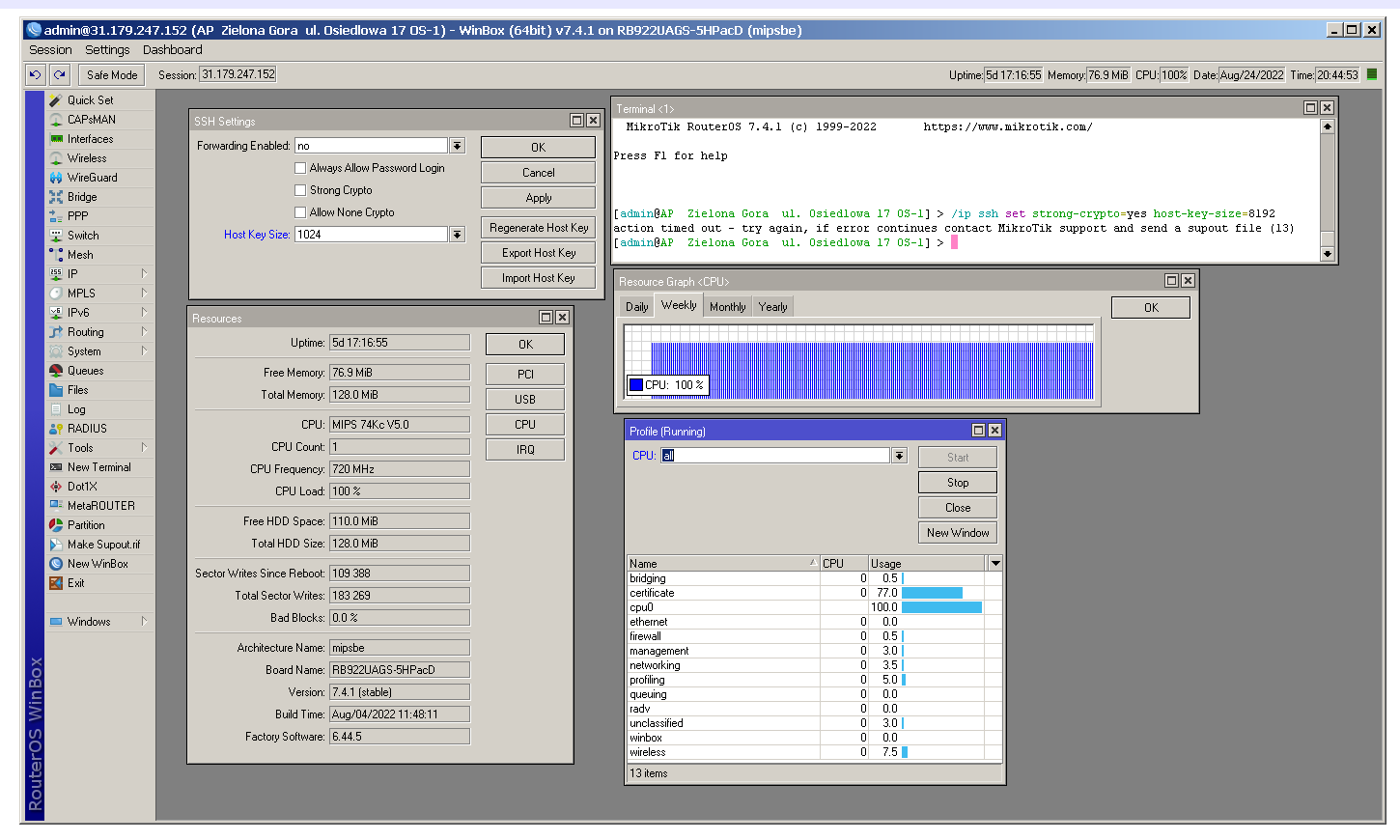
The SSH host key generation end regeneration problem is still very present in 7.4.1
SSH stops working when we have OS 7.x in the following situation:
When we set the key siz from 1024 to 8192 bits with these two commands:
/ip ssh set strong-crypto=yes host-key-size=8192
/ip ssh regenerate-host-key
The processor works at 100% all the time and it is not possible to connect via SSH.
I have tested on a lot of devices and 80% have this vulnerability. I don’t understand why not all of them?
This never finishes even after several days.
Rebooting the device then brings the behavior seen above.
To fix the situation, I need to downgrade to RouterOS 6.X and generate the ssh 8192 bit key and then upgrade to RouterOS 7.x
Almost every system went smooth except RB951-2n (upgrading from 7.1.5 to 7.4.1) which stated the following
aug/25/2022 06:50:09 system,error,critical kernel failure in previous boot
aug/25/2022 06:50:09 system,error,critical out of memory condition was detected