As I wrote in the OG thread, it's easier for me to understand the different roles of the entity "bridge" if I export the configuration and "rename" the occurrences of the bridge in the text file.
@sindy Well I think I have this correct now. I have revised my diagram indicate that BR1, the switch facing router interface, is to be considered part of the router and not of the bridge. To make sense of data frame flow through the device keeping it consistent with ARP and IP protocols I have treated the sub-interfaces of BR1 as behaving like access ports of the router with associated 'pvids'. BR1 can be thought of as a hybrid interface. But since all of this is happening in software for the RB5009 the reality may be quite different. RouterOS represents MikroTik's abstraction of the black box of the hardware & firmware differences in their devices with a "uniform" user facing command line interface. Still I find that my diagram helps me think about what the configuration commands I enter are accomplishing.
The diagram shows my current thinking about the RB5009 and similar MikroTik devices. ROS v7 is assumed. The code fragments have effects on the parts of the diagram indicated by arrows. I have not back tracked to earlier version to see how this holds up. I apologize for the shift in layout but hopefully the diagram is clear.
Edited
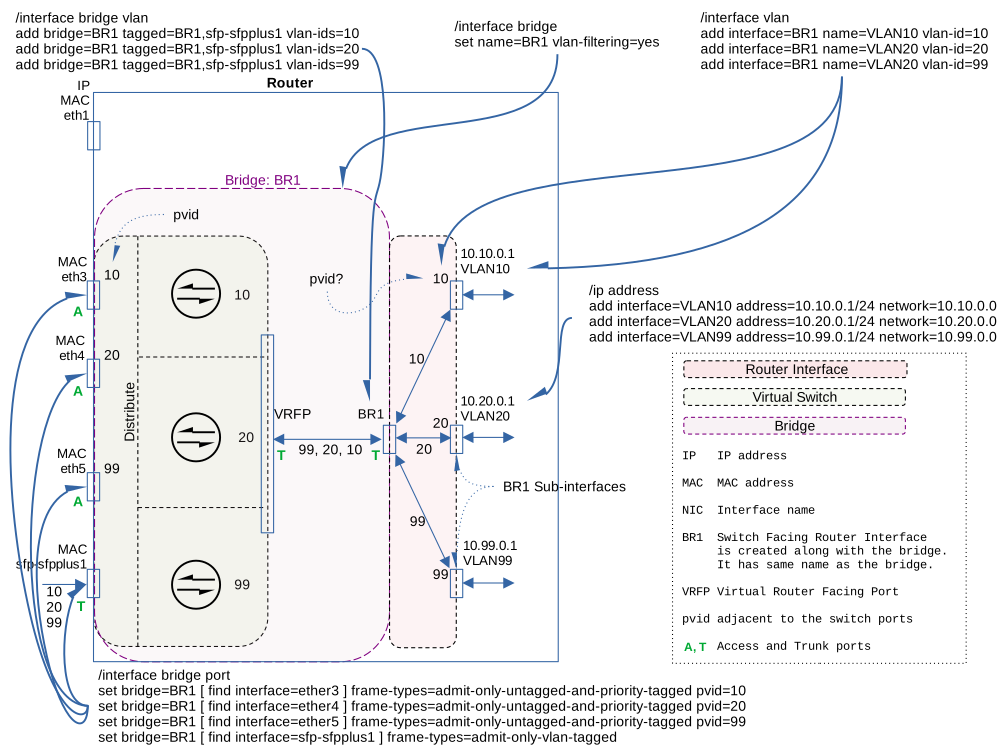
@DocPneumo You have a small copy/paste duplicate (duplicated 10.10.0.1 VLAN10).
Another thing this does not "capture" is that the BR1 router interface has an untagged vlan that exists on the virtual hybrid trunk link between the router interface and the bridge port on the virtual switch.
In fact in the defconf the BR1 interface will have ip address 192.168.88.1/24 and traffic for it will be untagged.
Also, changing vlan-filtering=off to vlan-filter=on does not affect the vlan interfaces on the router. It only affect how the virtual switch and virtual switch ports (bridge ports) behave. When off, the switch is vlan-transparent, if a tagged from from a vlan interface enters the switch from the router side, it will leave any other port tagged, if it arrives untagged it will exit untagged. In effect it is just a port expander, all ports will behave identically. In techical terms, the switch is only paying attention to the dst-mac for forwarding and the src-mac for learning; it just ignores the ethertype in forwarding and vlan selection (when vlan-filtering is off there is a single LAN with no traffic segregation due to vlan-tags).
Fixed the copy/paste oops.
I am aware now of the points you make. There is a limit to how much I can cram into one diagram. I think this is accurate as far as it goes. To try to understand what MT is doing I stepped back to the basics of network data traffic and worked my way forward. What you see is a brief summary of my series of hand written notes and drawings. I have thought of similarly formalizing the scribbling in a sequence of images and notes placed somewhere online but am not sure others would find it of much interest.
I din't even attempt (for the moment) to understand the diagram, BUT (observations):
- if it is a representation of a RB5009, where are ether2, 6, 7, 8?
- What do the green A and T mean? (I presume Access and Trunk, but it should be specified)
- the "10.20.99" in the center seems at first sight a malformed IP, should probably be "VLANS 10/20/99"
- if the physical ports SFP,ether3, ether4, ether5 are part of the bridge they should be inside the purple line and in any case NOT on the "same level" as ether1
@Buckeye Does this reflect correctly what you are saying about the effect of vlan-filtering=yes/no ?
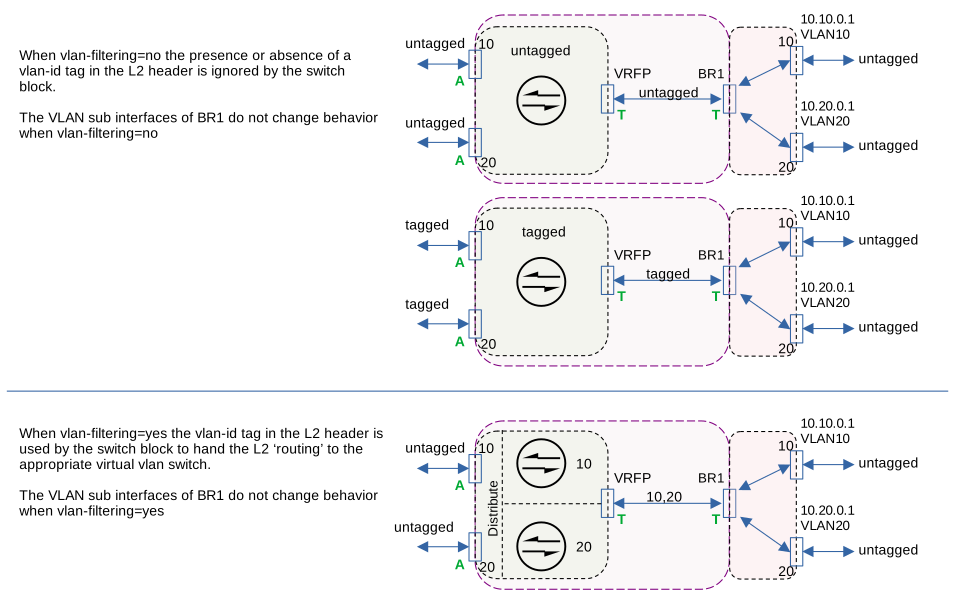
- The diagram was derived from others that were specific for my personal setup of an RB5009. I should probably have dropped that reference. ether2, 6, 7, & 8 were left off because they were not needed to show the paths involved. I reserve ether2 for an OffBridge interface.
- The green A & T do refer to access and trunk port behaviors. I have added that specification
- The "10,20,99" is not an ill formed ip address. Rather it is a list of vlan tags that can be carried on that path between the switch and router. Those are commas, not periods. I can see how the confusion was generated. Have attempted to make that a bit more clear on the diagram.
- You have identified a problem I have with visualizing the relationship between the switch and the physical hardware. As @Buckeye just pointed out the bridge vlan-filtering=yes or no simply changes the behavior of the switch ports.
Interestingly after removing "all" configuration withI think I can make that a little clearer. Will provide that edit a bit later. See my response to @Buckeye . And yes, ether1 is functionally a completely different beast/system reset-configuration no-defaults=yesthe device behavior seems the same as the configured bridge withvlan-filtering=no.
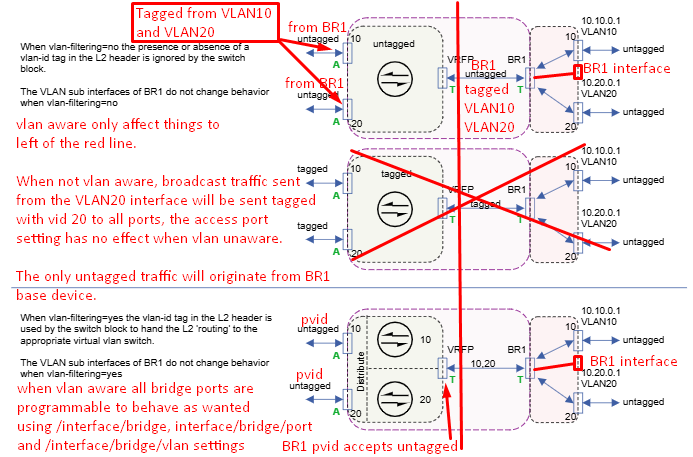
Only the virtual switch and its ports are affected by vlan aware (vlan-filtering=yes). The virtual trunk is a hybrid link with untagged traffic associated with the BR1 interface, tagged traffic from the vlan interfaces (e.g. VLAN10 and VLAN20). When the vlan-filtering is off, all ports just replicate frames as is. If a broadcast is sent from VLAN20 (for example an ARP request), it will be be received by what you have labeled VRFP (virtual switch's router facing port?) and flooded to all other ports without removing the tag. vlan membership makes no difference. If the switch is not vlan aware, most devices will ignore vlan tagged packets, so the only traffic they will see is what was sent from the BR1 interface.
In the case of the defconf, where eth1 is not a member of the bridge, all other ports are members of the bridge, and vlan-filtering=off, and frame-types=admit-all, and bridge has ip address 192.168.88.1/24
All traffic is now untagged on all bridge ports, and there is a single broadcast domain.
We can add a vlan interface br.20 for vlan 20 without changing vlan-filtering. We can then add 192.168.20.1/24 as the ip address of the vlan interface br.20. When we do then every port on the bridge has been promoted to "hybrid" status, with traffic for 192.168.88.0/24 being untagged, and traffic for 192.168.20.0/24 being tagged on all ports (including the link between the virtual switch and the router block). If you have an access point that supports different ssids on different vlans, it will "work" even when the bridge has vlan aware mode off, but as far as the switch is concerned, there is still a single broadcast domain. Why it "works" is because most devices will just ignore the vlan tagged frames, just like they would probably ignore Decnet Phase IV frames with ethertype 0x6003.
Once vlan aware mode is on, then at the switch level, there is a separate broadcast domain for every configured vlan. And if you haven't changed the defaults, turning on vlan-filtering doesn't change the behavior for most cases, because by default the pvid of the bridge ports (the external one as well as the link between the switch block and the router block all have their pvid set to 1, so all these ports are still connected to vlan 1 for untagged traffic on the ip subnet associated with the bridge (by default 192.168.88.0/24). And recent versions of ROS also include the bridge for vlans that vlan interfaces are created for, so the tagged traffic to the access point should also work. (I need to verify this in a lab)
This is what I think is more accurate, but messy because I don't know how to use libreoffice draw.
When empty config, there is no bridge device. How did you determine "the device behavior seems the same as the configured bridge with vlan-filtering=no" Specifically what behavior is the same?
After I enter this on my RB760iGS running 7.19.4
/system/reset-configuration keep-users=yes no-defaults=yes skip-backup=yes caps-mode=no
After confirming that I understand this is a dangerous operation, and rebooting, I get this with export
[demo@MikroTik] > /system/reset-configuration keep-users=yes no-defaults=yes skip-backup=yes caps-mode=no
[demo@MikroTik] > export
# 2025-07-27 10:05:17 by RouterOS 7.19.4
# software id = TRCJ-GM9Q
#
# model = RB760iGS
# serial number = *removed*
/interface wireless security-profiles
set [ find default=yes ] supplicant-identity=MikroTik
[demo@MikroTik] > /interface/print
Flags: R - RUNNING
Columns: NAME, TYPE, ACTUAL-MTU, L2MTU, MAX-L2MTU, MAC-ADDRESS
#   NAME    TYPE      ACTUAL-MTU  L2MTU  MAX-L2MTU  MAC-ADDRESS
0 R ether1  ether           1500   1596       2026  DC:2B:AD:4D:EC:F1
1   ether2  ether           1500   1596       2026  DC:2B:AD:4D:EC:F2
2   ether3  ether           1500   1596       2026  DC:2B:AD:4D:EC:F3
3   ether4  ether           1500   1596       2026  DC:2B:AD:4D:EC:F4
4 R ether5  ether           1500   1596       2026  DC:2B:AD:4D:EC:F5
5   sfp1    ether           1500   1596       2026  DC:2B:AD:4D:EC:F6
6 R lo      loopback       65536                    00:00:00:00:00:00
[demo@MikroTik] > /ip/address/
add     comment     disable     edit     enable     export     find     print     remove     reset     set
[demo@MikroTik] > /ip/address/print

[demo@MikroTik] >
So I am curious how you got the same behavior as when defconf was loaded.
I think you and I are really on the same page though I have one uncertainty. My quick and dirty diagrams just above were intended to what you have said well verbally. It might have helped if I had shown the various patterns of flow for traffic, broadcast and hop-to-hop, from say the VLAN10 interface.
My exception is to an element of your markup of my diagram. My understanding is that when vlan aware the vlan-id is added to the L2 header on ingress and removed from the L2 header on egress from an access port. Your mark might be taken to imply the pvid tags the frame on egress. I think you are indicating that the pvid set for the port is 'active' when vlan aware. I showed the PVID for the externally facing switch ports as numerals just adjacent to the little box indicating a port.
LibreOffice Draw is quite nice for this sort of diagramming. And free. However, I find that the diagrams need to be saved as svg to provide the resolution required for detailed diagrams to be readable on the forum. Subsequent editing of the svg file is another problem. Your markup was fine.
That was just a quick and not checked observation as I was getting ready to get out of the house for badly needed fresh air.  I used that same /system/reset-configuration. Following reboot I immediately was able to login via Winbox using the device ipv6 address. I expected to be forced to use the console port. Of course nothing else is reachable. So my comment should be scratched.
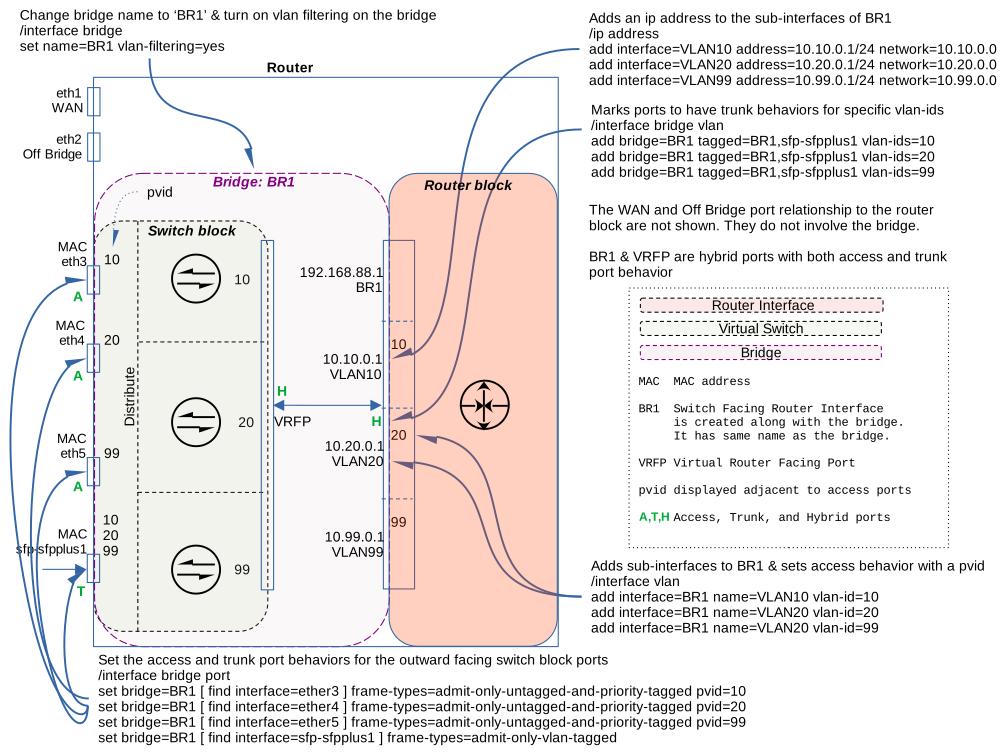
@jaclaz Does this seem more readable?
Start from the default configuration
/system reset-configuration keep-users=yes
Then after reboot and reconnection (suggest using ether3) create OffBridge port:
/interface bridge port
  remove [ find interface=ether2 ]

/interface list
  add comment="Management only" name=MGMT
  add comment="Management and LAN" name=MGMTandLAN include=LAN,MGMT
/interface list member add list=LAN interface=ether2

/ip neighbor discovery-settings
  set discover-interface-list=MGMTandLAN
/tool mac-server
  set allowed-interface-list=MGMTandLAN
/tool mac-server mac-winbox
  set allowed-interface-list=MGMTandLAN

/ip
  address add address=192.168.75.1/28 network=192.168.75.0 interface=ether2
  pool add name=OffBridge-Pool range=192.168.75.2-192.168.75.14
  dhcp-server add name=OffBridge-dhcp-serv interface=ether2 address-pool=OffBridge-Pool
  dhcp-server network add address=192.168.75.0/28 gateway=192.168.75.1 dns-server=192.168.75.1
Shift to the OffBridge port (ether2) and to match my diagram enter:
(edited 9/29/25)
/interface bridge
  set [ find default-name=bridge ] name=BR1 vlan-filtering=no

/interface vlan
  add interface=BR1 name=VLAN10 vlan-id=10
  add interface=BR1 name=VLAN20 vlan-id=20
  add interface=BR1 name=VLAN99 vlan-id=99

/interface bridge vlan
  add bridge=BR1 tagged=BR1 vlan-ids=10
  add bridge=BR1 tagged=BR1 vlan-ids=20
  add bridge=BR1 tagged=BR1 vlan-ids=99

/ip address
  add interface=VLAN10 address=10.10.0.1/24 network=10.10.0.0
  add interface=VLAN20 address=10.20.0.1/24 network=10.20.0.0
  add interface=VLAN99 address=10.99.0.1/24 network=10.99.0.0

/interface bridge port
  set bridge=BR1 [ find interface=ether3 ] frame-types=admit-only-untagged-and-priority-tagged pvid=10
  set bridge=BR1 [ find interface=ether4 ] frame-types=admit-only-untagged-and-priority-tagged pvid=20
  set bridge=BR1 [ find interface=ether5 ] frame-types=admit-only-untagged-and-priority-tagged pvid=99

/interface bridge vlan
  set bridge=BR1 [ find vlan-ids=10 ] tagged=BR1,sfp-sfpplus1
  set bridge=BR1 [ find vlan-ids=20 ] tagged=BR1,sfp-sfpplus1
  set bridge=BR1 [ find vlan-ids=99 ] tagged=BR1,sfp-sfpplus1

/interface bridge port
  set bridge=BR1 [ find interface=sfp-sfpplus1 ] frame-types=admit-only-vlan-tagged

/interface bridge set [ find bridge=BR1 ] vlan-filtering=yes
You probably want to setup DHCP for the VLANs:
(edited 10/11/25)

/ip pool
  add name=VLAN10-Pool range=10.10.0.100-10.10.0.254
  add name=VLAN20-Pool range=10.20.0.100-10.20.0.254
  add name=VLAN99-Pool range=10.99.0.100-10.99.0.254

/ip dhcp-server
  add name=VLAN10-dhcp-serv address-pool=VLAN10-Pool interface=VLAN10
  add name=VLAN20-dhcp-serv address-pool=VLAN20-Pool interface=VLAN20
  add name=VLAN99-dhcp-serv address-pool=VLAN99-Pool interface=VLAN99

/ip dhcp-server network
  add address=10.10.0.0/24 gateway=10.10.0.1 dns-server=10.10.0.1
  add address=10.20.0.0/24 gateway=10.20.0.1 dns-server=10.20.0.1
  add address=10.99.0.0/24 gateway=10.99.0.1 dns-server=10.99.0.1
That is essentially converting the bridge from vlan-transparent (aka dumb switch) to a vlan-aware switch.
Because this is done last, if you are configuring from a device that is not vlan-aware, only ether2 can be used for configuration unless you still have an ip address configured on the base bridge device (which is the only thing that can send untagged frames).
There are ways to configure without pulling a port from the bridge for configuration. See for example these posts:
and Once and for all COMPLETE Offbridge Port setup - #31 by Amm0
The procedure outlined in those posts allow a user to start with the defconf, and immediately switch to vlan-aware mode. No need to move the cable, etc. If you want all the data on the trunk between the router and switch to uses tagged frames, you can delay that until you have other access ports configured on the switch.
Pulling a port out of the bridge will work, and may provide a more failsafe situation, i.e. you can even delete the bridge and still have access, but it isn't necessary, and most users just want to get vlans setup, and won't be messing with things once they get them working. If you have a spare port that can be dedicated just for "recovery", then thats fine.
@Buckeye
If you have time/will, do review and comment post #2 in that thread, where I tried to explain/expand on CGGXANNX's post:
Once and for all COMPLETE Offbridge Port setup - #2 by jaclaz
@DocPneumo
I'll have a look at the new diagram and let you know, thanks.
@Buckeye Look, I came at this from an absolute beginner with MikroTik and ROS and with limited, mostly plug-and-play, experience with setting up three small offices for my work and a home network. I could have stayed there but what would be the fun in that? I locked myself out far too many times in the beginning of work with ROS. I quickly learned to use the serial console, Safe Mode, restoration from backup, and to turn on vlan-filtering last. Happily I never had to reach for the Dude. Never-the-less having offbridge access is quite helpful while experimenting. It can always be turned off later, but I see little harm in having the offbridge access if the port is not needed.
My Offbridge setup is almost cut and paste from the Once and for all COMPLETE Offbridge Port setup article by @jaclaz. The comment #31 by @Amm0 makes sense for those who have been working with this regularly. But for those who are learning whether for pleasure or for occupational reasons having access to multiple tools to rescue oneself is a godsend!
MikroTik provides a sharp knife. It is rather easy to seriously cut oneself. Having a good firstaid kit immediately at hand while learning is prudent.
@DocPneumo You make good points. And going back and reviewing my posts, I can see why you could feel like Aimee Mann when she wrote the "Nothing is Good Enough" lyrics with respect to my "comments". So consider this an apology for being too critical in tone.
I agree that removing a port is probably a good thing for people learning. Then the port is independent from what is done to bridge ports. That's what I did when I was learning the MikroTik way to do things when coming from a Cisco and Ubiquiti EdgeRouter background. But since then ROS has made changes that reduce the need for an off bridge port.
I will move new comments about the off bridge port configuration to the @jaclaz off bridge thread.
Well said.