I’ve noticed a lot of people struggling with RouterOS setups, so I made this lab. These configurations can be used for learning or as a base for your own networks. MikroTik’s help page is solid overall, but it can be tough for newcomers to grasp the concepts and follow isolated examples, so a full network export might be easier to understand. The configurations cover basic ideas that are essential (or useful) for SOHO and larger networks. I’d recommend checking out these concepts on MikroTik’s help page, searching online, or asking a chatbot if you’re unsure - then use these configurations as a reference while experimenting or setting up your own networks.
Definitely read the lab report first
Configurations are available in two versions: one with VLAN support and one without.
Included concepts:
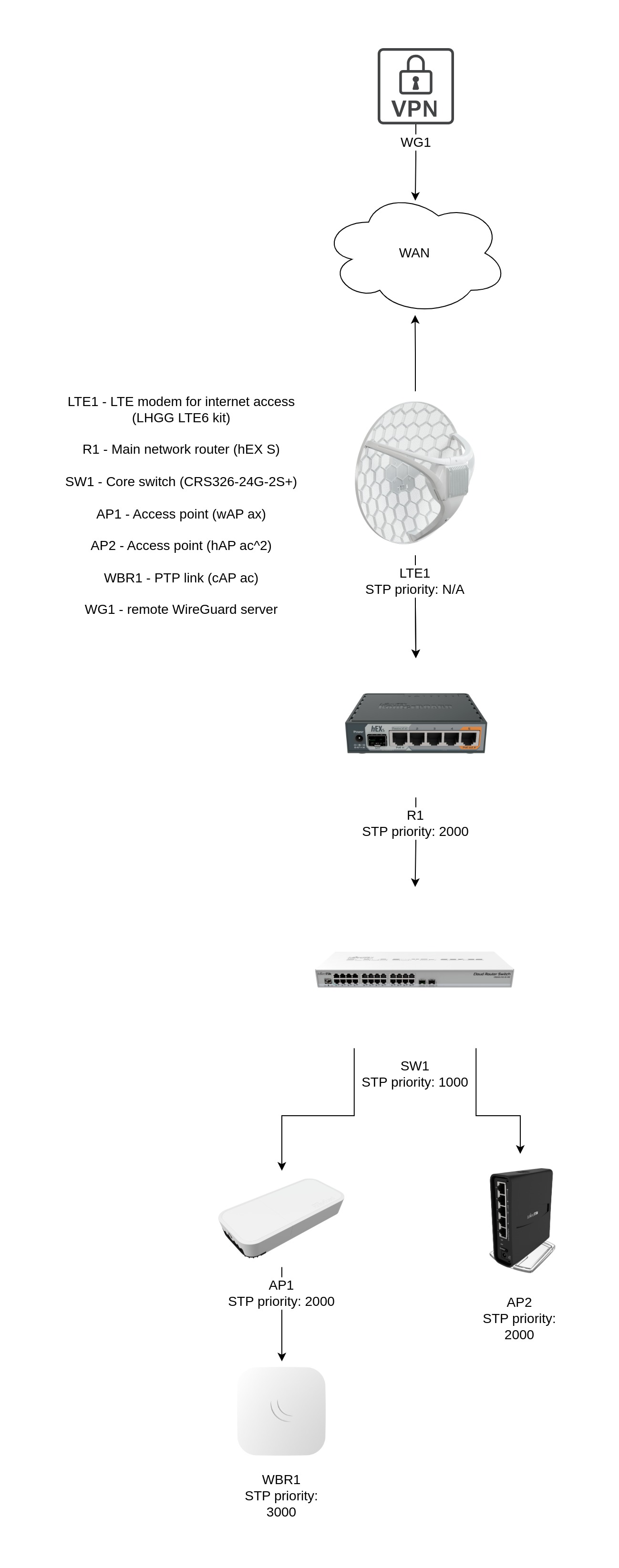
• Topology plan. Every network needs a topology plan to ensure smooth packet flow and scalability.
• Public internet access is provided via LTE. LTE1 is configured in pass-through mode.
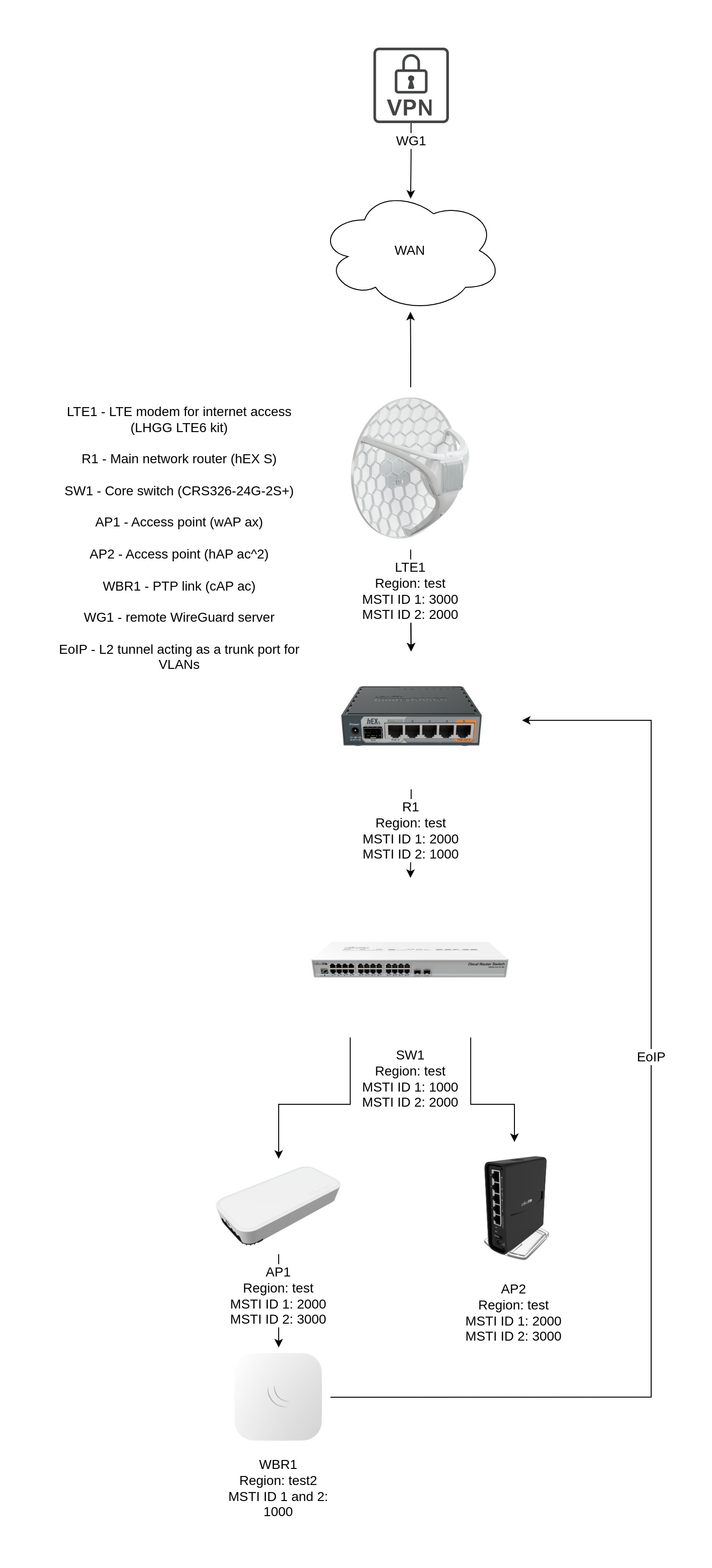
• STP (Spanning Tree Protocol). RSTP for non-VLAN and MSTP for VLAN version.
• VLANs are divided into two groups: the main network (VLAN 10) and the guest network (VLAN 20).
• Simple IP addressing provided by DHCP server(s), including static leases.
• New Wave2 CAPsMAN is used for Wi-Fi management.
• The PTP link is configured to establish a wireless bridge on the 5 GHz band while utilizing the 2.4 GHz band as the CAPsMAN interface.
• Two VPN configurations are included: Road Warrior and Site-to-Site. WireGuard is used as the VPN protocol.
• Basic firewall. The default configuration firewall is fine, but I think it includes several unnecessary rules for a basic setup.
• Interface lists on R1 are used for CAPsMAN ACLs and firewall filters, including NAT and LTE mangle rules.
• RoMON is configured for convenient access.
• Other various things like time zone, device naming, Wi-Fi debug logs, etc.
Topology plans:
non-VLAN version
VLAN version
Known issues, limitations and planned improvements:
• Sniffing, torch, or any other packet inspection on LTE1 causes a loop. Currently, I don’t know the root cause - the configurations look fine, and all tests show no packet leaks across interfaces. If you need to inspect traffic flow, do it from R1 instead.
• The EoIP tunnel in the VLAN config creates a loop due to BPDUs traveling over it, so I had to set "edge=yes" on the logical interfaces at both ends of the tunnel. This breaks STP, as mentioned earlier, so I had to create a new STP region on WBR1.
• At first, I also had an interface toggle script running on LTE1 as a safety measure in case the LTE connection fails and doesn’t recover on its own. But setting up a script that toggles the interface every x minutes while the session is down turned out to be more complex than expected.
• A more advanced queue example is needed for complex setups and requirements.
• OWE interfaces are not added to Steering group.
• No IPv6
• Documentation is WIP.
Link to GitHub: GitHub - maigonis-elleris/routeros-fundamentals-lab: RouterOS configuration fundamentals
If you notice a configuration issue or have suggestions for improving these basic concepts, please let me know. You can raise an issue on GitHub or post in the MikroTik forums’ Knowledge Base section.