I have some Watchguard xSeries firewalls that I got from work which are
end-of-lifed. It’s based on a PIII processor has a 256mb ram stick and
64mbCF card. There’s an IDE interface inside, LCD, serial port and a
bunch of ethernet ports as well as a mPCI slot with a VPN accelerator
and some keys on the front panel.
One of my coworkers put PFSense on it so we should be able to put ROS on it.
My thoughts were to get a 4 or 8gb CF card and download the ISO to it
from another PC by using a media reader on USB. I believe I have a PC
that will let me boot from USB. I believe we need the first boot on the
PC hardware and then move it over to the WG h/w. Did I miss anything?
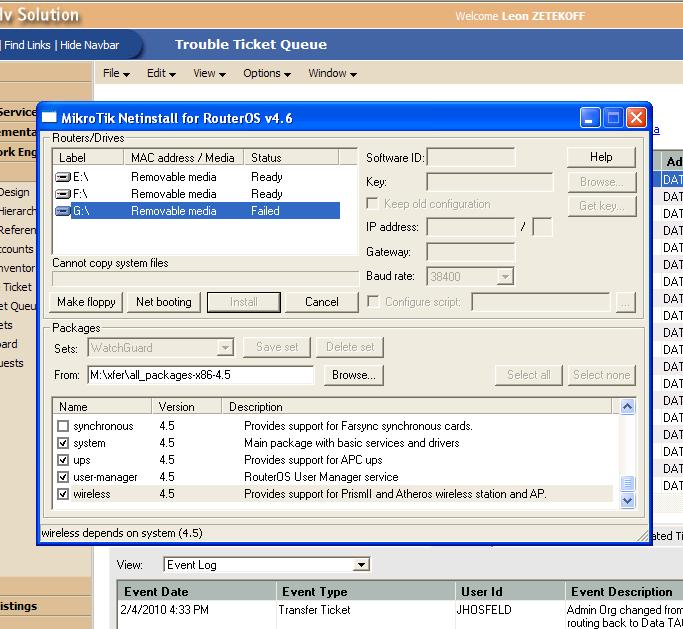
I picked up a 8 gb CF @ Walmart this morning and have been unsuccessful. I was able to use Netinstall once to load up the files but when I tried to boot off the USB/CF it didn’t. Since then I have been unsuccessful trying to reinstall. Netinstall says can not copy system files. Windoze thinks the CF is RAW which makes sense. I’ve attempted to format FAT32 to verify the CF - wonder if I have a bad one?
I’m assuming Netinstall formats the card? If so what filesystem?
You should attach a USB reader to a windows PC, format the CF with FAT32 so that windows recognizes it, then use Netinstall to install RouterOS directly onto this CF (it will be formatted as EXT3 I think), then plug the CF back into the PC to finish the installation.
UPDATE: Got 4gb stick does same thing. It seems Netinstall will format and write the contents one time. I then tried to reboot the PC from the USB and it bypassed the CF and went to Windoze. Windoze then showed it (the data) gone. If I now try and reinstall get the recurring error mentioned above.
Ideas? I have the flash with me at office today so I can try some recommendations.
Once I did the successful write I rebooted the PC to test and get it installed on the netbook I was using before I move it to the Watchguard. THe netbook allows booting off USB. I forced the boot to the USB and it didn’t see a boot image (I am guessing) and booted windoze.
Now subsequent times to re-install get the error message cant copy system files.
I can reformat FAT32 but if I try to netinstall again it fails.
We use a Watchguard x500 at the office here. I used Netinstall to put it on a larger CF and it works fine. I also made an adapter cable to get the LCD working; somewhere I have the drawing for that cable, it has a transistor & a couple resistors in it.
yes…i was trying to setup/config the CF with the use of the netbook since it has a keyboard and screen and then move the CF to the WG. What I don’t understand is why Netinstall stops working.
that is NOT how it is supposed to be done After the windows Netinstall program finishes, remove CF and move it to your Watchguard. It will continue the installation there.
You guys are not hearing what I am saying. I can not longer use Netinstall it dies saying whatever I mentioned up above.
I wanted to use the netbook since there is no display (except the 2-line LCD) on the WG and if memory serves me correctly when you do an initial boot doesn’t it ask questions?
SO back to my original question, how does one get Netinstall to reinstall?
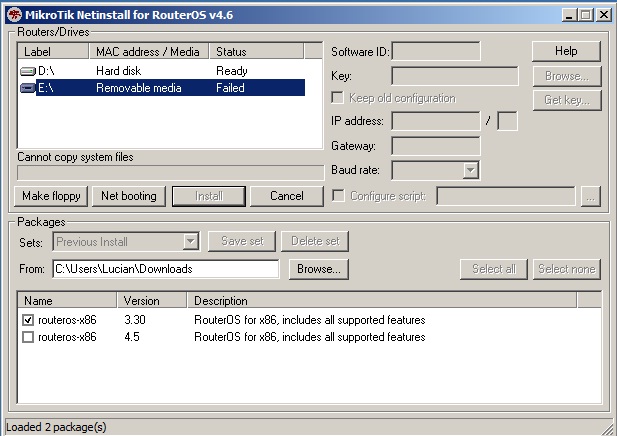
yes, the problem is - you didn’t say how it dies. Please post a screenshot of the problematic netinstall. I would like to see the exact error message when installation fails.
edit:
Now subsequent times to re-install get the error message cant copy system files.
Used an IDE → CF adapter on another machine with exact same results.
then tried going to an IDE drive (4gb) and that worked BUT only AFTER I formatted the IDE drive as FAT32.
But I need to use the CF not an IDE since I haven’t found power in the WG for the IDE drive.
Leon
PS: Yes I tried formatting the CF as FAT32 and get the same results.
 After the windows Netinstall program finishes, remove CF and move it to your Watchguard. It will continue the installation there.