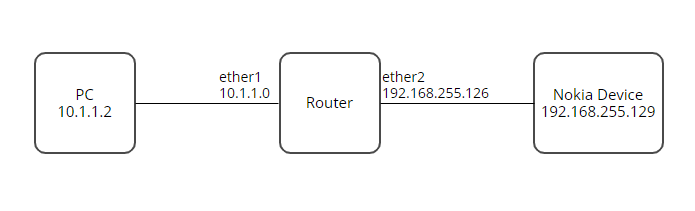
Hi, I am very new to networking and I have been having an issue trying to correctly set-up my router to allow for me to access a Nokia device from my PC. Eventually I will expand the system to access 3 different devices, but they all have the same IP address hence the need for a router.
Anyway, I am currently able to ping my PC and the Nokia device from the router. I tried added a route, but I am not able to ping the Nokia device from my PC. Is adding a route all I need to do, or is there another step I am missing. If not it is likely I do not have the route parameters setup correctly since as I mentioned this is my first time doing something like this. Any help would be greatly appreciated.
What is the purpose of the MT device,
If it was a router both subnent would be local and getting dhcp from the router and you just need firewall rule connect them.
However your configuration is almost nothing, so hard to say what you mean to do…
Is there a real upstream router tied to the i nternet??
Currently you would be correct in that there is no real purpose for the MT device. The final build will be like the attached image, where there are 3 Nokia devices I am trying to talk to but they all have the same IP address that cannot be changed, and in this case the router would be needed because of the design requirement where the IP address of the Nokia devices is the same. The router is not and will not be tied to the internet.
My idea was to try and talk with a single nokia device first, then once that is working I would work on the router config to talk to all 3 nokia devices.
They all will be on different physical ports the pc will be connected to ether1, and the other 3 devices on ether 2-4. The issue I was describing above is just for a single nokia device, since if I cannot get this to work with one device I will not be able to get it working for 3.
Your first drawing and posted configuration do not match (IP addresses).
Getting one to work should be very simple. As long as the PC knows that the router is it’s gateway, it will just work. Remember, it’s a router - it routes unless you tell it not to.
Getting three devices with the same IP to work would be more complex - and beyond my knowledge…
Id guess the Nokia doesn’t know how to respond to 10.1.1.2
There’s a few assumptions:
Nokia is a fixed IP and it’s gateway isn’t 192.168.255.126. the only thing you can do here is a source nat rule to masquerade to 192.168.255.126 then the Nokia will see requests from this up and not 10.1.1.2.
This gets very difficult when you have 3 devices with the same IP. Experience tells me I’d be “tunneling”. Issues with the router will be over lapping subnets. It just doesn’t make sense off the bat.
So I’d get 2 more routers, and be defining the same masquerade technique but using port forwarding.
Pc would now be requesting 10.1.1.1:8080 on router 1 port forwarding for Nokia 1
Router 2 would be 10.1.2.1:8080 on router 2 port forwarding for Nokia 2 etc.
Your assumptions are correct, the Nokia IP is fixed. In terms of the Gateway I am not sure what it is. Normally when I connect it directly to my pc I use an IP address if 192.168.255.126 mask: 255.255.255.0 Gateway:192.168.255.129, not sure if this information helps in anyway. And yes 3 routers would definitely be the simplest way to go. I will try some of this and get back to you.
In the configuration posted by networkingNoob7 (for a single device) it seems to me (but I am also a beginner) that what is missing is a NAT, either src-nat or masquerade should do:
Using some of the articles and tips in here I ended up with this config, but again still no luck. Note: this is a freshly reset HEx router, and I changed some connections around.
ether5 is my pc to router
ether4 is nokia device to router
I do have a second computer, and I have been able to ping the Nokia device from the router the whole time. I am not sure what you mean by turn off the firewall, are you referring to the firewall rules added to the router, or the firewall on the PC itself?
I figured it out I was able to get it working by just adding a masquerade rule. The issue I did not see was I did not realize my computer needed a route added to direct traffic to the router when I was trying to access 192.168.255.0/24 network