Routing VLAN through Wireguard

[Edit] replaced original post because it was too general - try again more specific :slight_smile:

Hi,
I’m new to this board and I recently bought a hAP ac2.
After some struggling with the fiber-adapter & my ISP-settings (I do need a specific vlan-tagging for all outgoing traffic…), it now works like a charm.

My next project is to use a specific VLAN to route every traffic through a wireguard tunnel.
I already configured a separate VLAN (30) for these ports and my wireguard tunnel is up and running.

I tested ether3 with a device and it already gets a 192.168.80.0/24 address and has access to the internet.

But I do need help with the last step - how to route the whole VLAN30 traffic through the wireguard tunnel.
I tried with some firewall and routing rules, but I just bricked the VLAN30 traffic without success.

Thank you for your help! :slight_smile:

Here’s my config:

# 2024-07-05 12:43:42 by RouterOS 7.15.2
# software id = MRVG-J4JI
#4
# model = C52iG-5HaxD2HaxD
# serial number = ***
/interface bridge
add admin-mac=48:A9:8A:DA:A7:5D auto-mac=no comment=defconf name=bridge \
    vlan-filtering=yes
/interface wireguard
add listen-port=26840 mtu=1420 name=wireguard1
/interface vlan
add interface=ether1 name=ether1.1 vlan-id=2
add interface=bridge name=vlan30 vlan-id=30
/interface pppoe-client
add add-default-route=yes disabled=no interface=ether1.1 name=pppoe-out1 \
    use-peer-dns=yes user=4036121000
/interface list
add name=WAN
add name=LAN
add name=WAN2
/interface wifi datapath
add bridge=bridge comment=defconf disabled=no name=capdp
/interface wifi
set [ find default-name=wifi1 ] configuration.mode=ap .ssid=P-Wave datapath=\
    capdp disabled=no security.connect-priority=0
set [ find default-name=wifi2 ] configuration.mode=ap .ssid=P-Wave datapath=\
    capdp disabled=no security.connect-priority=0
/ip ipsec policy group
add name=Philipp
/ip pool
add name=dhcp ranges=192.168.88.0/24
add name=dhcp_vlan30 ranges=192.168.80.2-192.168.80.254
/ip dhcp-server
add address-pool=dhcp interface=bridge name=defconf
add address-pool=dhcp_vlan30 interface=vlan30 name=dhcp_vlan30
/interface bridge port
add bridge=bridge comment=defconf interface=ether1
add bridge=bridge comment=defconf interface=ether2
add bridge=bridge comment=defconf interface=ether3 pvid=30
add bridge=bridge comment=defconf interface=ether4
add bridge=bridge comment=defconf interface=ether5
/interface bridge settings
set use-ip-firewall=yes use-ip-firewall-for-vlan=yes
/interface bridge vlan
add bridge=bridge tagged=bridge vlan-ids=30
/interface list
add include=LAN,*2000012 name=INTERN
/interface list member
add comment=defconf interface=ether1 list=WAN
add interface=bridge list=LAN
add interface=pppoe-out1 list=WAN
add interface=vlan30 list=LAN
/interface wifi cap
set discovery-interfaces=bridge enabled=yes slaves-datapath=capdp
/interface wireguard peers
add allowed-address=192.168.1.0/24 endpoint-address=\
    ***.myfritz.net endpoint-port=59599 interface=wireguard1 \
    name=peer2 persistent-keepalive=25s preshared-key="****" public-key=\
    "***"
/ip address
add address=192.168.88.1/24 interface=bridge network=192.168.88.0
add address=192.168.80.1/24 interface=vlan30 network=192.168.80.0
add address=10.255.255.1/30 interface=*D network=10.255.255.0
/ip dhcp-client
add comment=defconf interface=bridge use-peer-dns=no
/ip dhcp-server network
add address=0.0.0.0/24 dns-server=0.0.0.0 gateway=0.0.0.0 netmask=24
add address=192.168.80.0/24 comment=vlan30 dns-server=192.168.80.1 gateway=\
    192.168.80.1
add address=192.168.88.0/24 comment=defconf dns-server=192.168.88.1 gateway=\
    192.168.88.1 netmask=24
/ip dns
set allow-remote-requests=yes
/ip firewall filter
add action=accept chain=input comment=\
    "defconf: accept established,related,untracked" connection-state=\
    established,related,untracked
add action=drop chain=input comment="defconf: drop invalid" connection-state=\
    invalid
add action=accept chain=input comment="defconf: accept ICMP" protocol=icmp
add action=accept chain=input comment=\
    "defconf: accept to local loopback (for CAPsMAN)" dst-address=127.0.0.1
add action=drop chain=input comment="defconf: drop all not coming from LAN" \
    in-interface-list=!INTERN
add action=accept chain=forward comment="defconf: accept in ipsec policy" \
    ipsec-policy=in,ipsec
add action=accept chain=forward comment="defconf: acept our ipsec policy" \
    ipsec-policy=out,ipsec
add action=fasttrack-connection chain=forward comment="defconf: fasttrack" \
    connection-state=established,related hw-offload=yes
add action=accept chain=forward comment=\
    "defconf: accept established,related,untracked" connection-state=\
    established,related,untracked
add action=drop chain=forward comment="defconf: drop invalid" \
    connection-state=invalid
add action=drop chain=forward comment=\
    "defconf: drop all from WAN not DSTNATED" connection-nat-state=!dstnat \
    connection-state=new in-interface-list=WAN
/ip firewall mangle
add action=change-mss chain=forward log-prefix=MSS new-mss=1420 \
    out-interface=pppoe-out1 passthrough=yes protocol=tcp tcp-flags=syn
/ip firewall nat
add action=masquerade chain=srcnat comment="defconf: masquerade" \
    ipsec-policy=out,none out-interface-list=WAN src-address=192.168.88.0/24
add action=masquerade chain=srcnat comment="gerasdorf: vlan" \
    out-interface-list=WAN src-address=192.168.80.0/24
/ip service
set ftp disabled=yes
set api disabled=yes
set winbox disabled=yes
set api-ssl disabled=yes
/system clock
set time-zone-name=Europe/Vienna
/system note
set show-at-login=no
/tool mac-server
set allowed-interface-list=LAN
/tool mac-server mac-winbox
set allowed-interface-list=LAN
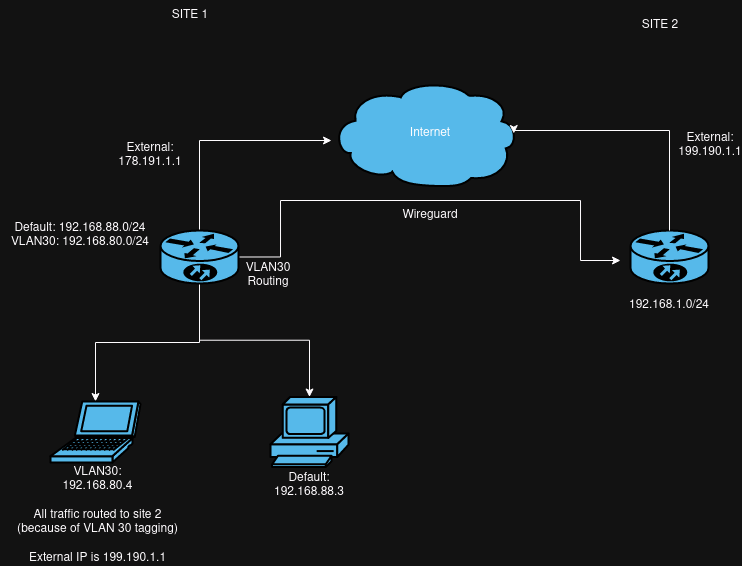
I updated my whole description - because my first post was way too general (I thought I edited this post instead of re-opening a new one - hope it’s ok)

A tunnel to where? or more accurately through which Device or Service at the other end/////////////

I note this error on the config → add address=10.255.255.1/30 interface**=D* network=10.255.255.0

What is this ??? ( should be deleted )
/ip dhcp-server network
add address=0.0.0.0/24 dns-server=0.0.0.0 gateway=0.0.0.0 netmask=24

/interface bridge port
add bridge=bridge comment=defconf interface=ether1 <------ REMOVE FROM BRIDGE
add bridge=bridge comment=defconf interface=ether2
add bridge=bridge comment=defconf interface=ether3 pvid=30
add bridge=bridge comment=defconf interface=ether4
add bridge=bridge comment=defconf interface=ether5

REMOVE - not required. use firewall filter rule for access requirements.
/interface bridge settings
set use-ip-firewall=yes use-ip-firewall-for-vlan=yes

Another error…
/interface list
add include=LAN**,*2000012 n**ame=INTERN

Another error ---- Is this a missing wireguard1 address ???
add address=10.255.255.1/30 *interface=D network=10.255.255.0

This rule seems to have no purpose??
/ip firewall mangle
add action=change-mss chain=forward log-prefix=MSS new-mss=1420
out-interface=pppoe-out1 passthrough=yes protocol=tcp tcp-flags=syn

This should be DISABLED < as your WAN configuration is handled the pppoe part of the config.
What does the bridge have to with WAN anyway!!!
/ip dhcp-client
add comment=defconf interface=bridge use-peer-dns=no

++++++++++++++++++++++++++++++++++++++++++++++++++++++++++++++++++++++++++++++

No point in doing much more in terms of vlan30 until we have answers to questions above… and changes made

Thanks for the improvements for my current setup! :slight_smile:

This rule seems to have no purpose??
/ip firewall mangle
add action=change-mss chain=forward log-prefix=MSS new-mss=1420
out-interface=pppoe-out1 passthrough=yes protocol=tcp tcp-flags=syn

This setting is necessary, otherwise some HTTPS Connections don’t work. I searched a lot to fix this ..


I tried to make a picture:
overview.png
I want to be able to switch between “default” and “vlan30” on site1.
If it’s “default”, the traffic is normally routed to the net
If it’s “vlan30”, the complete traffic is routed over the wireguard connection to site 2. In the end, the device, connected to port with “vlan30” tagged, has the external IP of site2.

[EDIT]
Because I bricked my mikrotik Environment (I guess I set something wrong and at least had to reconfigure it) - here’s my current config:

# 2024-07-08 10:14:11 by RouterOS 7.15.2
# software id = MRVG-J4JI
#
# model = C52iG-5HaxD2HaxD
# serial number = ***
/interface bridge
add admin-mac=48:A9:8A:DA:A7:5E auto-mac=no comment=defconf name=bridge \
    vlan-filtering=yes
/interface wireguard
add listen-port=30139 mtu=1420 name=wireguard1
/interface vlan
add interface=ether1 name=ether1.1 vlan-id=2
add interface=bridge name=vlan30 vlan-id=30
/interface pppoe-client
add add-default-route=yes disabled=no interface=ether1.1 name=pppoe-out1 \
    use-peer-dns=yes user=4036121000
/interface list
add comment=defconf name=WAN
add comment=defconf name=LAN
/interface wifi datapath
add bridge=bridge comment=defconf disabled=no name=capdp
/interface wifi
set [ find default-name=wifi1 ] channel.band=5ghz-ax .reselect-interval=\
    1h..1h20m .skip-dfs-channels=10min-cac .width=20/40/80mhz \
    configuration.country=Austria .mode=ap .ssid=P-Wave datapath=capdp \
    disabled=no security.authentication-types=wpa2-psk,wpa3-psk \
    .connect-priority=0 .ft=yes .ft-over-ds=yes
set [ find default-name=wifi2 ] channel.band=2ghz-ax .reselect-interval=\
    1h..1h10m .skip-dfs-channels=10min-cac .width=20/40mhz \
    configuration.country=Austria .mode=ap .ssid=P-Wave datapath=capdp \
    disabled=no security.authentication-types=wpa2-psk,wpa3-psk \
    .connect-priority=0 .ft=yes .ft-over-ds=yes
/ip pool
add name=default-dhcp ranges=192.168.88.10-192.168.88.254
add name=dhcp_vlan30 ranges=192.168.80.2-192.168.80.254
/ip dhcp-server
add address-pool=default-dhcp interface=bridge name=defconf
add address-pool=dhcp_vlan30 interface=vlan30 name=dhcp_vlan30
/disk settings
set auto-media-interface=bridge
/interface bridge port
add bridge=bridge comment=defconf interface=ether2
add bridge=bridge comment=defconf interface=ether3 pvid=30
add bridge=bridge comment=defconf interface=ether4
add bridge=bridge comment=defconf interface=ether5
add bridge=bridge comment=defconf interface=wifi1
add bridge=bridge comment=defconf interface=wifi2
/interface bridge settings
set use-ip-firewall=yes use-ip-firewall-for-vlan=yes
/ip neighbor discovery-settings
set discover-interface-list=LAN
/interface bridge vlan
add bridge=bridge tagged=bridge vlan-ids=30
/interface list member
add comment=defconf interface=bridge list=LAN
add comment=defconf interface=ether1 list=WAN
add interface=pppoe-out1 list=WAN
add interface=vlan30 list=LAN
/interface wifi cap
set discovery-interfaces=bridge enabled=yes slaves-datapath=capdp
/interface wireguard peers
add allowed-address=192.168.1.0/24 endpoint-address=\
    ***.myfritz.net endpoint-port=595** interface=wireguard1 \
    name=peer1 persistent-keepalive=25s preshared-key=\
    "***" public-key=\
    "***"
/ip address
add address=192.168.88.1/24 comment=defconf interface=bridge network=\
    192.168.88.0
add address=192.168.80.1/24 interface=vlan30 network=192.168.80.0
/ip dhcp-client
add comment=defconf disabled=yes interface=ether1
/ip dhcp-server network
add address=192.168.80.0/24 dns-server=192.168.80.1 gateway=192.168.80.1
add address=192.168.88.0/24 comment=defconf dns-server=192.168.88.1 gateway=\
    192.168.88.1
/ip dns
set allow-remote-requests=yes
/ip dns static
add address=192.168.88.1 comment=defconf name=router.lan
/ip firewall filter
add action=accept chain=input comment=\
    "defconf: accept established,related,untracked" connection-state=\
    established,related,untracked
add action=drop chain=input comment="defconf: drop invalid" connection-state=\
    invalid
add action=accept chain=input comment="defconf: accept ICMP" protocol=icmp
add action=accept chain=input comment=\
    "defconf: accept to local loopback (for CAPsMAN)" dst-address=127.0.0.1
add action=drop chain=input comment="defconf: drop all not coming from LAN" \
    in-interface-list=!LAN
add action=accept chain=forward comment="defconf: accept in ipsec policy" \
    ipsec-policy=in,ipsec
add action=accept chain=forward comment="defconf: accept out ipsec policy" \
    ipsec-policy=out,ipsec
add action=fasttrack-connection chain=forward comment="defconf: fasttrack" \
    connection-state=established,related hw-offload=yes
add action=accept chain=forward comment=\
    "defconf: accept established,related, untracked" connection-state=\
    established,related,untracked
add action=drop chain=forward comment="defconf: drop invalid" \
    connection-state=invalid
add action=drop chain=forward comment=\
    "defconf: drop all from WAN not DSTNATed" connection-nat-state=!dstnat \
    connection-state=new in-interface-list=WAN
/ip firewall mangle
add action=change-mss chain=forward new-mss=1420 out-interface=pppoe-out1 \
    passthrough=yes protocol=tcp tcp-flags=syn
/ip firewall nat
add action=masquerade chain=srcnat comment="defconf: masquerade" \
    ipsec-policy=out,none out-interface-list=WAN src-address=192.168.88.0/24
add action=masquerade chain=srcnat comment="gerasdorf: vlan" \
    out-interface-list=WAN src-address=192.168.80.0/24
/ip service
set ftp disabled=yes
set api disabled=yes
set api-ssl disabled=yes
/ipv6 firewall address-list
add address=::/128 comment="defconf: unspecified address" list=bad_ipv6
add address=::1/128 comment="defconf: lo" list=bad_ipv6
add address=fec0::/10 comment="defconf: site-local" list=bad_ipv6
add address=::ffff:0.0.0.0/96 comment="defconf: ipv4-mapped" list=bad_ipv6
add address=::/96 comment="defconf: ipv4 compat" list=bad_ipv6
add address=100::/64 comment="defconf: discard only " list=bad_ipv6
add address=2001:db8::/32 comment="defconf: documentation" list=bad_ipv6
add address=2001:10::/28 comment="defconf: ORCHID" list=bad_ipv6
add address=3ffe::/16 comment="defconf: 6bone" list=bad_ipv6
/ipv6 firewall filter
add action=accept chain=input comment=\
    "defconf: accept established,related,untracked" connection-state=\
    established,related,untracked
add action=drop chain=input comment="defconf: drop invalid" connection-state=\
    invalid
add action=accept chain=input comment="defconf: accept ICMPv6" protocol=\
    icmpv6
add action=accept chain=input comment="defconf: accept UDP traceroute" \
    dst-port=33434-33534 protocol=udp
add action=accept chain=input comment=\
    "defconf: accept DHCPv6-Client prefix delegation." dst-port=546 protocol=\
    udp src-address=fe80::/10
add action=accept chain=input comment="defconf: accept IKE" dst-port=500,4500 \
    protocol=udp
add action=accept chain=input comment="defconf: accept ipsec AH" protocol=\
    ipsec-ah
add action=accept chain=input comment="defconf: accept ipsec ESP" protocol=\
    ipsec-esp
add action=accept chain=input comment=\
    "defconf: accept all that matches ipsec policy" ipsec-policy=in,ipsec
add action=drop chain=input comment=\
    "defconf: drop everything else not coming from LAN" in-interface-list=\
    !LAN
add action=accept chain=forward comment=\
    "defconf: accept established,related,untracked" connection-state=\
    established,related,untracked
add action=drop chain=forward comment="defconf: drop invalid" \
    connection-state=invalid
add action=drop chain=forward comment=\
    "defconf: drop packets with bad src ipv6" src-address-list=bad_ipv6
add action=drop chain=forward comment=\
    "defconf: drop packets with bad dst ipv6" dst-address-list=bad_ipv6
add action=drop chain=forward comment="defconf: rfc4890 drop hop-limit=1" \
    hop-limit=equal:1 protocol=icmpv6
add action=accept chain=forward comment="defconf: accept ICMPv6" protocol=\
    icmpv6
add action=accept chain=forward comment="defconf: accept HIP" protocol=139
add action=accept chain=forward comment="defconf: accept IKE" dst-port=\
    500,4500 protocol=udp
add action=accept chain=forward comment="defconf: accept ipsec AH" protocol=\
    ipsec-ah
add action=accept chain=forward comment="defconf: accept ipsec ESP" protocol=\
    ipsec-esp
add action=accept chain=forward comment=\
    "defconf: accept all that matches ipsec policy" ipsec-policy=in,ipsec
add action=drop chain=forward comment=\
    "defconf: drop everything else not coming from LAN" in-interface-list=\
    !LAN
/system clock
set time-zone-name=Europe/Vienna
/tool mac-server
set allowed-interface-list=LAN
/tool mac-server mac-winbox
set allowed-interface-list=LAN[code]

You have two ends, why only one config? Whats at the other end??

On the other side (site2) is a Fritzbox. Do you need the config from the Fritzbox?

It’s like a site2site connection per wireguard. But I don’t need to connect to other clients at site2.

I think you can see site2 as a proxy for site1 in case it’s in VLAN 30.

Maybe there’s an easier solution for it :slight_smile:. I did the same thing with a ubiquiti network and a “split-vpn” script. That’s why I stick to the known :smiley:

So you are basically using the connection from MT to fritz to
a. use FRITZ internet for local vlan30 on MT (Most likely)
b. able to access fritz for configuration ( not likely )
c. able to access MT for configuration from road warrior perspective ( attached to Fritz WG), or when on Fritz local network - MAYBE??
+++++++++++++++++++++++++++++++++++++++++++++++++++++++++++++++++++++++

Very much so the Fritz wireguard setup is VERY germane! as well as the admin configuration access requirements

Observations:

(1) OKAY your mixing apples and oranges in the local LAN setup.
You assign vlan30 to the bridge but you still have dhcp setup on the bridge.
Once one goes VLAN its best to take DHCP off the bridge and go all vlan.
If the vlan is associated with a single port, you can alternatively set the vlan to the etherport and turn vlan-filtering off on the bridge.
Especially as its made clear from your bridge ports that vlan30 is only on ether3

(2) Why do you need this rule in your config..... purpose???
/interface bridge settings
set use-ip-firewall=yes use-ip-firewall-for-vlan=yes

(3) It would appear from your MT settings that the MT is a client peer for handshake. Therefore one question one has to answer before finishing the config, --->
Is there any expectation that users will need access to Fritz subnets. The answer given above is NO. Will the admin on the MT need access to the fritz for configuration purposes.
Probably not............. So will leave that alone for now.........

(4) Missing wireguard address................ ??
EDIT, we know now..............

(5) Remove the IP DNS STATIC default confg.

(6) Added another Mangle rule for traffic going out wireguard ( MTU support )

(7) NAT - sourcenat rule simplified.

(8) Modified the last default forward chain firewall rule so that what is happening is clear..............
add action=drop chain=forward comment=
"defconf: drop all from WAN not DSTNATed" connection-nat-state=!dstnat
connection-state=new in-interface-list=WAN

CONFIG ADJUSTED TO move VLAN to etherport3

model = C52iG-5HaxD2HaxD

serial number = ***

/interface bridge
add admin-mac=48:A9:8A:DA:A7:5E auto-mac=no comment=defconf name=bridge
vlan-filtering=no

/interface vlan
add interface=ether1 name=ether1.1 vlan-id=2
add interface=ether3 name=vlan30 vlan-id=30

/interface bridge port
add bridge=bridge comment=defconf interface=ether2
add bridge=bridge comment=defconf interface=ether4
add bridge=bridge comment=defconf interface=ether5
add bridge=bridge comment=defconf interface=wifi1
add bridge=bridge comment=defconf interface=wifi2

/interface bridge settings
set use-ip-firewall=no use-ip-firewall-for-vlan=no

/interface wireguard peers
add allowed-address=0.0.0.0/0 endpoint-address=
*.myfritz.net endpoint-port=595 interface=wireguard1
name=peer1 persistent-keepalive=25s public-key="++++++++"

/ip address
add address=192.168.88.1/24 comment=defconf interface=bridge network=
192.168.88.0
add address=192.168.90.1/24 interface=vlan30 network=192.168.90.0
add address=192.168.80.2/24 interface=wireguard1 network=192.168.80.0

/ip firewall mangle
add action=change-mss chain=forward new-mss=1420 out-interface=pppoe-out1
passthrough=yes protocol=tcp tcp-flags=syn

add action=change-mss chain=forward comment="Clamp MSS to PMTU for Outgoing packets"
new-mss=clamp-to-pmtu out-interface=wireguard1 passthrough=yes protocol=tcp tcp-flags=syn

{forward chain}
add action=fasttrack-connection chain=forward comment="defconf: fasttrack"
connection-state=established,related hw-offload=yes
add action=accept chain=forward comment=
"defconf: accept established,related, untracked" connection-state=
established,related,untracked
add action=drop chain=forward comment="defconf: drop invalid"
connection-state=invalid

**add action=accept chain=forward comment="internet traffic" in-interface-list=LAN out-interface-list=WAN
add action=accept chain=forward comment="allow V30 to tunnel" src-address=192.168.**90.0/24 out-interface=wireguard1
add action=accept chain=forward comment="port forwarding" connection-nat-state=dstnat { disable or remove if not required }
add action=drop chain=forward comment="drop all else"

/ip firewall nat
add action=masquerade chain=srcnat out-interface-list=WAN

/tool mac-server
set allowed-interface-list=NONE
/tool mac-server mac-winbox
set allowed-interface-list=LAN

+++++++++++++++++++++++++++++++++++++++++++++++
Now you need to "Force VLAN30" into the tunnel.

/routing-table
add fib name=to-FRITZ

/ip route
add dst-address=0.0.0.0 gateway=wireguard1 routing-table=to-FRITZ

/routing-rule
add min-prefix=0 action=lookup-only-in-table table=main comment="allow local traffic when required"
add src-address=192.168.90.0/24 action=lookup-only-in-table table=to-FRITZ

Note: IF wireguard is not working, then the users on v30 will have no internet. If you want to ensure they do, in this case,
change action to: action=lookup on the second routing rule.

Thanks a lot!

I do have some additional inputs:

  1. the ether3 has to be switchable between “vlan30” and “default” - ideally every port (including the additional switch) are possible to switch between vlan30 and not vlan30
    If not easy possible, I’ll stick to your setup :slight_smile:

  2. there is no IP address for wireguard set - I don’t find any in the wg-export file of the Fritzbox, nor at the fritzbox itself. Nevertheless, the Fritz says successfully connected (with my external IP in its log)
    I guess this is a problem … This is the export of the Fritz, which I imported and MT immediately creatd the wg-config and successfully established a connection to the Fritz:

[Interface]
PrivateKey = ****
Address = 192.168.80.1/24
DNS = 192.168.1.1
DNS = fritz.box

[Peer]
PublicKey =  ****
PresharedKey =  ****
AllowedIPs = 192.168.1.0/24
Endpoint =  ****.myfritz.net:595XX
PersistentKeepalive = 25
  1. I guess, you mean:
    /ip route
    add dst-address=0.0.0.0 gateway=**%**wireguard1 routing-table=to-FRITZ
    because without the “%”, I get an error (and the other rules are having the “%” as prefix as well


I’m using it for a)
I don’t need b) nor c) :slight_smile:

You can see the Fritz as “switchable proxy” for MT clients

Are you saying the fritz as the Server Peer has not wireguard information for itself???
That is what is missing in this equation, and what I need to see. I would have not assumed that fritz would give the MT the address 192.168.80.1, but would have used that for itself and given the next available number for MT export ???

So you are using the export file you got from the FRITZ to put on wireguard or generic client device…
It would not know about specifics that MT needs.!!!

This is the wireguard server peer info from the Fritz (exported the whole config):

{
enabled = yes;
editable = yes;
use_ikev2 = no;
conn_type = conntype_wg;
name = “wg-Tokiostrasse”;
boxuser_id = 0;
always_renew = no;
reject_not_encrypted = no;
dont_filter_netbios = no;
localip = ::;
remoteip = ::;
local_virtualip = 0.0.0.0;
remote_virtualip = 0.0.0.0;
keepalive_ip = 0.0.0.0;
mode = phase1_mode_aggressive;
phase1ss = “all/all/all”;
keytype = connkeytype_pre_shared;
key = “”;
cert_do_server_auth = no;
use_nat_t = yes;
use_xauth = no;
use_cfgmode = no;
phase2ss = “esp-all-all/ah-none/comp-all/no-pfs”;
app_id = 0;
wg_public_key = “";
wg_preshared_key = "$$$$
******";
wg_allowed_ips = “192.168.80.0/24”;
wg_persistent_keepalive = 25;
wg_dnsserver = “192.168.80.1”;
wg_dyndns = "
.myfritz.net”;
wg_slave_network = 0.0.0.0;
wg_slave_mask = 0.0.0.0;
wg_hide_network = no;
wg_fulltunnel = no;
wg_configured = yes;
}

I mean I can switch to IPSec, if it’s easier to config. But tbh, I tried IPSec Fritz-to-MT about 5-6 times and always give up (mostly because I wasn’t able to made any UDP connection from the MT to the Fritz .. the hell knows why …)

That is so weird… as a Server PEER, it should have unique address for each peer.
Will have to look into it…

It actually looks more like its setup to be Client peer for handshake but we know its not the fact.

It seems to indicate its address is 192.168.80.1 by the fact that is its stated DNS server ???

+++++++++++++++++++++++++++++++++

Does it show CLIENT Peer settings for each peer as well??? or just its own server peer configuration???

Maybe I can check the WG tunnel manually with MT itself without any config?

The log in Fritz says:

07.07.24
22:58:46
Es wurde erfolgreich eine WireGuard-Verbindung zur Gegenstelle “wg-Tokiostrasse” (188.22.46.XX:301XX) aufgebaut.

→ like "A WireGuard connection was successfully established to the remote site “wg-Tokiostrasse” "

188.22.46.XX is my external IP :slight_smile:

Ah - one thing!

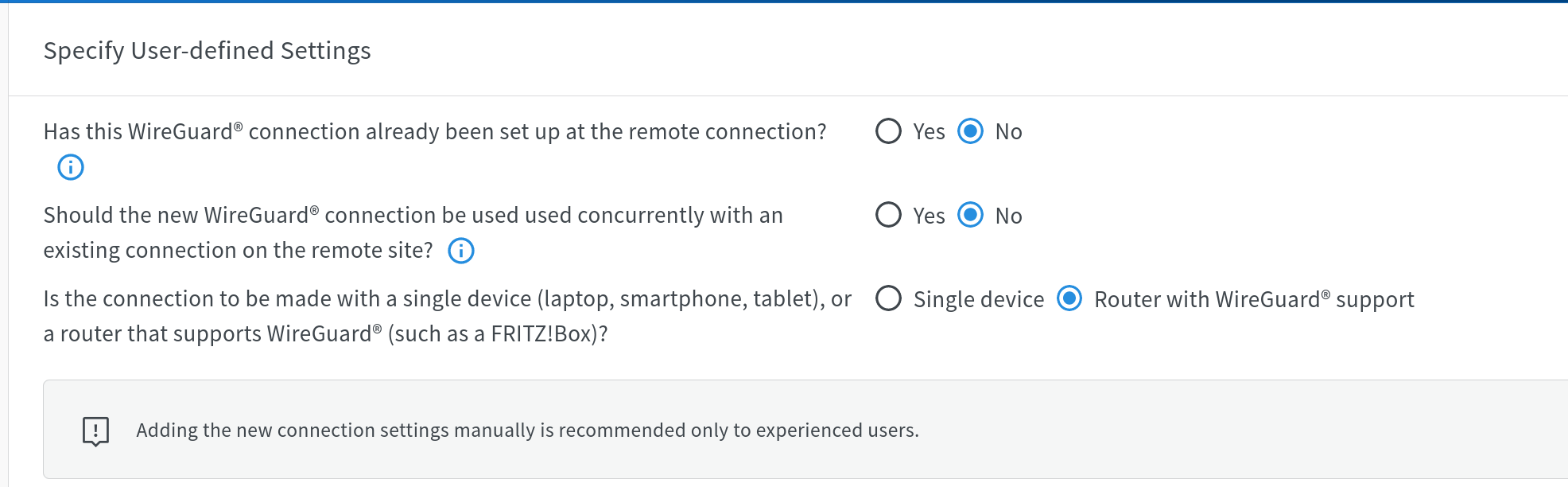
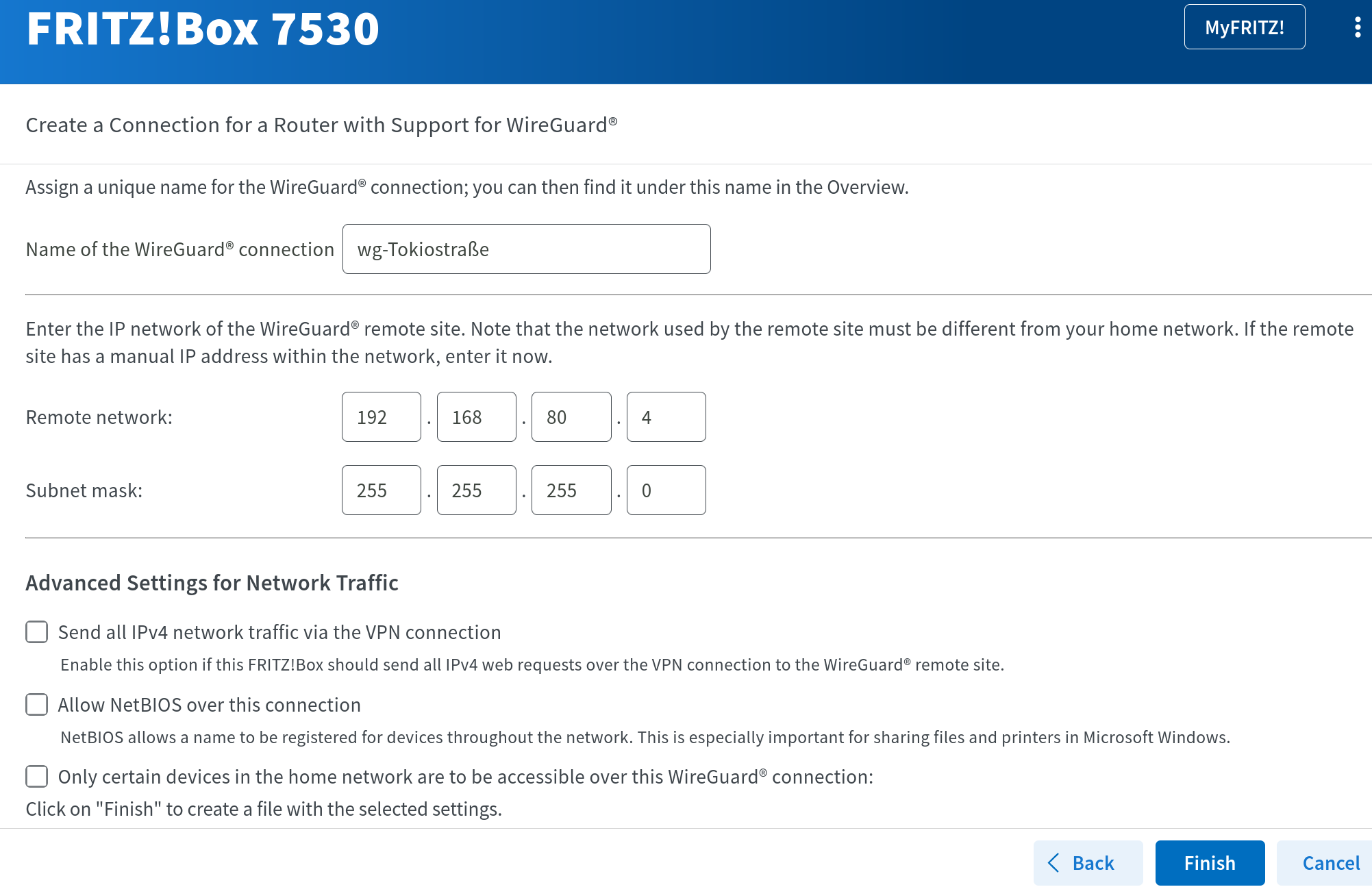
I had to add a remote network at start of the Wireguard-Workflow of the Fritz - there I added the 192.168.80.0/24 network
Maybe this is the reason?!

(As said - I can switch to IPsec and give it another try if this is a Fritz topic and you don’t want to dick into a non MT Setup)

Also why in the xport config did it give you a DNS address of 192.168.1.1 when in the Server peere settings it states wg-dnsserver=192.168.80.1

Me —> confused.

That would be the start of the wireguard setup I guess…
Did you try setting 192.168.80.2/24 as the wireguard address on the MT
Ive modified the allowed IPs and address in the post above accordingly

Hold the fort, MAJOR problem/

The local subnet VLAN30 must be DIFFERENT from the wireguard SUBNET…
Therefore change vlan30 to 192.168.90.0

Config provided adjusted above…

  • allowed ips on MT changed to 0.0.0.0/0 ( for internet access through Fritz )
  • changed all vlan30 affiliated config to 90
  • address for wireguard is 192.168.80.2/24

aahh .. I’ll give it a try :slight_smile:

btw. this is the setup-workflow for WG at the fritz.

I think I made a mistake :frowning:
“[…] If the remote site has a manual IP address within the network, enter it now. […]”
I guess here I need to add the endpoint, set at MT.
02-fritz-wg-setup.png
01-fritz-wg-setup.png

hmm .. doesn’t work :-/ .. the client at ether3 doesn’t get any IP address .. neither from the dhcp of vlan30, nor from the wg-tunnel
[edit] the other ports are running fine - as I’m currently using one of it to write these lines :wink:

this is my current config:

# 2024-07-09 00:01:10 by RouterOS 7.15.2
# software id = MRVG-J4JI
#
# model = C52iG-5HaxD2HaxD
# serial number = ***
/interface bridge
add admin-mac=48:A9:8A:DA:A7:5E auto-mac=no comment=defconf name=bridge
/interface wireguard
add listen-port=182XX mtu=1420 name=wireguard1
/interface vlan
add interface=ether1 name=ether1.1 vlan-id=2
add interface=ether3 name=vlan30 vlan-id=30
/interface pppoe-client
add add-default-route=yes disabled=no interface=ether1.1 name=pppoe-out1 \
    use-peer-dns=yes user=4036121000
/interface list
add comment=defconf name=WAN
add comment=defconf name=LAN
/interface wifi datapath
add bridge=bridge comment=defconf disabled=no name=capdp
/interface wifi
set [ find default-name=wifi1 ] channel.band=5ghz-ax .reselect-interval=\
    1h..1h20m .skip-dfs-channels=10min-cac .width=20/40/80mhz \
    configuration.country=Austria .mode=ap .ssid=P-Wave datapath=capdp \
    disabled=no security.authentication-types=wpa2-psk,wpa3-psk \
    .connect-priority=0 .ft=yes .ft-over-ds=yes
set [ find default-name=wifi2 ] channel.band=2ghz-ax .reselect-interval=\
    1h..1h10m .skip-dfs-channels=10min-cac .width=20/40mhz \
    configuration.country=Austria .mode=ap .ssid=P-Wave datapath=capdp \
    disabled=no security.authentication-types=wpa2-psk,wpa3-psk \
    .connect-priority=0 .ft=yes .ft-over-ds=yes
/ip pool
add name=default-dhcp ranges=192.168.88.10-192.168.88.254
add name=dhcp_vlan30 ranges=192.168.90.2-192.168.90.254
/ip dhcp-server
add address-pool=default-dhcp interface=bridge name=defconf
add address-pool=dhcp_vlan30 interface=vlan30 name=dhcp_vlan30
/routing table
add disabled=no fib name=to-Fritz
/disk settings
set auto-media-interface=bridge
/interface bridge port
add bridge=bridge comment=defconf interface=ether2
add bridge=bridge comment=defconf interface=ether4
add bridge=bridge comment=defconf interface=ether5
add bridge=bridge comment=defconf interface=wifi1
add bridge=bridge comment=defconf interface=wifi2
/ip neighbor discovery-settings
set discover-interface-list=LAN
/interface bridge vlan
add bridge=bridge tagged=bridge vlan-ids=30
/interface list member
add comment=defconf interface=bridge list=LAN
add comment=defconf interface=ether1 list=WAN
add interface=pppoe-out1 list=WAN
add interface=vlan30 list=LAN
/interface wifi cap
set discovery-interfaces=bridge enabled=yes slaves-datapath=capdp
/interface wireguard peers
add allowed-address=0.0.0.0/0 endpoint-address=yf8bw8kpxtav0ktp.myfritz.net \
    endpoint-port=558** interface=wireguard1 name=peer1 persistent-keepalive=\
    25s preshared-key="***" \
    public-key="***"
/ip address
add address=192.168.88.1/24 comment=defconf interface=bridge network=\
    192.168.88.0
add address=192.168.90.1/24 interface=vlan30 network=192.168.90.0
add address=192.168.80.4/24 interface=wireguard1 network=192.168.80.0
/ip dhcp-client
add comment=defconf disabled=yes interface=ether1
/ip dhcp-server network
add address=192.168.88.0/24 comment=defconf dns-server=192.168.88.1 gateway=\
    192.168.88.1
add address=192.168.90.0/24 dns-server=192.168.90.1 gateway=192.168.90.1
/ip dns
set allow-remote-requests=yes
/ip firewall filter
add action=accept chain=input comment=\
    "defconf: accept established,related,untracked" connection-state=\
    established,related,untracked
add action=drop chain=input comment="defconf: drop invalid" connection-state=\
    invalid
add action=accept chain=input comment="defconf: accept ICMP" protocol=icmp
add action=accept chain=input comment=\
    "defconf: accept to local loopback (for CAPsMAN)" dst-address=127.0.0.1
add action=drop chain=input comment="defconf: drop all not coming from LAN" \
    in-interface-list=!LAN
add action=accept chain=forward comment="defconf: accept in ipsec policy" \
    ipsec-policy=in,ipsec
add action=accept chain=forward comment="defconf: accept out ipsec policy" \
    ipsec-policy=out,ipsec
add action=fasttrack-connection chain=forward comment="defconf: fasttrack" \
    connection-state=established,related hw-offload=yes
add action=accept chain=forward comment=\
    "defconf: accept established,related, untracked" connection-state=\
    established,related,untracked
add action=drop chain=forward comment="defconf: drop invalid" \
    connection-state=invalid
add action=accept chain=forward comment="internet traffic" in-interface-list=\
    LAN out-interface-list=WAN
add action=accept chain=forward comment="allow V30 to tunnel" out-interface=\
    wireguard1 src-address=192.168.90.0/24
add action=accept chain=forward comment="port forwarding" \
    connection-nat-state=dstnat
add action=drop chain=forward comment="drop all else"
/ip firewall mangle
add action=change-mss chain=forward new-mss=1420 out-interface=pppoe-out1 \
    passthrough=yes protocol=tcp tcp-flags=syn
# no interface
add action=change-mss chain=forward comment=\
    "Clamp MSS to PMTU for Outgoing packets" new-mss=clamp-to-pmtu \
    out-interface=*E passthrough=yes protocol=tcp tcp-flags=syn
/ip firewall nat
add action=masquerade chain=srcnat comment="defconf: masquerade" \
    ipsec-policy=out,none out-interface-list=WAN src-address=192.168.88.0/24
add action=masquerade chain=srcnat comment="gerasdorf: vlan" \
    out-interface-list=WAN src-address=192.168.90.0/24
add action=masquerade chain=srcnat out-interface-list=WAN
/ip route
add disabled=no distance=1 dst-address=0.0.0.0/32 gateway=wireguard1 \
    routing-table=to-Fritz suppress-hw-offload=no
/ip service
set ftp disabled=yes
set api disabled=yes
set api-ssl disabled=yes
/ipv6 firewall address-list
add address=::/128 comment="defconf: unspecified address" list=bad_ipv6
add address=::1/128 comment="defconf: lo" list=bad_ipv6
add address=fec0::/10 comment="defconf: site-local" list=bad_ipv6
add address=::ffff:0.0.0.0/96 comment="defconf: ipv4-mapped" list=bad_ipv6
add address=::/96 comment="defconf: ipv4 compat" list=bad_ipv6
add address=100::/64 comment="defconf: discard only " list=bad_ipv6
add address=2001:db8::/32 comment="defconf: documentation" list=bad_ipv6
add address=2001:10::/28 comment="defconf: ORCHID" list=bad_ipv6
add address=3ffe::/16 comment="defconf: 6bone" list=bad_ipv6
/ipv6 firewall filter
add action=accept chain=input comment=\
    "defconf: accept established,related,untracked" connection-state=\
    established,related,untracked
add action=drop chain=input comment="defconf: drop invalid" connection-state=\
    invalid
add action=accept chain=input comment="defconf: accept ICMPv6" protocol=\
    icmpv6
add action=accept chain=input comment="defconf: accept UDP traceroute" \
    dst-port=33434-33534 protocol=udp
add action=accept chain=input comment=\
    "defconf: accept DHCPv6-Client prefix delegation." dst-port=546 protocol=\
    udp src-address=fe80::/10
add action=accept chain=input comment="defconf: accept IKE" dst-port=500,4500 \
    protocol=udp
add action=accept chain=input comment="defconf: accept ipsec AH" protocol=\
    ipsec-ah
add action=accept chain=input comment="defconf: accept ipsec ESP" protocol=\
    ipsec-esp
add action=accept chain=input comment=\
    "defconf: accept all that matches ipsec policy" ipsec-policy=in,ipsec
add action=drop chain=input comment=\
    "defconf: drop everything else not coming from LAN" in-interface-list=\
    !LAN
add action=accept chain=forward comment=\
    "defconf: accept established,related,untracked" connection-state=\
    established,related,untracked
add action=drop chain=forward comment="defconf: drop invalid" \
    connection-state=invalid
add action=drop chain=forward comment=\
    "defconf: drop packets with bad src ipv6" src-address-list=bad_ipv6
add action=drop chain=forward comment=\
    "defconf: drop packets with bad dst ipv6" dst-address-list=bad_ipv6
add action=drop chain=forward comment="defconf: rfc4890 drop hop-limit=1" \
    hop-limit=equal:1 protocol=icmpv6
add action=accept chain=forward comment="defconf: accept ICMPv6" protocol=\
    icmpv6
add action=accept chain=forward comment="defconf: accept HIP" protocol=139
add action=accept chain=forward comment="defconf: accept IKE" dst-port=\
    500,4500 protocol=udp
add action=accept chain=forward comment="defconf: accept ipsec AH" protocol=\
    ipsec-ah
add action=accept chain=forward comment="defconf: accept ipsec ESP" protocol=\
    ipsec-esp
add action=accept chain=forward comment=\
    "defconf: accept all that matches ipsec policy" ipsec-policy=in,ipsec
add action=drop chain=forward comment=\
    "defconf: drop everything else not coming from LAN" in-interface-list=\
    !LAN
/routing rule
add action=lookup-only-in-table comment="allow local traffic when required" \
    min-prefix=0 table=main
add action=lookup-only-in-table disabled=no src-address=192.168.90.0/24 \
    table=to-Fritz
/system clock
set time-zone-name=Europe/Vienna
/tool mac-server
set allowed-interface-list=none
/tool mac-server mac-winbox
set allowed-interface-list=LAN
(1) Remove this… no association with bridge just ether3
/interface bridge vlan
add bridge=bridge tagged=bridge vlan-ids=30

(2) Try this setting
add address=192.168.90.0/24 dns-server=192.168**.80.1** gateway=192.168.90.1

(3) Error no interface, should be wireguard1 where the *E is located.
/ip firewall mangle
add action=change-mss chain=forward new-mss=1420 out-interface=pppoe-out1
passthrough=yes protocol=tcp tcp-flags=syn
# no interface
add action=change-mss chain=forward comment=
“Clamp MSS to PMTU for Outgoing packets” new-mss=clamp-to-pmtu
out-interface=*E passthrough=yes protocol=tcp tcp-flags=syn

(4) Modify this its incorrect
/ip route
add disabled=no distance=1 dst-address=0.0.0.0/32 gateway=wireguard1
routing-table=to-Fritz suppress-hw-offload=no

TO
/ip route
add disabled=no distance=1 dst-address=0.0.0.0**/0 g**ateway=wireguard1
routing-table=to-Fritz suppress-hw-offload=no

(5) MISSING ROUTING RULES!!
/routing-rule
add min-prefix=0 action=lookup-only-in-table table=main comment=“allow local traffic when required”
add src-address=192.168.90.0/24 action=lookup-only-in-table table=to-FRITZ

REMEMBER if you want vlan30 to have no local internet if the connection to FRITZ fails then no change is required.
and you should additionally

  • remove the masquerade sourcenat rule for vlan30
  • remove vlan30 from LAN interface.

However if you want local WAN as a backup then change action to action=LOOKUP and keep sourcenat rule for v30 and current LAN interface membership for v30.