i am very happy with the performance of wifi-qcom-ac package on hap ac2 on 7.14.3
but dont have free memory anymore
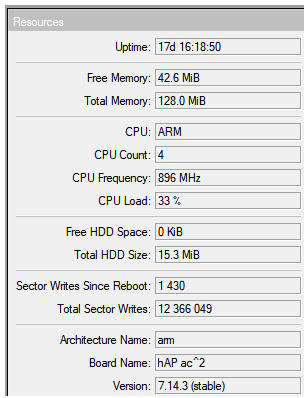
i am very happy with the performance of wifi-qcom-ac package on hap ac2 on 7.14.3
but dont have free memory anymore
Netinstall and applying exact same config might also help.
(NO restore, apply config from earlier made export)
Hm weird, no performance issues?
I have no idea what else could cause it…
no, but
i disabled graphing, no disk logging , i use a very simple config, i only use it as a wireless access-point, only fast-path bridging, no tracking, no rules etc
I have even less (440 KiB) and it’s not affecting performance, create topic with issue description and full config, maybe someone will help.
Thanks! Weird… I’ve created a thread.
Wait for 7.15 (or install the RC). It frees up some disk memory. That’s why my AC devices still run on 7.13.5 - because 7.14 consumed too much disk space.
What helped in my case is reinstalling RouterOS with netinstall. It somehow freed some space that was previously unavailable. Upgrade to 7.15 reduced space usage even further. So problem solved for now.
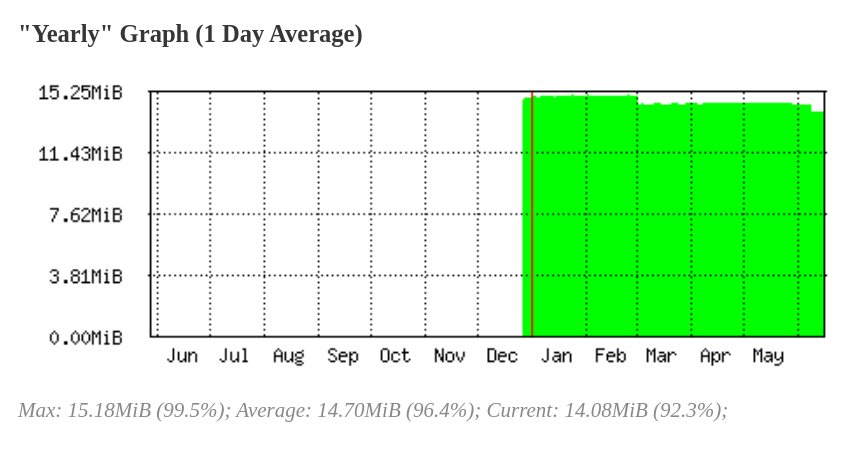
Yes, netinstall helps. Because the RouterOS configuration is in a kind of “database” which tends to expand over time.
E.g. when you add some config and then remove it, the space remains occupied in the flash. Also because you can “undo” the remove.
Besides that, when you have v6 on a device and upgrade to v7, a new database is created for v7 but the v6 one is kept.
(so when you downgrade to v6 it still has its original configuration)
This all gets cleaned up when you do netinstall. But you can also export the config, reset the configuration, and import it again.
Anyway, in version 7.15 apparently some optimization was done and again about 1MB of space was found.
Incredible that they still can find so much space, maybe a new compression method or so.
For now, the hAP ac2 (the most-used device that had real problems) again works well.
Of course the problem will come back in the future. Make sure you always read the forum before upgrading to a new major release.
What keeps me amazed is how much functionality they manage to squeeze into 15MB software package.
Hopefully this problem won’t come back for at least few more years. Then I’m fine to upgrade to ax2 or whatever will be Mikrotik’s latest-greatest device.
For how long is the previous version’s configuration kept? For example, if I decide to downgrade a year later, will it resurrect a year-old config from v6? Is there any way to clean out the old configuration remotely?
P.S. What about the autosupout.rif file? Could it be created after a crash and fill up the entire flash memory, leading to a boot loop?
Few notes here since this whole 16MB flash comes up in my world…
The only thing that truly cleans things is doing netinstall. And, if want to run wifi-qcom-ac, IMO, you should go through the trouble of netinstall.
The amount of free space even if clean can still vary because not everyone is going to have the same # of bad blocks. I’ve seen swings of 100+KBs between 16MBs units, so possible one unit runs same config+packages and another cannot. For example, the routeros+wifi-qcom-ac+zerotier package combo puts the device <1MB from being full. So it’s down to how many many bad sectors there are on whether that will combo will work (and even nothing is bad, it’s still close). So if you want zerotier+wifi-qcom-ac on hAPac2… you absolutely need to do a netinstall.
I do get netinstall is PITA. Until wifi-qcom-ac, netinstall was very infrequent thing for me. I’ll offer the Linux netinstall or a RouterOS container (on another router) is often easier than Windows, but still an elongated process - hopeful once to purge V6-config/past-upgrades/graphs/etc. But since netinstall re-formats the disk - it is the ONLY way to be sure all files are removed.
RouterOS goes to memory, so even if you have no disk space, it can still generally run. Failed upgrade (& often because of being close on disk space) is how you end up in generally bootloop, and again only fix is netinstall if that happens. But in most recent V7, it is not as common as when this thread started. If you do run out of disk space after upgrade, most likely problem is save the config is lost. In fact, I have a 16MB wAPacR that’s sitting on my disk awaiting a netinstall because it has 0 disk space – device works fine — but since I cannot save anything, I cannot command a downgrade (since that requires a config write) thus the familar refrain: netinstall.
Most people want downgrading, in general, to work - so they leave the needed bit… But RouterOS does not know when/what you might want to downgrade. Since we’re talking about KBs, that make sense - except on 16MB flash things… But again a netinstall will clean up all of the actual+theoritical files that could exist and start fresh - so that the recommend way of removing the option+files needed for downgrade.
Since you generally only run into disk space issues if you want to run wifi-qcom-ac – while that’s better – it’s just a strain with the 16MB flash. So even if everything clean/netinstall’ed, there still not a lot of breathing room. While still quite a good device… the hAPac2 are getting older… so another option is to get some newer AX wifi AP & remove ANY wifi package from hAPac2 so it end it’s life as just a router. Or, since it has USB, it be make a fine Dude server for some new hAPax3/2. Or, even container fit, if there is no Wi-Fi, so it run HomeAssistant/Pi-Hole or any of RPi-kinda things on hAPac2 containers. Just something to consider here. These 16MB units are still pretty close to be maxed on disk with the recent V7s & that ain’t going to get better over time…
The same problem again with version 7.17.1. Before upgrade I have 296KiB free on version 7.16.1. I do not keep any files on flash disk. Upgrade fails due to low disk space. My backup is 256 KiB in size which seems to be normal.
Make backup, netinstall 7.17.1 and restore backup.
That’s not how I see it.
Export config
Netinstall
Import config again.
Restoring backup will bring the binary image back which caused the troubles.
The whole “restore” process is complex… This decision would depend if user had an /certificates installed. An “:export show-sensitive” does not contain those… so a “:import savedconfig.rsc” alone may not be as complete. And sometime an :import is not always “fool proof”. While restoring a .backup file is easier and more complete…now the question is whether that “completeness” be a problem here. i.e. it restoring all the same “old”/unused files wasting space - now RouterOS may be smart about this when restoring a backup — but IDK.
But I’d imagine the netinstall re-formating will free space, so it may not matter…
Wondering. ROS should contain a cleanup command or something alike. And upgrade procedure should check for available space before even doing an attempt and cleanup junk when needed by itself. Instead it cancels with “not enough space” message. From 7.17.0 to 7.17.1 I lost another about 70kb of free-space on flash. I would not expect this from a patch release. But maybe it is because of the resized boot partition. This is all very irritating.
Actually it does perform some clean up, when I tried to upgrade from 7.16->7.17 it failed but some space was released and on 2nd attempt was successful without any manual cleanup or config change. Some small space was released just enough for new ver. to fit, but free space was too small and I reverted to 7.16.
I think issue is with config storage DBs, these database files needs to be shrinked after some time, like SQLite VACUUM command. This is suspect because backup file doesn’t backup whole system, just config/certs and when I reverted to 7.16 with netinstall with improt of same config and certs I made new backup, backup file was about 40Kb smaller from backup made before upgrade to 7.17 (same config for same ROS ver).
Indeed there should be some way to vacuum the database. Remove all deleted records and undo history.
When there is not enough space in the flash it can be done using the ramdisk as temporary storage.
(of course with the risk that the config may be lost when the power is interrupted at the wrong moment)
Thank you pe1chl. Reformatting disk indeed freed up around 500 KiB. This allowed me to install 7.17.1. But after install free space is only 124 KiB, so probably the problem will return with 7.18.x, as this version is again bigger.