abbio90
November 25, 2025, 10:01am
1
Hi everyone, I wanted to test this setup in production where I can't access the operator router and can't change the internal LAN subnet.
Essentially, I need to insert a MikroTik between the LAN and WAN, maintaining the same class but isolating the segments. I used VRF with routing leakage, but I'm unsure if the configuration is correct.
/ip pool add name=pool1 ranges=10.246.159.2-10.246.159.10
/ip dhcp-server add address-pool=pool1 interface=ether2 lease-time=12h30m name=server1
/ip vrf add interfaces=ether2 name=vrf-lan
/ip address
add address=10.246.159.1/24 interface=ether2 network=10.246.159.0
add address=10.246.159.245/24 interface=ether1 network=10.246.159.0
/ip dhcp-server network add address=10.246.159.0/24 dns-server=10.246.159.1 domain=WORKGROUP gateway=10.246.159.1 netmask=24
/ip dns set allow-remote-requests=yes servers=1.1.1.1 vrf=vrf-lan
/ip firewall mangle
add action=mark-connection chain=prerouting connection-mark=no-mark in-interface=ether2 new-connection-mark=vrf-lan-conn passthrough=yes
add action=mark-routing chain=prerouting connection-mark=vrf-lan-conn in-interface=ether1 new-routing-mark=vrf-lan passthrough=no
/ip firewall nat add action=masquerade chain=srcnat out-interface=ether1 src-address=10.246.159.0/24
/ip route
add disabled=no dst-address=0.0.0.0/0 gateway=10.246.159.50@main routing-table=vrf-lan suppress-hw-offload=no
add disabled=no distance=1 dst-address=0.0.0.0/0 gateway=10.246.159.50 pref-src="" routing-table=main scope=30 suppress-hw-offload=no target-scope=10 vrf-interface=ether1
With this configuration, the PC connects to the internet without any problems after the Mikrotik connection.
What's not working?
[admin@MikroTik] > ping 8.8.8.8 vrf=vrf-lan src-address=10.246.159.1 SEQ HOST SIZE TTL TIME STATUS 0 8.8.8.8 timeout 1 8.8.8.8 timeout sent=2 received=0 packet-loss=100%
would the rest be correct?
Hey abbio90,
Thanks for sharing your setup, it looks pretty solid overall. Using VRF with routing leakage is the right approach when you want to keep the same subnet for WAN and LAN but still isolate the segments.
About your ping issue: usually when you can access the internet from the PC but can’t ping the LAN gateway from the Mikrotik itself, it’s often related to VRF routing or firewall rules . A few things to check:
Make sure the interface ether2 is actually assigned to vrf-lan before adding the IP and DHCP , otherwise the VRF won’t see it correctly.
Check if your firewall mangle and NAT rules are applied to the correct interfaces and routing tables — sometimes passthrough=no can block certain traffic unexpectedly.
Try pinging with ping 10.246.159.245 vrf=vrf-lan (the ether1 address) to see if the VRF leakage works correctly.
Otherwise, the rest of the config looks okay — DHCP, DNS, and NAT should work fine for the PC as you mentioned.
VRFs can be tricky when LAN and WAN share the same subnet, but your approach is correct. Small adjustments in routing and firewall rules usually fix the ping issue.
The response to your ping cannot be routed.
This is because mark-routing isn't applied to it. It isn't applied because the connection mark is not set. The conn mark is not set because the generated packet doesn't pass through prerouting, and doesn't match the in-interface.
jaclaz
November 25, 2025, 9:18pm
4
And this Is where you can visually see the possible paths of packets, in and out:
As a side note, I am not sure that It can be adapted to your case, and I don't know if It Is right, but It works just fine for me:Attempting to evolve from caveman's failover
Attempting to evolve from caveman's failover - #37 by jaclaz
abbio90
November 26, 2025, 8:36am
5
Make sure the interface ether2 is actually assigned to vrf-lan before adding the IP and DHCP, otherwise the VRF won’t see it correctly.
This is ok
Try pinging with ping 10.246.159.245 vrf=vrf-lan (the ether1 address) to see if the VRF leakage works correctly.
ether1 is the WAN on the main table, so without VRF. If I ping with source 10.246.159.245 without specifying the VRF, it's ok.
The response to your ping cannot be routed.
This is because mark-routing isn't applied to it. It isn't applied because the connection mark is not set. The conn mark is not set because the generated packet doesn't pass through prerouting, and doesn't match the in-interface.
I'm aware that ping doesn't work because it isn't processed by the mangle rules. In fact, I tried adding this rule, but it didn't work.
/ip firewall mangle add chain=output src-address=10.246.159.1 routing-mark=vrf-lan connection-mark=no-mark new-connection-mark=vrf-lan-conn passthrough=yes
You don't need the mangle rule for chain=output. What you need in addition to the configuration in the original post is to have the route:
/ip route
add dst-address=10.246.159.1/32 gateway=vrf-lan@vrf-lan routing-table=main
and both these will work:
/ping 8.8.8.8 vrf=vrf-lan src-address=10.246.159.1
/tool traceroute 8.8.8.8 vrf=vrf-lan src-address=10.246.159.1
Also, as an alternative, if you only need to reach the gateway 10.246.159.50 and no other 10.246.159.0/24 addresses on ether1. Then you don't even need a VRF setup and mangle. This modified setup from your OP should be enough:
/ip pool add name=pool1 ranges=10.246.159.2-10.246.159.10
/ip dhcp-server add address-pool=pool1 interface=ether2 lease-time=12h30m name=server1
# removed: /ip vrf add interfaces=ether2 name=vrf-lan

/ip address
add address=10.246.159.1/24 interface=ether2 network=10.246.159.0
# changed: add address=10.246.159.245/24 interface=ether1 network=10.246.159.0
add address=10.246.159.245/32 interface=ether1 network=10.246.159.50

/ip dhcp-server network add address=10.246.159.0/24 dns-server=10.246.159.1 domain=WORKGROUP gateway=10.246.159.1 netmask=24
# changed: /ip dns set allow-remote-requests=yes servers=1.1.1.1 vrf=vrf-lan
/ip dns set allow-remote-requests=yes servers=1.1.1.1

#removed: /ip firewall mangle
#removed: add action=mark-connection chain=prerouting connection-mark=no-mark in-interface=ether2 new-connection-mark=vrf-lan-conn passthrough=yes
#removed: add action=mark-routing chain=prerouting connection-mark=vrf-lan-conn in-interface=ether1 new-routing-mark=vrf-lan passthrough=no

/ip firewall nat add action=masquerade chain=srcnat out-interface=ether1 src-address=10.246.159.0/24
/ip route
# removed: add disabled=no dst-address=0.0.0.0/0 gateway=10.246.159.50@main routing-table=vrf-lan suppress-hw-offload=no
# changed: add disabled=no distance=1 dst-address=0.0.0.0/0 gateway=10.246.159.50 pref-src="" routing-table=main scope=30 suppress-hw-offload=no target-scope=10 vrf-interface=ether1
add dst-address=0.0.0.0/0 gateway=10.246.159.50
In this setup, if you want the devices in LAN to also be able to access 10.246.159.50 (for example to manage that gateway), add this entry:
/ip arp
add address=10.246.159.50 interface=ether2 published=yes
Repeat if you have additional devices in the network attached to ether1 that you want to reach from LAN, for example 10.246.159.51:
/ip route add dst-address=10.246.159.51/32 gateway=ether1 scope=10 target-scope=5
/ip arp add address=10.246.159.51 interface=ether2 published=yes
I don't want to comment on whether OP actually needs vrfs; depending on the use case, who knows.
The output mangle rule would work if it was written in a correct way.
More generally, this is a usual "garden path". It's tempting (almost intuitive) to try to test all sorts of vrf behavior by using e.g. ping in vrf to verify what the routing would look like were this packet emitted in a vrf. It's ultimately not very useful. It's almost a cliche to test vrfs from outside interfaces. If you want to test it from inside the router, usually a veth is used for this.
I agree with what you wrote about the usefulness of testing VRF with ping from the router.
About the mangle rule: I assume the mange chain=output rule would look like this?
/ip firewall mangle
add action=mark-connection chain=output connection-mark=no-mark \
    dst-address=!10.246.159.0/24 src-address=10.246.159.1 \
    new-connection-mark=vrf-lan-conn passthrough=yes
However, with this in place, this works:
/tool traceroute 8.8.8.8 vrf=vrf-lan src-address=10.246.159.1
but this does not (timeout):
/ping 8.8.8.8 vrf=vrf-lan src-address=10.246.159.1
It's not due to ICMP vs UDP, because this also works:
/tool traceroute 8.8.8.8 vrf=vrf-lan src-address=10.246.159.1 protocol=icmp
With the /ping command, the mangle rule has no hit. I also upgraded to 7.21beta9 to use the 8.8.8.8@vrf-lan syntax but the result is the same (traceroute works but ping doesn't). With the gateway=vrf-lan@vrf-lan route both worked.
The ping tool is special. The old documentation (wiki) had some allusions to it.
abbio90
November 26, 2025, 4:59pm
10
Here I am, I did some tests, in fact I confirm what @CGGXANNX said regarding the output rules and the operation is exactly as he described.
Unless someone finds a way to make the output rule work with ping, for now I'm sticking with the vrf-lan@vrf-lan gateway.
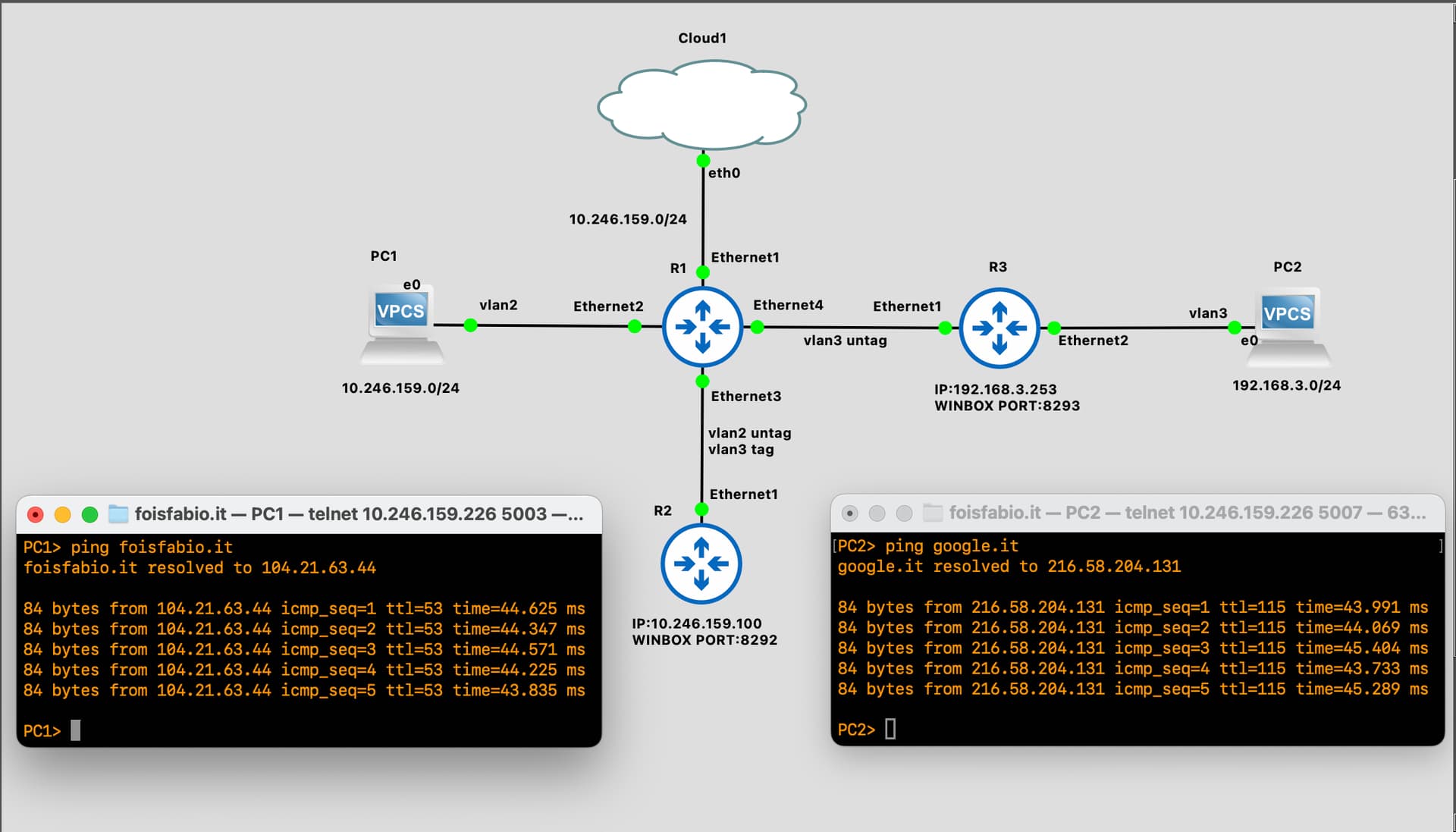
I decided to complicate the topology to make it more adaptable to a typical production topology.
The topology was transformed as shown in the following diagram, adding the dstnat (port forwarding) of R2 and R3 used for testing on gns3 (since I don't have a test web server) and VLAN filtering.
Can you confirm that the configuration I performed is correct? From my tests, it works perfectly.
I've attached the code below:
/interface bridge
add name=bridge-main pvid=2 vlan-filtering=yes
/interface ethernet
set [ find default-name=ether1 ] comment=wan
set [ find default-name=ether2 ] comment=to-pc1
set [ find default-name=ether3 ] comment=to-R2
set [ find default-name=ether4 ] comment=to-R3
/interface vlan
add interface=bridge-main name=vlan2-lan vlan-id=2
add interface=bridge-main name=vlan3-guest vlan-id=3
add interface=bridge-main name=vlan101-wan vlan-id=101
/interface list
add name=WAN
/ip pool
add name=pool-lan ranges=10.246.159.20-10.246.159.100
add name=pool-guest ranges=192.168.3.2-192.168.3.254
/ip dhcp-server
add address-pool=pool-lan interface=vlan2-lan lease-time=12h30m name=dhcp-server-lan
add address-pool=pool-guest interface=vlan3-guest name=dhcp-server-guest
/ip vrf
add interfaces=vlan2-lan name=vrf-lan
/interface bridge port
add bridge=bridge-main interface=ether1 pvid=101
add bridge=bridge-main interface=ether2 pvid=2
add bridge=bridge-main interface=ether3 pvid=2
add bridge=bridge-main interface=ether4 pvid=3
/interface bridge vlan
add bridge=bridge-main tagged=bridge-main untagged=ether2,ether3,ether4 vlan-ids=2
add bridge=bridge-main tagged=bridge-main,ether2,ether3 untagged=ether4 vlan-ids=3
add bridge=bridge-main tagged=bridge-main untagged=ether1 vlan-ids=101
/interface list member
add interface=vlan101-wan list=WAN
/ip address
add address=10.246.159.1/24 interface=vlan2-lan network=10.246.159.0
add address=10.246.159.245/24 interface=vlan101-wan network=10.246.159.0
add address=192.168.3.1/24 interface=vlan3-guest network=192.168.3.0
/ip dhcp-server network
add address=10.246.159.0/24 dns-server=10.246.159.1 domain=WORKGROUP gateway=10.246.159.1 netmask=24
add address=192.168.3.0/24 dns-server=1.1.1.1,8.8.8.8 domain=GUESTGROUP gateway=192.168.3.1 netmask=24
/ip dns
set allow-remote-requests=yes servers=1.1.1.1 vrf=vrf-lan
/ip firewall address-list
add address=cloud1.foisfabio.it list=white-list
add address=cloud2.foisfabio.it list=white-list
add address=10.246.159.0/24 list=inside-list
add address=192.168.3.0/24 list=inside-list
add address=10.246.159.245 list=public-ip
add address=5.90.157.104 list=white-list
/ip firewall filter
add action=accept chain=input comment=base-firewall connection-state=established,related
add action=drop chain=input connection-state=invalid
add action=accept chain=input comment=allow-icmp-from-all in-interface-list=WAN protocol=icmp
add action=accept chain=input dst-port=8291,22 in-interface-list=WAN protocol=tcp src-address-list=white-list
add action=drop chain=input in-interface-list=WAN
/ip firewall mangle
add action=mark-connection chain=prerouting comment=routing-leaking-main-lan connection-mark=no-mark in-interface=vlan2-lan new-connection-mark=vrf-lan-conn
add action=mark-connection chain=prerouting comment=routing-leaking-port-forwarding-to-R2 connection-mark=no-mark dst-address-list=public-ip dst-port=8292 new-connection-mark=vrf-lan-conn protocol=tcp
add action=mark-routing chain=prerouting connection-mark=vrf-lan-conn in-interface=vlan101-wan new-routing-mark=vrf-lan passthrough=no
/ip firewall nat
add action=masquerade chain=srcnat comment=main-nat out-interface=vlan101-wan src-address-list=inside-list
add action=dst-nat chain=dstnat comment=dstnat-R2 dst-address-list=public-ip dst-port=8292 in-interface=vlan101-wan protocol=tcp src-address-list=white-list to-addresses=10.246.159.100
add action=dst-nat chain=dstnat comment=dstnat-R3 dst-address-list=public-ip dst-port=8293 in-interface=vlan101-wan protocol=tcp src-address-list=white-list to-addresses=192.168.3.253
/ip route
add comment=route-return-vrf1-to-main disabled=no distance=1 dst-address=0.0.0.0/0 gateway=10.246.159.50 routing-table=vrf-lan scope=30 suppress-hw-offload=no target-scope=10
add comment=default-route-main disabled=no distance=1 dst-address=0.0.0.0/0 gateway=10.246.159.50 pref-src="" routing-table=main scope=30 suppress-hw-offload=no target-scope=10 vrf-interface=ether1
add comment=route-for-output-icmp-lan-packet disabled=no distance=1 dst-address=10.246.159.1/32 gateway=vrf-lan@vrf-lan routing-table=main scope=30 suppress-hw-offload=no target-scope=10
/ip service
set ftp disabled=yes
set telnet disabled=yes
set www disabled=yes
set api disabled=yes
set api-ssl disabled=yes
/system identity
set name=StessaStoria,StessoPosto,StessoBar
nichky
November 28, 2025, 10:47am
11
CGGXANNX
/ip route add dst-address=10.246.159.1/32 gateway=vrf-lan@vrf-lan routing-table=mainand both these will work:
This works from the router itself, but not from the LAN./routing/rule . Is there a different way we can approach this?
Do you mean that if in your main VRF you have another LAN, let's say 192.168.88.1/24 on ether5 (or bridge if you want), and from a device in this LAN (for example 192.168.88.20) you want to reach (ping) the address 10.246.159.1 of vrf-lan but can't, although the route
/ip route add dst-address=10.246.159.1/32 gateway=vrf-lan@vrf-lan routing-table=main
is already added? This is normal because after the ICMP packet sent from 192.168.88.20 reaches 10.246.159.1, the response has no valid path to go back to 192.168.88.20.
You can add a route leak in vrf-lan for destination 192.168.88.0/24:
/ip route add dst-address=192.168.88.0/24 gateway=ether5@main routing-table=vrf-lan
And pinging from 192.168.88.20 to 10.246.159.1 will work.
Of course, if you don't want to leak the route to 192.168.88.0/24 from vrf-lan, then you'll need to solve with mangle rules instead of the route leak (to make sure only the responses uses the route in main).
nichky
November 29, 2025, 11:54am
13
@CGGXANNX
sorry i was referring to:
Also on your explanais, does not work for me.
/ip route add dst-address=192.168.88.0/24 gateway=ether5@main routing-table=vrf-lan
my set up:
In the OP's configuration that LAN is on ether2 and is in vrf-lan already and has link-local access to 10.246.259.1, nothing else needs to be done.
Could you maybe post your configuration export, because it appears to differ from the OP's.
nichky
November 29, 2025, 10:35pm
15
/interface ethernetset [ find default-name=ether1 ] comment=WANset [ find default-name=ether5 ] comment=LAN/ip vrfadd interfaces=ether1 name=vrf1/ip addressadd address=10.120.10.250/24 interface=ether1 network=10.120.10.0add address=10.120.10.1/24 disabled=yes interface=ether5 network=10.120.10.0add address=192.168.10.1/24 interface=ether5 network=192.168.10.0/ip firewall natadd action=masquerade chain=srcnat out-interface=ether1/ip routeadd disabled=yes distance=1 dst-address=0.0.0.0/0 gateway=10.120.10.50 routing-table=main scope=30 target-scope=10add disabled=no distance=1 dst-address=10.120.10.1/32 gateway=vrf1@vrf1 routing-table=main scope=30 target-scope=10add disabled=no distance=1 dst-address=192.168.10.0/24 gateway=ether5@main routing-table=vrf1 scope=30 target-scope=10add disabled=no distance=1 dst-address=192.168.10.1/32 gateway=vrf1@vrf1 routing-table=main scope=30 target-scope=10add disabled=no distance=1 dst-address=0.0.0.0/0 gateway=10.120.10.50@vrf1 routing-table=vrf1 scope=30 target-scope=10
nichky
November 30, 2025, 11:43pm
16
CGGXANNX
There's one thing that's unclear to me, and I was hoping you could help. When I have NAT enabled on the home-router , it doesn't work as expected. However, if I disable NAT and push the static route from the ISP (this is all in a lab environment), everything works fine.
/interface ethernet
Addressing the particular config in this quoted post:
This entry
is not correct / not needed. You need a route with vrf1@vrf1 in table main if you need to reach the router at the address 10.120.10.250 from main. Because 10.120.10.250 is the address you assigned to the router on ether1 (which is in vrf1) and not 10.120.10.1. So, if you have this vrf1@vrf1 entry, then it should be:
/ip route
add dst-address=10.120.10.250/32 gateway=vrf1@vrf1 routing-table=main
And is needed to reach 10.120.10.250 from main.
This is also not correct and should be removed:
because 192.168.10.1 is assigned to the router on ether5, which is in main, and is already reachable in the main default VRF.
nichky:
There's one thing that's unclear to me, and I was hoping you could help. When I have NAT enabled on the home-router , it doesn't work as expected. However, if I disable NAT and push the static route from the ISP (this is all in a lab environment), everything works fine.
Here are the required settings (from a blank router configuration) that allows devices connected to ether5 on vrf1 to access the WAN through the gateway 10.120.10.50 on ether1. I've ignored everything you had with disabled=yes in your export.
/ip vrf
add interfaces=ether5 name=vrf1
/ip address
add address=10.120.10.250/24 interface=ether1 network=10.120.10.0
add address=192.168.10.1/24 interface=ether5 network=192.168.10.0
/ip firewall nat
add action=masquerade chain=srcnat out-interface=ether1 src-address=192.168.10.0/24
/ip route
add dst-address=0.0.0.0/0 gateway=10.120.10.50
add dst-address=0.0.0.0/0 gateway=10.120.10.50@main routing-table=vrf1
add dst-address=192.168.10.0/24 gateway=ether5@vrf1 routing-table=main
That's assuming you've manually assigned static addresses (in the 192.168.10.0/24 subnet) and gateway (set to 192.168.10.1) for the devices plugged to ether5.
If you want a full configuration (can be applied to a totally blank CHR installation for example) then here is the full config with DHCP server and DNS setup too:
With DHCP server and DNS
/ip pool
add name=dhcp_pool0 ranges=192.168.10.100-192.168.10.150
/ip dhcp-server
add address-pool=dhcp_pool0 interface=ether5 name=dhcp1
/ip vrf
add interfaces=ether5 name=vrf1
/ip address
add address=10.120.10.250/24 interface=ether1 network=10.120.10.0
add address=192.168.10.1/24 interface=ether5 network=192.168.10.0
/ip dhcp-client
add add-default-route=no interface=ether1
/ip dhcp-server network
add address=192.168.10.0/24 dns-server=192.168.10.1 gateway=192.168.10.1
/ip dns
set allow-remote-requests=yes servers=1.0.0.1,1.1.1.1 vrf=vrf1
/ip firewall nat
add action=masquerade chain=srcnat out-interface=ether1 src-address=192.168.10.0/24
/ip route
add dst-address=0.0.0.0/0 gateway=10.120.10.50
add dst-address=0.0.0.0/0 gateway=10.120.10.50@main routing-table=vrf1
add dst-address=192.168.10.0/24 gateway=ether5@vrf1 routing-table=main
Please note that in this case we use the router as DNS server for devices connected to ether5, that's why /ip dns set vrf=vrf1 is needed. If instead of that you give the client the DNS server information like 8.8.8.8 in /ip dhcp-server network then you don't even need the special /ip dns setup.
What do you want to proceed next from this setup? do you want to configure the 10.120.10.0/24 subnet on ether5 too?
nichky
December 3, 2025, 10:35am
19
There's nothing further to add on that. Thanks
I have one more question - Is there a way to access devices like Yealink phones if the management interface is in a VRF, while the phones themselves are on the main routing table?
I'm want accessing them via a web proxy using the IP of the management interface.
abbio90
December 5, 2025, 2:42pm
20
going back to my configuration, I can't reach 192.168.3.0/24 even if I set the route:
/ip route
add disabled=no distance=1 dst-address=192.168.3.0/24 gateway=vlan3-guest@main \
    routing-table=vrf-lan scope=30 suppress-hw-offload=no target-scope=10
I attach the complete configuration:
/interface bridge
add name=bridge-main pvid=2 vlan-filtering=yes
/interface ethernet
set [ find default-name=ether1 ] comment=wan
set [ find default-name=ether2 ] comment=to-pc1
set [ find default-name=ether3 ] comment=to-R2
set [ find default-name=ether4 ] comment=to-R3
/interface wireguard
add listen-port=4066 mtu=1420 name=wg1
/interface vlan
add interface=bridge-main name=vlan2-lan vlan-id=2
add interface=bridge-main name=vlan3-guest vlan-id=3
add interface=bridge-main name=vlan101-wan vlan-id=101
/interface list
add name=WAN
/ip pool
add name=pool-lan ranges=10.246.159.20-10.246.159.100
add name=pool-guest ranges=192.168.3.2-192.168.3.254
/ip dhcp-server
add address-pool=pool-lan interface=vlan2-lan lease-time=12h30m name=dhcp-server-lan
add address-pool=pool-guest interface=vlan3-guest name=dhcp-server-guest
/ip vrf
add interfaces=vlan2-lan name=vrf-lan
/interface bridge port
add bridge=bridge-main interface=ether1 pvid=101
add bridge=bridge-main interface=ether2 pvid=2
add bridge=bridge-main interface=ether3 pvid=2
add bridge=bridge-main interface=ether4 pvid=3
/interface bridge vlan
add bridge=bridge-main tagged=bridge-main untagged=ether2,ether3,ether4 vlan-ids=2
add bridge=bridge-main tagged=bridge-main,ether2,ether3 untagged=ether4 vlan-ids=3
add bridge=bridge-main tagged=bridge-main untagged=ether1 vlan-ids=101
/interface list member
add interface=vlan101-wan list=WAN
/interface ovpn-server server
add mac-address=FE:7C:C2:54:CA:6F name=ovpn-server1
/interface wireguard peers
add allowed-address=10.110.110.2/32 client-address=10.110.110.2/32 client-endpoint=home.foisfabio.it client-keepalive=25s client-listen-port=4066 interface=wg1 name=peer-road-warrior private-key=\
    "MBxxLvB7AvsncC3W4Md8VVJ+8MGZRy3JFHSMsJkI/2Q=" public-key="3vPBXbx0FeDKzj5PsYdfP78xyCFCfBTBETES0SmQN2A=" responder=yes
/ip address
add address=10.246.159.1/24 interface=vlan2-lan network=10.246.159.0
add address=10.246.159.245/24 interface=vlan101-wan network=10.246.159.0
add address=192.168.3.1/24 interface=vlan3-guest network=192.168.3.0
add address=10.110.110.1/24 interface=wg1 network=10.110.110.0
/ip dhcp-server network
add address=10.246.159.0/24 dns-server=10.246.159.1 domain=WORKGROUP gateway=10.246.159.1 netmask=24
add address=192.168.3.0/24 dns-server=1.1.1.1,8.8.8.8 domain=GUESTGROUP gateway=192.168.3.1 netmask=24
/ip dns
set allow-remote-requests=yes servers=1.1.1.1 vrf=vrf-lan
/ip firewall address-list
add address=cloud1.foisfabio.it list=white-list
add address=cloud2.foisfabio.it list=white-list
add address=10.246.159.0/24 list=inside-list
add address=192.168.3.0/24 list=inside-list
add address=10.246.159.245 list=public-ip
add address=10.110.110.0/24 list=wg-list
/ip firewall filter
add action=accept chain=input comment=base-firewall connection-state=established,related
add action=drop chain=input connection-state=invalid
add action=accept chain=input comment=allow-icmp-from-all in-interface-list=WAN protocol=icmp
add action=accept chain=input comment=allow-winbox-ssh-from-white-list dst-port=8291,22 in-interface-list=WAN protocol=tcp src-address-list=white-list
add action=accept chain=input comment=allow-wg dst-port=4066 in-interface-list=WAN protocol=udp
add action=drop chain=input in-interface-list=WAN
/ip firewall mangle
add action=mark-connection chain=prerouting comment=routing-leaking-main-lan connection-mark=no-mark in-interface=vlan2-lan new-connection-mark=vrf-lan-conn
add action=mark-connection chain=prerouting comment=routing-leaking-port-forwarding-to-R2 connection-mark=no-mark dst-address-list=public-ip dst-port=8292 new-connection-mark=vrf-lan-conn protocol=tcp
add action=mark-routing chain=prerouting connection-mark=vrf-lan-conn in-interface=vlan101-wan new-routing-mark=vrf-lan passthrough=no
/ip firewall nat
add action=masquerade chain=srcnat comment=main-nat out-interface=vlan101-wan src-address-list=inside-list
add action=masquerade chain=srcnat comment=wg-nat src-address-list=wg-list
add action=dst-nat chain=dstnat comment=dstnat-R2 dst-address-list=public-ip dst-port=8292 in-interface=vlan101-wan protocol=tcp src-address-list=white-list to-addresses=10.246.159.100
add action=dst-nat chain=dstnat comment=dstnat-R3 dst-address-list=public-ip dst-port=8293 in-interface=vlan101-wan protocol=tcp src-address-list=white-list to-addresses=192.168.3.253
/ip ipsec profile
set [ find default=yes ] dpd-interval=2m dpd-maximum-failures=5
/ip route
add comment=route-return-vrf1-to-main disabled=no distance=1 dst-address=0.0.0.0/0 gateway=10.246.159.50 routing-table=vrf-lan scope=30 suppress-hw-offload=no target-scope=10
add comment=default-route-main disabled=no distance=1 dst-address=0.0.0.0/0 gateway=10.246.159.50 pref-src="" routing-table=main scope=30 suppress-hw-offload=no target-scope=10 vrf-interface=ether1
add comment=route-for-output-icmp-lan-packet disabled=no distance=1 dst-address=10.246.159.1/32 gateway=vrf-lan@vrf-lan routing-table=main scope=30 suppress-hw-offload=no target-scope=10
add comment=route-return-to-vlan3-main disabled=no distance=1 dst-address=192.168.3.0/24 gateway=vlan3-guest routing-table=vrf-lan scope=30 suppress-hw-offload=no target-scope=10
add comment=route-return-wg1-main disabled=no distance=1 dst-address=10.110.110.0/24 gateway=wg1 routing-table=vrf-lan scope=30 suppress-hw-offload=no target-scope=10
/ip service
set ftp disabled=yes
set telnet disabled=yes
set www disabled=yes
set api disabled=yes
set api-ssl disabled=yes
/system identity
set name=StessaStoria,StessoPosto,StessoBar
furthermore, from wireguard I cannot reach the network under vrf-lan even though I added the route:
add comment=route-return-wg1-main disabled=no distance=1 dst-address=10.110.110.0/24 gateway=wg1 routing-table=vrf-lan scope=30 suppress-hw-offload=no target-scope=10