As per title:
Changing rights / disable / delete the users has no effect on already logged in users.
For example: If you open a terminal, or even winbox, with a user and this user's permissions are changed, or even the user is disabled or deleted,
this user will still be logged into the terminal or winbox until log out.
If is one administrative user, he would still have full powers, also if the user is deleted
To my knowledge, it’s already like that for as long as I can remember.
One of the very first things I do when configuring a new device is creating a new user and delete admin.
But I am logged in as admin at that point ?! So I can delete myself ?
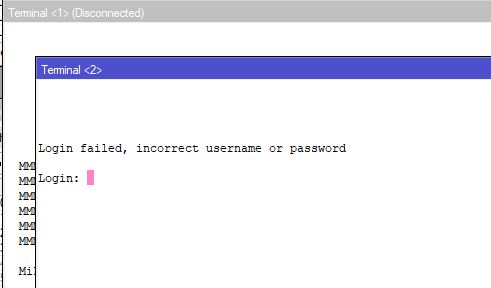
When you open terminal from that session, it will ask for new user and passwd.
But Winbox lets you continue just fine.
I think this behavior is as old as UNIX /etc/passwd .
Right or wrong – IDK – but RouterOS has done this forever. Existing “login sessions” (winbox/terminal/ssh) keep their authentication (since it isn’t re-checked). New ones fail. A “New Terminal” in winbox is a new session, so you’ll see a prompt for creds for new logins after some change to /users.
I don’t know what branding has to do with this topic.
So far this is only about a new feature request, as you discovered yourself (no easy way to kill an active user session).
Anyway, one could kill the connection using the firewall, or even cut access to the management VPN for that user, as a good admin should have.
No “security issue” .
I wrote a small script that detect logged in users that do not exist in /users:
::foreach item in=[/user/active find] do={:if ([/user find name=[/user/active get $item]->"name"]) do={} else={:put "Warning: found a removed user(s) being still be logged in: $[:tostr [/user/active get $item]]"}}
Warning: found a removed user that is still logged in: .id=*3;address=192.192.0.11;group=winbox;name=test;radius=false;via=winbox;when=2023-08-07 12:01:38
This could be run in schedule and write to the log.
Removing the connection in connection tracking does not work. The removed user can reconnect even while the connection is gone.
Mikrotik should allow to remove the active session in /user/active or/and, check on every reconnect if the user still exists or that changes in the rights are made.
And a check for changing groups:
:foreach item in=[/user/active find] do={:if ([/user find group=[/user/active get $item]->"group"]) do={} else={:put "Warning: found a logged in user using a wrong group. Ask user to disconnect and reconnect to the services: $[:tostr [/user/active get $item]]"}}
Then this could be adapted to find first if the user still exists or not. If user exists then the policies can be checked knowing group/radius/via from /user/active
no, not at all!
rOS needs a “kill session” since FOREVER! even it would be on CLI only … but not even that is available and it drives me crazy.
in winbox there also should be a button to kill sessions - especially if i am the user with “full” privileges
But I think the CLI does work – just stupidly – but if you’re trying to kill the current session and/or winbox, somethings go to an on-error=. So a more complex expression should work:
/user/active {:local lsess [print as-value where name~".*"]; :foreach i in=$lsess do={:do {
        request-logout ($i->".id")
    } on-error={}}}
Now if you don’t want all sessions change the “where” clause or name~ regex.
@Amm0, thank for finding that and it indeed closes the terminal (CLI) in the Winbox of the user that does not exits anymore. Disabled user is an other possible option.
This is can select the correct user to be booted from the terminal. Winbox seems to cache stuff and with that it can reconnect.
:foreach item in=[/user/active find] do={:if ([/user find name=[/user/active get $item]->"name"]) do={} else={:do {/user/active request-logout $item} on-error={:put "bugger"}}}
bugger
01:12:47 echo: system,error,critical login failure for user test from 192.168.0.11 via local
Displayed in the second Winbox, where the user has been requested to log out:
Then who want to do more tests which other connections it closes. It does not close Winbox. Terminal is closed and logging in again is not allowed.
In all seriousness:
I am quite aware a reboot can not be done on some devices whenever you want.
But equally so I can not understand an admin of such a device would have user profiles lingering around which would potentially require such actions to get rid of an unwanted user session.
Because from what I see, it's still left unanswered to deal with winbox-sessions. An unwanted person having such a session open, can potentially still do whatever he/she wants (given the user has/had admin rights). Even revert all changes earlier admin just made.
Given ROS is not really an environment where you can add a lot of granularity/functionality/handling to user profiles (unlike the underlying Linux environment), the only way out I currently see with my still limited knowledge of ROS is ... reboot. Like it or not.
With all the consequences it has, obviously. But sometimes that's the better choice.
Whatever environment, if you got unwanted visitors on your devices and the only way to get out of the loop is to reboot the systems, I want to see an admin who choses NOT to do so while he sees loads of money draining away because of business interruptions.
As it happens to be: my client got news yesterday afternoon from a MAJOR WORLDWIDE player in the adhesive business indicating they will bring all their systems off line for a WEEK because of hacker attack. All their systems potentially compromised. Production facilities worldwide down. Even their VPN/LAN/Wifi environment (probably some central authentication system in the background which controls everything).
I am pretty sure the moment they discovered the hack, some systems WILL have been SHUT DOWN at the moment only to be rebooted in an isolated manner.
I found it very disturbing that this tread was closed while I was still very active with this, even while the problem did not effect me directly.
Mikrotik could activate short time, the options to logout removed users/disabled users automaticly. First in local and other services.
An other thing is services that are left open and there should be a tool to lock or close those after a set time.
Winbox and maybe Web are caching and can hold open the connection. There then should be option select current behavior or new behavior rechecking rights every so many minutes. If rights change then the user have to login again or the session is blocked after a timeout.

 .
. .
.