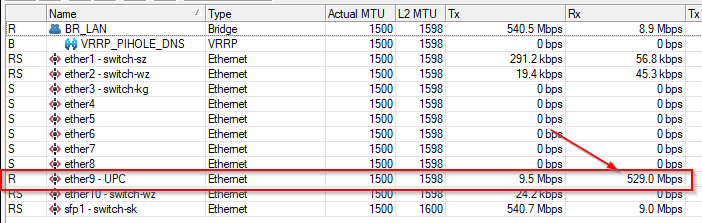
Speed drop after update to 7.1stable

I did already before.

How is this related when I even do NOT hit the cpu limit with my system. I did the test again with 7.1 and it maxes out at around 320MBit with 70% CPU.
So why not 100% CPU?

Please don’t blame me but I do not get the point …-

cheers

It will be a CPU limit if any one of the CPU cores is maxed out. Your router has two cores. You have to go into System->Resources->CPU button and look at the CPU load for each core. If either core goes to 100% (which means that your total utilization is at 50%) then it is a CPU limit. Many processes can only work on a single core and cannot be spread across different cores. Things like managing traffic on a single physical interface are often bound to one CPU core and therefore the interface traffic will not be able to go higher if that core is at 100%.

You have to ignore the CPU% in the top right corner of winbox and look at the percent for each core instead. The winbox display is near useless because it doesn’t show you if one of the cores is maxed. That 70% that you saw is an average across the two cores, so it could happen from one core at 100% usage and the other at 40% usage.

FYI - The “Building Your First Firewall” page has a much more complicated firewall than MikroTik devices normally come preconfigured with, with many more rules. I generally prefer the MikroTik default firewall to the one on that page. I’m not saying the one on that page is bad, but it goes overboard, especially if you are worried about performance. That is why I shared the rules with you instead of sending you to that page.

Hmm I did not post the cpu from winbox but from /tool profile (maybe you’ve overseen)
And I posted also in the very first post of this topic that the difference with even DISABLED firewall is not worth mentioning :slight_smile:

Ok I’ve looked to CPU Resources via console now and this even draws the same picture. cpu does not max out to 100%

[admin@router-main] /system/resource/cpu> print 
Columns: CPU, LOAD, IRQ, DISK
#  CPU   LOAD  IRQ  DISK
0  cpu0  78%   40%  0%  
1  cpu1  64%   55%  0%

and just for reference so no firewall could influence the behaviour - here the results with completely disabled firewall

[admin@router-main] /system/resource/cpu> print 
Columns: CPU, LOAD, IRQ, DISK
#  CPU   LOAD  IRQ  DISK
0  cpu0  76%   72%  0%  
1  cpu1  62%   47%  0%

so there is not really a noticeable difference.

Cheers

Did you disable your layer 7 rule as well for your test?

Of course

Cheers

Maybe I’ve time next week to reset the router completely to factory reset and test again.
I’ll update you with my results then.

Anyhow - If really a new device is needed - which one would you suggest? RB4011?
Cheers

This doesn’t seem to be a v7 issue as it is happening on both versions (in v6 with route cache off). It must be something config related. Can you post your full config? Also, try disabling the LCD (I recall some people had reduced performance with the LCD on on the RB2011 model), and I saw traffic accounting in your processes list, if you could ensure that is disabled as well.

If I had not seen it with my own eyes, I would never have believed that disabling the LCD had any effect. But it did!
With disabled LCD I got ~500Mbit at my first speedtest. Unfortunately it looks like this was a one-time shot. I was not able to reproduce it (even with some JDownloader download tests).
But anyhow I do get more then before. Around ~400 - 450MBit. Maybe there is still something to “tune”.

I also

Here is my whole config for reference. I’ve deleted my firewall adress lists (because the firewall was deleted / disabled at this point (I left only the fasttrack rules in place because without them speed dropped to 140MBit)), dhcp-leases and obfuscated my domain-things for privacy reasons.

# dec/11/2021 16:44:04 by RouterOS 7.1
# software id = LVGI-H82J
#
# model = RouterBOARD 3011UiAS
# serial number = B8950BD1D59A
/interface bridge add name=BR_LAN priority=0xF000 vlan-filtering=yes
/interface ethernet set [ find default-name=ether1 ] loop-protect=off name="ether1 - switch-sz"
/interface ethernet set [ find default-name=ether2 ] name="ether2 - switch-wz"
/interface ethernet set [ find default-name=ether3 ] name="ether3 - switch-kg"
/interface ethernet set [ find default-name=ether9 ] name="ether9 - UPC"
/interface ethernet set [ find default-name=ether10 ] name="ether10 - AP-Wohnzimmer"
/interface ethernet set [ find default-name=sfp1 ] name="sfp1 - switch-sk"
/interface vlan add interface=BR_LAN name=VLAN_MGMT vlan-id=10
/interface vrrp add authentication=simple interface=VLAN_MGMT name=VRRP_PIHOLE_DNS on-backup="/ip dns set allow-remote-requests=no\r\
    \n/ip dns set servers=192.168.100.246" on-master="/ip dns set allow-remote-requests=yes\r\
    \n/ip dns set servers=1.1.1.1,9.9.9.9" version=2 vrid=2
/caps-man security add authentication-types=wpa2-psk encryption=aes-ccm group-encryption=aes-ccm name=wifi
/interface list add name=LIST_WAN
/interface list add name=LIST_LAN
/interface lte apn set [ find default=yes ] ip-type=ipv4
/interface wireless security-profiles set [ find default=yes ] supplicant-identity=MikroTik
/ip ipsec mode-config add name=l2tp-vpn-mode-config static-dns=192.168.100.246 system-dns=no
/ip ipsec profile add dh-group=modp1024 enc-algorithm=aes-256,3des name=l2tp-vpn-peer-profile
/ip ipsec proposal add enc-algorithms=aes-256-cbc,3des name=l2tp-vpn-proposal pfs-group=none
/ip kid-control add fri=6h-20h mon=6h-20h name=Sandro sat=6h-20h sun=6h-20h thu=6h-20h tue=6h-20h wed=6h-20h
/ip pool add comment="Network:   192.168.100.0/27" name=dhcp-lan ranges=192.168.100.1-192.168.100.30
/ip dhcp-server add add-arp=yes address-pool=dhcp-lan interface=VLAN_MGMT name=DHCP-LAN
/port set 0 name=serial0
/routing bgp template set default as=65530 disabled=no name=default output.network=bgp-networks
/routing table add fib name=""
/snmp community add addresses=192.168.100.210/32 encryption-protocol=AES name=phpipam write-access=yes
/system logging action add name=synology remote=192.168.100.251 remote-port=5014 src-address=192.168.100.254 target=remote
/user group set full policy=local,telnet,ssh,ftp,reboot,read,write,policy,test,winbox,password,web,sniff,sensitive,api,romon,dude,tikapp,rest-api
/user group add name=prometheus policy=read,winbox,api,!local,!telnet,!ssh,!ftp,!reboot,!write,!policy,!test,!password,!web,!sniff,!sensitive,!romon,!dude,!tikapp,!rest-api
/user group add name=homeassistant policy=read,api,!local,!telnet,!ssh,!ftp,!reboot,!write,!policy,!test,!winbox,!password,!web,!sniff,!sensitive,!romon,!dude,!tikapp,!rest-api
/interface bridge port add bridge=BR_LAN frame-types=admit-only-vlan-tagged ingress-filtering=no interface="sfp1 - switch-sk"
/interface bridge port add bridge=BR_LAN frame-types=admit-only-vlan-tagged interface="ether1 - switch-sz" pvid=10
/interface bridge port add bridge=BR_LAN frame-types=admit-only-untagged-and-priority-tagged interface="ether2 - switch-wz" pvid=10
/interface bridge port add bridge=BR_LAN frame-types=admit-only-untagged-and-priority-tagged interface="ether3 - switch-kg" pvid=10
/interface bridge port add bridge=BR_LAN frame-types=admit-only-untagged-and-priority-tagged interface=ether4 pvid=10
/interface bridge port add bridge=BR_LAN frame-types=admit-only-untagged-and-priority-tagged interface=ether5 pvid=10
/interface bridge port add bridge=BR_LAN frame-types=admit-only-untagged-and-priority-tagged interface=ether6 pvid=10
/interface bridge port add bridge=BR_LAN frame-types=admit-only-untagged-and-priority-tagged interface=ether8 pvid=10
/interface bridge port add bridge=BR_LAN frame-types=admit-only-untagged-and-priority-tagged interface=ether7 pvid=10
/interface bridge port add bridge=BR_LAN frame-types=admit-only-untagged-and-priority-tagged interface="ether10 - AP-Wohnzimmer" pvid=10
/ip neighbor discovery-settings set discover-interface-list=all
/ip settings set max-neighbor-entries=8192 rp-filter=loose
/ipv6 settings set disable-ipv6=yes max-neighbor-entries=8192
/interface bridge vlan add bridge=BR_LAN tagged="BR_LAN,sfp1 - switch-sk,ether1 - switch-sz" vlan-ids=10
/interface bridge vlan add bridge=BR_LAN tagged="BR_LAN,sfp1 - switch-sk,ether1 - switch-sz,ether2 - switch-wz" vlan-ids=100
/interface bridge vlan add bridge=BR_LAN tagged="BR_LAN,sfp1 - switch-sk,ether1 - switch-sz,ether2 - switch-wz" vlan-ids=20
/interface bridge vlan add bridge=BR_LAN tagged=BR_LAN,ether8 vlan-ids=30
/interface l2tp-server server set allow-fast-path=yes authentication=mschap2 default-profile=l2tp-vpn-profile enabled=yes max-mru=1460 max-mtu=1460 one-session-per-host=yes use-ipsec=yes
/interface list member add interface="ether9 - UPC" list=LIST_WAN
/interface list member add interface=BR_LAN list=LIST_LAN
/interface list member add interface=VLAN_MGMT list=LIST_LAN
/interface ovpn-server server set auth=sha1 certificate="VPN Server" cipher=aes256 default-profile=ovpn-vpn-profile port=80
/interface sstp-server server set authentication=mschap2 max-mru=1600 max-mtu=1600 mrru=1600 pfs=yes port=55555 tls-version=only-1.2
/ip address add address=192.168.100.254/24 interface=VLAN_MGMT network=192.168.100.0
/ip address add address=192.168.100.246/24 interface=VRRP_PIHOLE_DNS network=192.168.100.0
/ip cloud set ddns-enabled=yes update-time=no
/ip dhcp-client add interface="ether9 - UPC" use-peer-dns=no use-peer-ntp=no
/ip dhcp-server network add address=192.168.100.0/24 dns-server=192.168.100.246 domain=acme.lan gateway=192.168.100.254 netmask=24 ntp-server=192.168.100.210
/ip dhcp-server network add address=192.168.101.0/24 dns-server=192.168.100.246 domain=iot.acme.lan gateway=192.168.101.254 netmask=24 ntp-server=192.168.100.210
/ip dns set allow-remote-requests=no servers=1.1.1.1,9.9.9.9
/ip dns static add address=192.168.100.251 name=home.acme.com ttl=1m
/ip dns static add address=192.168.100.253 name=poseidon.acme.lan ttl=1m
/ip dns static add address=192.168.100.246 name=pihole.acme.lan ttl=1m
/ip dns static add address=192.168.100.252 name=apollon.acme.lan ttl=1m
/ip dns static add address=192.168.100.210 name=ntp.acme.lan
add action=fasttrack-connection chain=forward comment=fasttrack connection-state=established,related hw-offload=yes
add action=accept chain=forward comment="accept established,related, untracked" connection-state=established,related,untracked
/ip firewall nat add action=dst-nat chain=dstnat comment="SSH to zeus 22" dst-port=8080 in-interface-list=LIST_WAN protocol=tcp to-addresses=192.168.100.211 to-ports=22
/ip firewall nat add action=dst-nat chain=dstnat comment=wireguard dst-port=51820 in-interface-list=LIST_WAN protocol=udp to-addresses=192.168.100.210 to-ports=51820
/ip firewall nat add action=dst-nat chain=dstnat dst-port=443 in-interface-list=LIST_WAN protocol=tcp to-addresses=192.168.100.210 to-ports=443
/ip firewall nat add action=dst-nat chain=dstnat comment=temp_rule_for_letsencrypt_do_not_change dst-port=80 in-interface-list=LIST_WAN protocol=tcp to-addresses=192.168.100.210 to-ports=80
/ip firewall nat add action=masquerade chain=srcnat comment="lan --> internet" out-interface-list=LIST_WAN src-address=192.168.100.0/24
/ip firewall service-port set ftp disabled=yes
/ip firewall service-port set tftp disabled=yes
/ip firewall service-port set irc disabled=yes
/ip firewall service-port set h323 disabled=yes
/ip firewall service-port set sip disabled=yes
/ip firewall service-port set pptp disabled=yes
/ip firewall service-port set udplite disabled=yes
/ip firewall service-port set dccp disabled=yes
/ip firewall service-port set sctp disabled=yes
/ip kid-control device add mac-address=7A:E8:FB:1A:E6:0B name="iPad Sandro" user=Sandro
/ip kid-control device add mac-address=40:A2:DB:B4:18:2D name="Sandro FireTV Stick" user=Sandro
/ip proxy set anonymous=yes port=3128
/ip proxy access add src-address=192.168.100.0/24
/ip service set telnet address=192.168.100.0/24 disabled=yes
/ip service set ftp address=192.168.100.0/24 disabled=yes
/ip service set www address=192.168.100.0/24 disabled=yes
/ip service set ssh address=192.168.100.0/24
/ip service set www-ssl address=192.168.100.0/24 certificate=wildcard.acme.lan disabled=no tls-version=only-1.2
/ip service set api address=192.168.100.0/24
/ip service set winbox address=192.168.100.0/24
/ip service set api-ssl address=192.168.100.0/24 certificate=wildcard.acme.lan tls-version=only-1.2
/ip ssh set always-allow-password-login=yes forwarding-enabled=both strong-crypto=yes
/ip traffic-flow set cache-entries=8k
/ip upnp set enabled=yes
/ip upnp interfaces add interface="ether9 - UPC" type=external
/ip upnp interfaces add interface=VLAN_MGMT type=internal
/lcd set backlight-timeout=never default-screen=stats enabled=no read-only-mode=yes time-interval=daily touch-screen=disabled
/lcd interface set "ether1 - switch-sz" disabled=yes
/lcd interface set "ether2 - switch-wz" disabled=yes
/lcd interface set "ether3 - switch-kg" disabled=yes
/lcd interface set ether4 disabled=yes
/lcd interface set ether5 disabled=yes
/lcd interface set "sfp1 - switch-sk" disabled=yes
/lcd interface set ether6 disabled=yes
/lcd interface set ether7 disabled=yes
/lcd interface set ether8 disabled=yes
/lcd interface set "ether10 - AP-Wohnzimmer" disabled=yes
/lcd interface pages set 0 interfaces="ether9 - UPC"
/lcd screen set 1 disabled=yes
/lcd screen set 2 disabled=yes
/lcd screen set 3 disabled=yes
/lcd screen set 4 disabled=yes
/lcd screen set 5 disabled=yes
/ppp profile add change-tcp-mss=yes dns-server=192.168.100.246 local-address=192.168.102.254 name=l2tp-vpn-profile remote-address=*3 use-encryption=required use-mpls=yes
/ppp profile add change-tcp-mss=yes dns-server=192.168.100.246 idle-timeout=30m local-address=192.168.102.254 name=ovpn-vpn-profile only-one=yes remote-address=*3 session-timeout=6h use-compression=no use-encryption=required use-mpls=yes
/ppp secret add name=florian.doe profile=l2tp-vpn-profile
/ppp secret add name=martina.doe profile=l2tp-vpn-profile service=l2tp
/ppp secret add name=florian.doe.ovpn profile=ovpn-vpn-profile service=ovpn
/snmp set contact="Florian Doe" enabled=yes location="Dream Lane 25"
/system clock set time-zone-name=Europe/Vienna
/system clock manual set dst-delta=+01:00 dst-end="oct/27/2019 03:00:00" dst-start="mar/31/2019 02:00:00"
/system identity set name=router-main
/system logging set 0 disabled=yes
/system logging set 1 disabled=yes
/system logging set 2 disabled=yes
/system logging add action=synology topics=interface
/system logging add action=synology topics=error
/system logging add action=synology topics=critical
/system logging add action=synology topics=info
/system ntp client set enabled=yes
/system ntp client servers add address=ntp.acme.lan
/system scheduler add interval=1d name="99_Daily Backup" on-event="Daily Backup" policy=ftp,reboot,read,write,policy,test,password,sniff,sensitive,romon start-date=aug/28/2014 start-time=04:00:00
/system scheduler add comment="Download spamnaus list" interval=3d name=DownloadSpamhausList on-event=DownloadSpamhaus policy=ftp,reboot,read,write,policy,test,password,sniff,sensitive,romon start-date=jan/01/1970 start-time=16:38:01
/system scheduler add comment="Apply spamnaus List" interval=3d name=InstallSpamhausList on-event=ReplaceSpamhaus policy=ftp,reboot,read,write,policy,test,password,sniff,sensitive,romon start-date=jan/01/1970 start-time=16:43:01
/system scheduler add comment="Download dshield list" interval=3d name=DownloadDShieldList on-event=Download_dshield policy=ftp,reboot,read,write,policy,test,password,sniff,sensitive,romon start-date=jan/01/1970 start-time=16:48:01
/system scheduler add comment="Apply dshield List" interval=3d name=InstallDShieldList on-event=Replace_dshield policy=ftp,reboot,read,write,policy,test,password,sniff,sensitive,romon start-date=jan/01/1970 start-time=16:53:01
/system scheduler add comment="Download malc0de list" interval=3d name=Downloadmalc0deList on-event=Download_malc0de policy=ftp,reboot,read,write,policy,test,password,sniff,sensitive,romon start-date=jan/01/1970 start-time=16:48:01
/system scheduler add comment="Apply malc0de List" interval=3d name=Installmalc0deList on-event=Replace_malc0de policy=ftp,reboot,read,write,policy,test,password,sniff,sensitive,romon start-date=jan/01/1970 start-time=16:53:01
/system scheduler add comment="Download voip-bl list" interval=3d name=Refresh_voip-bl on-event=Download_voip-bl policy=ftp,reboot,read,write,policy,test,password,sniff,sensitive,romon start-date=jan/01/1970 start-time=16:48:01
/system scheduler add comment="Apply voip-bl List" interval=3d name=Update_voip-bl on-event=Replace_voip-bl policy=ftp,reboot,read,write,policy,test,password,sniff,sensitive,romon start-date=jan/01/1970 start-time=16:53:01
/system script add dont-require-permissions=no name="Daily Backup" owner=admin policy=ftp,reboot,read,write,policy,test,password,sniff,sensitive,romon source="/file remove [find type=script]\r\
    \n:log info \"backup beginning now\"\r\
    \n:global backupfile ([/system identity get name] . \"-\" . [/system clock get time])\r\
    \n/export terse file=\$backupfile\r\
    \n:delay 5s\r\
    \n/system backup save name=daily_backup\r\
    \n:log info \"backup pausing for 10s\"\r\
    \n:delay 10s\r\
    \n:log info \"backup being emailed\"\r\
    \n/tool e-mail send to=\"florian@acme.com\" subject=([/system identity get name] . \\\r\
    \n\" Backup\") from=void@acme.com file=\$backupfile body=(\"This is an automated e-mail! Date is \" .\\ ([/system clock get date]).\\ \" time \".\\ ([/system clock get time]))\r\
    \n:log info \"backup finished\""
/system script add dont-require-permissions=no name=DownloadSpamhaus owner=admin policy=ftp,reboot,read,write,policy,test,password,sniff,sensitive,romon source="\
    \n/tool fetch url=\"http://joshaven.com/spamhaus.rsc\" mode=http;\
    \n:log info \"Downloaded spamhaus.rsc from Joshaven.com\";\
    \n"
/system script add dont-require-permissions=no name=ReplaceSpamhaus owner=admin policy=ftp,reboot,read,write,policy,test,password,sniff,sensitive,romon source="\
    \n/ip firewall address-list remove [find where comment=\"SpamHaus\"]\
    \n/import file-name=spamhaus.rsc;\
    \n:log info \"Removed old Spamhaus records and imported new list\";\
    \n"
/system script add dont-require-permissions=no name=Download_dshield owner=admin policy=ftp,reboot,read,write,policy,test,password,sniff,sensitive,romon source="\
    \n/tool fetch url=\"http://joshaven.com/dshield.rsc\" mode=http;\
    \n:log info \"Downloaded dshield.rsc from Joshaven.com\";\
    \n"
/system script add dont-require-permissions=no name=Replace_dshield owner=admin policy=ftp,reboot,read,write,policy,test,password,sniff,sensitive,romon source="\
    \n/ip firewall address-list remove [find where comment=\"DShield\"]\
    \n/import file-name=dshield.rsc;\
    \n:log info \"Removed old dshield records and imported new list\";\
    \n"
/system script add dont-require-permissions=no name=Download_malc0de owner=admin policy=ftp,reboot,read,write,policy,test,password,sniff,sensitive,romon source="\
    \n/tool fetch url=\"http://joshaven.com/malc0de.rsc\" mode=http;\
    \n:log info \"Downloaded malc0de.rsc from Joshaven.com\";\
    \n"
/system script add dont-require-permissions=no name=Replace_malc0de owner=admin policy=ftp,reboot,read,write,policy,test,password,sniff,sensitive,romon source="\
    \n/ip firewall address-list remove [find where comment=\"malc0de\"]\
    \n/import file-name=malc0de.rsc;\
    \n:log info \"Removed old malc0de records and imported new list\";\
    \n"
/system script add dont-require-permissions=no name=Download_voip-bl owner=admin policy=ftp,reboot,read,write,policy,test,password,sniff,sensitive,romon source="\
    \n/tool fetch url=\"http://joshaven.com/voip-bl.rsc\" mode=http;\
    \n:log info \"Downloaded voip-bl.rsc from Joshaven.com\";\
    \n"
/system script add dont-require-permissions=no name=Replace_voip-bl owner=admin policy=ftp,reboot,read,write,policy,test,password,sniff,sensitive,romon source="\
    \n/ip firewall address-list remove [find where comment=\"VoIP BL\"]\
    \n/import file-name=voip-bl.rsc;\
    \n:log info \"Removed old voip-bl records and imported new list\";\
    \n"
/tool bandwidth-server set authenticate=no
/tool e-mail set address=192.168.100.210 from=void@acme.com
/tool graphing interface add
/tool romon set enabled=yes
/tool sniffer set filter-interface=*12 streaming-enabled=no streaming-server=192.168.100.242
/tool traffic-generator packet-template add data=random header-stack="" name=packet-template1
/tool traffic-generator stream add mbps=200 name=str1 packet-size=1500 tx-template=packet-template1

Cheers
Florian

RB5009 is a better alternative to 4011 in my opinion.
Also bridge vlan filtering on rb3011 is done in software, that also eats CPU.
ipsec even hardware offloaded can eat a few tens of Mbps of throughput.

Even aside from the bridge vlan filtering (which I also noticed), that config is fairly complicated. Certainly see if disabling bridge VLAN filtering does anything, but there are many things in there that could potentially impact performance - even kid control as it does additional monitoring of all traffic. Temporarily disabling kid control may also help. It looks like those L2TP/ipsec tunnels are for remote connections to this router, so they are probably not even in use when this testing is happening, I would imagine. You have an anonymous proxy set up as well - is that being used for anything?

im interested to know also which box should supercede the 3011 .. I too experienced a serious perfrmance hit when upgrading.. (and changing my VLANs from the “old” way to the “new” bridge way.. not sure if that has any effect? my LCD’s are always disabled.. I had a 2011 which ran terribly slow with LCD so i just always tuirn it off on any MT device i get.. I have a 4011 in a box ive never even gotten out just because ive been lazy.. is it any better CPU-wise than the 3011?

I tested with real-world internetting and not just speed-test and notice the slow-downs.. my 500 meg connection takes forever to load complex sites.. DNS lookups appear to occur much slower than they did on ROS6, I went back to 6 and am happy again..

so if ROS7.1 causes performance hits in general what is the best machine i can get? I have 6 VLANs and use 4 physical ports.. there are 2 L2TP remotes that tunnel into my MT 24/7 .. firewall is pretty simple other than I do run a DDOS ruleset to catch people trying to spam the web server which sits behind my MT.

do I need a Chateau?

maybe the 5009?

I could use the LTE modem in one of my other routers since I dont need it in my fixed installation.

The RB4011 is over three times faster than the RB3011 - there is a huge difference between them. Just plug that in, don’t get a new device.

I think there is no alternative right?

I did not have IPSec tunnels. All of them where leftovers and were disabled.

I did not saw any reasonable difference with disabled VLAN Bridge Filtering. I got 5% less CPU load with disabled KID-Control but not more trohoughput. The Web-Proxy also was a leftover and was already disabled.

Anyway, I have reset my router to factory settings and configured it again without all these leftovers. I’ve put in again a new firewall (the advanced one from Building Advanced Firewall - RouterOS - MikroTik Documentation) - it does not really make a reasonable difference if is enabled or disabled (I think because of the benefit of the RAW-Filters - it takes ~5-7% CPU.

# dec/13/2021 06:31:05 by RouterOS 7.1
# software id = LVGI-H82J
#
# model = RouterBOARD 3011UiAS
# serial number = B8950BD1D59A
/interface bridge add name=BR_LAN priority=0xF000 vlan-filtering=yes
/interface ethernet set [ find default-name=ether1 ] loop-protect=off name="ether1 - switch-sz"
/interface ethernet set [ find default-name=ether2 ] name="ether2 - switch-wz"
/interface ethernet set [ find default-name=ether3 ] name="ether3 - switch-kg"
/interface ethernet set [ find default-name=ether9 ] name="ether9 - UPC"
/interface ethernet set [ find default-name=ether10 ] name="ether10 - AP-Wohnzimmer"
/interface ethernet set [ find default-name=sfp1 ] name="sfp1 - switch-sk"
/interface vlan add interface=BR_LAN name=VLAN_MGMT vlan-id=10
/interface vrrp add authentication=simple interface=VLAN_MGMT name=VRRP_PIHOLE_DNS on-backup="/ip dns set allow-remote-requests=no\r\
    \n/ip dns set servers=192.168.100.246" on-master="/ip dns set allow-remote-requests=yes\r\
    \n/ip dns set servers=1.1.1.1,9.9.9.9" version=2 vrid=2
/interface list add name=LIST_WAN
/interface list add name=LIST_LAN
/interface lte apn set [ find default=yes ] ip-type=ipv4
/interface wireless security-profiles set [ find default=yes ] supplicant-identity=MikroTik
/ip pool add comment="Network:   192.168.100.0/27" name=dhcp-lan ranges=192.168.100.1-192.168.100.30
/ip dhcp-server add add-arp=yes address-pool=dhcp-lan interface=VLAN_MGMT name=DHCP-LAN
/port set 0 name=serial0
/snmp community add addresses=192.168.100.210/32 encryption-protocol=AES name=phpipam write-access=yes
/system logging action add name=synology remote=192.168.100.251 remote-port=5014 src-address=192.168.100.254 target=remote
/user group set full policy=local,telnet,ssh,ftp,reboot,read,write,policy,test,winbox,password,web,sniff,sensitive,api,romon,dude,tikapp,rest-api
/user group add name=prometheus policy=read,winbox,api,!local,!telnet,!ssh,!ftp,!reboot,!write,!policy,!test,!password,!web,!sniff,!sensitive,!romon,!dude,!tikapp,!rest-api
/user group add name=homeassistant policy=read,api,!local,!telnet,!ssh,!ftp,!reboot,!write,!policy,!test,!winbox,!password,!web,!sniff,!sensitive,!romon,!dude,!tikapp,!rest-api
/interface bridge port add bridge=BR_LAN frame-types=admit-only-vlan-tagged ingress-filtering=no interface="sfp1 - switch-sk"
/interface bridge port add bridge=BR_LAN frame-types=admit-only-vlan-tagged interface="ether1 - switch-sz" pvid=10
/interface bridge port add bridge=BR_LAN frame-types=admit-only-untagged-and-priority-tagged interface="ether2 - switch-wz" pvid=10
/interface bridge port add bridge=BR_LAN frame-types=admit-only-untagged-and-priority-tagged interface="ether3 - switch-kg" pvid=10
/interface bridge port add bridge=BR_LAN frame-types=admit-only-untagged-and-priority-tagged interface=ether4 pvid=10
/interface bridge port add bridge=BR_LAN frame-types=admit-only-untagged-and-priority-tagged interface=ether5 pvid=10
/interface bridge port add bridge=BR_LAN frame-types=admit-only-untagged-and-priority-tagged interface=ether6 pvid=10
/interface bridge port add bridge=BR_LAN frame-types=admit-only-untagged-and-priority-tagged interface=ether8 pvid=10
/interface bridge port add bridge=BR_LAN frame-types=admit-only-untagged-and-priority-tagged interface=ether7 pvid=10
/interface bridge port add bridge=BR_LAN frame-types=admit-only-untagged-and-priority-tagged interface="ether10 - AP-Wohnzimmer" pvid=10
/ip neighbor discovery-settings set discover-interface-list=all
/ip settings set max-neighbor-entries=8192 rp-filter=loose
/interface bridge vlan add bridge=BR_LAN tagged="BR_LAN,sfp1 - switch-sk,ether1 - switch-sz" vlan-ids=10
/interface list member add interface="ether9 - UPC" list=LIST_WAN
/interface list member add interface=BR_LAN list=LIST_LAN
/interface list member add interface=VLAN_MGMT list=LIST_LAN
/ip address add address=192.168.100.254/24 interface=VLAN_MGMT network=192.168.100.0
/ip address add address=192.168.100.246/24 interface=VRRP_PIHOLE_DNS network=192.168.100.0
/ip address add address=192.168.100.1/24 disabled=yes interface=BR_LAN network=192.168.100.0
/ip cloud set ddns-enabled=yes update-time=no
/ip dhcp-client add interface="ether9 - UPC" use-peer-dns=no use-peer-ntp=no
/ip dhcp-server lease add address=192.168.100.50 mac-address=D8:8F:76:68:1F:A5 server=DHCP-LAN
/ip dhcp-server lease add address=192.168.100.52 mac-address=BC:E1:43:4A:6C:C9 server=DHCP-LAN
/ip dhcp-server lease add address=192.168.100.106 mac-address=F0:FE:6B:31:1D:66 server=DHCP-LAN
/ip dhcp-server lease add address=192.168.100.107 mac-address=F0:FE:6B:31:1D:78 server=DHCP-LAN
/ip dhcp-server lease add address=192.168.100.63 mac-address=70:EE:50:18:FB:3C server=DHCP-LAN
/ip dhcp-server lease add address=192.168.100.64 mac-address=EC:B5:FA:02:8D:5E server=DHCP-LAN
/ip dhcp-server lease add address=192.168.100.65 mac-address=00:04:20:F1:EC:C7 server=DHCP-LAN
/ip dhcp-server lease add address=192.168.100.68 mac-address=68:37:E9:39:93:04 server=DHCP-LAN
/ip dhcp-server lease add address=192.168.100.69 mac-address=44:00:49:80:A4:88 server=DHCP-LAN
/ip dhcp-server lease add address=192.168.100.197 mac-address=44:D9:E7:F6:5D:9A server=DHCP-LAN
/ip dhcp-server lease add address=192.168.100.203 mac-address=A4:38:CC:8F:68:CE server=DHCP-LAN
/ip dhcp-server lease add address=192.168.100.207 mac-address=00:05:CD:AA:7C:6C server=DHCP-LAN
/ip dhcp-server lease add address=192.168.100.182 mac-address=00:1E:06:33:E2:9F server=DHCP-LAN
/ip dhcp-server lease add address=192.168.100.209 mac-address=B8:27:EB:4B:20:57 server=DHCP-LAN
/ip dhcp-server lease add address=192.168.100.215 mac-address=A8:E3:EE:C9:0C:15 server=DHCP-LAN
/ip dhcp-server lease add address=192.168.100.217 mac-address=00:1D:EC:14:56:7B server=DHCP-LAN
/ip dhcp-server lease add address=192.168.100.246 mac-address=00:0C:29:5A:C6:61 server=DHCP-LAN
/ip dhcp-server lease add address=192.168.100.250 mac-address=64:D1:54:C3:01:66 server=DHCP-LAN
/ip dhcp-server lease add address=192.168.100.242 client-id=1:0:50:56:99:6f:ec mac-address=00:50:56:99:6F:EC server=DHCP-LAN
/ip dhcp-server lease add address=192.168.100.70 mac-address=08:12:A5:54:50:76 server=DHCP-LAN
/ip dhcp-server lease add address=192.168.100.66 client-id=ff:12:34:56:78:0:3:0:6:68:a4:e:e:ca:f0 mac-address=68:A4:0E:0E:CA:F0 server=DHCP-LAN
/ip dhcp-server lease add address=192.168.100.201 client-id=1:4:e:3c:59:5d:6e mac-address=04:0E:3C:59:5D:6E server=DHCP-LAN
/ip dhcp-server lease add address=192.168.100.244 mac-address=00:0C:29:D2:E9:2F server=DHCP-LAN
/ip dhcp-server lease add address=192.168.100.67 client-id=1:40:a2:db:b4:18:2d comment="FireTV Stick Sandro" mac-address=40:A2:DB:B4:18:2D server=DHCP-LAN
/ip dhcp-server lease add address=192.168.100.241 client-id=1:0:26:b9:7e:4e:d2 mac-address=00:26:B9:7E:4E:D2 server=DHCP-LAN
/ip dhcp-server lease add address=192.168.100.247 client-id=1:0:7:43:7:23:1c mac-address=00:07:43:07:23:1C server=DHCP-LAN
/ip dhcp-server lease add address=192.168.100.57 client-id=1:40:33:1a:45:70:23 mac-address=40:33:1A:45:70:23 server=DHCP-LAN
/ip dhcp-server lease add address=192.168.100.56 client-id=1:20:e2:a8:5c:1b:32 mac-address=20:E2:A8:5C:1B:32 server=DHCP-LAN
/ip dhcp-server lease add address=192.168.100.101 mac-address=24:0A:C4:F9:ED:CC server=DHCP-LAN
/ip dhcp-server lease add address=192.168.100.100 mac-address=9C:9C:1F:C6:00:DC server=DHCP-LAN
/ip dhcp-server lease add address=192.168.100.51 client-id=1:8:f4:ab:34:3e:57 mac-address=08:F4:AB:34:3E:57 server=DHCP-LAN
/ip dhcp-server lease add address=192.168.100.102 mac-address=2C:3A:E8:3B:77:F5 server=DHCP-LAN
/ip dhcp-server lease add address=192.168.100.103 mac-address=8C:AA:B5:5D:63:1B server=DHCP-LAN
/ip dhcp-server lease add address=192.168.100.104 mac-address=3C:71:BF:22:80:79 server=DHCP-LAN
/ip dhcp-server lease add address=192.168.100.108 mac-address=3C:61:05:D0:F6:B1 server=DHCP-LAN
/ip dhcp-server lease add address=192.168.100.59 client-id=1:70:85:c2:b8:ba:c9 mac-address=70:85:C2:B8:BA:C9 server=DHCP-LAN
/ip dhcp-server lease add address=192.168.100.109 mac-address=8C:AA:B5:7B:24:6C server=DHCP-LAN
/ip dhcp-server lease add address=192.168.100.110 mac-address=3C:61:05:D1:00:D5 server=DHCP-LAN
/ip dhcp-server lease add address=192.168.100.111 mac-address=9C:9C:1F:C4:F9:10 server=DHCP-LAN
/ip dhcp-server lease add address=192.168.100.112 mac-address=70:03:9F:5D:A8:2F server=DHCP-LAN
/ip dhcp-server lease add address=192.168.100.58 client-id=1:da:54:2e:91:20:b9 mac-address=DA:54:2E:91:20:B9 server=DHCP-LAN
/ip dhcp-server lease add address=192.168.100.71 client-id=1:74:a7:ea:7e:37:2d comment="FireTV Wohnzimmer" mac-address=74:A7:EA:7E:37:2D server=DHCP-LAN
/ip dhcp-server lease add address=192.168.100.53 client-id=1:7a:e8:fb:1a:e6:b comment="iPad Sandro" mac-address=7A:E8:FB:1A:E6:0B server=DHCP-LAN
/ip dhcp-server lease add address=192.168.100.55 client-id=1:84:b8:b8:60:d7:0 comment="Lenovo Tablet" mac-address=84:B8:B8:60:D7:00 server=DHCP-LAN
/ip dhcp-server lease add address=192.168.100.248 client-id=1:d4:ca:6d:85:67:c8 mac-address=D4:CA:6D:85:67:C8 server=DHCP-LAN
/ip dhcp-server lease add address=192.168.100.200 client-id=1:94:53:30:65:c7:7 mac-address=94:53:30:65:C7:07 server=DHCP-LAN
/ip dhcp-server lease add address=192.168.100.113 mac-address=98:CD:AC:1F:2C:15 server=DHCP-LAN
/ip dhcp-server lease add address=192.168.100.114 mac-address=C4:5B:BE:6B:B8:5E server=DHCP-LAN
/ip dhcp-server lease add address=192.168.100.243 client-id=ff:56:99:92:1:0:4:b0:c7:4d:56:c6:6d:eb:e3:7d:ee:ef:83:7:58:6c:de comment="pihole (non VRRP addr)" mac-address=00:50:56:99:92:01 server=DHCP-LAN
/ip dhcp-server lease add address=192.168.100.240 client-id=1:0:c:29:e2:ce:ab mac-address=00:0C:29:E2:CE:AB server=DHCP-LAN
/ip dhcp-server lease add address=192.168.100.116 mac-address=C4:5B:BE:75:3F:1D server=DHCP-LAN
/ip dhcp-server lease add address=192.168.100.115 mac-address=94:3C:C6:C0:59:3C server=DHCP-LAN
/ip dhcp-server lease add address=192.168.100.72 mac-address=C8:6C:3D:BB:AA:77 server=DHCP-LAN
/ip dhcp-server lease add address=192.168.100.239 client-id=ff:b6:22:f:eb:0:2:0:0:ab:11:ae:18:42:b2:a0:77:a0:9c mac-address=00:0C:29:FA:FE:BC server=DHCP-LAN
/ip dhcp-server lease add address=192.168.100.60 client-id=1:14:cb:19:c6:e8:3e mac-address=14:CB:19:C6:E8:3E server=DHCP-LAN
/ip dhcp-server lease add address=192.168.100.73 client-id=1:70:2e:d9:32:49:de comment="Sandro Fernseher" mac-address=70:2E:D9:32:49:DE server=DHCP-LAN
/ip dhcp-server lease add address=192.168.100.74 comment=twinkly_190_icicle_1 mac-address=E8:68:E7:24:49:E0 server=DHCP-LAN
/ip dhcp-server lease add address=192.168.100.75 comment=twinkly_190_icicle_2 mac-address=10:52:1C:6F:83:CC server=DHCP-LAN
/ip dhcp-server lease add address=192.168.100.76 comment=twinkly_105_strings mac-address=84:F3:EB:07:5A:C9 server=DHCP-LAN
/ip dhcp-server lease add address=192.168.100.77 comment=twinkly_400_strings mac-address=98:F4:AB:3D:94:6C server=DHCP-LAN
/ip dhcp-server lease add address=192.168.100.238 client-id=ff:b6:22:f:eb:0:2:0:0:ab:11:54:3:56:e5:28:43:96:c8 mac-address=00:0C:29:1C:9D:37 server=DHCP-LAN
/ip dhcp-server lease add address=192.168.100.212 client-id=ff:29:5f:63:99:0:1:0:1:29:37:79:73:0:c:29:5f:63:99 mac-address=00:0C:29:5F:63:99 server=DHCP-LAN
/ip dhcp-server lease add address=192.168.100.180 client-id=1:0:e0:4c:36:1:af mac-address=00:E0:4C:36:01:AF server=DHCP-LAN
/ip dhcp-server lease add address=192.168.100.199 client-id=1:4:18:d6:9c:fe:f8 mac-address=04:18:D6:9C:FE:F8 server=DHCP-LAN
/ip dhcp-server lease add address=192.168.100.198 client-id=1:4:18:d6:9a:67:cb mac-address=04:18:D6:9A:67:CB server=DHCP-LAN
/ip dhcp-server lease add address=192.168.100.251 client-id=1:0:c:29:97:b2:b1 mac-address=00:0C:29:97:B2:B1 server=DHCP-LAN
/ip dhcp-server lease add address=192.168.100.218 client-id=ff:29:35:5f:f5:0:1:0:1:29:3b:7b:17:0:c:29:35:5f:f5 mac-address=00:0C:29:35:5F:F5 server=DHCP-LAN
/ip dhcp-server lease add address=192.168.100.210 client-id=ff:b6:22:f:eb:0:2:0:0:ab:11:4a:f2:c0:28:4d:be:cd:79 mac-address=00:0C:29:0D:16:8A server=DHCP-LAN
/ip dhcp-server lease add address=192.168.100.105 mac-address=9C:9C:1F:C4:F7:74 server=DHCP-LAN
/ip dhcp-server lease add address=192.168.100.61 client-id=1:64:6e:e0:1e:68:83 mac-address=64:6E:E0:1E:68:83 server=DHCP-LAN
/ip dhcp-server lease add address=192.168.100.117 mac-address=3C:61:05:CF:DA:94 server=DHCP-LAN
/ip dhcp-server network add address=192.168.100.0/24 dns-server=192.168.100.246 domain=acme.lan gateway=192.168.100.254 netmask=24 ntp-server=192.168.100.210
/ip dns set servers=192.168.100.246
/ip dns static add address=192.168.100.251 name=home.acme.at ttl=1m
/ip dns static add address=192.168.100.253 name=poseidon.acme.lan ttl=1m
/ip dns static add address=192.168.100.246 name=pihole.acme.lan ttl=1m
/ip dns static add address=192.168.100.252 name=apollon.acme.lan ttl=1m
/ip dns static add address=192.168.100.210 name=ntp.acme.lan
/ip firewall filter add action=accept chain=input src-address=192.168.100.0/24
/ip firewall filter add action=accept chain=input comment="accept ICMP after RAW" protocol=icmp
/ip firewall filter add action=accept chain=input comment="accept established,related,untracked" connection-state=established,related,untracked
/ip firewall filter add action=drop chain=input comment="drop all not coming from LAN" in-interface-list=!LIST_LAN
/ip firewall filter add action=fasttrack-connection chain=forward comment=fasttrack connection-state=established,related hw-offload=yes
/ip firewall filter add action=accept chain=forward comment="accept established,related, untracked" connection-state=established,related,untracked
/ip firewall filter add action=drop chain=forward comment="drop invalid" connection-state=invalid
/ip firewall filter add action=drop chain=forward comment="Block YouTube on FireTV Sandro" layer7-protocol=*1 src-address=192.168.100.67
/ip firewall filter add action=drop chain=forward comment=" drop all from WAN not DSTNATed" connection-nat-state=!dstnat connection-state=new in-interface-list=LIST_WAN
/ip firewall filter add action=drop chain=forward comment="drop bad forward IPs" src-address-list=no_forward_ipv4
/ip firewall filter add action=drop chain=forward comment="drop bad forward IPs" dst-address-list=no_forward_ipv4
/ip firewall nat add action=dst-nat chain=dstnat dst-port=3074,27014-27050 in-interface-list=LIST_WAN protocol=tcp to-addresses=192.168.100.59
/ip firewall nat add action=dst-nat chain=dstnat dst-port=3074,3075,3076,3077,3078,3079 in-interface-list=LIST_WAN protocol=udp to-addresses=192.168.100.59
/ip firewall nat add action=dst-nat chain=dstnat comment="SSH to zeus 22" dst-port=8080 in-interface-list=LIST_WAN protocol=tcp to-addresses=192.168.100.211 to-ports=22
/ip firewall nat add action=dst-nat chain=dstnat comment=wireguard dst-port=51820 in-interface-list=LIST_WAN protocol=udp to-addresses=192.168.100.210 to-ports=51820
/ip firewall nat add action=dst-nat chain=dstnat dst-port=443 in-interface-list=LIST_WAN protocol=tcp to-addresses=192.168.100.210 to-ports=443
/ip firewall nat add action=dst-nat chain=dstnat comment=temp_rule_for_letsencrypt_do_not_change dst-port=80 in-interface-list=LIST_WAN protocol=tcp to-addresses=192.168.100.210 to-ports=80
/ip firewall nat add action=masquerade chain=srcnat comment="lan --> internet" out-interface-list=LIST_WAN src-address=192.168.100.0/24
/ip firewall raw add action=drop chain=prerouting in-interface-list=LIST_WAN src-address-list=blacklist
/ip firewall raw add action=accept chain=prerouting comment="accept DHCP discover" dst-address=255.255.255.255 dst-port=67 in-interface-list=LIST_LAN protocol=udp src-address=0.0.0.0 src-port=68
/ip firewall raw add action=drop chain=prerouting comment="drop bogon IP's" src-address-list=bad_ipv4
/ip firewall raw add action=drop chain=prerouting comment="drop bogon IP's" dst-address-list=bad_ipv4
/ip firewall raw add action=drop chain=prerouting comment="drop bogon IP's" src-address-list=bad_src_ipv4
/ip firewall raw add action=drop chain=prerouting comment="drop bogon IP's" dst-address-list=bad_dst_ipv4
/ip firewall raw add action=drop chain=prerouting comment="drop non global from WAN" in-interface-list=LIST_WAN src-address-list=not_global_ipv4
/ip firewall raw add action=drop chain=prerouting comment="drop forward to local lan from WAN" dst-address=192.168.100.0/24 in-interface-list=LIST_WAN
/ip firewall raw add action=drop chain=prerouting comment="drop local if not from default IP range" in-interface-list=LIST_LAN src-address=!192.168.100.0/24
/ip firewall raw add action=drop chain=prerouting comment="drop bad UDP" port=0 protocol=udp
/ip firewall raw add action=jump chain=prerouting comment="jump to ICMP chain" jump-target=icmp4 protocol=icmp
/ip firewall raw add action=jump chain=prerouting comment="jump to TCP chain" jump-target=bad_tcp protocol=tcp
/ip firewall raw add action=accept chain=prerouting comment="accept everything else from LAN" in-interface-list=LIST_LAN
/ip firewall raw add action=accept chain=prerouting comment="accept everything else from WAN" in-interface-list=LIST_WAN
/ip firewall raw add action=drop chain=prerouting comment="drop the rest"
/ip firewall raw add action=drop chain=bad_tcp comment="TCP flag filter" protocol=tcp tcp-flags=!fin,!syn,!rst,!ack
/ip firewall raw add action=drop chain=bad_tcp comment=defconf protocol=tcp tcp-flags=fin,syn
/ip firewall raw add action=drop chain=bad_tcp comment=defconf protocol=tcp tcp-flags=fin,rst
/ip firewall raw add action=drop chain=bad_tcp comment=defconf protocol=tcp tcp-flags=fin,!ack
/ip firewall raw add action=drop chain=bad_tcp comment=defconf protocol=tcp tcp-flags=fin,urg
/ip firewall raw add action=drop chain=bad_tcp comment=defconf protocol=tcp tcp-flags=syn,rst
/ip firewall raw add action=drop chain=bad_tcp comment=defconf protocol=tcp tcp-flags=rst,urg
/ip firewall raw add action=drop chain=bad_tcp comment="TCP port 0 drop" port=0 protocol=tcp
/ip firewall raw add action=accept chain=icmp4 comment="echo reply" icmp-options=0:0 limit=5,10:packet protocol=icmp
/ip firewall raw add action=accept chain=icmp4 comment="net unreachable" icmp-options=3:0 protocol=icmp
/ip firewall raw add action=accept chain=icmp4 comment="host unreachable" icmp-options=3:1 protocol=icmp
/ip firewall raw add action=accept chain=icmp4 comment="protocol unreachable" icmp-options=3:2 protocol=icmp
/ip firewall raw add action=accept chain=icmp4 comment="port unreachable" icmp-options=3:3 protocol=icmp
/ip firewall raw add action=accept chain=icmp4 comment="fragmentation needed" icmp-options=3:4 protocol=icmp
/ip firewall raw add action=accept chain=icmp4 comment=echo icmp-options=8:0 limit=5,10:packet protocol=icmp
/ip firewall raw add action=accept chain=icmp4 comment="time exceeded " icmp-options=11:0-255 protocol=icmp
/ip firewall raw add action=drop chain=icmp4 comment="drop other icmp" protocol=icmp
/ip firewall service-port set ftp disabled=yes
/ip firewall service-port set tftp disabled=yes
/ip firewall service-port set irc disabled=yes
/ip firewall service-port set h323 disabled=yes
/ip firewall service-port set sip disabled=yes
/ip firewall service-port set pptp disabled=yes
/ip firewall service-port set udplite disabled=yes
/ip firewall service-port set dccp disabled=yes
/ip firewall service-port set sctp disabled=yes
/ip service set telnet address=192.168.100.0/24 disabled=yes
/ip service set ftp address=192.168.100.0/24 disabled=yes
/ip service set www address=192.168.100.0/24 disabled=yes
/ip service set ssh address=192.168.100.0/24
/ip service set api address=192.168.100.0/24
/ip service set winbox address=192.168.100.0/24
/ip smb users add name=guest
/ip ssh set always-allow-password-login=yes forwarding-enabled=both strong-crypto=yes
/ip upnp set enabled=yes
/ip upnp interfaces add interface="ether9 - UPC" type=external
/ip upnp interfaces add interface=VLAN_MGMT type=internal
/lcd set enabled=no
/system clock set time-zone-name=Europe/Vienna
/system clock manual set dst-delta=+01:00 dst-end="oct/27/2019 03:00:00" dst-start="mar/31/2019 02:00:00"
/system identity set name=router-main
/system logging set 0 disabled=yes
/system logging set 1 disabled=yes
/system logging set 2 disabled=yes
/system logging add action=synology topics=interface
/system logging add action=synology topics=error
/system logging add action=synology topics=critical
/system logging add action=synology topics=info
/system ntp client set enabled=yes
/system ntp client servers add address=0.at.pool.ntp.org
/system ntp client servers add address=1.at.pool.ntp.org
/system ntp client servers add address=2.at.pool.ntp.org
/system scheduler add interval=1d name="99_Daily Backup" on-event="Daily Backup" policy=ftp,reboot,read,write,policy,test,password,sniff,sensitive,romon start-date=aug/28/2014 start-time=04:00:00
/system script add dont-require-permissions=no name="Daily Backup" owner=admin policy=ftp,reboot,read,write,policy,test,password,sniff,sensitive,romon source="/file remove [find type=script]\r\
    \n:log info \"backup beginning now\"\r\
    \n:global backupfile ([/system identity get name] . \"-\" . [/system clock get time])\r\
    \n/export terse file=\$backupfile\r\
    \n:delay 5s\r\
    \n/system backup save name=daily_backup\r\
    \n:log info \"backup pausing for 10s\"\r\
    \n:delay 10s\r\
    \n:log info \"backup being emailed\"\r\
    \n/tool e-mail send to=\"florian@acme.at\" subject=([/system identity get name] . \\\r\
    \n\" Backup\") from=void@acme.at file=\$backupfile body=(\"This is an automated e-mail! Date is \" .\\ ([/system clock get date]).\\ \" time \".\\ ([/system clock get time]))\r\
    \n:log info \"backup finished\""
/tool e-mail set address=mail.acme.lan from=void@acme.at port=587

It looks like that I really need a new router … huh?

Cheers

My RB4011 when using bridge-vlan-filtering enabled, gets only 600-700 mbps LAN -WAN, my RB5009 gets a bit better 850-900 Mbps.
I use PPPoE over vlan as wan. and when I enable bridge filtering I lose fasttrack and fast path towards the PPPoE WAN.

I think that Mikrotik failed to inform people about this, and keep coming saying about the “Route Cache” is the reason, but it is not just that, for me the release of 7.1 is rushed and unfinished, with bugs introduced in the lasts rc’s being ignored and finding it’s way till the “stable”

If you disable hardware offload for all bridge ports, fast track should continue to work with bridge vlan filtering and the rate will likely increase.

So I set up my mikrotik now without bridge-vlan-filtering (completely new). I don’t know what where the thing before (as I already tested it without bridge-vlan-filtering (at leas I though so)).
Now I do get my full speed with 7.1 as well. No need for a new device!!

Conclusio: Bridge-VLAN Filtering was the real bad boy!

Thx for all of your help!
2021-12-14 07_54_25-Clipboard.png

Bridge filtering and bridge IP firewall do not work as expected. It’s better to avoid them until they will be fixed.

Currently, a bridge with vlan-filtering=yes does not support FastTrack (both in v6, v7). The feature is in development.

This would be good information for the release notes. :slight_smile:

Cheers