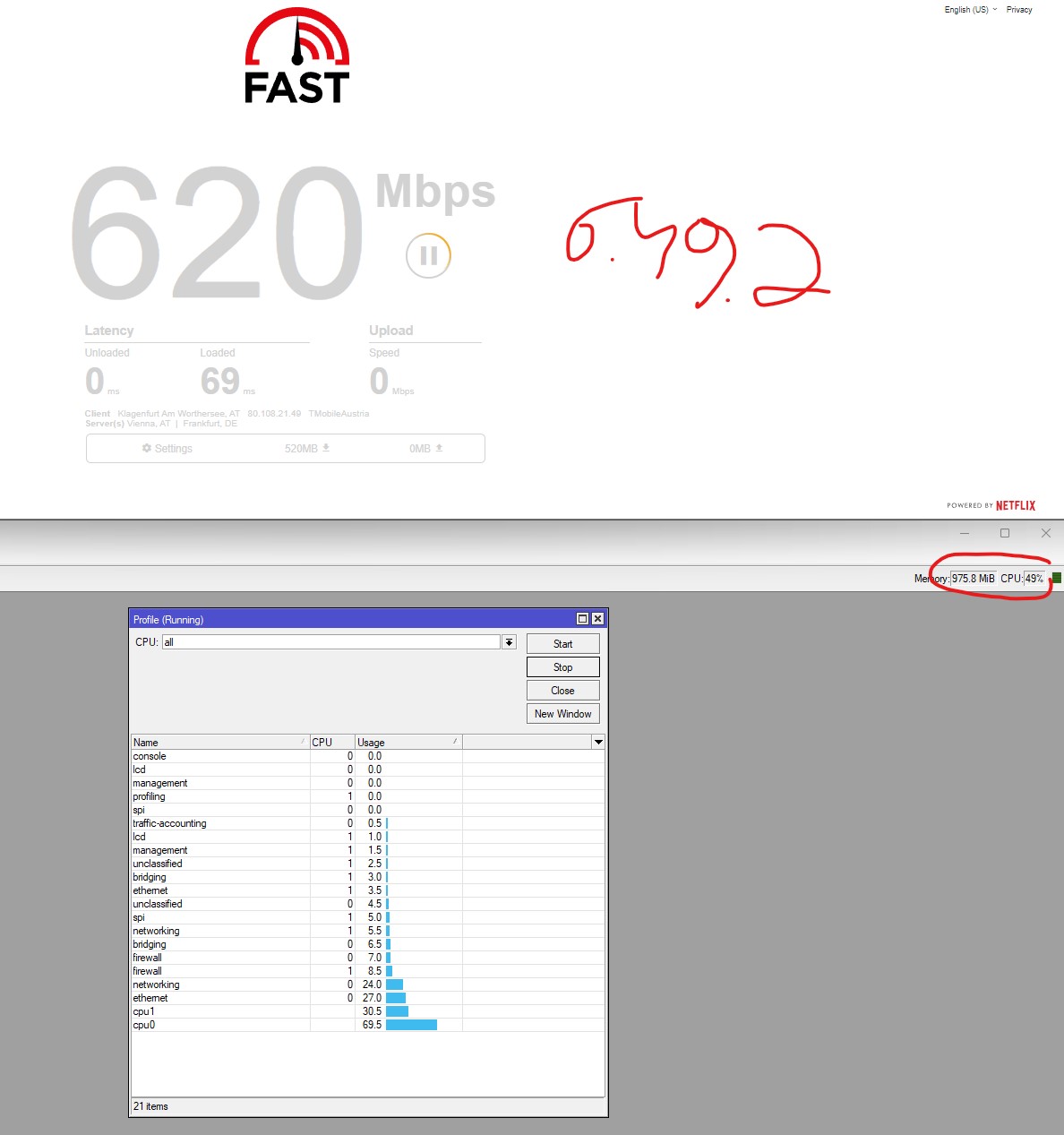
First of all I’m using a RB3011. My Internet Connection is normally around 550 - 650MBit which I do get with 6.49.2.
The CPU reaches about (max) ~50% load during speedtest (firewall enabled). After update to 7.1 stable it maxes out at around 250-300MBit and the cpu reaches 100% with firewall enabled and around 80% with firewall disabled (no change in max dl-speed with disabled firewall).
Fasttrack rules are in place of course.
I don’t know where to start to be honest.
Do you guys have any idea?
Cheers
PS: I can do a screenshot with 7.1 tomorrow. I’ve reverted back to 6.49.2 because of family constraints
See if the fasttrack rules are working and the fasttrack counters are going up. The lack of route caching in RouterOS v7 means that you will get lower speed test results without fasttrack, but I would expect Fasttrack to help more than it is if it was working.
Yes, I suspect the disable route cache setting was made into a dummy switch in RouterOS v7 that doesn’t actually do anything (because there is no route cache there), and this change (making it a dummy switch) was accidentally backported to RouterOS v6, breaking the ability to turn off route caching from recent v6 versions.
The route cache is gone from v7 and is not coming back, so if it is the only reason for the speedtest results you are seeing, then unfortunately you will not be able to replicate those speedtest results with v7. Route caching would give an artificial boost to things like speedtests making it look like your router could handle more traffic than it could in normal real world situations, so on RouterOS v6 you get the 620Mbps speedtest result when your router most likely can’t handle more than 300-350Mbps of real world traffic with route caching on in v6.
Are you using the default firewall ruleset, or did you modify things? If you modified things it could be that you are only fasttracking a portion of your traffic instead of all traffic.
Ehm - don’t get me wrong but I can download from the internet with ~55MB from CDN-networks (for example via ddownload or rapidgator for example) so I assume that the speedtest tells me the truth and does not tells me “fictional facts”.
Also the test-results on https://mikrotik.com/product/RB3011UiAS-RM#fndtn-testresults tells another language.
Route caching gives a boost to speed tests and big file downloads in the same way because of how it works. So yes, big file downloads to one system will also decrease in speed in v7, but you are not doing big file downloads all the time like that. Where route caching starts to really harm the performance of the device is when you have a bunch of users behind it going to a bunch of different websites and other online things. In RouterOS v6 most of this regular browsing traffic will miss the cache, and the cache harms performance more than helping. That is why it was removed from the Linux kernel nearly a decade ago.
Those test results are on RouterOS v6. As MikroTik has been revising test results for RouterOS v7 they are often 20-50% lower than what they were on RouterOS v6 for the same device.
The block Youtube on fireTV layer 7 rule needs to be moved down and adjusted. It will be extremely heavy on the router and is probably the reason you are getting slower fasttrack speeds than I would expect. Layer7 matchers are so heavy that they often completely kill the performance. If you disable it temporarily you should find higher speeds with fasttrack, and then you can figure out how to adjust the rule in the list and in terms of the conditions so that it doesn’t have to scan so much traffic.
You could also remove some things like the ssh brute force - you probably shouldn’t have ssh open to the world anyway so there is no need for address lists for brute force, and you can cut down on the number of rules for ICMP. And some other changes, like moving the accept dstnat rule below the accept established,related. And you have the raw blacklist rule as well, which is probably not necessary for a home router.
You may even want to try using the MikroTik default firewall for comparison temporarily:
                    /interface list member add list=LAN interface=bridge comment="defconf"
                     /interface list member add list=WAN interface=ether1 comment="defconf"
                     /ip firewall nat add chain=srcnat out-interface-list=WAN ipsec-policy=out,none action=masquerade comment="defconf: masquerade"
                     /ip firewall {
                       filter add chain=input action=accept connection-state=established,related,untracked comment="defconf: accept established,related,untracked"
                       filter add chain=input action=drop connection-state=invalid comment="defconf: drop invalid"
                       filter add chain=input action=accept protocol=icmp comment="defconf: accept ICMP"
                       filter add chain=input action=accept dst-address=127.0.0.1 comment="defconf: accept to local loopback (for CAPsMAN)"
                       filter add chain=input action=drop in-interface-list=!LAN comment="defconf: drop all not coming from LAN"
                       filter add chain=forward action=accept ipsec-policy=in,ipsec comment="defconf: accept in ipsec policy"
                       filter add chain=forward action=accept ipsec-policy=out,ipsec comment="defconf: accept out ipsec policy"
                       filter add chain=forward action=fasttrack-connection connection-state=established,related comment="defconf: fasttrack"
                       filter add chain=forward action=accept connection-state=established,related,untracked comment="defconf: accept established,related, untracked"
                       filter add chain=forward action=drop connection-state=invalid comment="defconf: drop invalid"
                       filter add chain=forward action=drop connection-state=new connection-nat-state=!dstnat in-interface-list=WAN comment="defconf: drop all from WAN not DSTNATed"
                     }
If all that does not help you may just need a faster device.
It is not a typical traffic pattern for an internet router. You aren’t doing file transfers like that all the time, only occasionally. Still, even if you make the argument that it should be considered typical, route caching has been gone from the Linux kernel for almost 10 years, and MikroTik cannot put it back.
I wasn’t picking on route caching beeing gone, I was picking on your definition of “real world”.
There are users out there that bought routers for home use, not to be a small ISP in their home, nobody keeps at home tens of machines doing random stuff on the internet.
And yes there are users that do video editing and 3D rendering from a home office. And yes they have 500Mbps+ connections.
And yes they bought a hEX or hAP ac2/ac3/Audience/ for that connection, which currently work fine with ROS v6, not so much with IPv6, but that will probably change if IPv6 FastTrack gets implemented.
It’s not all about ISPs.
LE: removed Chateau, that’s v7 only(?).
These days there are a lot of systems in homes - families with kids, you can have a bunch of laptops, phones, tablets, and gaming systems. In most cases the total traffic used is fairly low because things are not being used all the time, so whether such heavy users have 300Mbps connections or 1Gbps connections they really only use 10-20Mbps on average. So the 1Gbps connection isn’t really any faster for them than the 300Mbps connection if only 10-20Mbps is used.
And for the people who do a lot of file transfers and bulk traffic that route caching really helps with, in cases where there is a CPU bottleneck, then unfortunately they will get slower speeds on v7, and the choice will be to remain on RouterOS v6 forever or upgrade to a more powerful device. I suspect some users will instead try to wait for this to be “fixed” in v7, thinking it is just a bug that can be fixed, when this will never happen.
I am hoping that at some point MikroTik goes back and revises the product pages for existing devices to show the v7 performance instead of v6, so that people know what to expect.
@mducharme
In my market many clients have multiple [4 to5] real-time HD iptv streams running all day long plus many other ream time activities by other family members plus plus plus … they all have I Gbps service and yes all working well ….
I deleted my whole firewall and took this one as successor Log into Atlassian - MikroTik Documentation wich should be MT approved I guess. There is no reasonable difference in CPU load.
But to be honest I do not get the point why I do need another device - I did speedtests now with and without Route-Cache on v6 (not tested v7 until know)
So from a CPU-Load perspective I do not understand why a more powerful device is needed (btw - I thought that the 3011 with dual 1,4GHz ARM CPU “is” powerful - which one would you assume to fullfill the needs for my internet-connection then?)