yea ccq is very unstable but as you could see on my tests ping wasnt growing a lot, that may mean that MT ccq is very very sensitive and do not fully picture reality.
@Arnold2222 how far the device from each other?
around 250-300m, both shielded.
Try reduce the power output if your signal is to strong all below-65 Db is good.
I will try at night
We blogged about our SXT AC testing:
http://blog.linitx.com/mikrotiks-sxt-acs/
Hope you like it !
Nick
@nickshore are you able to check latency and ccq while iperfing ? thanks!
Hello friends and as already been doing some test about 250 meters and could have a 200Mb file from one computer to another via samba, using the PTP configuration and modifying a few things that put the friend is very stable speed here I leave baked capture
very good results!
Could you post which changes you have done to the config please
plisken
September 15, 2014, 1:19pm
71
Oops deleted i posted it twice
plisken
September 15, 2014, 1:26pm
72
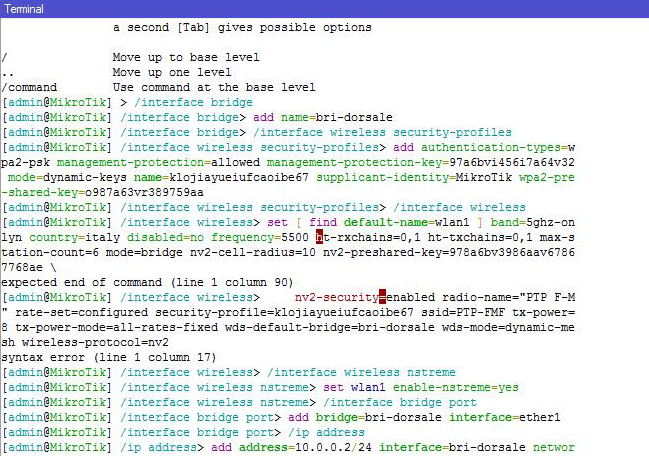
Hello Rextended, i have copy and paste this script in new terminal but i have an error by wireless.
Can you see whats happend?
see printscreen a made
rextended:
Paste this on the devices. This create a transparent Layer 2 bridge with management IP.
For be totally secure you do not alter any config [I’m expecting no other item are changed from default],
Some settings (band “ac”, mode “ap-bridge”, country and frequency) must be tuned because I not have at the moment one “ac”.
REMEMBER: DO NOT USE MORE TX POWER THAN NEEDED for 250m link…
PTP Start (or PTMP Start if Licence>=4 and mode=ap-bridge)
/interface bridge
add name=bri-dorsale
/interface wireless security-profiles
add authentication-types=wpa2-psk management-protection=allowed management-protection-key=97a6bvi456i7a64v32 mode=dynamic-keys name=klojiayueiufcaoibe67 supplicant-identity=MikroTik wpa2-pre-shared-key=o987a63vr389759aa
/interface wireless
set [ find default-name=wlan1 ] band=5ghz-onlyn country=italy disabled=no frequency=5500 ht-rxchains=0,1 ht-txchains=0,1 max-station-count=6 mode=bridge nv2-cell-radius=10 nv2-preshared-key=978a6bv3986aav67867768ae \
    nv2-security=enabled radio-name="PTP F-M" rate-set=configured security-profile=klojiayueiufcaoibe67 ssid=PTP-FMF tx-power=8 tx-power-mode=all-rates-fixed wds-default-bridge=bri-dorsale wds-mode=dynamic-mesh wireless-protocol=nv2
/interface wireless nstreme
set wlan1 enable-nstreme=yes
/interface bridge port
add bridge=bri-dorsale interface=ether1
/ip address
add address=10.0.0.2/24 interface=bri-dorsale network=10.0.0.0
/ip dns
set servers=8.8.8.8
/ip firewall service-port
set ftp disabled=yes
set tftp disabled=yes
set irc disabled=yes
set h323 disabled=yes
set sip disabled=yes
set pptp disabled=yes
/ip route
add distance=1 gateway=10.0.0.1
/ip service
set telnet disabled=yes
set ftp disabled=yes
set ssh disabled=yes
set api disabled=yes
set api-ssl disabled=yes
PTP End (or any PTMP End):
/interface bridge
add name=bri-dorsale
/interface wireless security-profiles
add authentication-types=wpa2-psk management-protection=allowed management-protection-key=97a6bvi456i7a64v32 mode=dynamic-keys name=klojiayueiufcaoibe67 supplicant-identity=MikroTik wpa2-pre-shared-key=o987a63vr389759aa
/interface wireless
set [ find default-name=wlan1 ] band=5ghz-a/n country=italy disabled=no frequency=5500 ht-rxchains=0,1 ht-txchains=0,1 mode=station-wds nv2-preshared-key=978a6bv3986aav67867768ae nv2-security=enabled radio-name=\
    "PTP M-F" security-profile=klojiayueiufcaoibe67 ssid=PTP-FMF tx-power=8 tx-power-mode=all-rates-fixed
/interface wireless nstreme
set wlan1 enable-nstreme=yes
/interface bridge port
add bridge=bri-dorsale interface=wlan1
add bridge=bri-dorsale interface=ether1
/ip address
add address=10.0.0.3/24 interface=bri-dorsale network=10.0.0.0
/ip dns
set servers=8.8.8.8
/ip firewall service-port
set ftp disabled=yes
set tftp disabled=yes
set irc disabled=yes
set h323 disabled=yes
set sip disabled=yes
set pptp disabled=yes
/ip route
add distance=1 gateway=10.0.0.1
/ip service
set telnet disabled=yes
set ftp disabled=yes
set ssh disabled=yes
set api disabled=yes
set api-ssl disabled=yes
you need to fix it a little cuz he posted it from 6.14 or so and in 6.15+ there has been some chanegs in commands…
plisken
September 15, 2014, 2:35pm
74
Thanks Arnold2222 i’m waiting no problem
plisken
September 16, 2014, 12:40am
75
@Arnold2222
Change ht-rxchains and ht-txchains:
ht-rxchains => rx-chains
ht-txchains => tx-chains
syntax is changed on 6.15+
plisken
September 26, 2014, 1:25pm
77
Hello Rextended glad to hear you my friend. I try this
hello good afternoon I see that mk field and fail a lot and seen playing with channel widths from 20 to 80 MHz, and if there is any way to place static or somehow using the 60 MHz channel width greetings
vakh13
September 11, 2015, 5:59pm
80
Hello.
 now there is too many customers online

 but also ccq is flapping XD I think its soft thing that it is moving a loot no matter of link stabiliti so much xD