I got a doozy for you all.
First a tiny bit of background information.
Teraterm is a terminal emulator program that I use pretty much exclusively. It comes in a few ‘parts’ for want of a better word. A bit like a car, they come with wheels, motor, seats etc to make it function. When I refer to ‘teraterm’ I mean the bundle of these components.
- ttermpro.exe is the executable file which launches an application exactly the same as putty or securecrt.
- ttpmacro.exe is the executable which you can run scripts/macros to get ttermpro to do your bidding like a good minion. Similar to AutoHotKey or how I’d imagine Python scripting working.
- TTSSH looks like the module used to form SSH connections for ttermpro to use.
There are other parts which for simplicity I’ll skip past, if you really want, you can dive in here.
Now that is out of the way, I’ve been having some issues with scripts that I’ve been using quite well for about 6-8 years and I don’t know where the issue really lies and would like to bounce some ideas off you all.
If I use ttermpro to connect to any Mikrotik, I have no issues with it. Doesn’t matter if its local, remote, routed or bridged, as long I can ping it, it works. Now Teraterm gets updated periodically (change log) and as of version 4.107 my macros wont connect with SSH to a Mikrotik that has ‘some’ Round Trip Time (RTT) delay. The ‘some’ value is a bit rubbery, by 50ms it’s pretty reliably failing and wont connect, less than 5ms, no problems, 5-10ms sometimes works, sometimes fails.
So to do some testing I built a network. Please refer to Test.pdf (44.1 KB)
Its pretty simple with OSPF running between all the Cisco’s and Mikrotik’s all in area 0. Everyone is running SSH on an open TCP port, no port knocking or anything like that. The WAN Emulator is a linux Ubuntu machine, I give it a command, it sets a delay value for traffic running across it’s bridge. Its just Traffic Control if your wondering.
Now the laptop can ping all the devices and interfaces in the network. When I set a delay on the WAN Emulator, I see that reflected in the RTT for ping and I see it in the console responsiveness, so I’m confident that is working.
The laptop can SSH using ttermpro to any of device regardless of the delay I set in the WAN emulator. Even 500ms…
With 100ms in the WAN Emulator I get the following results, all launched with ttpmacro.
- Teraterm 5.5.0 x64 portable connecting to Mikrotik’s - Fails
- Teraterm 5.5.0 x64 portable connecting to Cisco’s - Connects
- Teraterm 5.5.0 x64 installed same results as 1 and 2.
For reference I have tried other version of Teraterm in the 5 range, all the same results. - Teraterm 4.106 portable connecting to Mikrotik’s or Cisco’s - Connects
- I havent tried the installed version for 4.106 but I’m close to certain it will work.
- If I dial down the WAN Emulator delay back to 0, everything connects just fine doesn’t matter which version of Teraterm I use.
The failure message looks like this.
- The top message is the macro freaking out that I’m trying to use commands that need an active connection which doesn’t exist due to the error at the bottom.)
- The second message is the macro itself just displaying that it’s at line 47 in the macro waiting for ‘[admin’ to appear in the console
- This is the error message TTSSH is giving when trying to connect to the Mikrotik.
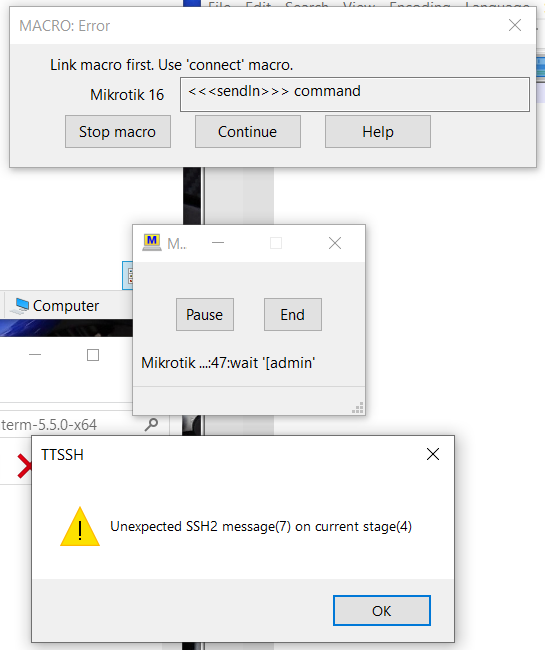
Out of the mikrotik when I log the SSH system I get this for a log
log.0.txt (53.8 KB).
In that log there is a connection that works from the start until line 529. Then I quickly add some delay and from line 530 to the end is what is captured in the Mikrotik log when that picture above happens.
I do have wireshark captures from the laptop for both working and failing connections, but it’s at work so I can put them in if wanted. I’ve decided to just put them in, it might help.Teraterm Wireshark.zip (110.6 KB)
Config files from the Mikrotik I know will be requested so I’ll put them in tomorrow. Its very basic, an interface or two, ospf and a local user account. The Mikrotiks are all running 7.20.4.
Here are those configs. Mikrotik configs.txt (2.4 KB)
I’ve had a good look at the changelog for Teraterm and can’t spot anything that changes between 4.106 and 4.107 which causes to me to be concerned, it looks like pretty mundane fixes and improvements to me at least.
I suppose my question are,
- What should I test next?
- I’ll probably test ROS 6.47 or whatever long term is.
- Are there any known or suspected ‘features’ with SSH on Mikrotik units?
Its getting late here and I’m certain I’ve missed something so ask and I’ll edit this original post as long as I can.