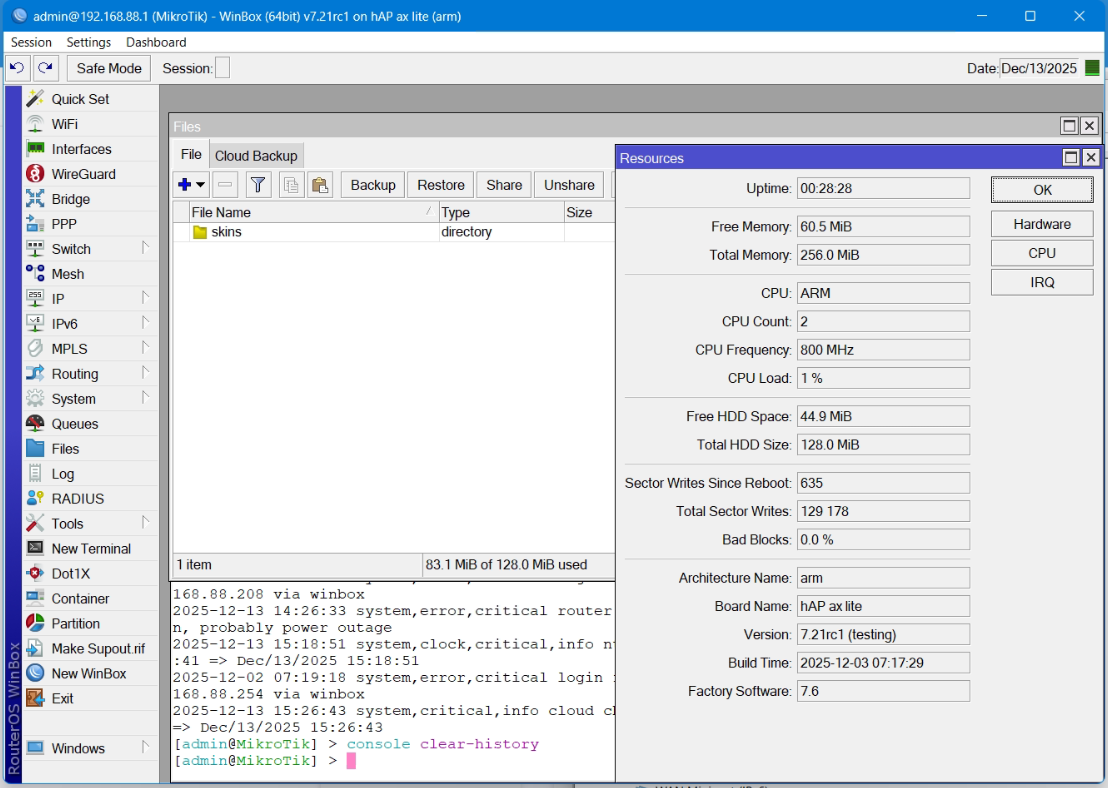
I have hap ax lite, 7.21rc1 flashed via netinstall. Configured via quickset at the base and container installed. After adding a pppoe connection and several reboots, the space simply runs out at 0. Deleting files frees up space, but only 45 MB out of 128 MB becomes free, the files are empty. How is this possible? Downgrading to 7.20.6 does not solve the problem.
Hi,
maybe this: CLEAR SYSTEM HISTORY - #4 by skylark
its already added in scheduler and tried
Netinstall. It's the only way to clean internal memory.
Use 7.16.4 or so, there have been quite some reports about ppoe issues starting (I think) 7.19.5 and later.
I'm not even sure it's resolved in 7.21-chain. Look for the relevant release threads and see what's being said there.
Make sure you first export your config (use show-sensitive) and move it away from your device.
You can import it again after clean install, block by block (don't simply import, that will not work).
Don't use binary backup since you wil simply re-import all occupied space.
You'll have to find out what in particular is eating up the space. I'm not sure the "usual" suspects can account for 45MB usage. And you did mention running container(s), are you sure those are using storage economically? Are there any "smart" scripts or any firewall rules collecting addresses to address lists? Having many certificates installed also uses up storage.
One really has to be careful about storage ... we're all used to computers with hudreds of gigabytes of storage ... RouterBoards come with hundreds (or even only tens) of megabytes of storage which is like 1000-times less.
I am waiting for the usual drive by posting "avoid 16mib flash devices!!!!1!" just to find out: it is a 128mib device. 
Indeed, how did we not guess? It's impossible to do this remotely. After resetting the settings and changing the firmware, the amount of used/free space does not change. Moreover, we only noticed this bug on hap ax lite; it does not occur on hap ax2/hap ax3. May be problem with mediatek instead cpu? By the way, transferring a binary backup does not take up any space.
After resetting the settings and changing the firmware to netinstall, the situation remains unchanged. The user applied quickset to a configured router with a container and got this result. Why is this even possible?
I have already sent a request to technical support with supout.rif for analysis, but it's really something, just like the still unresolved issues with WireGuard in 7.21 and Wi-Fi. Apparently, there will be a release with problems by the new year.
Summary
I hope they acknowledge and fix the bug, because it's quite a critical issue. And I hope they don't behave like Activision, which has been hiding behind its policy for a year now and not fixing bugs. In our case, we got banned for no reason, just for running the game on Windows with ReFS installed, just like other players get banned simply for running it on Wine/Proton...
You apply a testing version to a device remote from where you are ?
Sorry for saying but that's already a "not so smart thing to do".
And why different from AX2/AX3 ?
We don't have a crystal ball, we don't know what you did with your config ...
Initially, they were configured with 7.21rc1, because there are many improvements related to containers, but downgrading to the stable version and resetting the settings did not help. Now several hap ax lite have been downgraded to 7.20.6 with netinstall, we will see how they behave. However, my personal hap ax2/hap ax3 do not suffer from this problem for some reason. Perhaps the problem is related to the implementation of QuickSet on hap ax lite. This is a necessary measure, as we are experiencing internet issues and must utilize mihomo.
Or your config applied on AX Lite.
Put it on the table for review please.
The forum does not allow it to be uploaded. There is only a binary backup, and hap ax lite is not available to obtain the text.
How about partitions?
by default
Earlier you said “After adding a pppoe connection and several reboots, the space simply runs out at 0.”, and now you are talking about containers.
When you want a useful response, you need to tell the truth. Hiding stuff is not going to help you finding a solution.
You also did not save an offline export of config for that remote device ?
Something I always do ...
Everything was written at the beginning of the post.
i have only binary backup now, no text backup
fullbackuptext.rsc (182.3 KB)
before pppoe adding