/ip firewall {
    ...
    filter add chain=input action=drop in-interface-list=!LAN comment="defconf: drop all not coming from LAN"
    ...
    filter add chain=forward action=drop connection-state=new connection-nat-state=!dstnat in-interface-list=WAN comment="defconf: drop all from WAN not DSTNATed"
}
It seems like the FORWARD filter won't be called once the INPUT drops everything that is not from LAN. Makes sense? I misunderstood this somehow.
Is it not better to just create a filter add chain=input action=drop connection-state=new connection-nat-state=!dstnat in-interface-list=WAN? Every new packet that isn't DSTNATed will be dropped, DST-NAT will work as expected, and you don't need two filters.
Input is for connecting to the router, forward is for connnecting through the router.
In case of a service running on a server behind the router, the first rule is not hit but the second is.
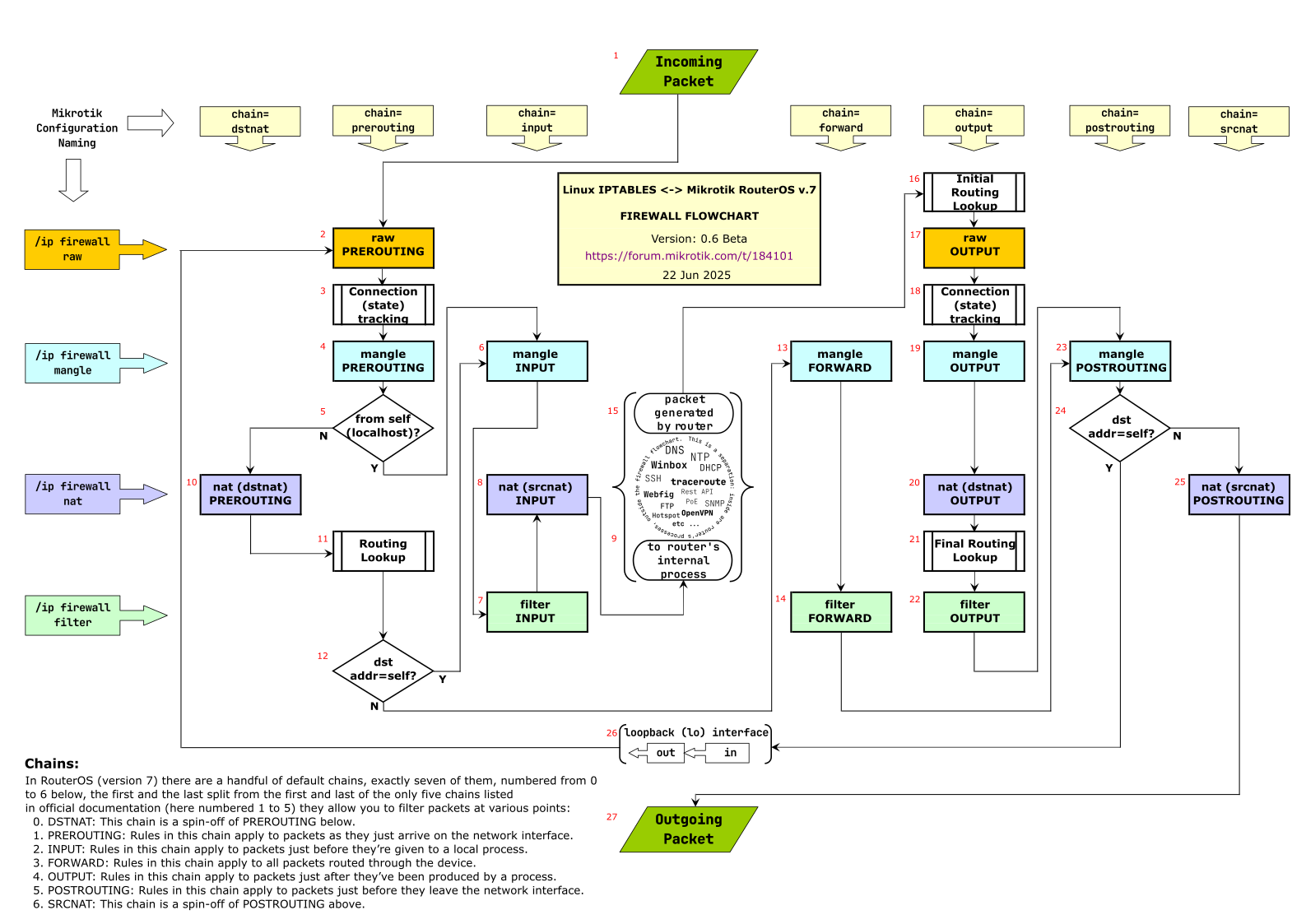
The input chain and the forward chain are separate. A packet that goes to the input chain "branch" will never match the rules in the forward chain. See the flowchart in this thread:
For example, a service is running behind the router with a port forwarding, so if an external connection tries to access this service, the new connection will go directly to the FORWARD chain?
Look at the flowchart above, the initial packet of this incoming connection arrives at #1, goes through #2 -> #3 -> #4 -> #5 (branch N is taken) -> #10.
At this point #10 you have the DSTNAT rule that does the port forwarding. This NAT rule changes the destination address and/or port to the one of the devices behind the router.
Next is #11 where the routing table is consulted and the route & out-interface is determined. Then we have #12 (branch N is taken because the dst-address has been changed by DSTNAT is no longer of the router) -> #13 -> #14 (here is your filter rule in the forward chain) -> #23 -> #24 (branch N) -> #25 (here are SRCNAT rules such as masquerade) -> #27 (sent to out-interface).
As you can see, in this case the filter input rule at #7 is not reached.
Readers digest version, If one had an input chain rule and a dstnat rule (port forwarding) for the same service, the traffic would never hit the input chain or the router's particular service on that port.
Second point, to allow port forwarding, aka the router allows dstnat traffic on an identified port to be redirected to a LAN server, one needs one simple and clear firewall rule in the forward chain, as the traffic is through the router (not to the router) and is heading to a LAN IP ( as in traffic flow inspection, dstnat comes first )
 0  D ;;; special dummy rule to show fasttrack counters
      chain=forward action=passthrough

 1    ;;; fasttrack
      chain=input action=accept connection-state=established,related,untracked log=no log-prefix=""

 2    ;;; invalid connection
      chain=input action=drop connection-state=invalid log=no log-prefix=""

 3    ;;; only lan connection
      chain=input action=drop in-interface-list=!LAN log=no log-prefix=""

 4    ;;; fasttrack
      chain=forward action=fasttrack-connection hw-offload=yes connection-state=established,related log=no log-prefix=""

 5    ;;; fasttrack
      chain=forward action=accept connection-state=established,related,untracked log=no log-prefix=""

 6    ;;; invalid connection
      chain=forward action=drop connection-state=invalid log=no log-prefix=""

 7    ;;; new connection and not in dstnat
      chain=forward action=drop connection-state=new connection-nat-state=!dstnat in-interface-list=WAN log=no log-prefix=""
The 7th filter is never being hit by the firewall (I'm testing in the real world). Basically, all DSTNATed packets are naturally connection-nat-state=dstnat when they come to the FORWARD chain. It seems dumb that this drop filter in the FORWARD chain is a default configuration.
The filter that you are suggesting makes much more sense in my opinion except for one detail: set connection-state=new to make the filter work in an isolated way without giving a chance to interfere with other FORWARD filters like FastTrack.
Understandable viewpoint, however in reality, a rule is only new the first hit, and after that the new is irrelevant for that connection, as the following traffic is captured by established,related !!
Thus there really is rarely any point to stating new connection. I vaguely remember it could have some application in mangle rules when trying to differentiate traffic to be mangled from other traffic.
One has to remember that order of rules (within same chain) is important, rules get evaluated from top to bottom and first one matching executes. In default config one of early (if not the first) rule is the one accepting established,related. So rules below will be only hit by packets that have other connection state (either invalid, untracked or new). If one then keeps also rule which drops everything invalid (and keeps setting of default rule, which already accepts untracked along with established,related), then remaining packets are only those with state=new .
Now, if one starts to get creative with rules and their order, it might be necessary to set connection-state=new property not to trigger on other packets.
accept established,related,untracked
drop invalid
accept ICMP
accept 127.0.0.1
drop not LAN <mean: drop all from interfaces that not are LAN, included interfaces not in WAN!!!>
<remain only new from LAN>
Forward:
fastpath established,related
accept established,related,untracked
drop invalid
<remain all new on forward from any source>
drop new not NATted from WAN
<remain from WAN all new that is NATted>
<remain all new from LAN>
<but also remain all new forward on interfaces that do not are on interface group WAN or LAN>
For example, the router (firewall) has the chain=input action=drop in-interface-list=!LAN filter. Do you have any case in which a new WAN connection in the FORWARD chain is not NATed?
This is the default rule that protects the router's CPU.
I said router. Yes, router. The router and the internal network are two different things.
If you feel smart about removing the default ICMP and 127.0.0.1 rules, you're not.
It's been explained so many times, I don't feel like rewriting or pasting the link.
So for learning "how to build your own firewall"... the default configuration may not be entirely the best example since some of the more complex rules allow some add-on features to "just work" if enabled. For example, IPSec VPN can be enabled in QuickSet on many profiles, so that has to work... and so the default firewall needs to support that (and firewall path for IPSec is get tricky, so it has use more complex matchers for that).
Also keep in mind, the MikroTik defaults embrace a "less rules is better" approach, so yeah some of the firewall filters kinda pull multiple duties. Which also makes it a bit tricky to unwind what's going on.