Sorry, it was my fault! If you don’t mind, any other doubts about router configuration will be placed on the Router OS forum under a more appropriate topic!
Regards
Enviado desde mi Nexus 5 mediante Tapatalk
Sorry, it was my fault! If you don’t mind, any other doubts about router configuration will be placed on the Router OS forum under a more appropriate topic!
Regards
Enviado desde mi Nexus 5 mediante Tapatalk
Hello,
I am another user pretty interested in having my Mikrotik as the unique device connected to my ISP fiber optic network, instead of having an ONT in the middle.
The solution for this problem relies on Mikrotik developing a firmware capable of changing the SN of the SFP module with our ONT’s SN, and being able to set the ONT ID or PLOAM PWD manually (in my ISP case, it is equal to the ONT SN).
Thanks to you guys, this thread might “help” Mikrotik to face this issue.
Regards.
Yes…We will have to wait by Mkrotik
Hi there,
Thumbs up with this post. How it’s possible to sell a GPON module for FTTx, and say “all the configuration should be done on the ISP side”?? What is “no configuration required”? FTTx excludes FTTH?? The information on Mikrotik website make you understand that you can introduce the PLOAM in some section inside RouterOS and it already works, or how Mikrotik pretend to identify ourselves towards the ISP?? I dunno if it’s possible to ask the ISP to add your module in other countries, but in Spain… surely not. It doesn’t make sense to buy this module in Spain, unless the PLOAM it’s programmable in the “not too distant future”. Very disappointed about this. What solution does plan Mikrotik offer to the “current” GPON module batch owners? A pat on the back and a “bad luck” while smiling, or something? It’s the only you understand with the Krisjanis response. This isn’t serious. Adapt the business to the market dynamics involves studying it first. Now I understand why this module is refunded so often in this country.
Regards,
Finalmente he podido realizar la tirada de fibra y ya tengo la fibra junto al Mikrotik.
Acabo de conectar el SFP GPON al Mikrotik con el cable de fibra puesto y por lo menos observo que lee valores.
Esta es la información que Mikrotik me devuelve:
name: sfp
status: no-link
auto-negotiation: done
advertising:
link-partner-advertising:
sfp-module-present: yes
sfp-rx-lose: yes
sfp-tx-fault: no
sfp-type: SFP-or-SFP+
sfp-connector-type: SC
sfp-link-length-9um: 20000m
sfp-vendor-name: HUAWEI
sfp-vendor-part-number: HPSP2120
sfp-vendor-serial: 0605656TD901XXXX
sfp-wavelength: 1310nm
sfp-temperature: 158C
sfp-supply-voltage: 3.382V
sfp-tx-bias-current: 11mA
sfp-tx-power: 2.759dBm
sfp-rx-power: -28.719dBm
eeprom-checksum: good
eeprom: 0000: 03 04 01 71 33 00 00 00 01 10 99 03 0d 00 14 c8 …q3… …
0010: 00 00 00 00 48 55 41 57 45 49 20 20 20 20 20 20 …HUAW EI
0020: 20 20 20 20 00 00 00 00 48 50 53 50 32 31 32 30 … HPSP2120
0030: 20 20 20 20 20 20 20 20 00 00 00 00 05 1e 00 68 …h
0040: 00 1c 00 00 30 36 30 35 36 35 36 54 44 39 30 31 …0605 656TD901
0050: XX XX XX XX 31 33 30 39 32 34 31 34 58 80 03 fc XXXX1309 2414X…
0060: 00 00 00 00 00 00 00 00 00 00 00 00 00 00 00 00 … …
0070: 00 00 00 00 00 00 00 00 00 00 00 00 00 00 00 00 … …
0080: 00 ef 00 80 00 ef 00 80 02 f2 02 6b 02 d0 02 8d … …k…
0090: 14 08 00 cd 14 08 00 cd ff ff 00 00 ff ff 00 00 … …
00a0: 02 01 00 09 02 01 00 09 00 00 00 00 00 00 00 00 … …
00b0: 00 00 00 00 00 00 00 00 b1 dc fb 9e 36 bf d3 96 … …6…
00c0: b8 2b db 40 3f eb 8c d3 bf 36 c7 9f 09 c0 00 00 .+.@?.. .6…
00d0: 01 00 00 00 dc b7 91 35 30 a6 fe 5a 00 00 00 3d …5 0..Z…=
00e0: 00 b7 02 b2 02 57 49 bf 00 14 00 00 00 00 00 00 …WI. …
00f0: 00 40 00 00 00 40 00 00 00 00 00 00 00 00 00 00 .@…@.. …
Aunque tiene el cable puesto y recibe los valores de la fibra, marca como link No.
Finally I was able to perform the fiber spin and I already have the fiber next to the Mikrotik.
I just connected the SFP GPON to the Mikrotik with the fiber cable put and at least I noticed it reads values.
This is the information that Mikrotik returns me:
name: sfp
status: no-link
auto-negotiation: done
advertising:
link-partner-advertising:
sfp-module-present: yes
sfp-rx-lose: yes
sfp-tx-fault: no
sfp-type: SFP-or-SFP+
sfp-connector-type: SC
sfp-link-length-9um: 20000m
sfp-vendor-name: HUAWEI
sfp-vendor-part-number: HPSP2120
sfp-vendor-serial: 0605656TD901XXXX
sfp-wavelength: 1310nm
sfp-temperature: 158C
sfp-supply-voltage: 3.382V
sfp-tx-bias-current: 11mA
sfp-tx-power: 2.759dBm
sfp-rx-power: -28.719dBm
eeprom-checksum: good
eeprom: 0000: 03 04 01 71 33 00 00 00 01 10 99 03 0d 00 14 c8 …q3… …
0010: 00 00 00 00 48 55 41 57 45 49 20 20 20 20 20 20 …HUAW EI
0020: 20 20 20 20 00 00 00 00 48 50 53 50 32 31 32 30 … HPSP2120
0030: 20 20 20 20 20 20 20 20 00 00 00 00 05 1e 00 68 …h
0040: 00 1c 00 00 30 36 30 35 36 35 36 54 44 39 30 31 …0605 656TD901
0050: XX XX XX XX 31 33 30 39 32 34 31 34 58 80 03 fc XXXX1309 2414X…
0060: 00 00 00 00 00 00 00 00 00 00 00 00 00 00 00 00 … …
0070: 00 00 00 00 00 00 00 00 00 00 00 00 00 00 00 00 … …
0080: 00 ef 00 80 00 ef 00 80 02 f2 02 6b 02 d0 02 8d … …k…
0090: 14 08 00 cd 14 08 00 cd ff ff 00 00 ff ff 00 00 … …
00a0: 02 01 00 09 02 01 00 09 00 00 00 00 00 00 00 00 … …
00b0: 00 00 00 00 00 00 00 00 b1 dc fb 9e 36 bf d3 96 … …6…
00c0: b8 2b db 40 3f eb 8c d3 bf 36 c7 9f 09 c0 00 00 .+.@?.. .6…
00d0: 01 00 00 00 dc b7 91 35 30 a6 fe 5a 00 00 00 3d …5 0..Z…=
00e0: 00 b7 02 b2 02 57 49 bf 00 14 00 00 00 00 00 00 …WI. …
00f0: 00 40 00 00 00 40 00 00 00 00 00 00 00 00 00 00 .@…@.. …
Although it has the cable on and receives the values of the fiber, mark as link No.
I have to say that all this has been without being able to modify the value of the ID in memory a2 that I continue with this pending.
I know someone who has a WISP and fiber operator who asked about the provisioning of the equipment, I have pending to see when we can stay and take the sfp to see its central that recognizes that there is puncture and if once knowing the ID I can locate it from Some way in the eeprom and modify it.
I continue searching information about it:
Bytes 123 – 126 contain write-only RAM for entry of a 32 bit password that allows
access to user writable EEPROM at locations 128-247. The default password for
Finisar devices is 0, however it can be set to any value at the factory to insure security
of the user writable EEPROM contents. Please contact your Finisar sales
representative for details on setting up a custom password. Once the password has
been entered into locations 123 – 126, a ‘1’ should be written to address 127 (readable
and writeable RAM cell). Note that the power-on default value of byte 127 is ‘0’. Once
these two steps have been completed, EEPROM at locations 128 – 247 is readable and
writable. The EEPROM remains readable and writable until either the password is
changed or byte 127 is set to 0.
Table 3.19: Password Addresses (2-Wire Address A2h)
Byte Bit Name Description
120-122 All Reserved Reserved
123 All Password Byte 3 High order byte of 32 bit password
124 All Password Byte 2 Second highest order byte of 32 bit password
125 All Password Byte 1 Second lowest byte of 32 bit password
126 All Password Byte 0 Low order byte of 32 bit password
127 All User EEPROM Select ‘1’ selects user writable EEPROM at locations 128 - 247
But my ID is F2XXXXXXXXXXXX
Alferez, are we talking about the Mikrotik SFP GPON module? or a Huawei one???
Mi sfp is Huawei HPSP2120.
This information are generic of sfp, y think that are same for Gpon.
Hello Alferez
Do you’ve any new about Huawei Gpon?
Any improvement about this?
Sorry for not being able to answer before.
I have not been able to do the tests yet since it does not just depend on me, so I do not know that “idont” has my sfp, and until I do not have the idont I will not be able to search it inside the eeprom and make the modification.
If we have help by mikrotik, we could have a solution… The help is simple, only had to update your Gpon and that permit the modifcation of idONT.
Finally I was able to deliver the sfp today so this person will put it in their network and try to get the idon that appears to him in the registry.
With Idont observer, I will try to look for it in the eeprom and make the change.
I go slow, but I hope to get good results.
Is there any new infomation of the new firmware?
Hello,
We be pending of the libration by Mikrotik of new firw. We haven’t more info…
In my case, a people that can check my sfp on their equipment, His system no detect my sfp. 
Does anyone know of any other options to try to detect the sfp idont?
Mikrotik release new sfp module firmware at same time that ros 7???
Not exactly what you are looking for but for the time being… a cheap solution (30euro) and it talks to NaranjaES
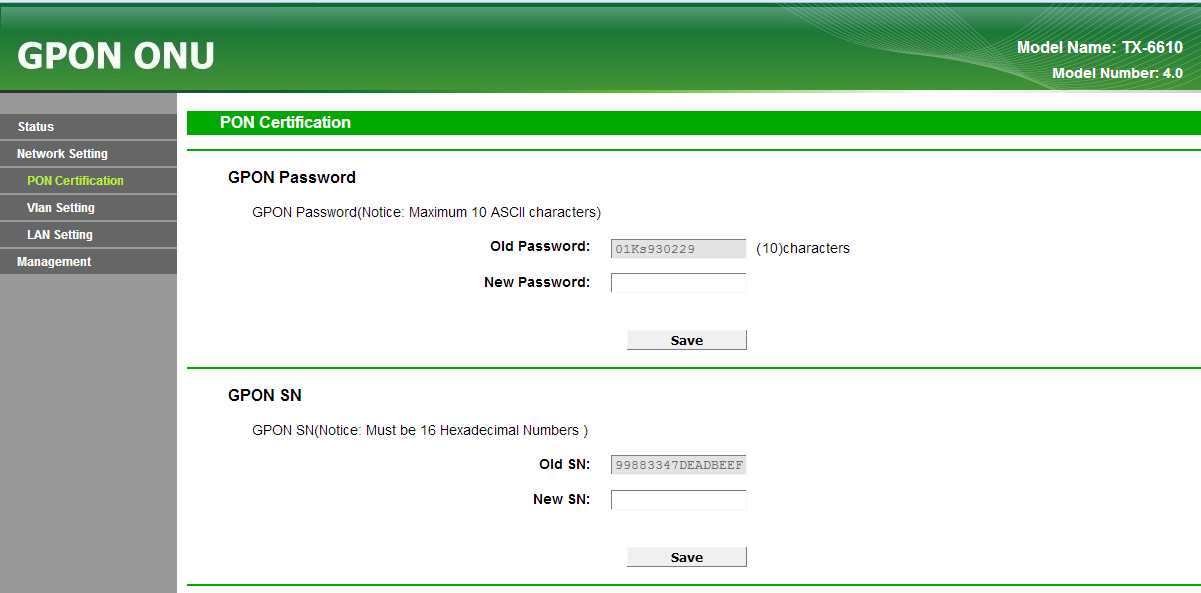
Do you have a TP-LINK TX-6610 work fine with Orange Spain? We also want this solution but with the SFP of Mikrotik or other manufacturers.
When you installed this ONU, Did you have to talk witn Orange Spain for change? or you only, change the IdONT and all oK ¿?¿?
More info about TP-LINK TX-6610 → http://www.tp-link.es/products/details/cat-17_TX-6610.html
Why in god’s name Tp-link can make it and not mikrotik? 