I observe the same problem on my RB2011
I don’t see this problem on my RB2011. Switch #1 is identified as Atheros 8327
After upgrading to 6.2 all my INPUT firewall rules disappeared.
i’m sorry i realy need help now.
can i know where i can find the command for api in mikrotik 6.3?
like /tool/user-manager/user/add comandblablablalbablab
I’m sorry if it was already described, but ssh client in the version 6.2 does not work properly. When i trying to connect with my linux servers from a mikrotik’s ssh session using ssh client and my publik dsa key, the new ssh session hung. SSH-Client work properly in version 5.25 for example. Fix it please in future.
Attention danger.
I updated to 6.3 from the 6.3rc1 four rbs, three caught, only to return with netinstall.
01 rb711 no problem.
01 rb711 crash, was necessary netinstall.
01 rb600a crash, was necessary serial + netinstall.
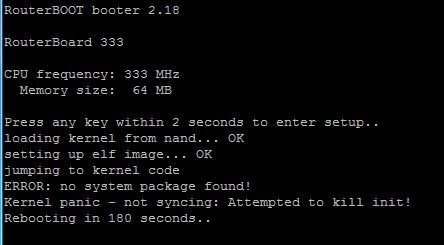
01 rb333 chash, not yet managed to recover.
Stay tuned with update he is spoiling rbs.
Att.
Dzieva.
Now that v6.2 was released and the download links upgraded on the MT website I wonder which is the stable firmware for CCRs (definitely not v6.2)? v6.1? Is it available somehow or do I have to find someone who already posesses it?
(It have shipped with v6.0rc14, I had no bad experiences with it in the past.)
With the RB333 was the same, was necessary serial + netinstall v6.3.
ERROR: no system package found!
Think, update is very risky.
Att.
Dzieva.
RouterOS 6.3 Build Time Aug/30/2013 13:25:42 RB433UAH hours CPU 100% http://demo2.mt.lv/graphs/cpu/

in my RB433UAH build Aug/30/2013 08:26:33 processor without load (netwatch,scheduler works)
Im running 6.2 on x86 with dual Intel PT Server adapter,
currently having issues with simple queues.
When any type of Simple Queue is added, network throutput for the traffic limited by the queue degrades enourmously, transfer rate is down below the value set in queue settings. For example, speedtest.net showing not more than 2Mbps when queue is set at 20Mbit/s, sometimes link is so unstable that the measurement cannot start at all.
Browsing is affected badly, single-threaded file downloads suffer too, starting at 100Kbytes/s and stalling later.
I have tested such kinds of queues as sfq, pcq and pfifo, result is the same.
The issue affects the queues having IP address as a target. When a queue is applied to PPP interface, it works as expected.
The same queues set up on RB2011 work great, so I think the described proble is x86-specific.
your router is open. I suggest setting a password.
Updated to 6.3, still experiencing the simple queues issue.
Queue trees work fine.
That’s one of the public demo routers. It is expected to be open. 
I am getting very short isp dropout (ETH1) on 6.2 when a computer connected over lan is turned on. No error in the log, but ie. connected vpn to work from a laptop drops out ALWAYS when a desktop computer which is connected over LAN (ETH3) is turned on…
I have raised a similar issue with Mikrotik support few days ago.
Hi, you attemp to update production boards? Simply, board was freshly booted before update or have some uptime? Some of my boards crashed too when trying to update to version 6.xx and also 5.2x. But what works for me is:
- Reboot
- Immediately after boot upload update packages
- Reboot (Update)
Maybe just a piece of luck, maybe solution. Just try it this way.
If you have defined ANY bridge interface, try to set them admin-mac.
hahaha not funny. 
Yes - ETH2, ETH3 and Wireless are under one bridge. ETH1 which leads to isp is not bridged.
If I understand well, I should set the admin-mac - but for what value? should I make a random mac and put it there?? Does it also mean to set “auto-mac” to no?