Hi!
I downloaded it using this link: https://www.mikrotik.com/download/routeros-ALL-6.34.torrent
You are right, the problem is about not empty Address:
In previous versions, the Address was empty for dynamic hosts, so I could get it right as in screeenshot, dynamic hosts first, sorted by Expires column and then static hosts:
- click on Expires column, sorting is by this column ascending;
- click on Expires column again, sorting is by this column descending;
- click on Address column, sorting is by Address - the rows without any Address are listed first, sorted by Expires column.
It is not possible to set the same sorting in newer RouterOS, because dynamic hosts have the Addresses not empty.
Please, revert the old behaviour, it was much better. I have just sent e-mail to support.
I suppose the old behaviour is fixed in mind, so all dynamic entries where on the top of the list regardless of any sorting.
Now they are sorted in correctly, but I think a additional sort criteria with “D” for dynamic will be fine to give the look as before.
When you have a very long list it would be easier to find out a dynamic address listed on top of the list.
So a behaviour by sorting after clicking on first column will be fine => Dynamic-addresses on top…
mikrotik_dhcp_serv1.jpg
Regards…Detlef
just for everyone’s info.. this version broke our firewall I got an error that said expecting : in this line
add chain=ICMP protocol=icmp icmp-options=0:0-255 limit=5,5 action=accept comment=“0:0 and limit for 5pac/s” disabled=no
I figured out what the change was by export the firewall which was already loaded that would no no longer load..
it wants this
add chain=ICMP protocol=icmp icmp-options=0:0-255 limit=5,5:packet action=accept comment=“0:0 and limit for 5pac/s” disabled=no
so there is a new option on the limit command.. that specifies packets or bits apparently … no sure what it does.
I noticed that too, but didn’t have the adjusted command, thanks.
I was thinking about that too. It would not be the same - it would just list dynamic hosts first, sorted by IP. But I would like to see most fresh dynamic hosts first and, after them all the static sorted by IP - exactly as it was until now. Many of my routers have hundreds of dynamic host in wireless subnet and tens of static host for each other subnets. The old behaviour was perfect to see actual status.
There seems to be an issue with the DHCPv6-Client. In a dual stack environment with dynamical IPV4 and dynamical IPV6-prefix, the client hangs in status “renewing”, after a reconnect to the ISP is established, regardless if the reconnection is initiated from the ISP or from the router itself. Clicking on “Release” in Winbox changes the status immediately to “bound”.
This issue occurs in 6.34 for the first time. Until 6.33.5 there are no problems. 6.33.6 not tested.
Is there something wrong with traffic counter?
(RB2011 with RoS v6.34)
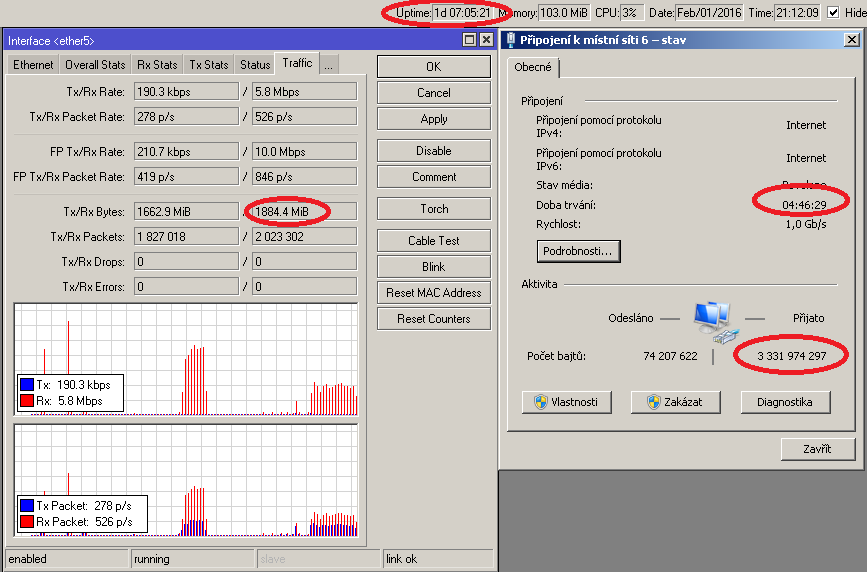
Hi!
After i upgrade from 6.30.4 to 6.34 i discover ipv6 was not working anymore. The issue seams to be the ipv6 dhcp client stuck in “Status: searching…”. After i click the “Release” button the status is switching to “Status: bound” and then ipv6 is working fine. I’m using RouterOS in a KVM virtual machine and before the update i made a snaphot. If i revert to snapsot (version 6.30.4) everything is working fine. I try to reconfigure from scatch the version 6.34 to see if the issue is present and it was.
My connection type is pppoe with dhpd-pd
Marius.
I’ve seen another problem with the DHCPv6-Client in 6.34 and Prefix Delegation. The “prefix-hint” doesn’t appear to be functioning correctly.
I was bringing up a new router and have “prefix-hint=::/60” configured. I only received a /64 from the provider (that being the default, if a hint is not sent by the client). I downgraded the router to 6.33.5, with no configuration changes, and received the proper /60.
If/when given the opportunity, I will do a packet capture and see if the hint is being sent at all in 6.34.
Anybody else seen this? I suspect it only occur on a new install. If you already have a longer prefix lease and are just renewing, I suspect it will continue to renew.
Regarding the two posts before about IPV6, Dualstack with Carrier “T-Online/Deutsche Telekom” is running fine here.
No Problems, so I can´t confirm it . Hardware used is RB2011UiAS-2HnD with Vigor 130 in modem-mode.
Regards…Detlef
My configuration is very similar. Vigor 130 in PPPoE Pass Through Mode, RB751G, ISP is “1und1” but carrier is also “Deutsche Telekom”. The issue can be reproduced at 100%. After a downgrade it works again flawless.
I have same issue with graphs after upgrade! No configuration changes, I did remove all my graphs and added them again but still same issue, seems there is something wrong with capturing the data in 5 min intervals, I have switched to 1 hr intervals and will see if anything changes. A fix soon would be nice  lol I use these each morning they are emailed to me so I can monitor for possible bandwidth issues etc and now I don’t know how much data we are moving in peak hours..
Unfortunately, it is not a bug, it is the new feature  We should use filter “Dynamic - is - yes” and then reorder (cca 7 clicks all together) or change to “no” and reorder again.
Hi, with v 6.34, whenever my pppoe connection is disconnected and reconnects, the ipv6 address on the interface which is used to advertise the prefix is not refreshed with the new ipv6 prefix. Had to revert to the bugfix release, 6.32.3.
6.34 WebFig Torch malfunction, showing two lines of incomplete data (after clicking on start it works):
webfig.png
Good day.
Device RB951G-2HnD
After update 6.34 service SNMP is incorrect.
I use zabbix for visualisation interface speed in kbps, and my trend decrease 1/2 from actual value.
Is this bug fix on next firmware?
Thank you all for the report about SNMP values. Fix is on the way.
About hAP lite issue - starting from 6.35rc3 you will be able to see all related information on Winbox if you will use Winbox 3.1. For hAP lite devices which use older RouterOS than 6.35rc3 you will need next Winbox version (3.2) which is not built yet.
Thx, we are waiting impatiently