You have done some liket this:
http://forum.mikrotik.com/t/dns-over-https/138774/2
Post output of /ip dns export
You have done some liket this:
http://forum.mikrotik.com/t/dns-over-https/138774/2
Post output of /ip dns export
Thank you shahani! This does work for me as well. I was unsuccessful in determining the root cause when I discussed this earlier in this thread. Your suggestion seems to fit my case, only one of my routers got affected (back since v6.46.x - not sure which release exactly) despite both of them having the default config script wiped blank - it was indeed only the one where wireless interface naming was also modified.
Why is the router connecting every hour to upgrade.mikrotik.com and fetching the LATEST.6 file?
Hello Jotne, good morning.
The configuration was done just as normis indicated.
I tried it with both Cloudflare and Google and the same thing happens.
Try the same configuration and others in 3 different mikrotiks and they all do the same.
Reading the full post, I see that other persons do the same… v6.47 [stable] is released!
It doesn’t seem to be a configuration error …
I cannot send you the output dns export because I went back with the configuration just in case, since they are mikrotiks that I have in companies and are productive
Cheers!!!
Hi all. After upgrading to 6.47 stable, Xiaomi Mi Robot Vacuum does not connect to wifi.
Wifi connects and immediately disconnects. logs:
19:47:49 wireless,info 50:EC:01:01:01:01@wlan1-2G: connected, signal strength -48
19:47:51 wireless,info 50:EC:01:01:01:01@wlan1-2G: disconnected, received deauth:
sending station leaving (3)
19:47:57 wireless,info 50:EC:01:01:01:01@wlan1-2G: connected, signal strength -48
19:47:59 wireless,info 50:EC:01:01:01:01@wlan1-2G: disconnected, received deauth:
sending station leaving (3)
19:48:19 wireless,info 50:EC:01:01:01:01@wlan1-2G: connected, signal strength -49
19:48:21 wireless,info 50:EC:01:01:01:01@wlan1-2G: disconnected, received deauth:
sending station leaving (3)
19:48:53 wireless,info 50:EC:01:01:01:01@wlan1-2G: connected, signal strength -52
19:48:55 wireless,info 50:EC:01:01:01:01@wlan1-2G: disconnected, received deauth:
sending station leaving (3)
ip dhcp-server lease print
D 192.168.0.109 50:EC:01:01:01:01 rockrobo DHCP-local bound 1s
2 sec later
D 192.168.0.109 50:EC:01:01:01:01 rockrobo DHCP-local offered 1s
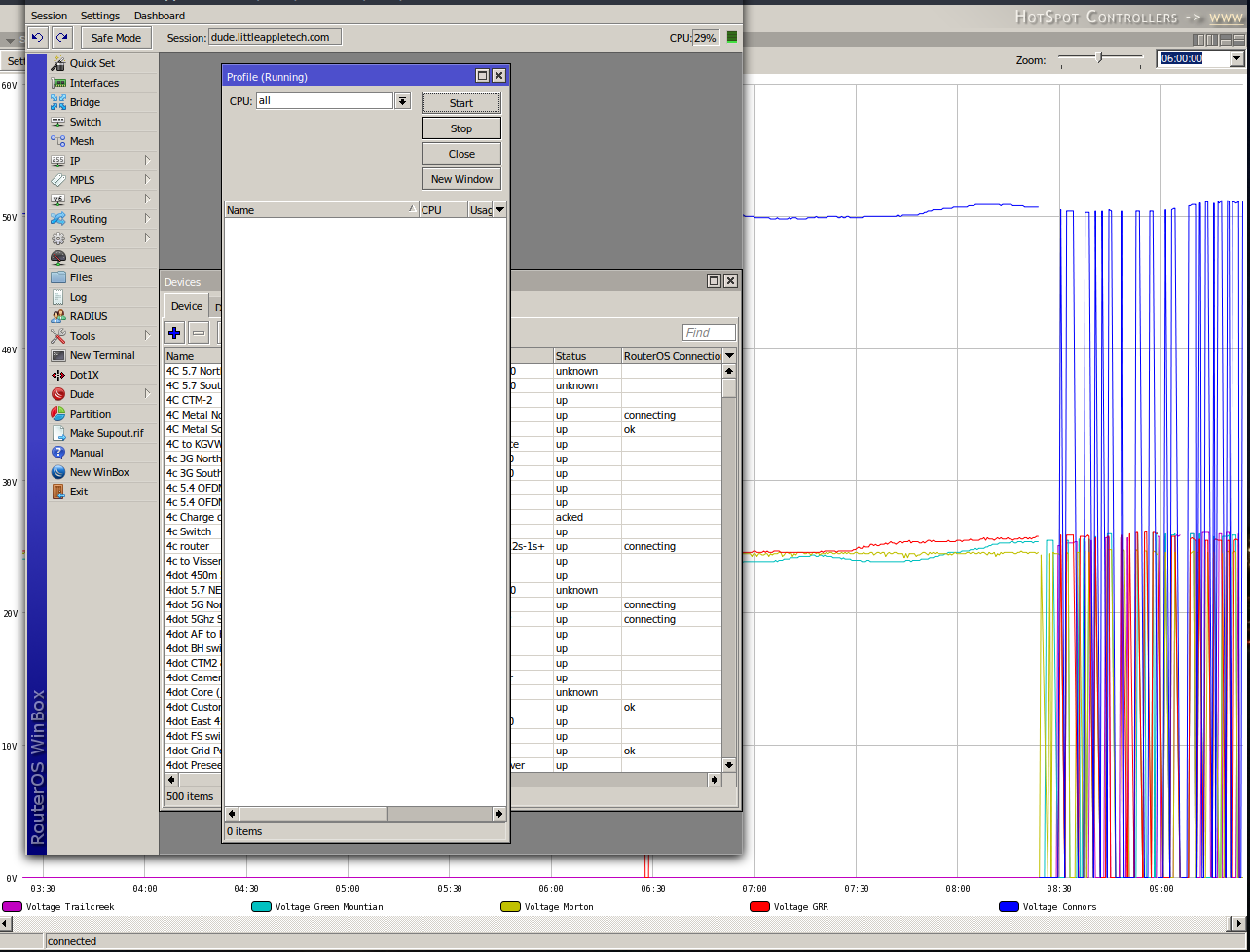
Is there any upcoming fix for the dude performance running version 6.46.4 and newer. What ever changed that required version 6.46.4 of the dude to monitor devices is broken. On 6.46.4 and higher the winbox process will pick one core and use 100 percent of it. This is on a 1100AHx4 Dude edition with 500 devices that it is monitoring. Using 6.46 my CPU is running 2% - 15%.
Anyone have any issues with link on ether2 on RB4011? New device and I can only get link with slight down pressure on the cable on this port only. I think it’s a mechanical issue but the port looks okay from visual inspection and the whole block of 5 ports I imagine is soldered to the board. Unlikely to be software issue but thought I’d ask as I’m waiting on a RMA. Did try with 6.45.9 as well but that exhibited the same problem.
As it says in the opening post: Please keep this forum topic strictly related to this particular RouterOS release.
Quick warning before putting 6.47 on 60GHz radios!
I loaded 6.47 on my 60GHz gear (wap60g, LHG, Cube’s) and, with frequency 58320 (and region USA) selected, the links began to bounce all over the place. Link counts on some CPE were in the hundreds (222, 256, 524, and 999) over the weekend. I thought it was due to the rain, but in retrospect the problems only happened on a couple of the busier AP’s and backhaul links.
The first fix was to move those AP’s off of 58320 (I noticed that those on the other channels had much lower link down counts).
The second was to downgrade most radios, starting with the AP’s. While going back through, I found that some CPE on 6.47 connected to AP’s on 6.46.6 (also not on 58320) didn’t have a crazy Link down count. So I’m carefully watching a couple of other CPE that I deliberately left on 6.47 to see if it’s an AP-only setting issue.
I haven’t narrowed down whether it was the region setting in combination with the frequency (58320), or the frequency alone that made the difference.
We are seeing the same issue and rolling back all our 6.47 deployments. We did about 100 antennas as a test, and it not good. There is an issue with the phased array algorithm, perhaps? It doesn’t know when it is locked in.
Hello,
how are your experience with DHCPv6 Server Static bindings?
I have couple WAP60x3 and any of them cannot keep static bindings.
They are lost after lease expiration and than they are dynamic.
Is it a bug or my mistake?
Thanks
Miroslav
Same issue with CRS125-24G-1S-RM. ROS 6.47, SFP ONU GePON is not detected any more. Rollback to 6.46.6 solved situation.
I have the same problem 6.46.6 all 96 clients connect, after update 6.47 only 25-30 can connect at the same time, nothing suspicious in the logs. After downgrade to 6.46.6 all Clients are connectet
Okay, I mentioned another release but I was testing it with 6.47 (hence in this thread) so from a strict perspective you are correct I shouldn’t have mentioned it. Sometimes there are strange issues with software than manifest as problems with hardware. Try to forget the part about the non-6.47 software 
Hello, install this latest version and my rb4011 resets the wifi all the time when I’m in winbox, and sometimes when I’m not …
is there a reported failure?
I also get ip/smb error on 6.47:
192.168.101.46 dialect: NT LM 0.12
192.168.101.46 session setup GSS error: 0x90000
192.168.101.46 dialect: SMB 2.002
192.168.101.46 session setup GSS error: 0x90000
Till this issue, for now I downgraded to 6.46.6 and all work fine.
Please fix it in next stable release.
Hi!! I have a DVR and this working rules
add action=dst-nat chain=dstnat comment=DVR dst-address-type=local dst-port=8000 in-interface=all-ppp in-interface-list=!LAN protocol=tcp to-addresses=192.168.88.9 to-ports=8000
add action=masquerade chain=srcnat dst-address=192.168.88.0/24 dst-port=8000 out-interface=bridge protocol=tcp src-address=192.168.88.0/24
add action=dst-nat chain=dstnat dst-address=!192.168.88.0/24 dst-address-type=local dst-port=8000 protocol=tcp to-addresses=192.168.88.9 to-ports=8000
When I update to 6.47 this stop working, I delete all and create a simple rule but dont work. I roll back to long term firmware and all start working againg. Some problem with 6.47?
I’m also experiencing this issue and found that it happens when a client connects to an l2tp server that has multiple WAN IP’s.
Scenario:
L2TP client has two tunnels, first tunnel connects to my server dedicated l2tp WAN IP, second tunnel to general internet WAN IP.
One connects but the other doesn’t. If I make both tunnels the same IP then both connects.
Hope this helps in troubleshooting the latest version bug.
Regards
Same for me aswell