I totally agree. Each name entry can match only one name, each regexp entry can match multiple names.
If something (a name entry) matches a single name, then there is no point of having it overridden by something else (a regexp entry) - currently if a name entry is overridden by a broader regexp entry then the name entry only participates in reverse lookup and has absolutely no effect on forward lookup.
I think it would allow much more flexibility (and ensure that reverse lookup returns names that actually point back to the IP addresses) if name entries would have priority over regexp entries.
Further testing shows reconnects are also a problem on 58320 on 6.46.6, just not as bad. As for 6.47, the problem only shows up if the AP’s are upgraded. Clients still on 6.47 are actually working just fine now with 6.46.6 AP’s.
This is not the case for me. Both my L2TP server and the clients, that cannot connect, have only one WAN IP. The L2TP server is on Google cloud and most of the L2TP clients are on 3G/LTE.
I noticed issues with Windows 10 clients – dhcp server is not giving any lease to Windows 10 machines. Same machine (same mac address) with different OS - dhcp lease is given. Can’t see any errors on Mikrotik log.
SMB server stooped working after upgrade to 6.47.
memory smb,info closing connection with (ip address)
All routers I upgraded to 6.47 (hapac*,wap60g*, ccr, crs*, rb2011, hex*, hexs*, hexlite*, etc.) the dynamic BPG-signalled VPLS interfaces were not added to any of the bridges specified in their configuration. Every single one had the same issue - they were all missing. As I couldn’t downgrade to 6.46.x I loaded the long-term build on all my routers and the issue was resolved. I will try to dig up a supout file, but because my entire network was crippled, I had to reload the long-term builds quickly so I may not find one. That being said, since all of them had the same issue I am thinking it may be easy to replicate in your labs.
after the upgrade, two failure of web-proxy, stops responding to users helps to restart the the service web-proxy, at 6.46 this was not a problem
I have problem on DHCP Client still searching while upgrade to this version. on version before not happen.
i try on Omnitik and RB450G

even wiser is to use https://1.1.1.2/dns-query for included free malware site blocking
https://developers.cloudflare.com/1.1.1.1/1.1.1.1-for-families/
Now only if Mikrotik could themselves add a pi-hole package to their RouterOS included packages to work together with DoH 
With included web GUI !!!
It begins well, the Mikrotik support asked me to check the hardware … 
I also tried 6.47rc2 and 7beta8 and it’s the same thing with the SFP module.
Sentenced to stay in 6.46.6?
I have suggested several times that MikroTik should add a capability to run user code in a “sandbox” (separate user, chrooted filesystem, etc) to allow users to add features they think are essential but are too much work / too little reward for MikroTik to add to RouterOS itself.
It would be a lightweight variant of MetaROUTER which is full virtualisation, this would just be a process which could e.g. run a DNS resolver like pi-hole.
However, there has never been a response (neither positive nor negative) on that.
I can expand further on this. In 6.46.6 when you open BGP Advertisements page in winbox, and you have many routes, the Winbox does not allow you to view all of them and instead gives a filter, and a warning about clicking a link to view all routes.
In 6.47 This does not happen, and instead it attempts to load all the routes in the advertisements page, with the result that you are disconnected immediately by winbox.
When you reconnect, winbox remembers the Advertisements page, so you are disconnected again.
To recover from this you must be ready to click another tab in the BGP page. Then you can continue to use winbox.
As mentioned, none of these issues existed in 6.46.6, this happens only in 6.47.
Alex
after updating to v6.47, smb doesn’t work. Any solution? I even reset the basic settings and re-enabled the smb server and still can’t connect to it.
SMB not working is a known issue. The next 6.48beta will fix it, when it is released.
Poorly decided and implemented.
You have discriminated routers that have to weak antenna to begin with, case in point HAP AC2 vs HAP AC3 or Audience.
So if your signal with HAP ac2 is to weak, well, buy another router. With no significant upgrade except antenna.
Secondly, I cannot now switch to regulatory domain country setting. Which is simply ridiculous.
I suppose solution is to default my wireless interface.
Yay
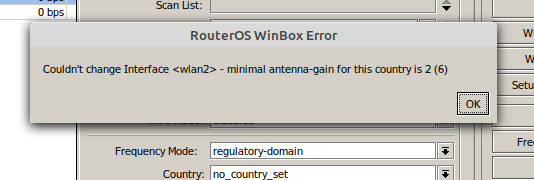
Antenna gain should not be changed, especially for devices with built-in antennas. What were you trying to achieve anyway?
If your signal is too weak, fix position or alignment. Playing with antenna gain is not the right way and can be illegal.
I am fully aware of antenna gain setting that can be illegal.
So, I fixed position and alignment.
Can antenna gain be illegal for routers that have detachable antennas?
I am sorry, but I do not understand why routers with built in antennas are affected with this, others are not.
Please explain, what is so special about builtin antennas, that they have to have this limit.
One of the best features of Mikrotik products was SAME options on all products, hardware limitations aside.
And that does not answer my question regarding that it is not possible anymore to change my setting to regulatory one, after the upgrade.
Which I would consider a software bug.
If it is not clear from picture, I cannot anymore set regulatory domain, and coutry, as if antenna gain 0 is now hard coded.
And it is supposed to be set to 2 for my country.
Antenna gain is a physical parameter of the antenna. Like my height is 183CM. I can’t change it, so just in the same way - routers with built-in antenna can’t change the gain. It is what it is.
For detachable antenna RouterOS doesn’t know the gain, so you read it from the datasheet and enter into the settings manually.
With a built-in antenna the antenna gain supposedly has been measured and there should be no reason to set it.
With an external antenna, the unit has no way of knowing the antenna gain and it is the responsibility of the installer to set the correct value.
(and MikroTik can claim that it is not within their influence that the installer has set a lower value than it really is)
You should understand that manufacturers are under constant threat of revocation of license to sell their equipment when they clearly do not care about the licensed EIRP limits and their users regularly set much higher values.
Different manufacturers have different takes on this, varying from “not possible at all to exceed EIRP limits” to “easily circumvented via a checkmark with text that it is your own responsibility” or “only possible to change it using (undocumented) commands in CLI where users normally use GUI”.
Usually we see the thing becoming more and more restrictive in subsequent versions of the software, for all manufacturers.
The same is true for DFS enable/disable settings and the behaviour of DFS in the software.
However, it would be nice when MikroTik added a new setting (like a slider in the GUI or a number that has to be between two limits) to allow, with a correctly set antenna gain, the EIRP to be varied between the minimum supported by the hardware and the maximum allowed by the local regulations.
Other manufacturers have that as well. Plus, there should be an “auto” setting for that which adjusts the power to obtain a certain BER or remote SNR.
(called TPC, transmitter power control, in the regulations)
And still no answer to other question.
How to change now to regulatory setting?
Also, I see no mention of this in release changelog.
EDIT: it is in changelog, my error