almost 25000000 Sector writes.. what are you doing to your flash memory?
I bought it november 2016. We have a normal usage i think… just for our private home network. Never had any problems, works like a charm… I have no idea what these numbers mean…
I have 35 683 586 here. That happened when I had the "/tool graphing" running for some interfaces and resources, with the "store on disk" option on.
After I found this I have removed the "store on disk" on all items and this problem went away.
But my router (2011) still works OK so I am not so worried about 500 writes, as some others are.
I’m not worried about “500 writes”. I’m concerned with the fact that the writes more than quadrupled, with this new version. Same hardware, same config. Just an upgrade - from 6.46.4 to 6.47.
The same unit I posted above is now with 24155 writes after reboot. When I posted, it had 14409. We are talking about 1700 writes/hour. This would give me something like 40800 writes/day. That’s about 14900000/year.
No, it’s not the end of the world. But it IS much higher than this used to do, with version 6.46.4
I have a third AP, same hardware and config - but still at 6.46.4. Is is at 90321 rewrites since last reboot - 10 days ago. See? I went from about 10k writes/day to 41k writes/day. There is something weird here.
And it isn’t the graphics. I set them to be written once per hour - and the counters increase slow and steadily.
I have a problem with the DHCP Server. I have connected a TP LINK AP200 as a repeater/bridge of the wifi network of Mikrotik. The repeater connects ok, I can ping it and login to web interface. When a client connects to tp link wifi network it can’t get IP. The mikrotik log says DHCP Server offering lease 192.168.88.114 for (mac of the client) to (mac of the TP LINK) without success. If I put static ip to the client and connect to TP link everything works ok. I downgraded to firmware 6.46.6 and it works fine.
I just did the same on my RB4011 and its working. Did you do the chain pem or just the root pem?
osc86,mirolm,dakotabcn,ErfanDL,roe1974,pe1chl,Werlock,jenechka,Institor,Paco,Jotne - The issue will be resolved in the upcoming RouterOS releases. But there is nothing to worry about here. Simply default configuration script got generated incorrectly.
wuffzack,pe1chl - Please send two supout files from this router to support@mikrotik.com (one from v6.47 and one from the previous version that was installed on your router).
templeos - We will consider changing the topic of these messages, but I think that you would like to know if the DNS server is not reachable when someone tries to use it.
obscurus - We will update the manual as soon as possible.
amokkatmt,MTeeker,buset1974 - The issue will be resolved in the upcoming RouterOS releases.
bpwl,krafg - The antenna gain setting is not available there anymore for the routers that have a built-in antenna.
diablothebest, w0lt,shmichael,nexusds,ementat,0012nish,Chisee - Please send a supout file from this router to support@mikrotik.com.
vecernik87 - We will look into this.
fs0c13ty,Grant,dvm,ErfanDL,pe1chl,dvm,pendie,Paternot,denisnk,JohnTRIVOLTA,WeWiNet,mirolm,faxxe,SnkB,nmt1900,osc86,pe1chl - We are currently looking into this.
llubik - Please make sure that upgrade.mikrotik.com domain name on your router is resolved to these IP addresses 159.148.147.204, 159.148.172.226.
Wakko - There are no such changes in the RouterOS that might do such a thing automatically. If you experience the same issue again, then please provide supout file from your router to support@mikrotik.com.
tricyclevent - Make sure that there are no unnecessary RouterOS packages installed on your router and there are not too many files stored on this unit.
teonok - Usually this means that there is only traffic in one direction. DHCP server receives requests, replies to it, but does not ever receive an accept from the client (most likely reply was lost between the server and client).
To Strods:
I verify, but then how is it possible that I updated from 6.44.x to 6.45.8 and then to stable 6.46.3 if he didn’t have the correct IP ?
THX
My hAP ac2 did upgrade without problem to 6.47.
I guess you now that you have to select stable in channel to see the upgrade?
For example, if there is some kind of a cache between your router and download servers, then it can cache old “LATEST.6” file and as a result you might see wrong version number here. Then router downloads (“upgrade.mikrotik.com/routeros/package” + LATEST.6 file contents) file.
Hello
I have a curious problem and it only happens to me with a router RB4011 without wifi: winbox via local connects perfectly, via VPN L2TP or does not connect (it remains in downloading descriptors) or when it accesses it does not load and it remains blank, with other routers in 6.46.6 does not happen, with a 4011 wireless version with 6.47 does not give this error
But if someone had a long-term file somewhere in the cache, both stable and test?
long-term 6.45.8, stable 6.46.3 and tester 6.47beta35? I don’t have any cache, only if the ISP had what it seemed to me probably, since there was no problem yet. . . Can I download eg 6.46.6 manually and upload to files-flash? Is my system updating after a reboot?
I brought this topic up for beta and rc releases... Mikrotik's answer was that DoH is always preferred when configured.
In general that's a good idea, with this exception: I want to forward specific zones to dns servers in local network or vpn.
So please chance the priority list:
- forwarding with FWD record
- DoH
- regular DNS
We want conditional forwarding of DNS queries AND DoH at the same time.
I have two routers at home, HAP AC2 and selfmade x86. After ROS upgrade to 6.47 I have faced with following problems:
HAP AC2: there were script errors in the log (fixed by clearing config and re-applying backup)
x86: no more discoverable by WinBOX. DHCP client on WAN interface is getting IP address too long, about several minutes.
Just found another hiccup with DNS and DoH…
Let’s assume I have a domain eworm.de (I do!  ), which has A and AAAA records. My router has a record router.eworm.de, using *.router.eworm.de as local zone:
/ip dns static
add address=10.0.0.1 name=router.eworm.de
add address=10.0.0.10 name=host.router.eworm.de
This worked with RouterOS up to version 6.46.x:
$ dig +short A host.router.eworm.de @mt-6-46
10.0.0.10
$ dig +short AAAA host.router.eworm.de @mt-6-46
Last command does not give output, as NXDOMAIN is returned. Clients in my network just use the IPv4 address.
Now the same with RouterOS 6.47, same static records, DoH enabled:
$ dig +short A host.router.eworm.de @mt-6-47
10.0.0.10
$ dig +short AAAA host.router.eworm.de @mt-6-47
eworm.de.
2a01:4f8:13a:16c2::80
It does not find a record locally, so querying Doh. It finds a CNAME for eworm.de, then returns the AAAA address.
Nowadays clients prefer IPv6 if available, so my traffic goes to my public server instead of local host.
I would see this behavior correct, so fine with me - if I can work around. My idea was to add a catch-all NXDOMAIN at the end of static records:
/ip dns static
add address=10.0.0.1 name=router.eworm.de type=A
add address=10.0.0.10 name=host.router.eworm.de type=A
add regexp=".*\\.router\\.eworm\\.de\$" type=NXDOMAIN
But that’s even worse: I get NXDOMAIN for all queries about *.router.eworm.de. Looks like regular expressions are handled first? IMHO this is a bad idea. More specific rules should match first. (Compared to routing: Would be a bad idea if default route is considered first!)
Currently thinking about a solution… I could keep the catch-all record, then convert all records to regular expression - probably a bad idea in terms of performance (and readability). Or I add two records for every address, simple A record (10.0.0.1) and AAAA record representing the IPv4 address (::ffff:10.0.0.1). I do not like both.
Mikrotik, I would like to see the default behavior changed. Either …
- use simple (non-regexp) records first or …
- apply the static list from top to bottom - regardless of whether it is simple or regexp
Please make the typical use cases work in combination with DoH!
Hi Strods, a sad choice , but its your RouterOS.
Problem is not for me, I’ll handle it using CLI, but will not advice this to newbies on this forum.. (Or they have to stay with 6.46.6 for a while).
You should check your MUM presentations, where people explain how to reduce the TXpower in the proper way (with antenna gain) better than setting it manually.
(Ron Touw, minute 37 : https://www.youtube.com/watch?v=pmtB3LlwquA)
We only have “poor mans band steering” with Mikrotik , and that’s OK as we can play with the TXpower. That is explained by many to set the 2.4 GHz band 7 dBm lower than the 5 GHz radio.
And on Mikrotik the best and easy way to do that is adding 7 dBi tot the antenna gain on the 2.4 GHz WLAN interface.
So advice will now be: for the 2.4 GHz band,: “use regulatory domain, set the right country, look in Status for the dBm value (eg 17dBm). Now use “manual-TXpower”, “no_country_set” (your TX power has risen to 25 dBm) , and manually set your TXpower as ‘all rates fixed’ to 17-7=10dBm. Don’t be tempted to use the 25 dBm”. You may need “Network analyzer” or “inSSIDer” , or any other wifi monitor to know what you are doing."
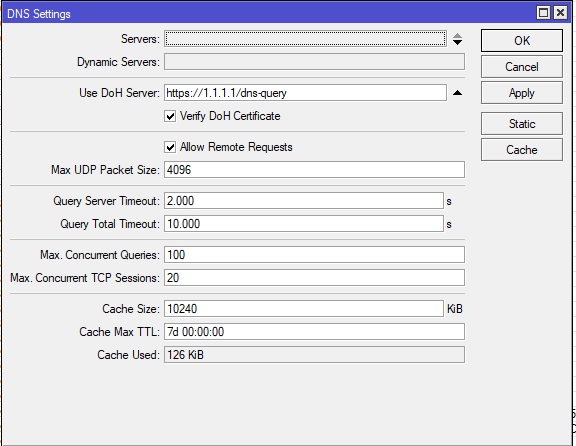
This is the actual result of DoH. This build(6.47) is same as 6.47rc2. I’m fetching DoH connection error: idle timeout issue from both versions. This issue solves by rebooting router but not permanently. It starts after sometimes.
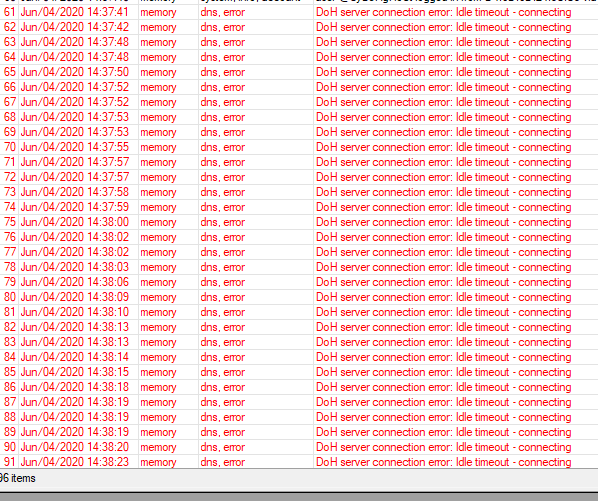
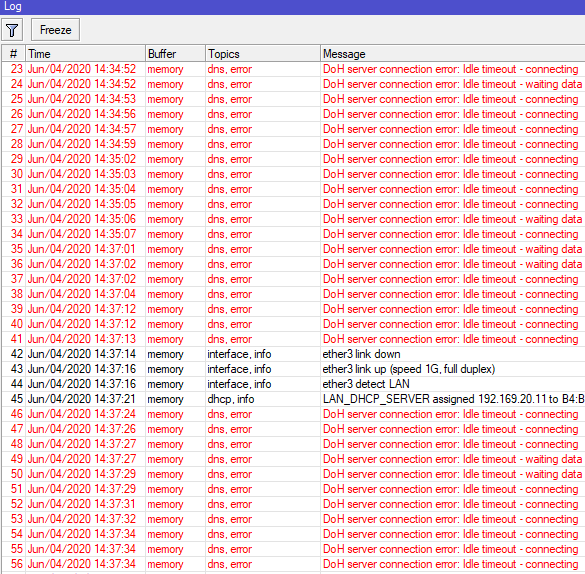
This will continue until reboot and start again this loop.
+1 !!!
Do you seriously expect us to keep an archive of supout files made before upgrading so we can send them to you in case there is a problem after upgrading??
I never saw that mentioned in upgrade instructions. I do have an export of the IPsec config for this tunnel as it was on 6.46.2 (before upgrade):
/ip ipsec profile
add dh-group=modp1536 enc-algorithm=aes-128 lifetime=8h name=modp1536 \
    nat-traversal=no
/ip ipsec peer
add address=x.x.x.x/32 comment=peername disabled=yes local-address=\
    x.x.x.x name=peer-peername profile=modp1536
/ip ipsec policy
add comment=peername disabled=yes dst-address=x.x.x.x/32 proposal=\
    modp1536 sa-dst-address=x.x.x.x sa-src-address=x.x.x.x \
    src-address=x.x.x.x/28 tunnel=yes
After upgrading to 6.47 this showed peer “unknown” in the policy and it had added peer=*FFFFFFFF
I presume the conversion went wrong because policy and peer were disabled during the upgrade.
Another tunnel with similar config which was enabled at that time got converted OK.
Consider rate-limiting the messages. Only print the message when it has not been printed within the last 10 or 60 seconds or so.