Just tested with mAP on 7.9.1.
Boot without ether1, no wireguard communication.
Insert ether 1. Still nada.
Toggle peer after a while, traffic starts flowing as expected with the bug as we know it.
Upgrade to 7.10b8
Boot without ether1, no wireguard comm (logical ).
Insert ether1, a couple of seconds and traffic starts flowing.
So yes, it seems they FINALLY solved that bug.
I would advise you to make (a couple of) API programs to retrieve and view information like that, this is so much more convenient than using webfig or similar!
I do that all the time, also for our Unifi WiFi system. The “modern GUI” environments are unreadable and unusable, but with API you can generate a page in the style you prefer, and it renders in 100ms instead of several seconds.
Because before it was possible to skim all the comments. Now one have to either widen the field or hover the mouse. Both are worse than the previous case.
And I say this as someone who liked the inline comments. But they DO have this problem.
Well I guess that with any change in any system there will be people claiming it is a problem because their niche use is now no longer possible…
I use a lot of comments, but as I have switched over to winbox quite some time ago (after initially using webfig because I use Linux and did not want to install Windows software), and I have used inline comments ever since then, my comments are always single-line and normally like 40 characters or less. They fit in the column that I allocate for it in winbox.
“general notices” go in the /system note section, where there is room for a lot of prose.
Hopefully MikroTik will develop the webfig framework a bit further, so it can use “site data” (storage for dynamic data from sites similar to cookies) and you thus have the equivalent of a winbox “session file” in webfig. That would open the possibility for user-settable options like “inline comments”, “show passwords”, “center forms” and of course selectable columns.
Since the layout in WebFig is quite strict in terms of table layouts and row order, it should be reasonably straightforward to create a function that realigns, resizes or removes comments according to your needs. Also, you might save per-table/session settings and stores them as cookies or in a session database much like Winbox.
OK, so after updating several routers to 7.9.1 during tonight’s maintenance window, and then losing two AF60LR’s this morning to a bad/failed firmware update procedure, I had to use my phone while in the field to get the replacement Wave LR’s online. The routers at the two sites involved in the outage have 7.10b8 (was hoping to test BFD, but then read that it’s for BGP-only, not OSPF), and I had to browse into them to verify the radio link had returned.
Anyway, the new mechanism for handling tables is horrible when used on a phone browser. I don’t know if it’s a scrollable DIV or an iframe or what (I haven’t looked at the underlying HTML–not something you do while restoring from an outage), but I was having a heck of a time trying to zoom, then scroll to find the DHCP-assigned address for the new radio. Normally I can browse into any router or radio and move around the page with ease. But as of 7.10, something is screwy and that table slides back and forth under the items on the left, and pinch zooming is nigh impossible. Maybe I should just make a video of it.
Needless to say it was frustrating since it took 2-3x as long to accomplish the task today.
Bgp prefix count work now, not realtime but is ok for now.
Hope in 7.10, show bgp advertise also fixed.
Before both work i will not upgrade my production router.
Long wait
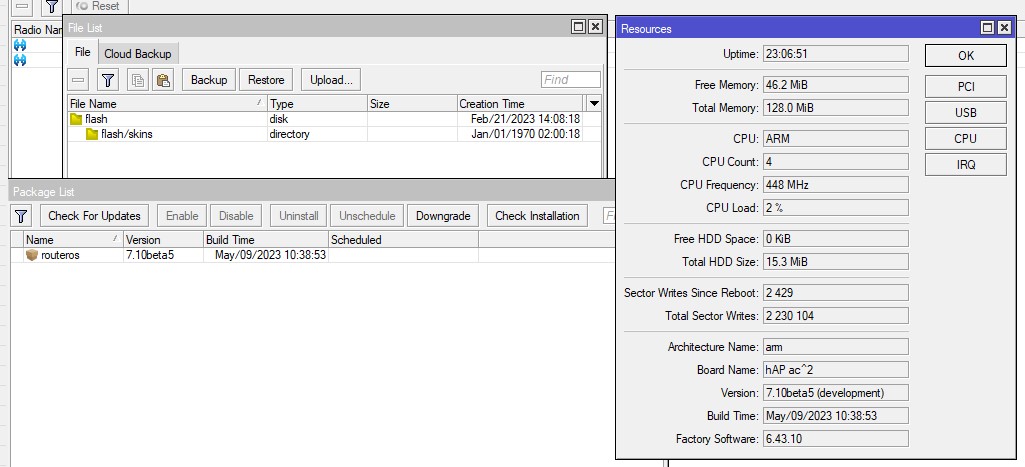
Indeed I also update a hAP ac2 without problems, but on that device the flash memory space is getting very tight.
When you have put files of your own on the device, remove them. When you have installed extra stuff like user-manager, remove it (move to some other device).
When you have done upgrade after upgrade, it may be required to do a netinstall. Export the config and download it beforehand, when you have a lot of special things on it.
When not, just netinstall it, put the defaults, and work from there.
Hi,
I had another error login with WiFi on this 7.10beta8. It has been reported as SUP-116195. Mobile can not join WiFi mobile say the password is not correct and after reboot all is OK and mobile can join the WiFi without any chage. Im using only WPA/WPA2. I will go back to ROS7.8..
Did you do backup before the netinstall and restore afterwards? Don’t do that!
Use export/import when you really need to transport some config. Better is to use default settings and do manual reconfig.
I have a hAP ac2 configured as an AP in bridge mode and it has about 1MB free. Still not a comfortable situation, of course!
16 mb flash chips should be cheaper than 32 mb. they count each and every penny
I think there is another issue at the 16MB boundary where going beyond that capacity requires extra I/O lines from the processor which may not be available because they are used for something else, e.g. LEDs or buttons.
This is dilema…ROS 7.9.1,ROS 7.10beta8 contains wifi bug which keeps mobile disconected but they also contains fix for CVE-2023-32154. I can only use 7.8 for stable wifi but without fix for CVE-2023-32154. MT please issue the fix as soon as possible.
 ).
).