No idea, but I would recommend:
- check if firmware version is up to date, otherwise upgrade (/system/routerboard/print → current-firmware: 7.11.2)
- supout to Mikrotik so they can see why and fix it
- netinstall (if not already done)
No idea, but I would recommend:
Did you restore a “backup” file from another device on that one?
pe1chl is absolutely right! That is the typical unpredictable outcome you get into if you do that 
It’s definitely a possibility.
Hint: it’s a boring task importing from export and validating line by line, but it’s the only reliable one.
Is it just me or is the wireguard bug back? I cannot get more than one peer to work. If I disable and then re-enable the peer it works fine but breaks all other peers. Just to be clear, all peers still connect but only one can route traffic at a time.
edit: nevermind
Usually that’s an indication of error in peer config allowed address.
Wireguard works just fine for me with multiple peers.
You are correct! Had to set allowed address to a /32 for all peers and now it works.
Is it normal for Device → RouterOS → Route tab to have empty lines?
I see this in all of my RouterOS devices

They all seem to be working correctly and connected with no issues. All other tabs show values correctly except for that one.

The Dude has not been properly updated to work with RouterOS v7. The routing table has changed design and probably it is no longer able to parse the new table correctly.
Likely you can still view the routing table in the Snmp tab, if that is an option.
Except when you have multiple routing tables, then SNMP retrieval of routes will fail in v7.
Has anyone had issues after updating to 7.11.2 Stable? If so, what kind?
I am using CCR2116-12G-4S+ (ARM64)
I still see some strange behaviour in the SNMP-BGP Peer Table;
bgp as defined at https://oidref.com/1.3.6.1.2.1.15
Is missing the following properties;
bgpLocalAs (https://oidref.com/1.3.6.1.2.1.15.2)bgpIdentifier (https://oidref.com/1.3.6.1.2.1.15.4)bgpPeerInUpdateElapsedTime (https://oidref.com/1.3.6.1.2.1.15.3.1.24)Also incorrect values are presented, and not updated over time;
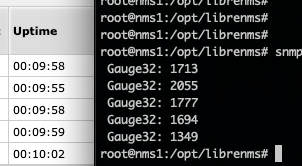
bgpPeerFsmEstablishedTime (https://oidref.com/1.3.6.1.2.1.15.3.1.16); this one should indicate how long (in seconds) this peer has been in the Established state or how long since this peer was last in the Established state.These values aren’t updated over time, nor after a reboot (and therefore a new Established) and completely inaccurate!
After a reboot, all the BGP-sessions are established at almost the same timestamp (+/- 10 minutes ago), side-by-side the output of snmpwalk ‘.1.3.6.1.2.1.15.3.1.16’ is shown. 10 minutes should result in 600 seconds, these values are far off and quite random;
About two weeks ago I’ve upgraded RB3011UiAS from 6.49.8 to 7.11.2, CPU usage went up to 100%, there were significant packet loss. Going back to RoS v6 (exactly 6.49.10) solved the problem. Upgrade was made on 2023-10-24 early morning, and downgrade on 2023-10-26 same quite early. Is this normal behaviour on that platform?
CPU usage:
http://pasteboard.co/TtG4lE43OHEw.png
Total traffic:
http://pasteboard.co/c52g5tGU60aE.png
RB3011 is a particular device, was the First Routerboard on ARM Arch, so is somewhat old, also is the Only Routerboard Based on Qualcomm IPQ-8064 SoC so is possible to encounter a problem only happening to that device
RouterOS v7.12 has been released
http://forum.mikrotik.com/t/v7-12-1-stable-is-released/171017/1