Bricked on 750gr3 on upgrade and one WAPac RBwAPG-5HacT2HnD. Had to recover both with netinstall, not what I expected on “stable” tree.
First inform you about what “stable” means before you base your expectations on it. That prevents disappointment.
To be fair, regardless of what “stable” means I’d expect firmware updates not to brick my devices.
Yes, but so do we expect for “testing” or “development” updates. However, it is for a reason that the release topic always starts with:
Before an upgrade:
- Remember to make backup/export files before an upgrade and save them on another storage device;
- Make sure the device will not lose power during upgrade process;
- Device has enough free storage space for all RouterOS packages to be downloaded.
I.e. you must always be prepared. Sometimes the upgrade goes wrong for some unusual reason, and when it happens it usually is not related to the particular version of the update, but to some pre-existing condition on the device.
“bricked” MikroTik devices are normally not permanent bricks, they can be recovered using the “netinstall” procedure.
They didn’t lose power. They had enough storage space. Guess what. I also have a backup, but it isn’t like it isn’t a PITA to recover a bricked device…
Having to uninstall ceiling mounted devices so you can hold the reset button to force netinstall is a PITA, for something that should have “worked”. I am sorry you can’t see that this is in fact a defect. 1 out of 2 RB750GR3 failed, 1 out of 3 WAP AC failed.
I do. DHCP client can’t add a simple default route:
dhcp-client on ether1 failed to add 0.0.0.0/0 route to 192.168.1.1: std failure: timeout (13)
What a nonsense, didn’t expect this bullshit from mikrotik.
Mikrotik can’t handle users and their sometimes exotic configs. Not saying this is the case with you…just saying that this is not caused by RouterOS v7.11.2.
It's the default config, which comes with AX³, you know. Mikrotik must handle it with no excuses.
RAM shortage (where firmware is stored during the upgrade) is common problem on those smaller smips devices, you must make sure you have at least 7.7MB free RAM available (winbox/system/resources) before upgrade, unfortunately this doesn’t help you now I guess…
It is common opinion that you should not use RouterOS 7 on these devices at all, although that isn’t official Mikrotik stance, on a contrary the download link on hAP lite TC page points to 7.11.2 version…
You cannot use steps you are referring to to downgrade between major version, 7 to 6 for example, just between same major version like 6.x.x to 6.x.x, this unfortunately isn’t mentioned on that help page and it should be really.
Considering all the above you are probably justified to be angered.
The only way to downgrade to lower major version, as long it is not lower than factory installed one, is to use netinstall, and that is what you should now to unbrick your device…
https://help.mikrotik.com/docs/display/ROS/Netinstall
No, those small smips devices do NOT use RAM to store the downloaded firmware, that is stored in flash.
Using RAM for that is only in the other devices with 16MB flash. (MMIPS, MIPSBE etc)
dhcp-client on ether1 failed to add 0.0.0.0/0 route to 192.168.1.1: std failure: timeout (13)
Default is 192.168.88.1
Hello,
I recently installed version 7.11.2 on an RBM33G, along with the R11e-LoRa8/R11e-LoRa9 LoRa card. We updated to this version because the release notes indicated that filtering option using NetID or JoinEUI is now supported on uplink messages. We made several attempts to activate filtering using JoinEUI, but unfortunately, it did not function as expected. I’ve outlined our approach to filtering data below; however, the gateway continued to transmit data to the server. We tried stopping and restarting the LoRa module and even rebooting the device, but none of these actions resolved the issue.
/iot lora joineui
add joineuis="{ min=0000000000000000; max=0000000000000000 }" name=discard_all
/iot lora servers
add address=ttn.mydomain.com down-port=1700 joineui=discard_all name=TTN-TEST up-port=1700
When we attempted to filter data using NetIDs, it worked as intended, but this method does not align with our specific requirements.
Could you please verify whether this is a known bug or if there are specific settings we need to adjust?
Thank you
Anyone having issues with fasttrack stopping working after some time?
My RB5009 loses the ability of fasttrack, what limits its routing performance.
On hAP ax^2 (with wifiwave2) if you turn on Hardware Offload on ethernet ports (and it actually works meaning you have H flag) in a Bridge where wifi interfaces are connected (say LAN) the packets from wifi interfaces are not forwarded, it just doesn’t work…
I am not sure if this is the case in previous versions but in 7.11.2 it is definitely the case.
After upgrading from 6.49.10 only 9 of 50 openVPNs (over 443 TCP) are coming up. I don’t know why, after every restart other 9 connections are active. The only fixed thing is the counter 9…
Niels
I’m seeing what appears to be a memory leak on v7.11.2, likely related to the DNS resolver once again. Have already reported, with supout files, as SUP-128622 on September 20th, but absolutely no answer there, almost one month after the report with detailed data
Posting here to let people aware that some memory leak is still present on v7.11.2 and, by my own analyses of the supout files, it’s once again DNS resolver related (no confirmation from Mikrotik at this one). While I have other that are not presenting the behavior, the faulty behavior (and screenshot) was taken from a RB2011 box.
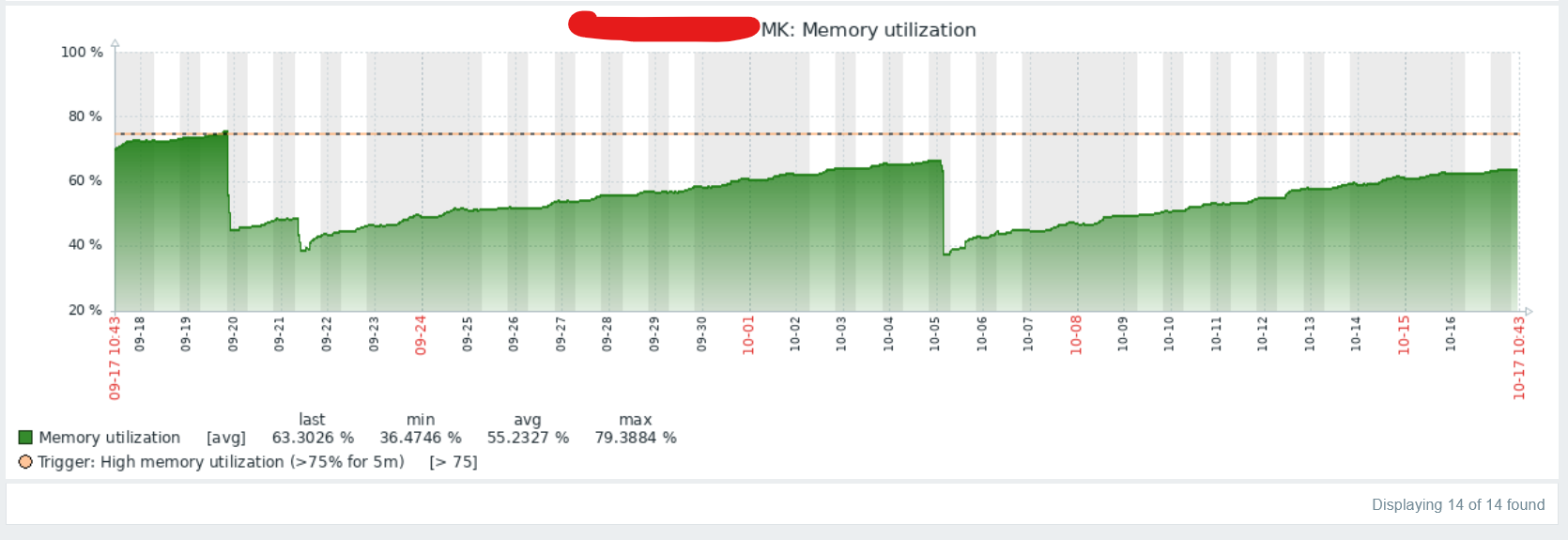
In fairness to the poor DNS server… maybe it’s related to the architecture. Is there something that point at DNS, other than DNS has had memory leaks before? It seems if DNS is leaking, it be more widespread.
For sure it might be arch related, I also considered that. Thing is that even other RB2011s i have running the same RoS version, the leaky behavior can’t be seen. After decoding supout files before and after a reboot (attached to my bug report), I can clearly see the /nova/bin/resolver process is the one using much more memory than likely needed, so I’m pretty sure (to my best knowledge) that it’s DNS resolver related. Might have other variables as well, but I couldn’t find any. Was expecting Mikrotik Support to pay some attention to my bug report, but it’s almost 1 month old and no interaction at all from Mikrotik there 
Hi,
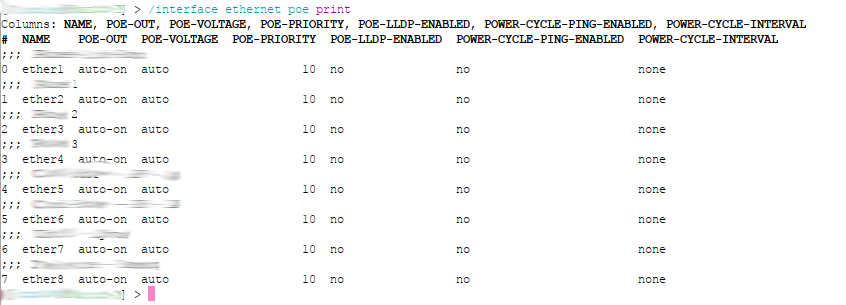
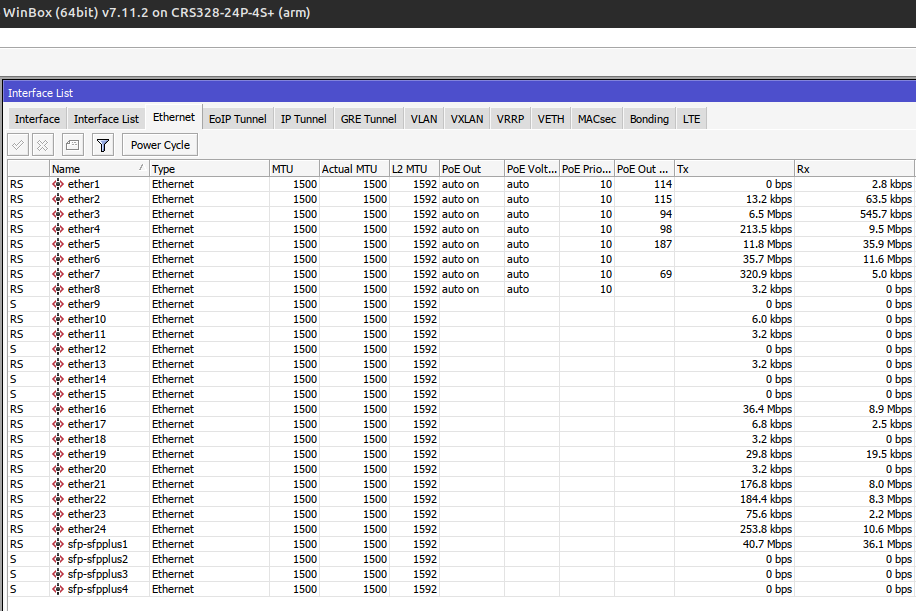
one of my CRS328-24P-4S+ don’t know about PoE on interfaces 9-24, however PoE on theese ports still works…
Same model, with same RoS version, but different device this problem haven’t.
Any idea?
I had to netinstall a couple of RB4011 because they had a weird partition scheme with two “part1” (instead of “part0” and “part1”) that prevented them to work properly. The two RB4011 were used for labbing so they passed through multiple install of beta/rc ..so I’m not too concerned about the weird partitions, but I need cleaning them before putting them into production.
Well .. I tryied to netinstall with the [netinstall-7.11.2] utility → both the two RB4011 went into a sort of “boot loop” (ether boot-loop).
Then I switched to [netinstall-6.49.10] utility → READY !there you go! ..here I flashed the 7.11.2 ok, then created the 2 partitions which were ok (part0/part1). Nice!
It seems that the the old 6.x netinstall utility is more robust than the new one (at least of the 7.11.2).
Had anyone come across similar issues (weird partitions / netinstal) ?
Have a nice week-end guys.