Hi Normis,
via Support-Ticket?
Hi Normis,
via Support-Ticket?
either a new topic or in a support ticket, yes.
in general the new SMB should be very fast, so curious what is different in your setup
Hi Normis,
I think this is a misunderstanding. I don´t use the buildin SMB-service.
The fileserver are Windows Server 2022 and use their native fileservices. (SMB 1.3)
The problem is the throuput via the Switch to those both file server afte the update. I assume something with the “ethernet” or the SFP´s, but I don´t have any evidences for that.
The config on that switch is unchanged since many month and since some ROS updates.
I´ll open a ticket with the config and an supout.rif 
I had the same issue - not being able to access the smb share. I changed the share name to all lowercase and now i can connect. In my case the order of the interfaces did not matter.
CVE-2023-52160, Does this affects ROS in any way?
*) system - expose “lo” and “vrf” interfaces;
Does this mean we can (or should?) delete our “loopback bridge” interfaces and use the native loopback interface of the Linux kernel?
*) bgp - allow to leak routes between local VRFs;
Do we have any configuration example/documentation for this?
Hi,
Netwatch is not sending notification thorough Teams…
I use this
:log error “Ping to RAP AX56 1 OK”
/tool fetch http-method=post http-header-field=“Content-Type: application/json” http-data=“{"text": "Ping to RAP AX56 1 OK"}” url=https://itwconnect.webhook.office.com/webhookb2/c08e-503f-4f76-9542-8602dd6e3eac@7fa9f-fff9-4884-a6e2-898886b775/IncomingWebhook/2a6a1dc4a18048d819b39e5e/d7e0e1b7-b8fd-4e6d-9ded-bbf216e4b7fd
and in the log is: Couldn’t start task: cannot open file: permission denied
Do you please know what is wrong?
fetch needs FTP pernission?
Did you read it or are you just throwing CVE numbers around?
If you did read that CVE, you would know the answer 
i hope that the LTE can be fixed on the stable version , as per advised.
Can you please clarify exactly what you mean ?
[admin@MikroTik] > ip smb export
/ip smb users
set [ find default=yes ] read-only=yes
add name=1234
/ip smb
set domain=WORKGROUP enabled=yes
/ip smb shares
set [ find default=yes ] directory=/flash/pub
add directory=flash name=share1 valid-users=1234
add directory=usb1-part1 name=share2 valid-users=1234
Tried with interfaces=all and interfaces=ether3 (that's the only running interface), neither work with 2 Windows 10 PCs and an Android phone.
OSPF SNMP support when?
v7.14rc1 (firmware v7.14rc1) on hAP ax^3 - USB disk handling is totally broken.
I upgraded from 7.13.3 because my new IoT lightbulbs did not connect to Wi-Fi with 7.13 and I saw this in release notes:
*) wifi - increased value for SAE retransmit period to 3s to improve WPA3 compatibility with IoT client devices;
and yes, it helped, but at the same time USB disk has started behaving in a weird way. My container stopped working, recreating it ended with “error”.
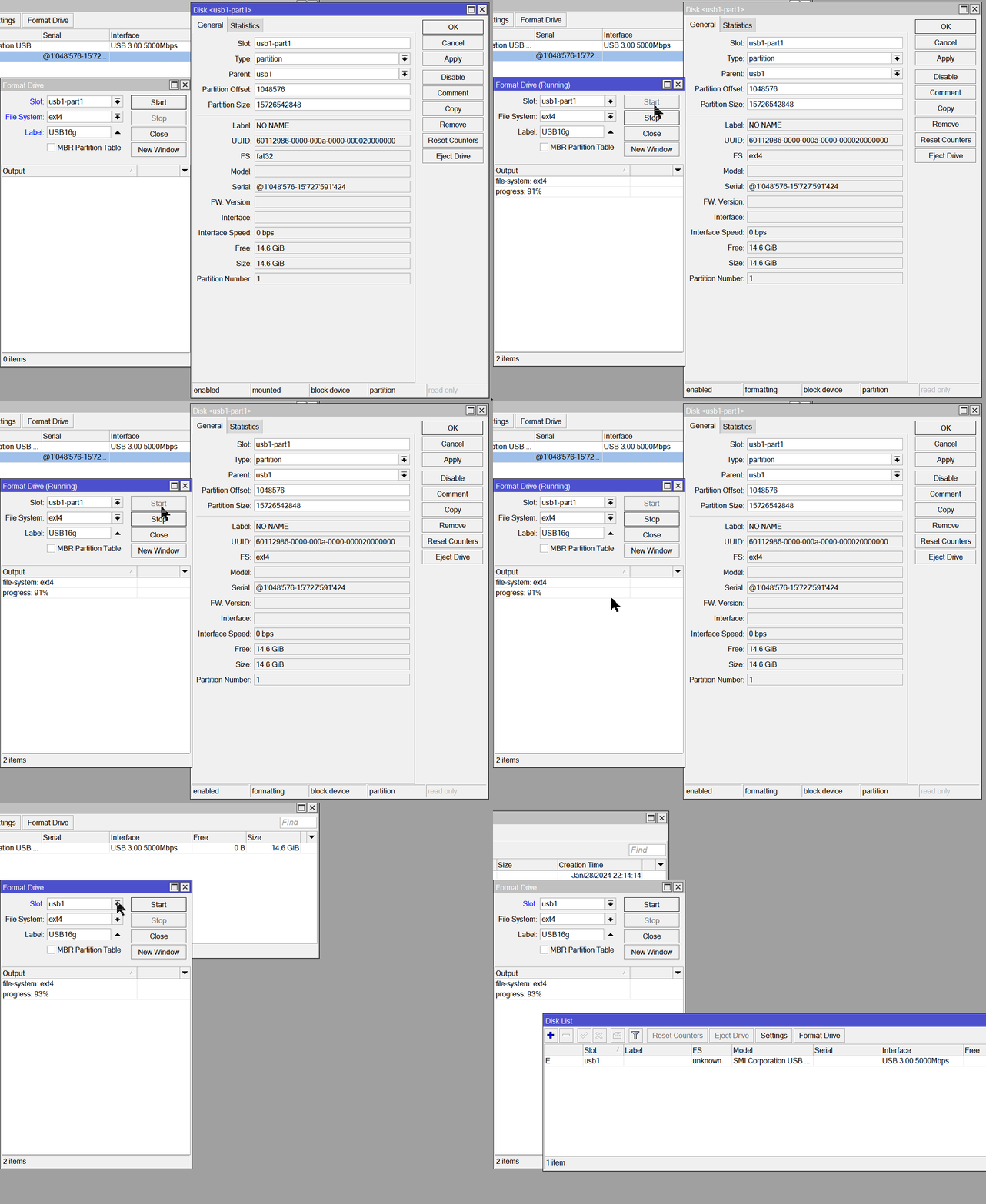
Trying to format the USB disk does not succeed most of the time. The disk randomly disappears, just like it was ejected by the system. Unfortunately there are no logs regarding formatting or ejecting.
I was able to capture the process of formatting and disappearing of the partition. See the screencast below. Note that the action occurs at the end - the window with partition details automatically disappears, the partition is no more, and the disk is not selectable in dropdown anymore. The LED on the disk suggests it’s been ejected.
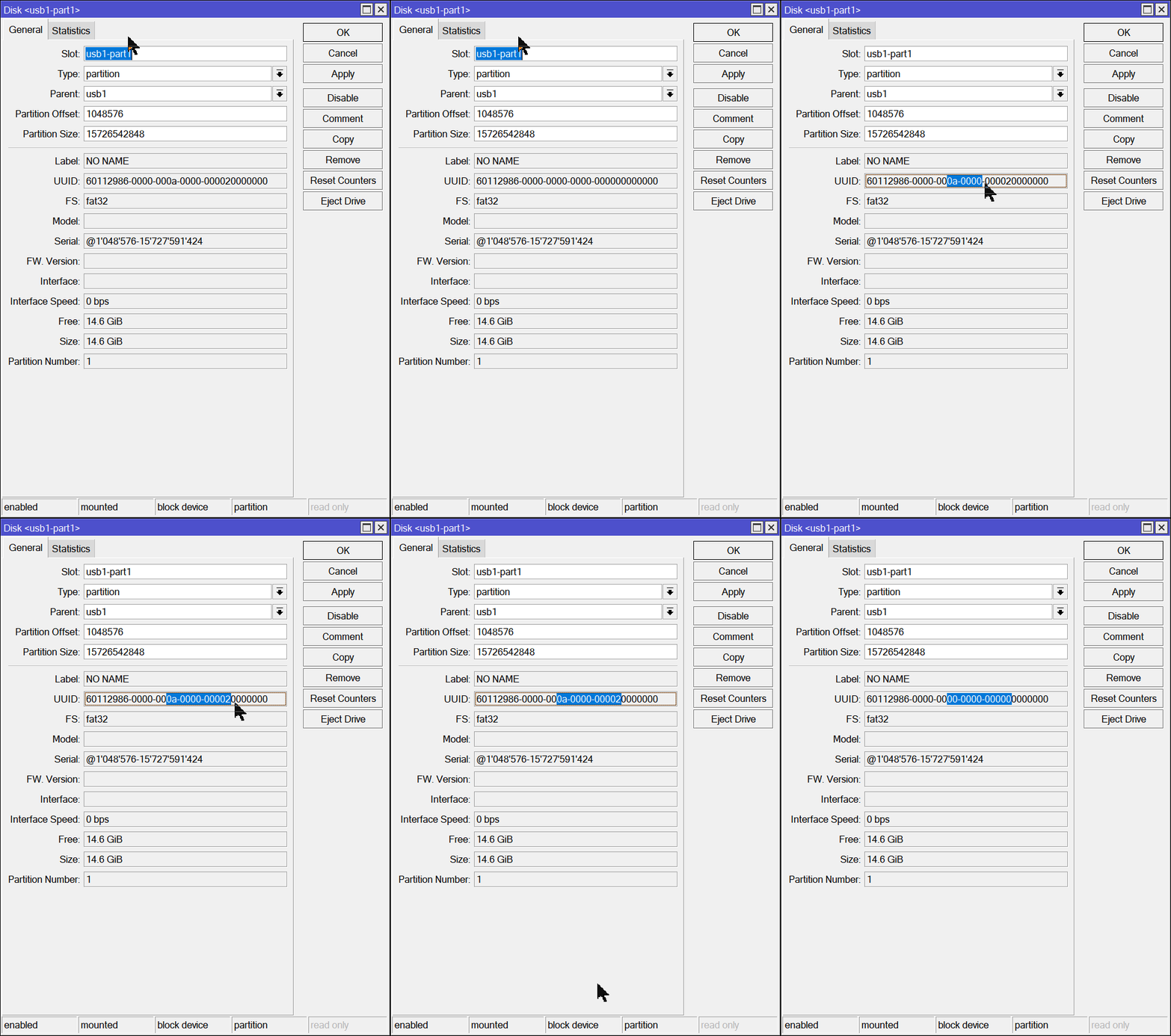
Also, when displaying properties, the UUID of the partition changes while looking at it - a phenomenon that should never occur.
I double checked the USB disk in my laptop and it’s perfectly okay, got another one with the same symptoms.
Can you please clarify exactly what you mean ?
the LTE usb 4g dongles , since v7.13 are not working.
I’ve raised a ticket, and i’ve been advised that on v7.14 stable probably will be fixed.
(im using that fro BTH)
Ullinator - Did you manage to create a support ticket? We would like to check out what is going on here for you, since the issue clearly is caused by an upgrade.
As I cannot open a new topic I post my request here, in hope to be heard… 
Feature Request: Wireguard client config: configurable “AllowedIPs”
As 0.0.0.0/0, ::0 is not always the right choice, this should be configurable.
Most of the time I do not want to route all traffic through wireguard as I use split-tunneling, so i beg you: please!
Ralf.
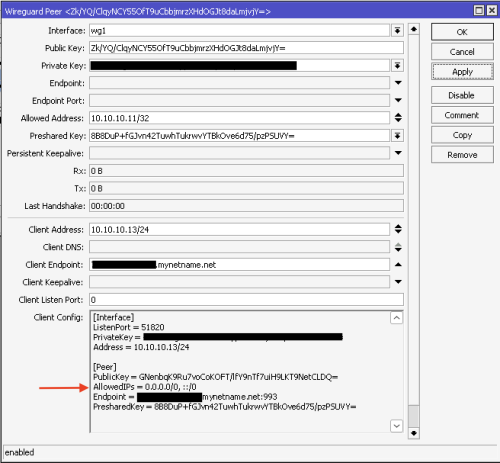
I think you can define whatever you want on the client side to do this split-tunneling behavior you mention. What you point out is just a reference.
Regards.
Hello folks,
If I use the rest API extensively for getting stats etc, the user list gets spammed with active users.
Please fix this or what am I doing wrong?
Greetings
/user/active/print
36 2024-02-15 13:48:28 api 10.10.0.5 (unknown)
37 2024-02-15 13:58:30 api 10.10.0.5 (unknown)
38 2024-02-15 14:08:31 api 10.10.0.5 (unknown)
40 2024-02-15 14:28:32 api 10.10.0.5 (unknown)
41 2024-02-15 14:38:33 api 10.10.0.5 (unknown)
42 2024-02-15 14:48:34 api 10.10.0.5 (unknown)
43 2024-02-15 14:58:36 api 10.10.0.5 (unknown)
44 2024-02-15 15:08:36 api 10.10.0.5 (unknown)
45 2024-02-15 15:18:37 api 10.10.0.5 (unknown)
46 2024-02-15 15:28:38 api 10.10.0.5 (unknown)
47 2024-02-15 15:38:39 api 10.10.0.5 (unknown)
48 2024-02-15 15:48:39 api 10.10.0.5 (unknown)
49 2024-02-15 15:58:40 api 10.10.0.5 (unknown)
50 2024-02-15 16:08:40 api 10.10.0.5 (unknown)
51 2024-02-15 16:18:41 api 10.10.0.5 (unknown)
52 2024-02-16 08:01:50 api 10.10.0.5 (unknown)
53 2024-02-16 08:11:50 api 10.10.0.5 (unknown)
58 2024-02-16 08:21:54 api 10.10.0.5 (unknown)
59 2024-02-16 08:21:54 api api
Looks like you are using a new connection for every request. Is the list cleared after some time?