*) defconf - use “fq_codel” queue as default interface queue for wired ports on LTE devices;
What difference does this make in practice? My assumption would be that it only has an impact when the ethernet port is maxed out, but the likelihood is that the LTE will be maxed out first.
Hi strods,
no, I didn´t, because, like I wrote in my first post, I did a downgrade to 7.14Beta10 after the issue and everything was good.
As a preparation for the config-files and the supout.sif I´ve upgraded the device once again to 7.14RC1 and after this second upgrade the problem didn´t exist anymore.
I have no explanation for this. :-/
During the first issue with 7.14RC1 and the bad performance I´ve rebooted my server to exclude an error with them. But nothing helped, the performanmce even between the two servers (both 40GBit connection to the CRS) was only ~500kBit/s. What I didn´t do was a second reboot of the switch itself at that time.
Long speak, shot summary: the issue has gone after the second update to 7.14RC1.
For those that do not use VRF but use manually created route tables, it would be very convenient when there would be an option to import Connected routes into a newly created table (so they can be distributed using BGP).
E.g.: add an option to /routing/table/add which specifies an interface list. All connected routes to interfaces in that list are imported into that routing table, similar to what happens in a VRF.
Good one! I’d never thought about that way, but simplify PBR rules too. Today, you have to force local subnets going to main, or statically configure each route table with local/connected routes.
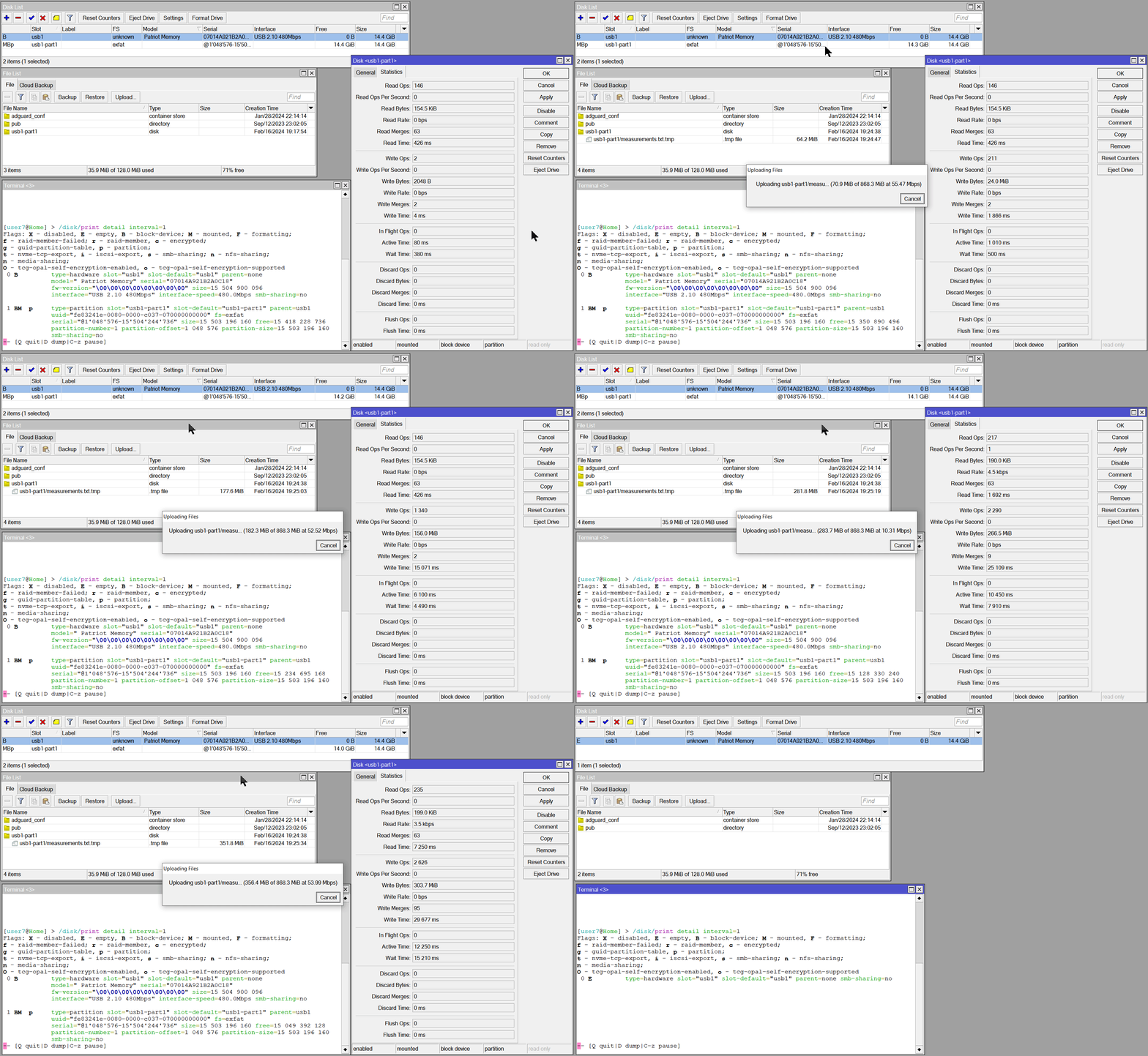
I was able to do it even by simple file upload operation. Please see the screencast. Note it has approx. 75 seconds and the issue is near the end. Pay attention when the upload counter shows 400 MiB. As you can see the disk is different than in the previous screencast (Patriot USB 2.0 vs SMI USB 3.0) but the issue persists.
(The mouse position is weird due to DPI difference between my main and the second monitor).
Can you see this actually updated on queue menu? I have updated an LtAP-mini to 7.14rc1 and there are no changes on this menu: no new queue on queue types menu, and ether1 is still on “only-hardware-queue” in tab “Interface Queues”.
That is correct, you need to reset the device to defaults to see such changes.
Or you can do /system/default-configuration/print and selectively cut/paste from that.
(it is also possible to use file=filename with that, and download the file, for easier examination)
Yes, and with routes only present as PBR rules you cannot advertise them on BGP anymore, they really have to be in that routing table.
So you need to manually open each connected route, copy it, and save it in the appropriate routing table.
It would be much more convenient when there could be an automatic import, like there is with VRF.
Reason I bring it up again: yesterday I found a bug in a router config that was caused by the changed behavior of routing rules on v7 (changed from v6) which has been present ever since I changed the router from a CCR1009 to a CCR2004 and was thus forced to migrate to v7. I have been searching for this problem for more than half a year…
While it of course is my own responsibility to configure the router correctly, this problem would not have occurred when I could have those connected routes automatically imported.
Is this in relation to my comment? It is weird because, even when that is true, I spect to see at least the definition of the new queue in queue > queue types, isn’t it? I cannot see fq_codel defined there.
OP clearly stated the obvious and you seem not to understand nor answer his question? So once again - how is something as queue-types related to the defconf or resetting the router? It has imo nothing to do with anyone expectations, nor wishes.
Because this is a NEW queue type in RoS. Since it’s new, it wasn’t set in the 7.13.x series. Now it is the new default - but RoS doesn’t change configurations already made: this is by design. It’s too risky to change something that the user already uses.
So. Devices upgraded from 7.13.x to 7.14.x keep the old default. Devices that are netinstalled get the new default. The user can change this, of course - but only after the upgrade.
Is this injected by MikroTik in THIS RC and for what reason ?
api.ipify[.]org and similar domains have long been used by malware to look up an infected device’s public IP. In research on malicious artifacts published by SANS, Jay Yanza detected api.ipify[.]org used as a third-party external IP lookup in 205 of 7747 unique file hashes. Other IP lookup sites totaled over 2000. Of all malware types, ransomware utilizes external IP lookups most often as it is generally a location-based threat. While an external IP lookup is not in and of itself malicious, it may be an unexpected occurrence that requires further investigation.
I reverted my LAB CCR1009 back to v7.13.4 and no such log enty was made …
I do agree your point, but adding a new default queue type to the queue type list (the ones with the start simbol << * >> at begining) doesn’t break anything. I expected to see the queue there, but no association with the Interface queue type, as you said, for not breaking backward compatibility.
But yes, as @pe1chl mention, the default configuration script shows the new queue definition + assignment:
/queue type add name=fq-codel-ethernet-default kind=fq-codel fq-codel-ecn=no
/queue interface set [find default-queue=only-hardware-queue] queue=fq-codel-ethernet-default
In my opinion, still pretty werid not to see the queue defined as another default queue type.