So basically something like that? If I would like to hand out, for example, fd23:dead:beef:babe:0000 up to fd23:dead:beef:babe:ffff for clients?
/ipv6/pool/add name=mypool prefix=fd23::dead:beef:babe:0/112 prefix-length=128
So basically something like that? If I would like to hand out, for example, fd23:dead:beef:babe:0000 up to fd23:dead:beef:babe:ffff for clients?
/ipv6/pool/add name=mypool prefix=fd23::dead:beef:babe:0/112 prefix-length=128
Those values are correct and same for me, but there are 3 issues: 1) In case of 5490-5710 I have only maximal power 26 dBm with 2.5 dBi antenna. 2) I can not set up manually or automatically any of frequencies beyond 5600 with 20 MHz channel or beyond 5580 with 20/40 MHz channel or beyond 5560 with 20/40/80 MHz channel. If I try - there is only message “no available channels”. 3) And in addition why is there 160 MHz channel, but in reality I can not set up? Everything with wifi-qcomm-ac.
[admin@MikroTik] > interface/wifi/radio/reg-info country=Czech
number: 1
  ranges: 2402-2482/20dBm/40MHz
          5170-5250/23dBm/160MHz/indoor
          5250-5330/23dBm/160MHz/indoor/dfs
          5490-5710/30dBm/160MHz/dfs
Anybody else has issue with connection to internet after upgrade? (I’m using pppoe and there are some changes for PPP) - SUP-171366
Why bandwidth-test is now blocked by default?
Yes, i have same problem with pppoe ISP connection on the one of remote routerboard. It looks like it’s fine, but there’s no internet. After downgrade to stable channel everything work fine again.
Same for me on my home router. Downgrade to beta4 and seems stable now.
This device mode is a PITA
We supplied all of our end clients routerboards (hapac2, ax2, etc), the VERY first thing we do if someone complains about speed is we login to their router and do a btest to our core, we’re losing such a valuable tool - boo
Anyone who is experiencing these problems with “No Internet” after upgrade to beta5, please generate supout file while running beta5 and send this files to support@mikrotik.com.
blingblouw2 you can just enable bandwidth test. ask the user to push the button to confirm. it’s a one time operation, you don’t have to do it every time.
@normis I don’t think that’s practical on operation standpoint I also can feel their pain, can we revert or go back to 7.16 and moved on and don’t touch that device-mode thing!, you guys are shooting yourself on the foot there are lot of people don’t like where this is heading, just my 0.02$
1.)
If you check specifications for hAP ac2, you’ll see that chipset can only transmit at 26dBm in 5GHz band. As I already mentioned, higher limits, settings, etc. can’t change that.
2.)
According to wifi channel table for 5GHz band it should be possible to set something above 5600MHz. But in Europe, frequencies starting from 5650MHz (that’s channel 132 with center frequency 5640MHz) come with limitation of indoor use only. While I don’t see any configuration parameter available in wifi-qcom-ac , this might still affect channel availability somehow. I can’t try (I have one hAP ac2, but without any wireless/wifi driver as I’m using it as router and tight flash storage makes problems if wifi driver is installed). In legacy wireless driver there was property installation with possible settings any, indoor and outdoor … and if it was set to outdoor, it would refuse to use channels specified for indoor use only by regulations.
You may want to “delegate” this problem to MT support (e.g. by opening a ticket by sending e-mail to support@mikrotik.com)
3.)
I guess it’s because wifi-qcom-driver supports 160MHz channels on different hardware (e.g. Audience on the “upper 5GHz” radio)
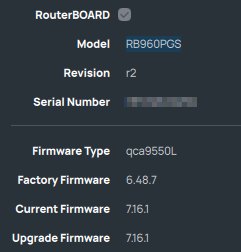
7.17beta5 seems to brick RB960PGS - I had to do recovery via Netinstal. I even tried to flash 7.17beta5 via Netinstal and unfortunately the same story - device leds are off except of Blue for POE and RED to POE enabled ports, no ping, no visibility for WinBOX, simply dead. Haven’t tried to reset config but if 7.16.1 is running well and 7.17beta4 was okay except of DHCP issue, I don’t see reason for reset.
Is there some way to diagnose this, eg. makes suppout sense here after reset via Netinstal ?
Is this answer even real, or your computer got hacked? So you think that ppl will do so for 1000+ potential clients, and more so, if the router is e.g. on /under the roof? How on earth disabling stuff like btest protects just anyone? Are there any documented cases of a feature missuse?
Is quad9 DoH ever going to work properly on Mikrotik ?
This works fine when I use Cloudflare DoH, but I get the following for Quad9 DoH, the reason I want to use Quad9 is It’s faster!
I Have all the certs etc…
 2024-11-14 19:17:03 dns,warning DoH server response not OK: 502: no downstream server available
 2024-11-14 23:17:19 dns,error DoH server connection error: remote disconnected while in HTTP exchange
 2024-11-15 06:46:36 dns,error DoH server connection error: remote disconnected while in HTTP exchange
 2024-11-15 06:57:10 dns,error DoH server connection error: remote disconnected while in HTTP exchange
 2024-11-15 07:44:29 dns,error DoH server connection error: remote disconnected while in HTTP exchange
 2024-11-15 07:44:29 dns,error DoH server connection error: remote disconnected while in HTTP exchange [ignori
ng repeated messages]
 2024-11-15 08:12:11 dns,error DoH server connection error: remote disconnected while in HTTP exchange
 2024-11-15 08:25:39 dns,error DoH server connection error: while reading - Connection reset by peer
 2024-11-15 08:39:23 dns,error DoH server connection error: remote disconnected while in HTTP exchange

Exactly - I think that all this fuss related to (previously mentioned) OVHCloud blogpost is probably related to traffic-gen and not bandwidth-test feature. Bandwidth test can generate actual traffic only after establishing session with other Mikrotik device.
If my memory serves me right then in United States they have some sort of federal requirement to do periodic automated bandwidth measurements to CPE’s - and bandwith test can actually be used for this if configured correctly. Bandwidth test cannot send billions of packets willy-nilly to “non-predetermined” locations…
Can’t reproduce this behavior.
Can you share your /ip dns export?
no need to get agressive. yes, of course there is documented cases of misuse, even in this forum there are people who are asking why they have unrecognized accounts and unrecognized scripts in their devices, that are calling traffic generator, configuring proxy etc. even forum users make mistakes and let in people they did not intend to let in.
I still wonder how many of the large number of users who have a not-optimal configuration are actually upgrading RouterOS, given the fact that this does not occur automatically. They may “forever” remain on <7.17 and only new buyers who get 7.17 from the factory get the improved safety.
I think more would have been gained with a default-enabled auto-upgrade mechanism that can install critical updates, because that helps those people that simply never do any maintenance by themselves. “If it works, don’t touch it!”. Understandable.
It also would be good when the updater recognizes that the firewall config is a past default, and upgrades it to the current default.
I would like to blame my isp but this doesn't happen on Cloudflared, or not very often anyway!
/ip/dns/export
# 2024-11-15 12:12:26 by RouterOS 7.17beta5
# software id = FA8N-TIE6
#
# model = C52iG-5HaxD2HaxD
# serial number =
/ip dns
set allow-remote-requests=yes cache-max-ttl=1d cache-size=250000KiB doh-max-concurrent-queries=200 doh-max-server-connections=2 \
    doh-timeout=4s max-concurrent-queries=200 max-concurrent-tcp-sessions=40 use-doh-server=https://dns.quad9.net/dns-query \
    verify-doh-cert=yes
/ip dns adlist
add url=https://raw.githubusercontent.com/hagezi/dns-blocklists/main/hosts/pro.txt

/ip dns static
add address=192.168.0.254 comment=defconf name=router.lan type=A
add address=9.9.9.9 name=dns.quad9.net type=A
add address=149.112.112.112 name=dns.quad9.net type=A
add address=1.1.1.1 disabled=yes name=cloudflare-dns.com type=A
add address=1.0.0.1 disabled=yes name=cloudflare-dns.com type=A
[@MikroTik] > /ip/dns/static print
Flags: X - DISABLED
Columns: NAME, TYPE, ADDRESS, TTL
#   NAME                TYPE  ADDRESS          TTL
;;; defconf
0   router.lan          A     192.168.0.254    1d
1   dns.quad9.net       A     9.9.9.9          1d
2   dns.quad9.net       A     149.112.112.112  1d
3 X cloudflare-dns.com  A     1.1.1.1          1d
4 X cloudflare-dns.com  A     1.0.0.1          1d
How does your router know the IP adress of dns.quad9.net?
/ip dns
set allow-remote-requests=yes cache-size=409600KiB servers=9.9.9.9 use-doh-server=https://dns.quad9.net/dns-query verify-doh-cert=yes
Mostly default settings, no DNS entries in the log so far.