v7.17beta [testing] is released!

The reaction is that this will cost customers time and money. It’s like y’all are saying we don’t care about professional users. Other Linux-based network OSes give customers root access, and can directly install packages without a physical presence to do even worse.

And the issue, in terms of security, the problem is: “unrecognized accounts and unrecognized scripts in their devices”. So if there is similar attack that use /tool/fetch or ping or whatever instead… are those going to going require a physical presence to re-enable in 7.18+? Requiring more costly site visits and more changes in your customer’s provisioning processes. These all eat into the value of RouterOS.

Mikrotik seems to want to focus home users. So this trend is concerning, since disabling features is not root cause and shows a haphazard approach to security.

They are set static ?

/ip/dns/static print                                                                                   
Flags: X - DISABLED
Columns: NAME, TYPE, ADDRESS, TTL
#   NAME                TYPE  ADDRESS          TTL
;;; defconf
0   router.lan          A     192.168.0.254    1d 
1   dns.quad9.net       A     9.9.9.9          1d 
2   dns.quad9.net       A     149.112.112.112  1d 
3 X cloudflare-dns.com  A     1.1.1.1          1d 
4 X cloudflare-dns.com  A     1.0.0.1          1d

Its my opinion the the Tik market is focused on small ISP, entrepreneurs, SMB’s and the Home users who are enthusiast’s …

TIK can never be a Enterprise solution consideration because Tik does not provide direct support … to keep prices down many compromises must be made in hardware, software and peripherals … IMO, what one gets for the money in purchasing Tik is a very good product … the shortcoming that many complain about is just very poor planning on “their” part and overestimating the capabilities that Tik provide or should provide … Nice to have [must have] generally means that cost must rise …

In those markets you don’t assume your customers are idiots, which is what device-mode assumes. And UBNT or any other new Linux-based network distro - used in those markets - folks can install packages. And I cannot imagine many in those categories see value in truck rolls to re-enable remotely doing a bandwidth test.

There is no distinction between “critical” and “non-critical” updates and there’s no way to activate this feature (if it would become in existance eventually) on already existing devices. Somewhat “unknown” level of QC would lead to additional maintenance costs when issues caused by new bugs will spread like wildfire through automatic updates. It is not viable to do this at current state of things…

Yes of course it should only update to versions that have been “stable” for a long time, and without modifying them.
At the moment, a “beta” is promoted to “stable” and that is when everyone starts installing it and the bugs appear all over the place.
So such a “critical” update should always be only a x.xx.2 or higher subrelease, which has been in “stable” for at least a couple of months.
Unfortunately it is likely that when a critical vulnerability would appear, the current “stable” release is quickly patched and marked as “critical”, without field testing.
(much like Windows Update lately)

Where did you find that address? Perhaps your device queries the wrong address?

https://quad9.net/service/service-addresses-and-features

Well, yes… But querying DNS this combination does not exist. So possibly the hosts at 149.112.112.112 are not configured to accept requests for dns.quad9.net? You should disable that static entry, or use a different url:

https://9.9.9.9/dns-query
https://149.112.112.112/dns-query

Even then I am not sure the latter is intended to work.

i’m more confused than when i started…
I get send and rec when using tool/sniffer/quick port=443 ip-address=9.9.9.9,149.112.112.112 from both.
I’ll dissable the 149 and see what gives!
I’m just used to using pi-hole, ie example

# Commandline args for cloudflared, using Cloudflare DNS
CLOUDFLARED_OPTS=--port 5053 --upstream https://1.1.1.1/dns-query --upstream https://1.0.0.1/dns-query --address 0.0.0.0

I also updated from 7.16 to 7.17beta5

  • PPPoE client works so fortunately no “No Internet”
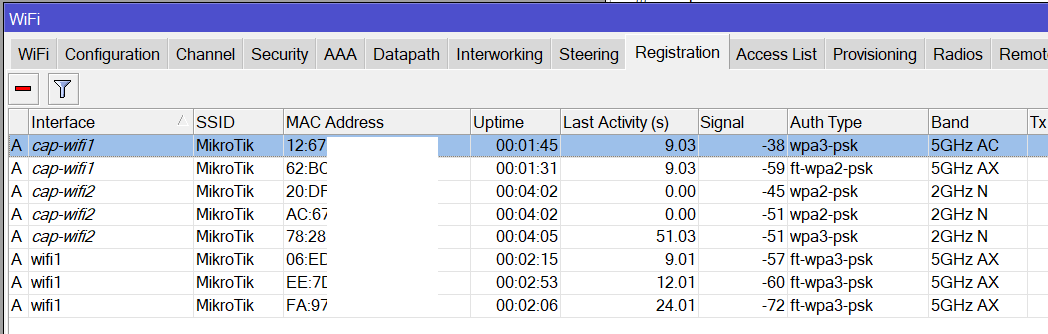
  • FT-WPA3 finally works very well, it doesn’t work only with old smartphones that connect in WPA3 but don’t support fast roaming.
    ft_wpa3.png
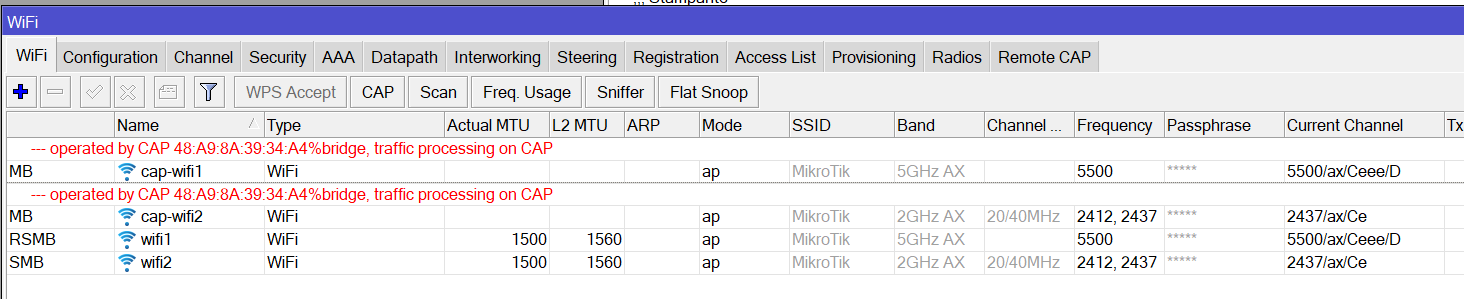
    What does “D” mean in Current Channel?

Thanks
channel.png

This argument is flawed bacause quad9 set with 9.9.9.9 is still doing this
DoH server connection error: remote disconnected while in HTTP exchange

I’d say it means DFS.

You’re right, I hadn’t thought of that!
Thanks

All these additional properties may be the cause for your issues. Unset and leave the defaults. Start from there again.

[quote=mrz post_id=1109515 time=1731681771 user_id=11373]
[quote=Amm0 post_id=1109508 time=1731678893 user_id=89256]
In those markets you don’t assume your customers are idiots, which is what device-mode assumes.
[/quote]
Device mode is direct consequence of exactly this assumption.
[/quote]

You have two different clients. The first is the home or small business user who has one or a few devices and has no idea that there is anything to update on the devices at all and the device is dying of obsolescence with the firmware that was on the device when it has been bought, and the other is the professional business user. You have lost or is slowly losing the professional users and stuck in the home segment.

MikroTik is still sponsoring a team of engineers with snowmobiles and helicopters to push buttons on routers on remote mountaintop sites, right?
It’s pretty hilarious, “We’re trying to improve security! How? By making sure users will never update past ROS 7.16!”

Has been running pretty stable for some time (think at least 6 hours), but then all of a sudden:

DoH server connection error: remote disconnected while in HTTP exchange
DoH server response not OK: 403: dns query not allowed
DoH server response not OK: 403: dns query not allowed [ignoring repeated messages]

Have the feeling that it is not MikroTik related.

About this fight around device-mode and the famous “power-off or push button”.

Possible solution to that: TPM, Key-Pair file in boot, or similar.

It’s clear that MikroTik guys are trying to do something good.
Certainly, related to security and avoid use of MikroTik devices as a denial-of-service attack vector.

I guess probably they were “kindly” forced by some government to do something about that.
And they are doing it! And I reinforce: THIS IS A GOOD THING.

This “physical access to the device” is the only way they found to verify that those “possible malicious actions” are not malicious.

But what if it were possible to get a remote signal saying “Yes, this is trustworthy” from someone that the device could cryptographically validate?

P.S.:
This leads-me to other unicorn that exists on MikroTik’s world:
The MikroTik Devices Controller
haha.jpg

That push could come via API/Secure-API/Rest-API/TR-069, bringing an “It’s safe to do what the other guy is saying.” in a cryptographic signed message that only a “trustable guy” could do.

For that, the ideal would be some kind hardware based cryptography key. I guess TPM would be ideal for that.
But I had never heard any mention of this type of hardware in any Mikrotik hardware. If it exists, it would be great.
So I think this is a solution that will only be implemented and available 10 years from now.

An alternative to the hardware key would be to put the cryptography keys on a boot partition(or similar). Not a perfect alternative, but maybe reasonable.
Something to be studied.


But in the hypothesis been accepted, comes another discussion:
Who will generate those certificates? And how would those certificates be inserted there?
(It reminds-me of some very old discussions on the linux mail list. haha)

Dreaming a bit here in my own world where everything is possible:
“/ip/cloud” already has something to deal with key-pairs, maybe new release that would have a feature like:
“The special reboot cycle that will write the file on the boot partition will only occur on releases newer than X.Y.Z, and it will only occur if the device can connect “/ip/cloud” and “flagged: no”.
By now it’s just an idea!
There is a “spotted in the wild” series on Mikrotik youtube channel. People send images of Mikrotik devices found anywhere. Sometimes on obscure places (hard, hard to reach physically). Still they insist on the button push confirmation thing.

There must be an alternative approach.