PPSK functionality relies on a weakness in WPA2. It is not possible in WPA3.
(you will find that it is not available on other manufacturer’s devices either)
A better solution for this functionality, which works with WPA3 as well, is EAP instead of PSK. But then some devices will not be able to use it.
Probably best long-term solution is to have a WPA2-PPSK SSID for legacy- and simple devices, and another SSID with WPA3-EAP for secure future-proof.
That’s not true, both Aruba and UniFi APs support this
https://www.arubanetworks.com/techdocs/central/2.5.4/content/nms/access-points/cfg/security/wpa2_mpsk.htm
https://community.ui.com/releases/UniFi-Network-Application-7-5-187/408b64c5-a485-4a37-843c-31e87140be64
I would like to see another RC release before this 7.17 branch receives a stable release.
What’s new in 7.17rc6 (2025-Jan-07 10:54):
!) webfig - redesigned HTML, styling and functionality (additional fixes);
*) console - updated copyright notice;
*) dhcp-server - use single RADIUS accounting session for IPv4 and IPv6 when dual stack is used (additional fixes);
*) dhcpv6-server - do not require “prefix-pool” to be specified;
*) dhcpv6-server - fixed dynamically created DHCPv6 server addition (introduced in v7.17rc1);
*) dhcpv6-server - properly display “static-pool” value in server print output for “prefix-pool” argument;
*) disk - fixed managing and cleaning up mount points (additional fixes);
*) iot - improved system stability for LoRa;
*) leds - fixed a potential issue with missing LED indication on SMIPS, MIPSBE and MMIPS devices (introduced in v7.17beta2);
*) qos-hw - improved PFC behavior (additional fixes);
*) ssh - fixed logout process during router shutdown (introduced in v7.17beta2);
*) switch - fixed a potential issue with packet corruption caused by incorrect switch initialization on CRS3xx/5xx devices;
*) system - improved IPv6 maximum routing table size based on total memory;
*) webfig - improved system stability when used over many simultaneous sessions;
*) webfig - Skin Designer moved to centralized page (additional fixes);
You called for it 
The issue with User-Manager and oversize UDP packet that I mentioned in post #236 http://forum.mikrotik.com/t/v7-17rc-testing-is-released/180248/1 is still present in 7.17.rc6. I’ve tested with eapol_test as RADIUS client running on different machines, including in WSL1 under Windows (which uses Windows’ network stack). Also tried to disable all IPv4 firewall rules on the router. If I select another self-signed certificate (instead of the Let’s Encrypt one) for User-Manager, the packets stay under the MTU limit, don’t need to be fragmented, and the RADIUS authentications work. But that is not a solution (I want to use real, trusted certificates). The issue was not present under 7.16.2 and prior versions (with same configuration and certificates).
Is anything mentioned about it in the release notes for that version ? I don’t see it. Therefor it’s logical the issue is still there.
It should be solved but it hasn’t been mentioned as being fixed (yet).
Yeah, you are correct. But in the past, they have sometimes fixed things silently :).
Also, looking at the changelog, the only change mentioned that might be related is:
*) user-manager - improved stability;
Did you by chance upgrade the Unifi application to version 9.x? I see others reporting RADIUS problems for that version, unclear what the problem is.
You mentioned that the second fragment never appears on the device directly connected to RB5009 Ethernet port. It could be something related to RB5009 Ethernet or switch. Can you quickly test if disabling bridge HW offloading makes any difference (I assume you are using bridge)? Can you share supout.rif file and pcap files from the RB5009 to support?
No, I haven’t upgraded to version 9 yet, still running 8.6.9. And it’s unrelated to UniFi or the UniFi APs, because the tests showed the issue even when sending packets to normal Linux and Windows machines. And my next post will, I think, show that it’s not even caused by User Manager, but something else inside RouterOS that has changed in 7.17.
I have disabled hardware offload on the bridge’s ethernet ports on the RB5009 and the behavior was the same. But I have since made many more tests, and have found out that the problem is related to the size of the second fragment. Please note that the following test outcomes have been repeated with both hardware offload turned on and off, and with both tagged and untagged VLANs (my config doesn’t use the native VLAN of the bridge interface):
I wanted to test whether the problem is solely caused by User Manager, or whether RouterOS 7.17 is unable to properly fragment UDP packets. At first, I tried Traffic Generator, but it doesn’t seem to automatically fragment UDP packets. Luckily, there is another tool in RouterOS that allows sending UPD packets with arbitrary sizes, and that’s the Traceroute tool in UDP mode (instead of ICMP). However, the Packer Size field doesn’t allow any value larger than 1500. So, the next logical step is to reduce the MTU on the (VLAN) interfaces. At first, I reduced the MTU down to 1480, but the packets seem to be broken up at the 1476-byte mark anyway, so there is no difference between MTU 1480 and MTU 1476 for the following findings.
With the MTU set to 1480 (or 1476), I used Traceroute to send UPD packets to a Windows machine running Wireshark. Windows doesn’t support UDP traceroute but that’s not important because I only wanted to capture the incoming packets. By setting the traceroute Packet Size to 1482, I got the same fragmentation where the 2nd fragment has the same 40-byte frame size:
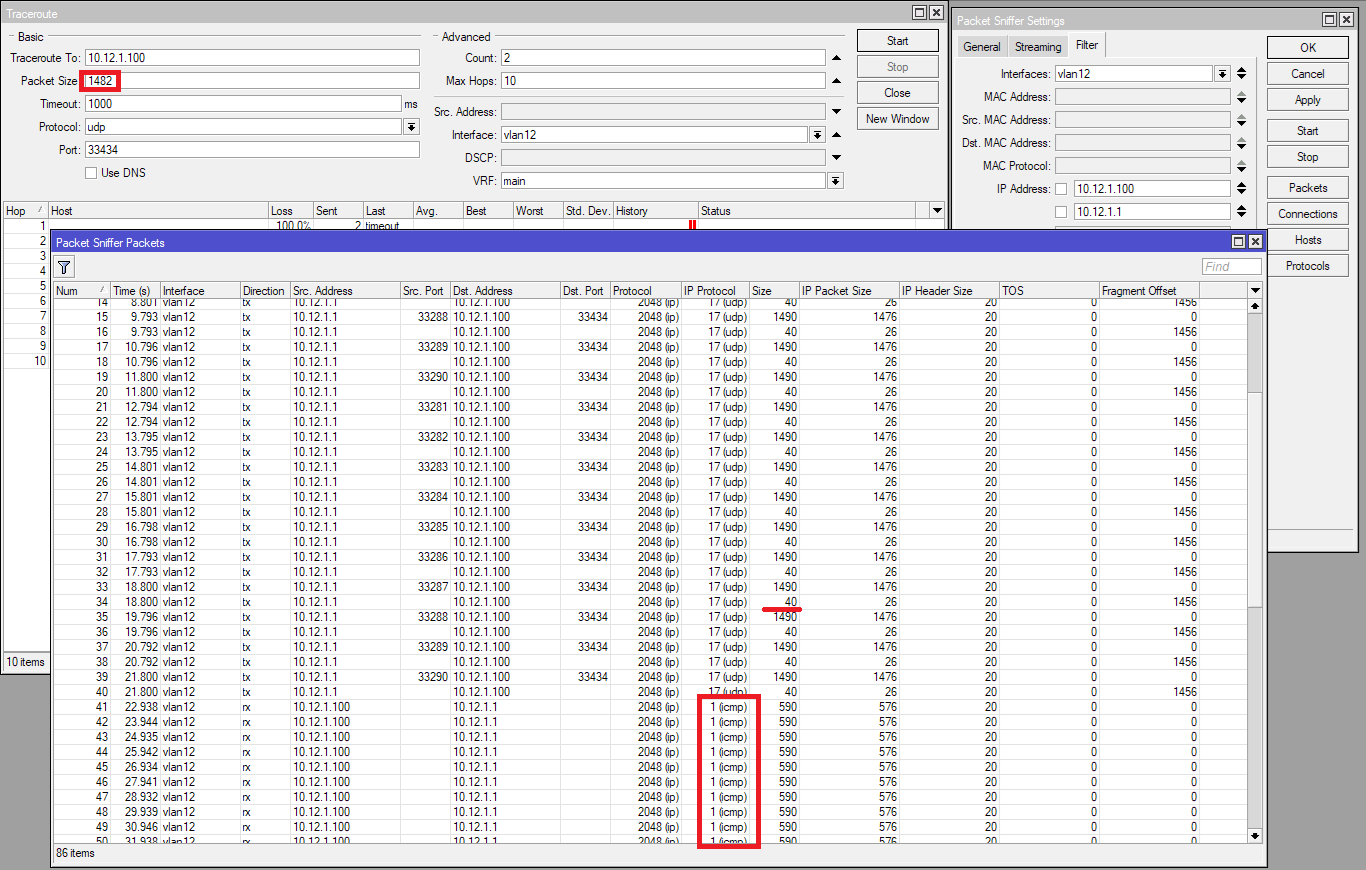
And the exact same issue as the one with User Manager happened. After a while the Packet Sniffer showed a bunch of ICMP packets. On the Windows machine, Wireshark showed that the 40-byte frames never arrived, only the 1490-byte ones. And Windows sent the ICMP Fragment reassembly time exceeded responses.
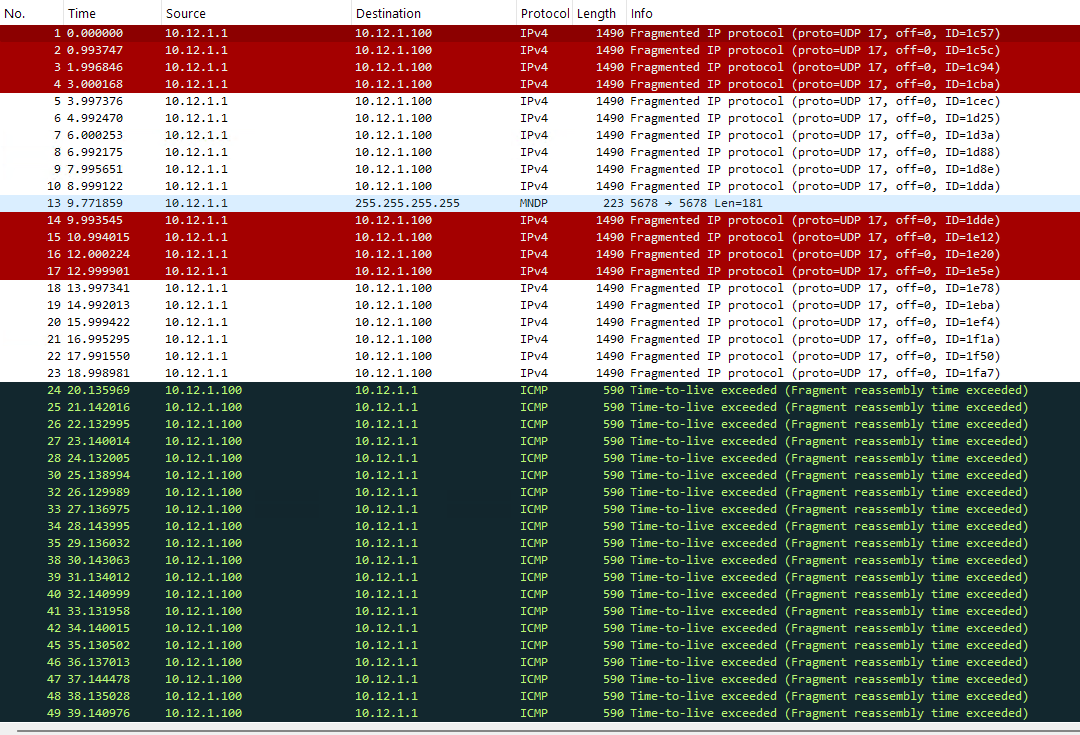
But at this moment, with the MTU set to 1480, the same RADIUS authentication tests with eapol_test suceeded! Obviously, with smaller MTU the 2nd fragment got bigger. So I tried to increase the size of the traceroute packet to 1492:
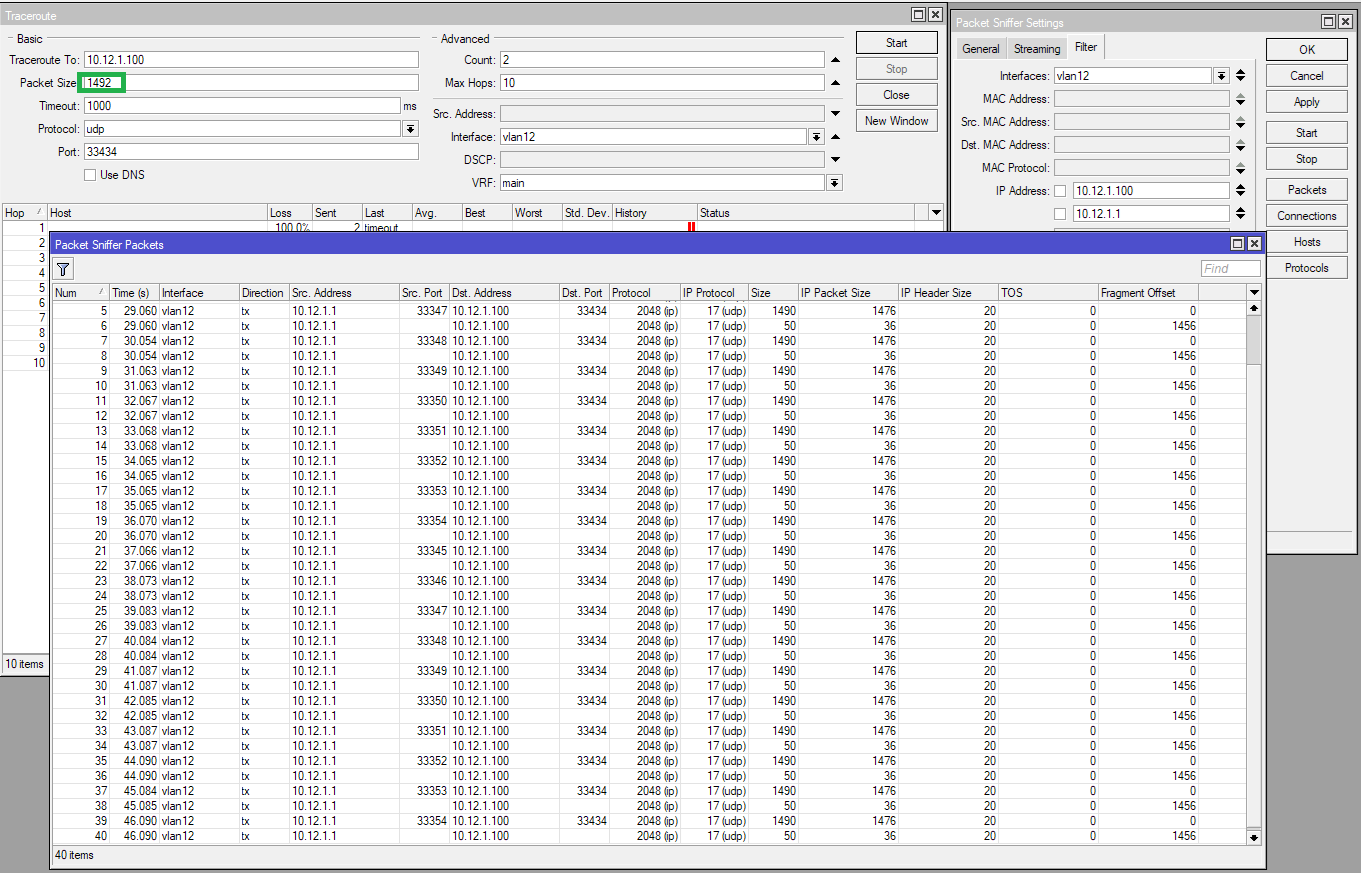
Packet sniffer showed the ethernet frame size of the 2nd fragment to be 50 bytes. This time there is no ICMP packets. And on the windows machine, all packets have arrived! But the 2nd fragments have a frame size of 56 bytes. With trailer inserted at the end.
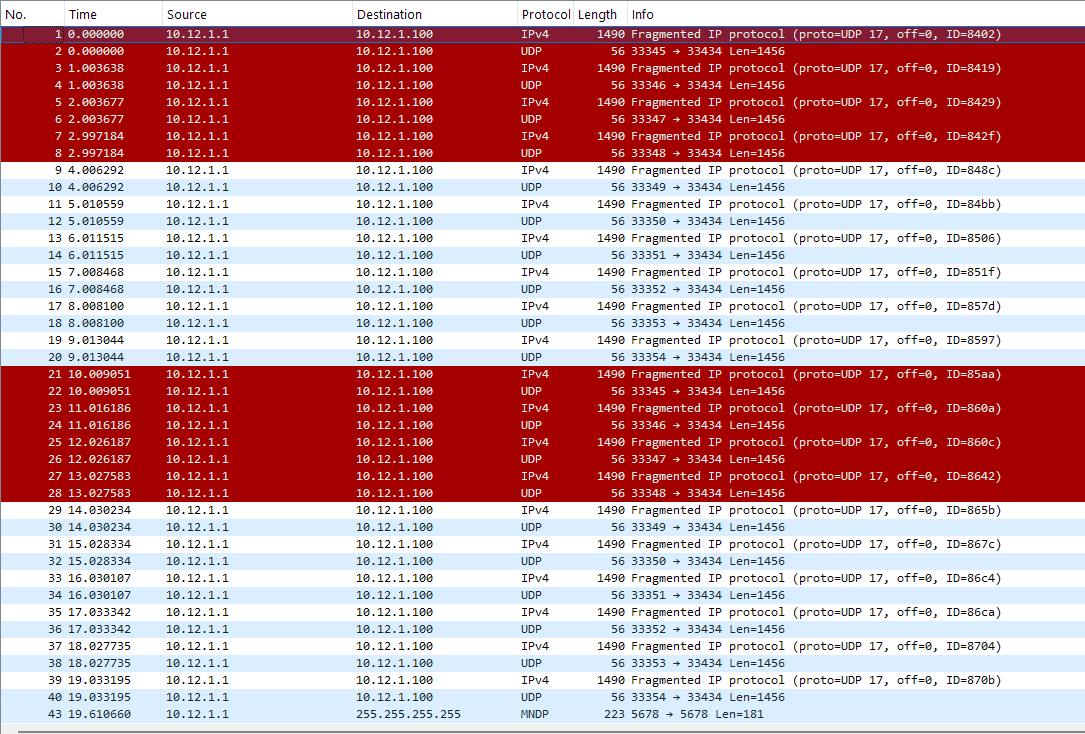
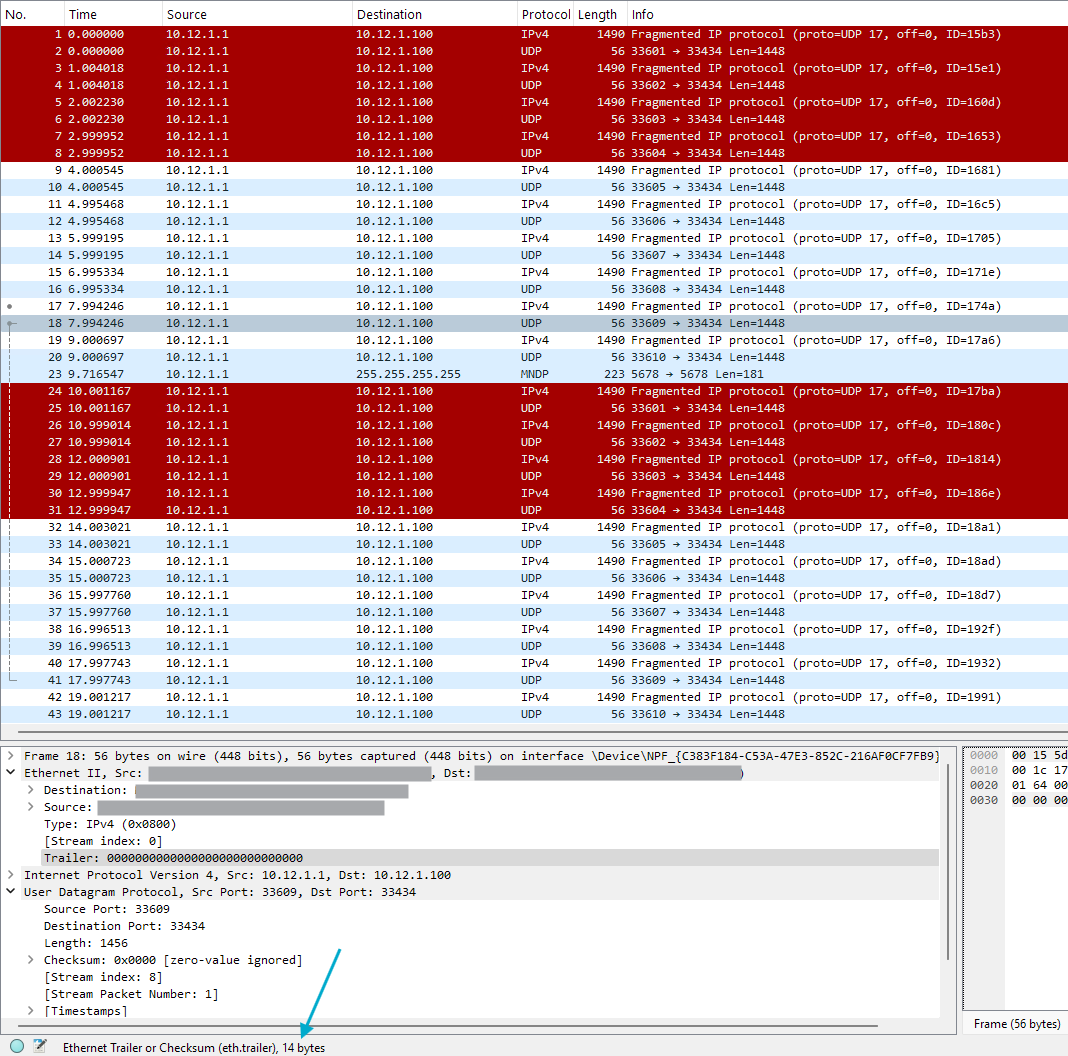
Next, I tried to increase the traceroute packet size from 1482. At 1483 bytes, a 41-byte 2nd fragment was produced, but also disappeared and never arrived. At 1484 bytes however, just two bytes larger than 1482, the fragmentation worked, and the Windows machine could reassemble all the UDP packets:
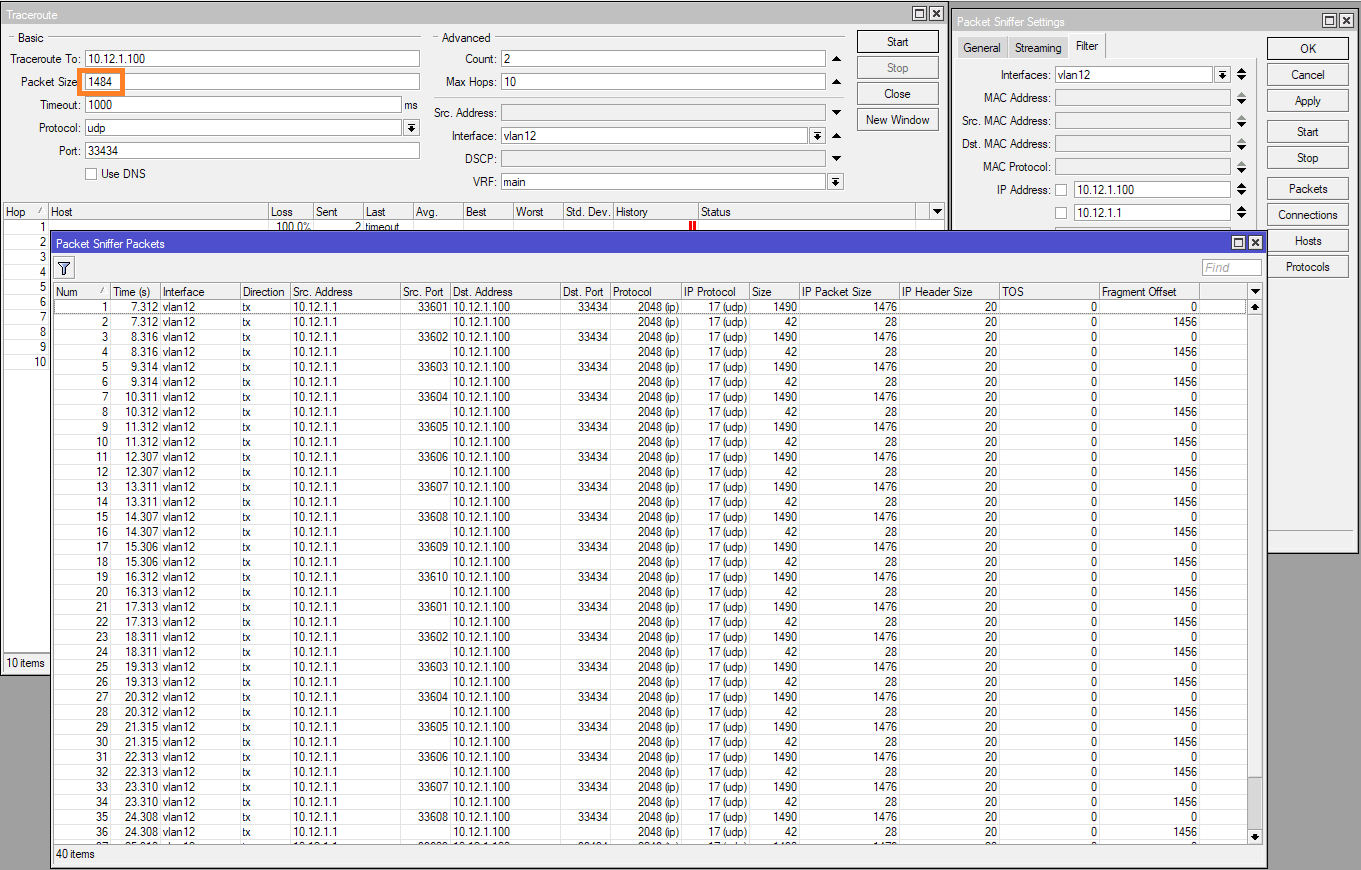
We can also see that the 2nd fragments are listed as having a 42-byte framesize on ROS, but were sent as 56-byte frames with 14-byte trailer:
When I changed the traceroute target to one UniFi AP, which runs Linux, the traceroute worked with packet size 1484 (because the AP understands UDP traceroute and can respond), but also failed with ICMP fragmentation timeout when the packet size was reduced to 1482 bytes.
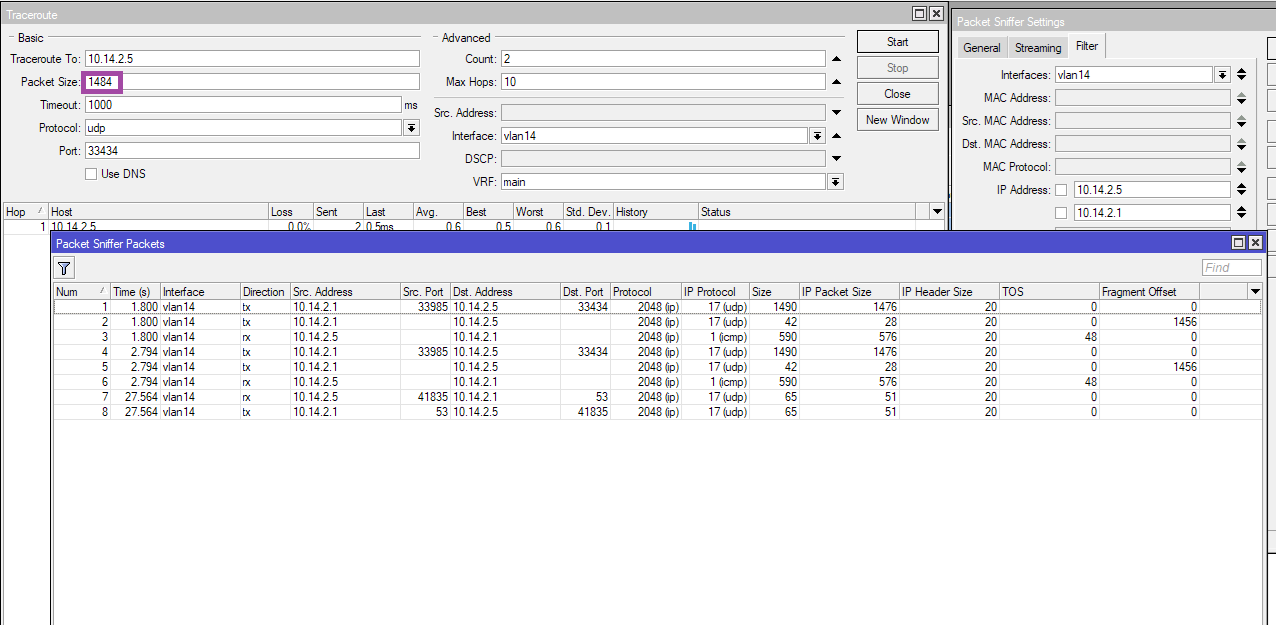
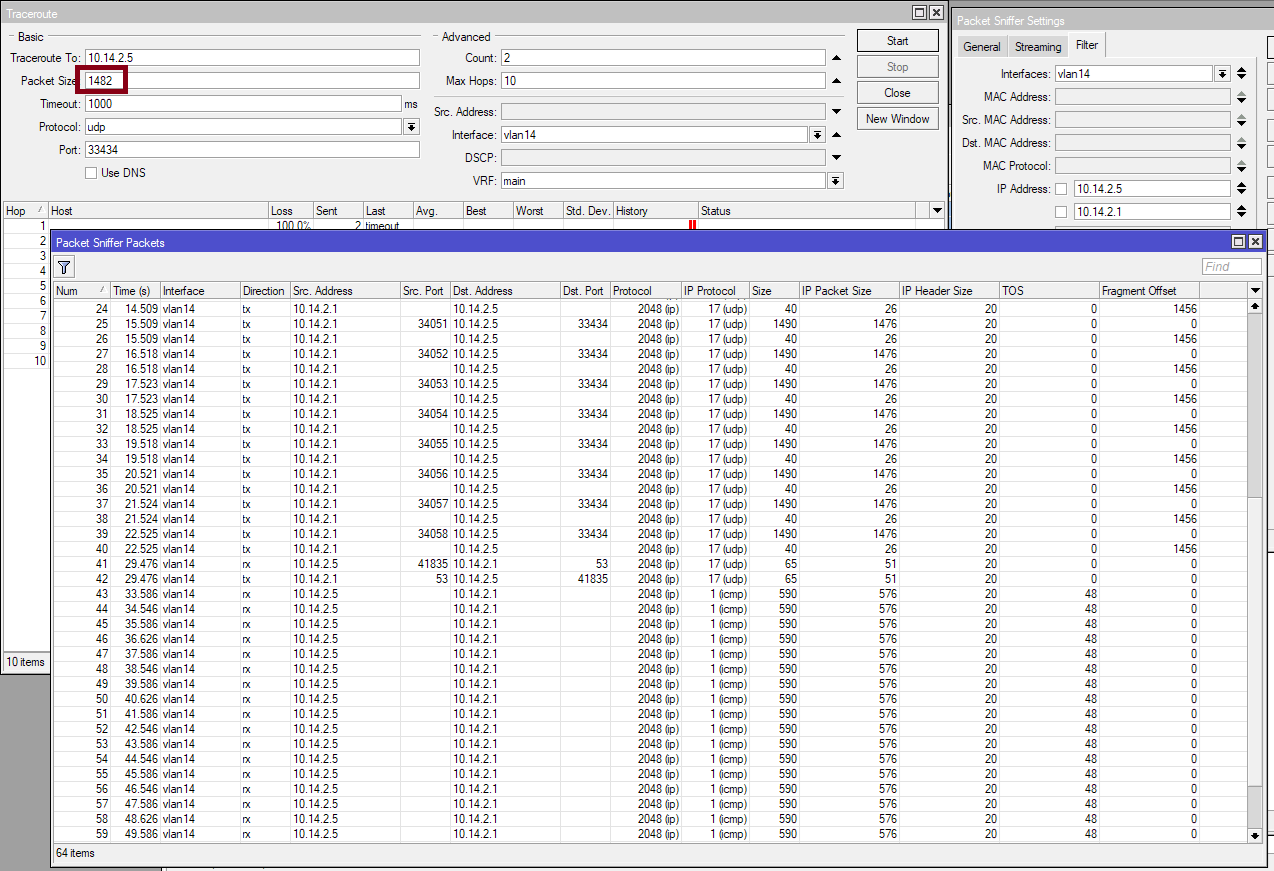
It looks like RouterOS is unable to append a 15- or 16-byte trailer, so that the ethernet frame sent can reach the minimum allowed size? Am I unlucky that my certificate size somehow causes User Manager to produce UDP packets that cause fragmentation with the 40-byte second fragment (at MTU 1500)? Maybe I should try to add some junks into the different fields of the certificate to make it larger  ?
?
I just made some test with a hAP ac² running 7.16.2 using the normal bridge (no VLAN). With MTU set to 1480 and packer size 1482, sending UDP traceroute to an UniFi AP (at another location but with the same model and firmware) and there were no problems at all with the 40-byte fragment.
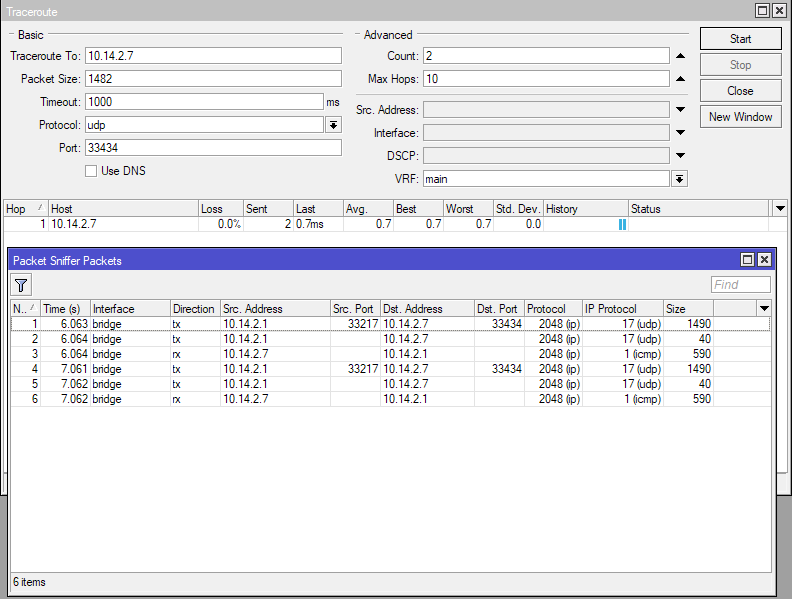
I went ahead and upgraded the hAP ac² to 7.17rc6. And now the bug is reproducible there too. With no configuration changes (MTU was 1480 same as with the 7.16.2 tests) the router can no longer send the 1482-byte traceroute to the same AP as from the post above.
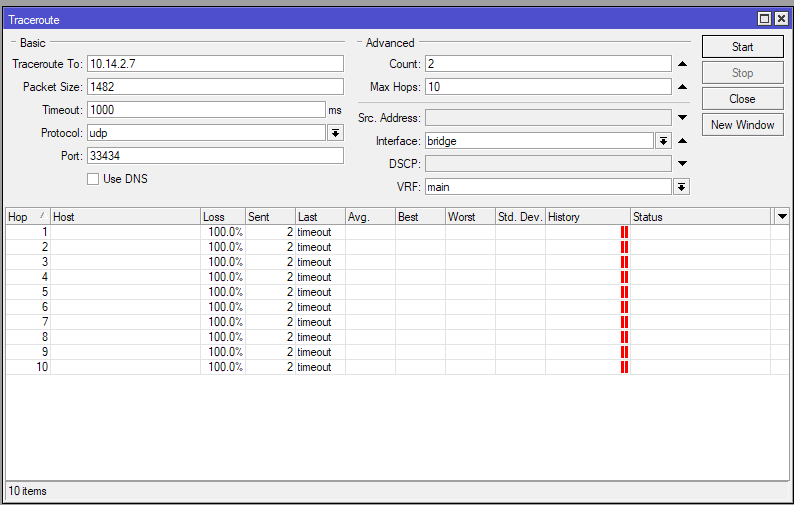
But 1484 worked:
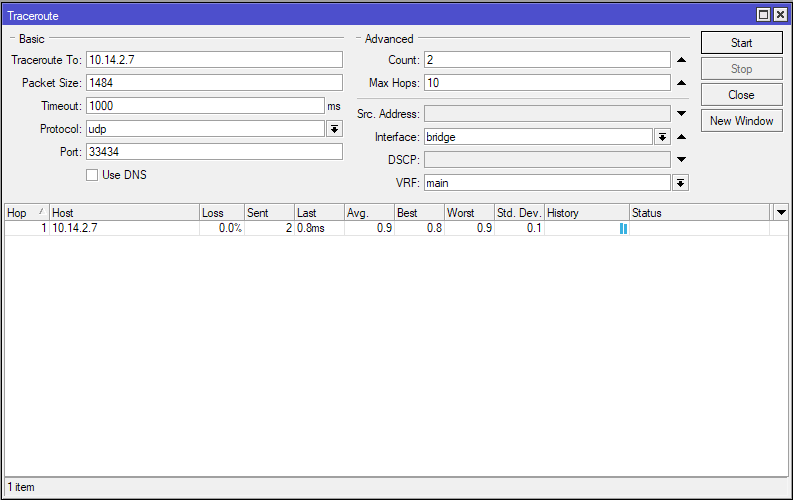
Which means it’s definitely a bug introduced by 7.17, and is not restricted to the RB5009, and also regardless of VLAN configuration. The hAP ac² only has the standard bridge from defconf.
I just noticed that the command line allows entering packet size > 1500 bytes. Which means running the traceroute test with MTU 1500 is possible too. Here is the result which shows the problem when there are 6 extra bytes that need to be transferred:
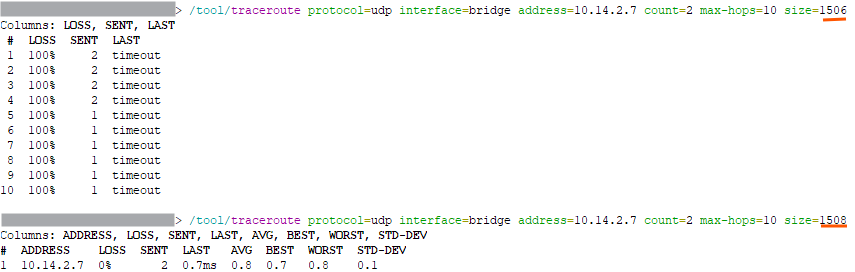
All tests with packet size 1501-1507 failed. It worked for sizes <= 1500 and >= 1508.
I have always wondered why the IP fragmentation code in network stacks splits a too-large packet into a maximal size packet and a small remainder… IMHO that only increases the risk that further fragmentation is required further down the path when another smaller MTU is encountered.
Back when I maintained IP network software I modified the fragmentation so that it splits the packet into fragments of about equal size, so a 1500 byte packet that has to go over a 1480 MTU link would not be split into 1480 and 20 but instead into 752 and 748 (the first fragment(s) have to be a multiple of 8 bytes in size).
That worked just fine and it is more efficient e.g. when further down the path the MTU is 1400 bytes. The two fragments can pass without further splitting, unlike in the commonly used method.
It would also have avoided the bug currently at hand, but of course that is not relevant.
@CGGXANNX thanks for the details so far.
Can you test if disabling bridge dhcp-snooping fixes the issue?
You did not post your configuration export and I failed to reproduce the problem in our labs, but once I tried different bridge settings, the dhcp-snooping=yes caused the same behavior as you described, so I assume you have it enabled as well.
Yes, I have DHCP Snooping enabled on both routers (because both support it with hardware offload still possible), IGMP snooping is not enabled. I just disabled DHCP Snooping on the RB5009 and now both the traceroute and the RADIUS authentication for WPA3 Enterprise are working. So the bug is definitely related to that feature  .
.
Don’t get me wrong, I really appreciate the detailed debugging effort. I am 100% sure it helped to identify and reproduce the issue. Especially it made EdPa look into it.
But one remark; these statements were misleading:
I just made some test with a hAP ac² running 7.16.2 > using the normal bridge > (no VLAN).
The hAP ac² > only has the standard bridge from defconf> .
It implied that bridge settings were not modified from defconf.
But I am glad EdPa did not give up and identified the issue. Good job!
Sorry for the wordings. What I meant was that it was using the “bridge” interface (with the “defconf” comment still over it) and not an additional VLAN interface over it like on the RB5009, or a bridge that has been created from scratch like in the cases of a blank configuration. Of course, other settings have been changed, like, from the screenshots, the IP address range.
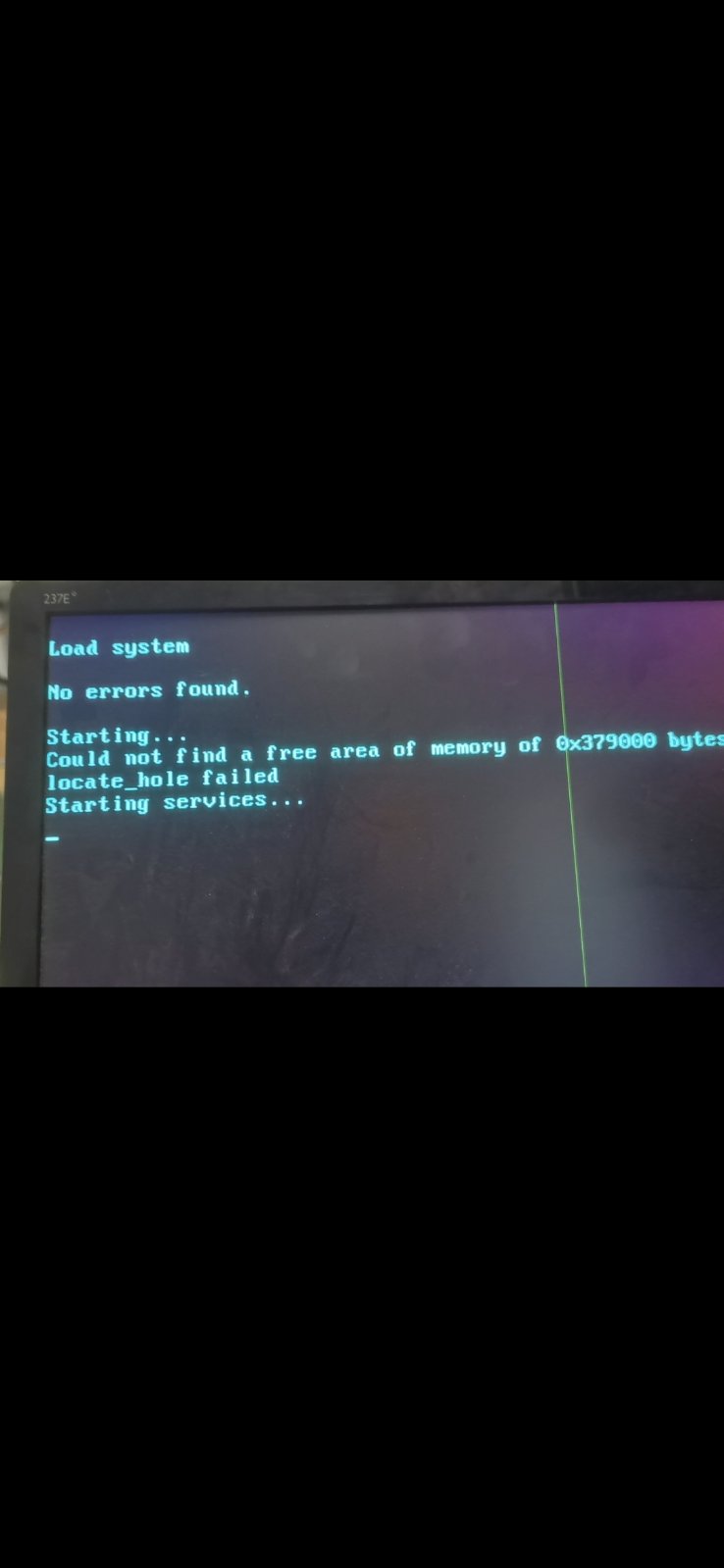
Hello! I need help from support - after upgrading from ros7.16.2 to 7.17rc6 i have loop reboot on my x86 machine. Just tried to change PC to other with same disk - still same problem. How can i solve this problem without reinstalling system(i dont want to loose my license)? Disk is Transcend DOM SATA 2GB
Photo of screen stuck: