I really really hope this chrooted feature will happen in v7.1. There’s plenty of security features available in the kernel to make sure it’s secure so it can’t be abused, so this shouldn’t be a problem.
And it would allow us to finally get some of the most wanted tools running on a ROS that Mikrotik doesn’t want to give us.
Good examples are UDPXY (there’s 5 years old thread here), NMAP (another thread about missing portscanner in ROS), MQTT, …
Yes I agree! And I keep posting it in every topic where this limitation is discussed and this solution would solve it, hoping that finally some MikroTik employee will pick it up and start considering it.
After all, MetaROUTER was implemented at some time. So they are not completely blind to this wish. But MetaROUTER is not supported on new devices and it is likely difficult to implement, whereas running user processes should be easier to implement on new architectures.
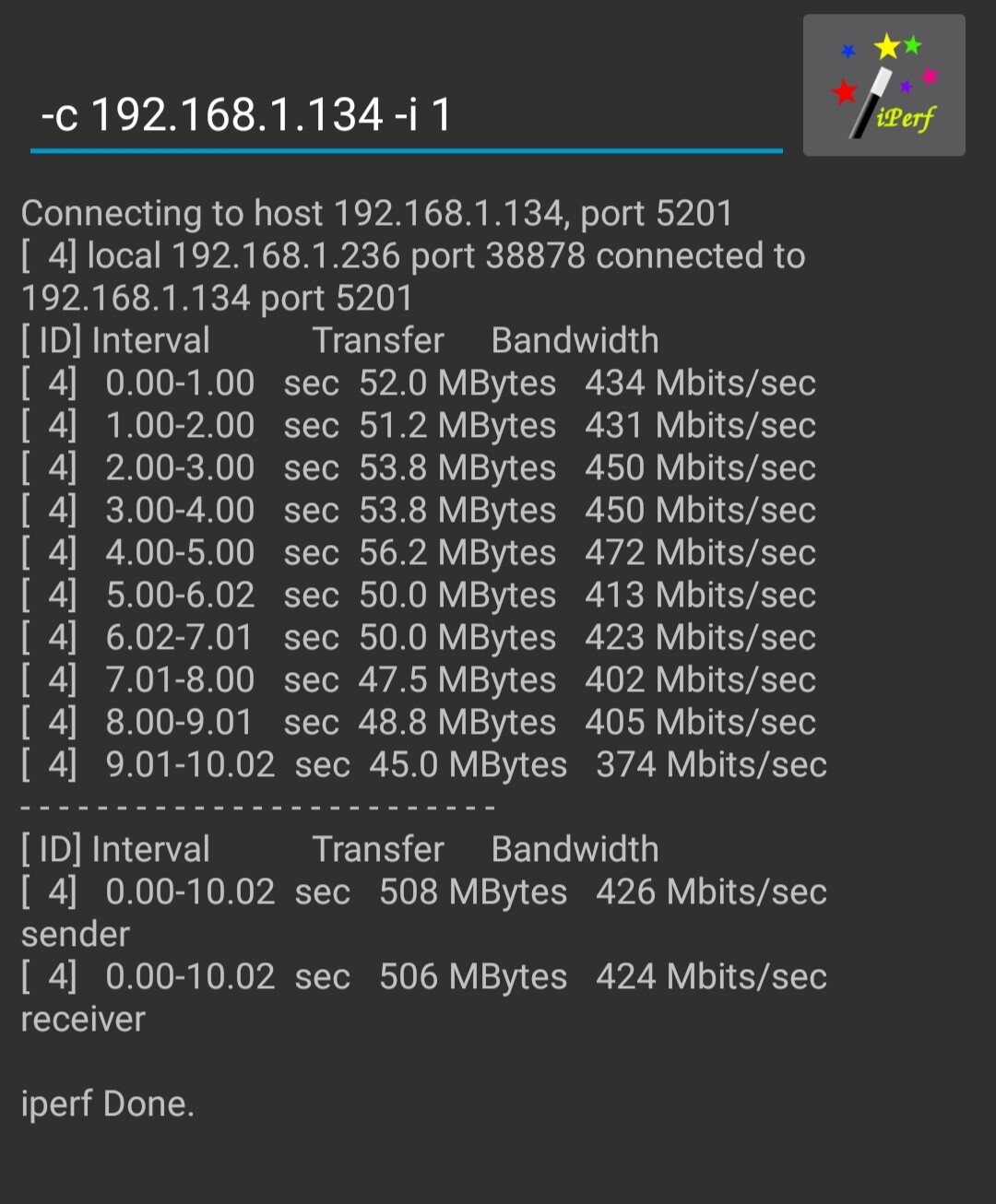
A quick iPerf3 LAN - 5GHz WLAN benchmark of my hAP AC2 running OpenWrt RC4 with irqbalance.
Host: Linux laptop connected through Cat 5e
Client: Xiaomi X3 Pro
Channel: 52 (DFS) @ 80MHz
This is far better than anything else the stock RouterOS can offer when it comes to WiFi performance.
I guess the wifiwave2 driver on the hAP AC3 can outperform these results due to some propietary QCA optimizations which are not publicly disclosed, however this unit won’t benefit from those improved drivers anyways.
Hopefully the wait for next beta will be worth it and it fixes Wifiwave2 issues where my wifi sometimes goes down every few minutes on my audience.
I have reported this multiple times with logs and config export already.
@Normis I also asked for comment few times from MikroTik on this, no answer so far while the bug exists in last 3 beta releases.
Have you created a support ticket about it?
I though this thread is good enough to report a bug/issue.
But as you are asking for it it sounds like it isn’t.
I will raise support ticket separately.
Thanks.
But this is then slightly weird. Are you telling me that all the problems reported in this forums are ignored if no support ticket is raised?
Then why do we have this forum and why then MikroTik support tickets are not available for people to view/track like many it projects are for example using jira.
It would definitely limit the amount of reports you get.
It sure is weird! Why are there “is released” topics that are open for comment and where often remarks are made to “stay on the topic of issues with that release” when MikroTik is not at all following the replies on these topics.
One would expect someone reads the replies and creates internal support tickets for reported issues as necessary, especially when others in the topic confirm the issue.
They do. At least Normis tells us.
Re: CCR1009 reboots at startup using 7.1b6
Hi,
does anybody have an idea, why my CCR1009 does reboot just after start? It shows “loading services”, double beeps and then reboots. Over and over.
If I remove the SFP+ which is the only connection, the router comes up and if I replug the SFP+ after 10 seconds, everything works fine.
I also tried SFP and RJ45, the result is just the same.
Thanks
dksoft
PS: Yes, I already sent autosupout.rif to support and created a ticket but never heard back.
Re: WireGuard interface shuts down when bandwith test runs on 7.1b6
Hi,
I created a WireGuard tunnel between a CHR (7.1b6) and CCR1009 (7.1b6). Simple configuration, all IP addresses allowed, no fast path/track.
CHR server is 192.168.178.1, the CCR1009 client is 192.168.178.2.
Ping works fine, but if I do a TCP Bandwith test (the Router OS embedded one) from client to CHR server at 192.168.178.1, the WireGuard interface shuts down.
Both ends show that the tunnel is still running but ping/bandwith test no longer work. Also dis-/enabling the tunnel interfaces on both ends does not bring it back to live.
Only rebooting the client brings up the tunnel again. Rebooting the server does not have an effect.
Any ideas, what might go wrong here?
Thanks,
dksoft
the new filter rule syntax in 7.1beta7 is much much better, but does need to have tab/? completion implemented. the documentation at https://help.mikrotik.com/docs/pages/viewpage.action?pageId=74678285 is fairly complete, and not hard to follow. The resulting syntax from /routing/filter/rule/print is very easy to read and comprehend.
An example:
[admin@BETA7-TEST] > /routing/filter/rule/print
Flags: X - disabled, I - inactive
 0   chain=bgp_in rule="set bgp-local-pref 100"

 1   chain=bgp_in rule="if (bgp-input-local-as == 4242424201) {set bgp-local-pref -10}"

 2   chain=bgp_in rule="accept"

 3   chain=bgp_out rule="if (dst in 192.168.0.0/16) {accept}"

 4   chain=bgp_out rule="if (dst in 10.0.0.0/8) {accept}"

 5   chain=bgp_out rule="reject"
[admin@BETA7-TEST] >
One issue so far is that I cannot use the if (bgp-as-path [regex]) predicate - it seems to crash the BGP process.
edit: bgp connections can now have output.filter-chain= added which uses a rule chain, without needing to use /routing/filter/select-rule. That’s still there though, and you can apply that to a connection using output.filter-select= .
So far, a really good bit of progress.
I notice that in the /ipv6 firewall mangle rules there still is no “set priority” action, as there is in /ip firewall mangle.
(to set the priority of packets to a fixed value, according to DSCP, or from ingress)
I think it was promised that this would be implemented in v7, but frankly I would like to see it in v6 as well.
What makes it so hard to complete the ipv6 feature set? There are lots of small things still missing from IPv6.
How soon is soon?
Almost a month has passed since this message from normis
23 Aug 2021
Hey come on, not so impatient! It has been SEVEN YEARS since this message from normis:
On this update
Dial on Demand l2tp connections doesn’t work 
Is there a special upgrade procedure for the LTE modem after upgrading to v7.1beta6?
It seems on the factory shipped firmware (6.45.9) and testing firmware (6.49beta54), LTE works fine as configured out of the box. However, I am upgrading to development firmware (7.1beta6) and this seems to break LTE connection to the network.
When I upgrade to 7.1beta6, LTE just says that “a newer version of modem firmware is available” but since I cannot connect to the network it can’t download any update. Downgrading back to 6.49beta54 allows the LTE to work instantly.
I have the same problem, just use Wireguard until it’s fixed.
I always wonder how “Dial on Demand L2TP” is ever supposed to work… I don’t need it, but I think “well, an L2TP client only gets an IP address and peer IP when it is connected, how is the router supposed to know that certain traffic is to be routed to that L2TP connection unless it already is established (catch-22)”.
But probably there is a reasonable usage scenario for it…
You can specify L2TP interface itself as a gateway in a static route (including default one).