Yep, I tested iperf3 with my Galaxy S10e (HE 80MHz) next to the Belkin and I got ~600mbps speeds not the most amazing results for WiFi 6 but it can handle SQM CAKE @ 100mbps and Adguard Home flawlessly.
Where exactly does ROS report exact SoC in the device? On my hAP ac2 the most specific item I can find is firmware-type: ipq4000L in /system routerboard … and that’s pretty vague. Cpu type in /system resource (cpu: ARMv7) is even more vague.
OK, my device is running 6.48.4, so perhaps 7.1rc is more verbose?
I found only some info in IRQ…

The irq info contains name which driver sets and doesn’t bear any special meaning. It really depends on what driver servicing certain interrupt line sets. And I’d guess it’s the very same driver loaded on both IPQ4018 and IPQ4019 SoCs and then driver is intelligent enough to initialize whatever hardware it finds (and that doesn’t have to depend on SoC type).
It’s same principle as output of /system resource pci print … having the name there doesn’t mean running ROS has driver for device (and lack of name doesn’t mean there’s no driver installed).
CCR2004 rebooted after 8 days of uptime. It’s over.
I’ve contacted my bank to conduct a chargeback on my purchase. I’m not paying for shipping.
In the downloads area, I see that ROS v6.8.4 is available for the RB2004. I just bought this box because I saw this and hoped I could use it until a usable version of ROS v7.x comes out. Subsequently, I tried downgrading to stable and even NetInstall but the router notifies me that it will only work with ROS v7.0.x as a minimum.
WTF Mikrotik?
I’m thinking about returning mine as well till the get their S#@t together over in Latvia and quit advertising firmware that doesn’t work !! 
You can’t downgrade below factory-firmware (/sys routerboard print). There are 2 types of CCR2004, CCR2004-16G-2S+ and CCR2004-1G-12S+2XS.
CCR2004-1G-12S+2XS works with v6, the new CCR2004-16G-2S+ does not.
Bbbbut 7.1 is already in RC state. Ususally that means: “yeah, works well for 99% of users. may contain some edge-case issues.”

infabo
No, this is not right and it’s not 99%.
rc3 can remove your config after power loss…
rc20 maybe will be prepared to know as 7.1 but we know MikroTik and probably they put some like rc5-8 as “stable”.
Many migration problems from 6x to 7.1 will be solved probably after 7.15 like it’s was with 6.x
many stuff are not right and I agree with all people who return they beta devices. It’s not for final sell.
Not good enough !!
The downloads page clearly does not differentiate between the two...It nearly says CCR2004 !! 
-tp
I should have marked my comment as “sarcasm”.
Of course this rc3 is far away from a stable state. What I wanted to say is: RC means release candidate in the world outside the mikrotik universe. For many and most other software in this state, it means 99% stable. Yeah, of course, in mikrotik world RC means something like “yeah, we are getting there…”. Maybe it is something like a real beta now. As I started with 7.1beta2 or so - as a home-user with home-user-needs - I felt like a tester of some nightly builds.
But what irritates most: these RCs receives features like Docker support just in the RC phase. RC usually is feature freeze. But OK. This v7 is - judging from other topics and many comments - not even feature complete in many regards (routing protocols and so on).
And last but not least: mikrotik starts selling “real” devices with v7 only. It was another level, selling a consumer device like Chateau with v7 only.
any hope to have thsi bug fixed in some 7.1rc?
[SUP-35291]: bug about udp pps in dst-limit (no more then 9999 pps, then it is never triggered).
thanks
ros
This is exactly the same as with the big guys (Cisco, Juniper,...)
Hidden on some obscure page you can find info like "do not install version <X on device with serial number <Y" or something like that.
Mikrotik is no different as the others.
Well, that's hardly compensation.
They hold their standards to the same as Cisco, Juniper? Sad...
As I said earlier..The downloads page says CCR2004 for ROS 6.48.4. Not just certain model numbers. False advertising !!
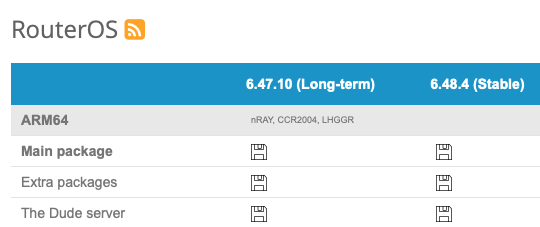
They should make a version of 6.48.4 that works with all CCR2004's till they can actually get 7.1x to work.
I have had "Zero" problems with 6.48.4. 
6.8.4? that must be from 7-8 years ago, if it existed, on what are you running it?
Thanks, corrected.. 
Just upgraded my RB1100 X2 AH from v7.1Beta6 (where there is no traffic passing on the majority ethernet interface ex eth1 till eth8 and eth11/12/13) but now i`m stuck witch cpu stuck
[admin@MikroTik] > system/reset-configuration
Dangerous! Reset anyway? [y/N]:
y
system configuration will be reset

Rebooting...
[   32.063561] watchdog: BUG: soft lockup - CPU#1 stuck for 22s! [bridge2:78]
[   60.063557] watchdog: BUG: soft lockup - CPU#1 stuck for 22s! [bridge2:78]
failed to stop net: std failure: timeout (13)
[   96.063557] watchdog: BUG: soft lockup - CPU#1 stuck for 22s! [bridge2:78]

[  124.063555] watchdog: BUG: soft lockup - CPU#1 stuck for 22s! [bridge2:78]
^C
[  152.063554] watchdog: BUG: soft lockup - CPU#1 stuck for 22s! [bridge2:78]
[  180.063554] watchdog: BUG: soft lockup - CPU#1 stuck for 22s! [bridge2:78]
[  208.063554] watchdog: BUG: soft lockup - CPU#1 stuck for 22s! [bridge2:78]
[  236.063555] watchdog: BUG: soft lockup - CPU#1 stuck for 22s! [bridge2:78]
[  276.063555] watchdog: BUG: soft lockup - CPU#1 stuck for 23s! [bridge2:78]
[  304.063555] watchdog: BUG: soft lockup - CPU#1 stuck for 23s! [bridge2:78]
[  332.063554] watchdog: BUG: soft lockup - CPU#1 stuck for 23s! [bridge2:78]
[  360.063554] watchdog: BUG: soft lockup - CPU#1 stuck for 23s! [bridge2:78]
[  388.063554] watchdog: BUG: soft lockup - CPU#1 stuck for 22s! [bridge2:78]
[  416.063554] watchdog: BUG: soft lockup - CPU#1 stuck for 22s! [bridge2:78]
[  456.063554] watchdog: BUG: soft lockup - CPU#1 stuck for 22s! [bridge2:78]
[  484.063554] watchdog: BUG: soft lockup - CPU#1 stuck for 22s! [bridge2:78]
[  512.063554] watchdog: BUG: soft lockup - CPU#1 stuck for 22s! [bridge2:78]
[  540.063553] watchdog: BUG: soft lockup - CPU#1 stuck for 22s! [bridge2:78]
I have disabled the watchdog to prevent reboots, but the unit is still not usable.
But it seems that since the last reboot it is working including working traffic on all ethernet interfaces, but the rebooting is back as soon as i create a bridge and add ether6 to it when it has link. Adding ether7/8/9/10 to is is working fine, until i move my laptop from ether6 to ether7
Actually not. The download pages states that CCR2004 models are ARM64 architecture. They do not state that all CCR2004 models do run all RouterOS versions. Also the product page for CCR2004-16G-2S+ lists RouterOS (v7 only) in specitications.
I see you are disappointed but please don’t pollute multiple threads, it will not help you further. Rather focus on the solution - what problems are you experiencing with 7.0.4, are they not solved in 7.1rc3? Can the distributor provide another model?
Really, give me a break. Since this is unique, it should be spelled out on the downloads page as well.
If you think this is pollution, rather than informing then you are the one with the issues.
Not everyone (besides yourself apparently) reads all the threads. This my method of information. Do you not believe in that? Nevermind… 
What is the exact issue with 7.1rc3 that you reported in this topic?