openvpn server was not working after this upgrade (not sure what version it was upgraded from, would be either 12.1 or 15.1)
Disabling and re-enabling the openvpn interface resolved the issue and generated this event log
Jan/16/2026 09:30:25 memory system info ovpn server added by (/interface ovpn-server server set)
simple fix, not a big deal, just thought worth mentioning.
so this is across about 100 routers that I upgraded from 12.1 or 15.1…. also had one router pair where wireguard between the two routers did not re-establish after upgrade. everything looked ok. simply deleted and re-created the tunnel and it started working again. again no big deal, just small quirks in the upgrade.
Just out of curiosity.
Did this only happen after the first reboot right after the upgrade?
Or does it continue to happen even after 2 or more reboots?
/ip dns static
add address=1.1.1.1 disabled=yes name=cloudflare-dns.com type=A
add address=1.0.0.1 disabled=yes name=cloudflare-dns.com type=A
add address=1.1.1.1 name=mozilla.cloudflare-dns.com type=A
add address=1.0.0.1 name=mozilla.cloudflare-dns.com type=A
```
Both of these options have been tested and work with internal certs enabled.
I use 2 CRS326-24S+2Q switches in MLAG. I have 3 Proxmox servers connected to the switches with LACP. On the servers I have mounted 2 NFS datastores. After the upgrade from 7.20.6 to 7.20.7, the connectivity to the NFS datastore is broken. I tested also with 7.21, 7.22beta3. Same behaviour.
I have the same configuration but with 2 CRS520-4XS-16XQ. The same behavior. The VMs that i have breaks because they have limited connectivity to NFS. Shall I open a ticket? @EdPa
Thanks for reporting, I do have similar setup and was just about to upgrade to 7.20.7, now I will definitively wait...
You should however send support request to MT as recommended...
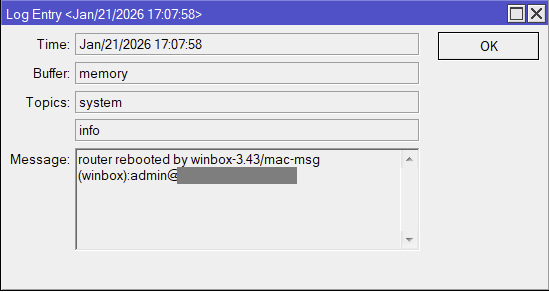
In 7.20 I've noticed, that the 'Message' field in the 'Log Entry' window became multiline in WinBox. This is a great improvement. But there is a problem with selection in this field. You can select text blindly, it will be actually selected and you can copy selection, the only problem is that selection is not visible at all.
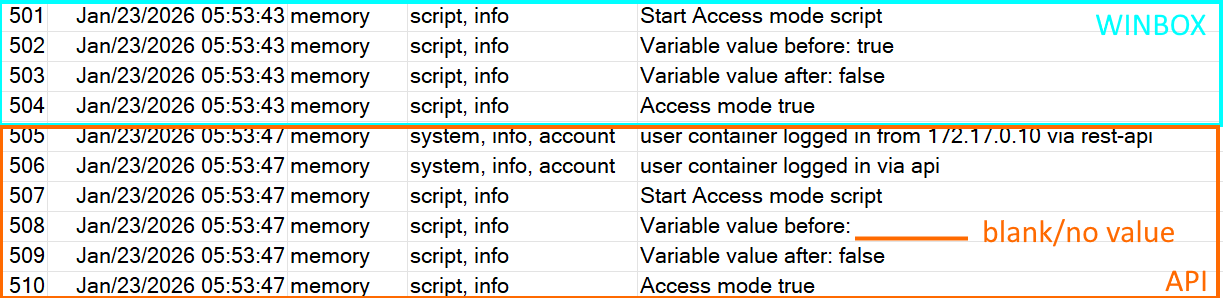
I’m running v7.20.7 on a RB5009 router, calling one of my scripts via the rest API and while the scripts runs it does not update the environment variables, is this by design (same issue in v7.20.6) or a bug?
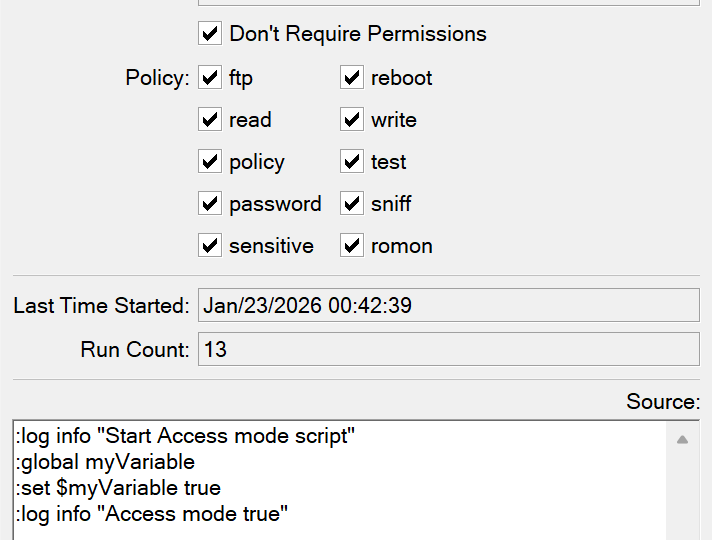
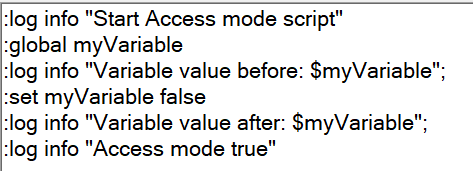
Thanks for your input, this looks like it works but it doesn’t take effect when it’s run via the API, after removing $ from myVariable it sets the value, but seems like it’s handled as a local variable and not updated, these screenshots might bring clarity to the matter:
The user that you used (container I think) must belong to a group that has the policies policy and test to be able to see global variables created by other users. Otherwise, the global variables created and written by the user are only valid in the current session of that user.
You can try yourself by adding an account in the write group, login with that account in WinBox, then open multiple Terminal windows at once. :global variables defined in each of those Terminal windows will be isolated from the other windows and have different values. Even if you give them the same name.
If the account belongs to a group with the required permissions (policy and test), the global variables created by the user will be stored in /system/script/environment and survive across sessions, and are also usable by other accounts with the same required permissions, in multiple other sessions, at the same time (updates are live and visible immediately in the other sessions).
Config Policies:
...
policy - policy that grants user management rights. Should be used together with the write policy. Allows also to see global variables created by other users (requires also 'test' policy). Allows to design skins (requires also "sensitive" policy).
Thanks @CGGXANNX , this I’ve already made sure and the container user has full access at this point. So I’m leaning towards a bug, have reported to MikroTik support and hope to get confirmation that this is a bug or additional guidance.